A swift subcommand for checking if your dependencies have an update available. This especially applies to updates outside of your version requirements.
Calling swift package update will only update to the latest available requirements inside your specified version requirements, which totally makes sense, but you might miss that there's a new major version available if you don't check the dependency's repository regularly.
This tool aims to help with that by allowing you to quickly check the remote git tags of your dependencies to see if something outside of your version requirements is available. It also aims to be smart regarding dependencies that are pinned to a branch or a specific revision, not checking transitive dependencies, following forks to their upstream, resolving package registry dependencies, checking for known security vulnerabilities, and supporting SwiftPM, Tuist and plain Xcode projects.
This project is very much inspired by cargo-outdated.
swift-outdated can be installed via Homebrew.
$ brew install swift-outdatedswift-outdated can also be installed via Mint.
$ mint install kiliankoe/swift-outdatedSince swift-outdated installs with its name, it can be called just like a subcommand of Swift itself via swift outdated.
$ swift outdated
| Package               | Current | Latest | URL                                                |
|-----------------------|---------|--------|----------------------------------------------------|
| rainbow               | 3.2.0   | 4.0.1  | https://github.com/onevcat/rainbow.git             |
| swift-argument-parser | 1.1.4   | 1.2.2  | https://github.com/apple/swift-argument-parser.git |
This lists all your outdated dependencies, the currently resolved version and the latest version available in their upstream repository.
By default swift-outdated only reports your project's direct dependencies, the ones you declared yourself, via swift package dump-package for SwiftPM and Tuist projects, and from the XCRemoteSwiftPackageReference entries in project.pbxproj for Xcode projects.
Pass -t / --include-transitive to report transitive dependencies as well. If the direct dependencies can't be determined (for example a project layout without a recognizable manifest), every package is reported.
swift-outdated also allows listing all your dependencies alongside the ones that are not up to date.
Run the application using -u or --include-up-to-date command line switch and every dependency is listed in the same table. Up-to-date packages show a ✓ in the Latest column, and pins without any available information show a ?:
$ swift outdated -u
| Package   | Current | Latest | URL                                    |
|-----------|---------|--------|----------------------------------------|
| rainbow   | 3.2.0   | 4.2.1  | https://github.com/onevcat/Rainbow.git |
| swift-log | 1.14.0  | ✓      | https://github.com/apple/swift-log.git |
| somepin   | abc1234 | ?      | https://github.com/example/somepin.git |
If a dependency is a fork of another project, the fork's own repository often carries no new tags, so it looks up to date even when the original (upstream) project has shipped newer releases. You can tell swift-outdated to measure outdatedness against the upstream instead, via a .swift-outdated.yml file in your project directory:
forks:
  - fork: https://github.com/mycompany/SomeLib.git
    upstream: https://github.com/original/SomeLib.git
fork is matched against the URL in your Package.resolved (SSH/HTTPS and a .git suffix are treated the same); upstream is the repository whose tags then determine the latest version. The dependency is still listed under its own fork URL, only the version comparison, including the base/latest tags for branch and revision pins, uses the upstream.
Use --config / -c to point at a config file elsewhere.
SwiftPM also supports dependencies from a package registry, declared with .package(id: "scope.name", …) rather than a git URL. These have no repository to check, so swift-outdated instead queries the registry's list-releases API to determine the latest version. The dependency is shown with a registry: marker in place of a URL:
$ swift outdated
| Package         | Current | Latest | URL                       |
|-----------------|---------|--------|---------------------------|
| mona.linkedlist | 1.1.0   | 2.0.0  | registry: mona.linkedlist |
The registry to query is resolved from SwiftPM's registries.json (a project-local .swiftpm/configuration/registries.json takes precedence over the user-level ~/.swiftpm/configuration/registries.json), honoring both the [default] registry and any scope-specific override. When no registry is configured or it can't be reached, the dependency is still listed with its registry: marker but its latest version is left unknown.
Note: Automatic updates (
--update) are not yet supported for registry dependencies.
Dependencies pinned to a branch or a specific revision have no resolved version, so there's nothing to compare against a list of remote tags. swift-outdated instead analyzes them against the local checkout that SwiftPM and Xcode already create, showing the tag the pinned commit sits at and the latest available version:
$ swift outdated
| Package   | Current          | Latest | URL                                    |
|-----------|------------------|--------|----------------------------------------|
| swift-log | 1.6.4            | 1.14.0 | https://github.com/apple/swift-log.git |
| rainbow   | 626c3d4 (v3.2.0) | 4.2.1  | https://github.com/onevcat/Rainbow.git |
For a ref pin, the Current column shows the branch (if any), the short revision, and the closest tag at or before that commit (git describe); Latest is the newest tag available upstream. This makes it obvious when a pin can move back to a normal tagged release, for example because a fix you were tracking on a branch has since shipped.
This works automatically when a checkout is present. swift-outdated looks in .build/checkouts (run swift build or swift package resolve first) and in an Xcode SourcePackages/checkouts directory; use --checkouts-path to point it elsewhere. Pins without an available checkout keep the previous behavior and are listed as ignored.
Use --check-security to add security columns to the output — a per-version CVE status for both your current and the latest version, plus a repository security score:
$ swift outdated --check-security
| Package               | Current | Latest | Sec. Current | Sec. Latest | Score    | URL                                                |
|-----------------------|---------|--------|--------------|-------------|----------|----------------------------------------------------|
| rainbow               | 3.2.0   | 4.0.1  | ✓ No CVEs    | ✓ No CVEs   | ⚠ 2.9/10 | https://github.com/onevcat/Rainbow.git             |
| swift-argument-parser | 1.1.4   | 1.2.2  | ⚠ 1 CVE      | ✓ No CVEs   | ✓ 6.8/10 | https://github.com/apple/swift-argument-parser.git |

Scorecards:
- rainbow: https://scorecard.dev/viewer/?uri=github.com/onevcat/Rainbow
- swift-argument-parser: https://scorecard.dev/viewer/?uri=github.com/apple/swift-argument-parser
Each package is checked against two sources:
- OSV: known CVEs for a specific version. Reported per version, so you can see when updating clears a known vulnerability.
✓ No CVEsmeans no known advisories,?means the status couldn't be determined. - OpenSSF Scorecard: repository security posture score (0–10), covering pinned dependencies, signed releases, active maintenance, and more. This rates the repository, not a version, so it's a single
Scorecolumn; scores below 5 are flagged. Links to the scorecard pages detailing the individual checks are listed below the table (or asscorecardURLin JSON output).
Both APIs are free and require no authentication.
Note: Scorecard is GitHub-only; packages hosted elsewhere will show
?for the score. Full supply chain attack detection (malicious code injection, typosquatting) is not yet available for Swift via any public free API.
This packages also exposes a library target called Outdated. Use this if you want to integrate the functionality into your project.
Here's a basic usage example.
import Outdated

let pins = try SwiftPackage.currentPackagePins(in: .current)
let packages = await SwiftPackage.collectVersions(for: pins, ignoringPrerelease: true, onlyMajorUpdates: false)
packages.output(format: .markdown)swift-outdated also supports Xcode projects that use Swift packages for their dependency management. Either run it manually inside your repo
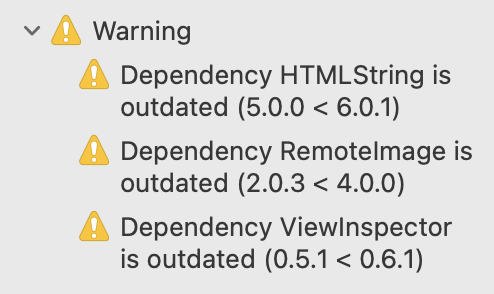
or set up a Run Script Phase. In the latter case swift-outdated emits warnings for your outdated dependencies.
When run inside Xcode, swift-outdated caches the fetched versions for an hour (under ~/Library/Caches/swift-outdated/) so repeated
builds don't refetch every dependency each time. Pass --no-cache to force a fresh fetch. Outside of Xcode the cache is never used, so
manual runs always report the latest available versions.
Checking a dependency's versions runs git ls-remote against its repository. A private repository that requires authentication will not allow
swift-outdated to fetch its tags, so the dependency is listed with ? as its latest version.
To have private dependencies resolved as well, make sure git can authenticate without prompting:
- For password-protected SSH keys, load the key into
ssh-agentfirst (eval "$(ssh-agent)"; ssh-add ~/.ssh/your_key). - For private HTTPS repositories, configure a git credential helper that can answer without a prompt, for example
git config --global credential.helper osxkeychain.

