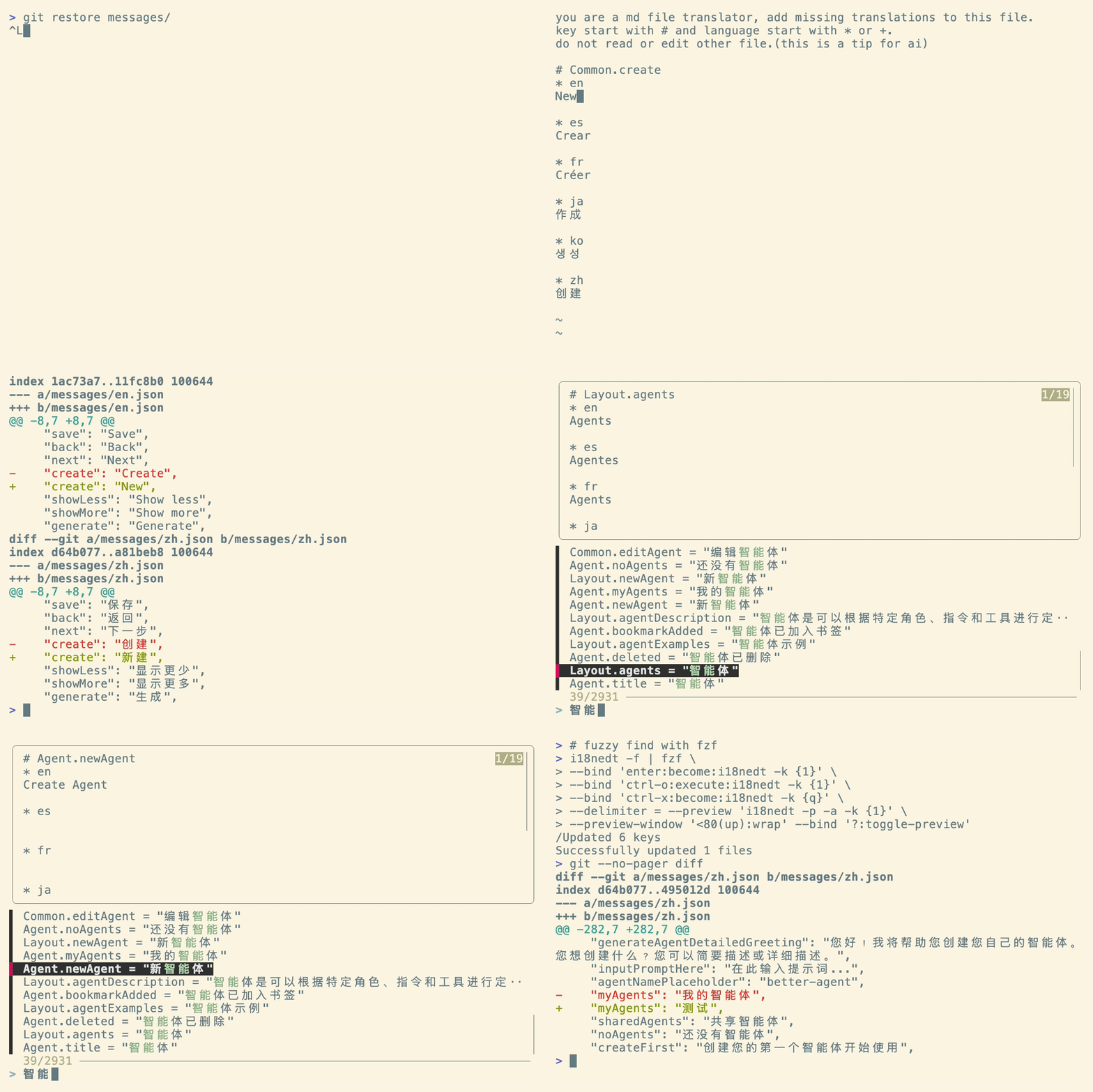
i18nedt is a command-line tool designed to streamline the editing of internationalization (i18n) JSON files. It converts complex JSON structures into a simplified, Markdown-like format, allowing you to edit translations across multiple locales simultaneously using your favorite text editor.
It is specifically designed to be AI-friendly, making it effortless to generate translations using LLMs.
- Features
- Installation
- Quick Start
- The Editing Format
- Key Selection Syntax
- AI Workflow
- Doctor Mode
- Advanced Configuration
- CLI Reference
- Integrations
- Contributing
- License
- Multi-file Editing: specific keys across
zh-CN.json,en-US.json, etc., in a single view. - Deep Nesting Support: Handles complex JSON structures (e.g.,
home.welcome.title) effortlessly. - AI-Ready: Generates a context-rich format optimized for prompting LLMs to fill in missing translations.
- Namespace Support: Works with folder-based structures (e.g.,
locales/en/common.json). - Editor Agnostic: Uses your
$EDITOR(Vim, VS Code, Nano, Zed, etc.). - Safety: Automatically creates non-existent keys and files.
git clone https://github.com/kikyous/i18nedt.git
cd i18nedt
make build
# Binary will be in ./bin/i18nedtgo install github.com/kikyous/i18nedt/cmd/i18nedt@latestEdit a single key across all locales:
i18nedt src/locales/{zh-CN,zh-TW,en-US}.json -k home.welcomeEdit multiple keys:
i18nedt src/locales/*.json -k home.welcome -k home.startEdit a parent key (and all its children):
i18nedt src/locales/*.json -k homeWhen i18nedt opens your editor, you will see a temporary .md file. This format is designed to be human-readable and AI-parseable.
you are a md file translator, add missing translations to this file.
key start with # and language start with *.
do not read or edit other file.(this is a tip for ai)

# home.welcome    <-- Existing key
* zh-CN
欢迎
* en-US
Welcome

# home.start      <-- New key (values empty)
* zh-CN
* en-US
Simply edit the text under the locale codes. When you save and exit, i18nedt updates the JSON files.
You can also provide raw JSON objects or arrays as values with + mark.
# home
+ en-US
{
  "start": "Start",
  "welcome": "Hello"
}

+ zh-CN
{
  "start": "开始",
  "welcome": "你好"
}To delete a key, change the # to #-.
#- home.deprecated_keySince i18nedt focuses on a diff-like editing experience, renaming a key is a manual two-step process within the temporary editing file:
- Delete the old key: Mark the old key for deletion using
#-. - Create the new key: Add the desired new key name using
#.
Example: To rename home.welcome to home.greeting and migrate its translations:
#- home.welcome   <-- Mark old key for deletion
# home.greeting   <-- New key with migrated translations
* zh-CN
欢迎词

* en-US
Greetings
This approach ensures that the historical content is preserved for the new key.
i18nedt supports flexible key selection, powered by GJSON Syntax.
# Standard dot notation
i18nedt ... -k home.start

# Wildcards
i18nedt ... -k "home.st*"
i18nedt ... -k "*.start"

# Array access
i18nedt ... -k array-key.0The temporary file format is optimized for interaction with AI.
Using AI Code Editors (Cursor, Windsurf, VS Code) If you are using an editor with built-in AI, you don't need to copy-paste.
- Run
i18nedtto open the temporary file. - In your AI chat, reference the temporary file (e.g., type
@.i18nedt-xxx.md). - the AI will understand the context and generate the translations for you.
Standard LLMs The file header acts as a system prompt. You can also copy the entire content into ChatGPT/Claude/Gemini and paste the result back.

i18nedt includes a doctor mode to help you maintain the health of your translation files. It scans your files for:
- Missing Keys: Keys present in some locale files but missing in others.
- Empty Values: Keys that exist but have an empty string
""as their value.
To run the check:
i18nedt --doctor src/locales/*.json
# or short flag
i18nedt -d src/locales/*.json
If issues are found, i18nedt will report them grouped by file and exit with a non-zero status code, making it suitable for CI/CD pipelines.
Interactive Fix Mode:
You can combine --doctor with --flatten to output a simple list of problematic keys, which can be piped into tools like fzf or xargs, see Fuzzy Finding with fzf below.
# List only problematic keys
i18nedt -d -f src/locales/*.jsoni18nedt uses the $EDITOR environment variable.
# Set explicitly
export EDITOR="code --wait"   # VS Code
export EDITOR="zed --wait"    # Zed
export EDITOR="vim"           # Vim (Default)

# One-off usage
EDITOR=nano i18nedt ...You can specify files using arguments or an environment variable.
Using Arguments:
# Brace expansion
i18nedt src/locales/{zh-CN,en-US}.json -k welcome

# Deep wildcards
i18nedt src/locales/**/*/common.json -k welcome
Using Environment Variable (I18NEDT_FILES):
This allows you to omit the file path in every command. Highly recommended to set this via .env or direnv.
export I18NEDT_FILES="src/locales/*.json"
i18nedt -k welcomeIf your project uses namespaces (e.g., locales/en/common.json, locales/en/auth.json), use the {{ns}} (or {{namespace}}) and {{language}} (or {{locale}}) placeholders in your pattern.
1. Define the pattern:
# Pattern matches: locales/en-US/common.json
i18nedt "locales/{{language}}/{{ns}}.json" -k common:home.title
2. Select keys with namespace:key syntax:
# Edit 'home.title' in 'common.json'
i18nedt ... -k common:home.title

# Edit 'login' in 'auth.json'
i18nedt ... -k auth:login
Custom Separator:
By default, the namespace separator is :. You can change this using the --separator (or -s) flag or I18NEDT_SEPARATOR environment variable.
# Use dot separator
i18nedt --separator "." -k common.home.title
Automatic Namespace Creation:
If you reference a namespace that doesn't exist (e.g., -k newPage:title), i18nedt will automatically create the corresponding JSON files (e.g., locales/en/newPage.json) upon saving.
Usage: i18nedt [--key KEY] [--print] [--no-tips] [--doctor] [--flatten] [--separator SEPARATOR] [--version] [FILES]

Positional arguments:
  FILES                  Target file paths [env: I18NEDT_FILES]

Options:
  --key KEY, -k KEY      Key to edit (can be specified multiple times)
  --print, -p            Print temporary file content without launching editor
  --no-tips, -a          Exclude AI tips from temporary file content
  --doctor, -d           Check for missing and empty keys
  --flatten, -f          Flatten JSON files to key=value format
  --separator SEPARATOR, -s SEPARATOR
                         Namespace separator (default: ':') [env: I18NEDT_SEPARATOR]
  --version, -v          Show version information
  --help, -h             display this help and exit
Combine i18nedt with fzf for an interactive translation experience. Add this alias to your shell (.bashrc or .zshrc):
# Requirement: I18NEDT_FILES must be set
export I18NEDT_FILES="src/locales/*.json"

fi18n() {
  # 1. i18nedt -f "$@" : Pass arguments to i18nedt (e.g., -d)
  # 2. fzf -m          : Enable multi-selection (TAB key)
  # 3. {+1}            : Returns space-separated list of selected keys (e.g., "key1 key2")
  # 4. printf          : Formats each key with "-k" prefix
  #    "-k %s " applied to "key1 key2" results in "-k key1 -k key2 "
  # 5. i18nedt $(...)  : Executes i18nedt with the constructed flags
  i18nedt -f "$@" | fzf -m \
     --bind 'enter:become:i18nedt $(printf -- "-k %s " {+1})' \
     --bind 'ctrl-o:execute:i18nedt $(printf -- "-k %s " {+1})' \
     --bind 'ctrl-x:become:i18nedt -k {q}' \
     --delimiter = --preview 'i18nedt -p -a -k {1}' \
     --preview-window '<80(up):wrap' --bind '?:toggle-preview'
}
Usage:
- Run
fi18nto search keys. - Run
fi18n -dto search only problematic keys (missing or empty). Tab: Select multiple keys to edit together.Enter: Edit selected key(s).Ctrl-x: Create/Edit a new key using your search query.?: Toggle preview of values.
- Fork the repository
- Create your feature branch (
git checkout -b feature/amazing-feature) - Commit your changes (
git commit -m 'Add some amazing feature') - Push to the branch (
git push origin feature/amazing-feature) - Open a Pull Request
This project is licensed under the MIT License - see the LICENSE file for details.

