A self-hosted key/value store and event API. One PHP file to install, one dashboard to manage everything.





Static preview with mock data. Explore the landing page, admin dashboard, and superadmin panel without installing anything.
A real-world application using SlimStorage's Event API to collect and display Geiger counter measurements from Berlin.
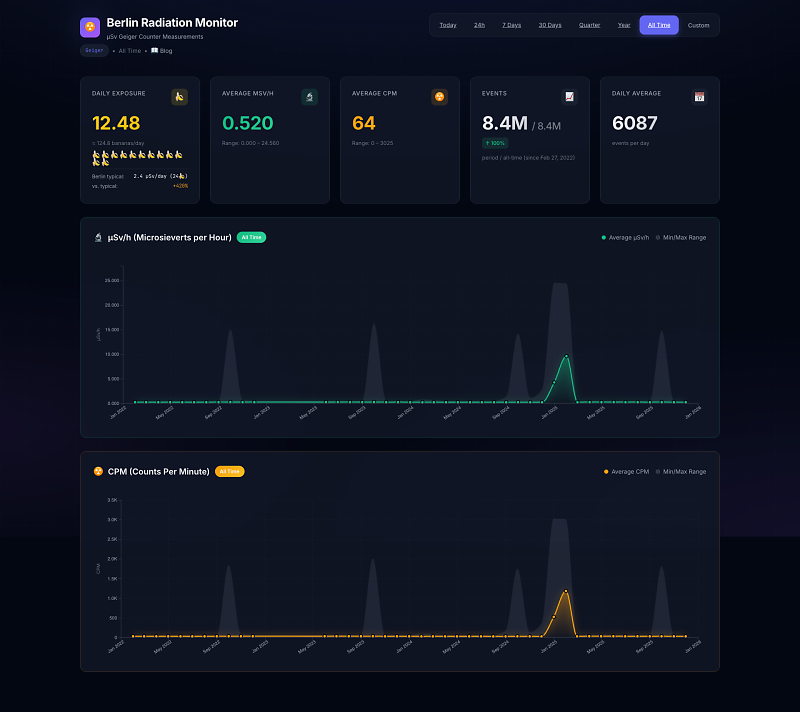
Features demonstrated:
- Event API — Pushing sensor readings (CPM, µSv/h) with millisecond precision
- Schema optimization — Sub-millisecond queries on 8M+ events
- Time-series visualization — Daily, weekly, monthly, and yearly aggregations
- Statistics — Min/max ranges, averages, and daily exposure calculations
👉 View Radiation Monitor Blog Article
Sometimes you just need a simple API to store and retrieve data. No vendor lock-in, no monthly bills, no complicated setup. Just upload one file, follow the wizard, and you're done.
Perfect for:
- Mobile apps that need cloud sync
- IoT devices pushing sensor data
- Side projects that need a quick backend
- Teams who want full control over their data
| Feature | What it does |
|---|---|
| Key/Value Store | Store JSON, strings, whatever. Each API key gets its own isolated namespace. |
| Event API | Push time-series data with millisecond precision. Great for analytics, logs, sensor readings. |
| Schema Optimization | Define schemas for sub-millisecond queries on millions of events. |
| Admin Dashboard | Manage API keys, browse data, test endpoints, view logs. |
| Superadmin Panel | System-wide analytics, user management, session monitoring. |
wget https://github.com/kibotu/SlimStorage/releases/latest/download/install.phpUpload it to your server and open https://yourdomain.com/install.php in your browser.
The installer handles everything:
- Checks requirements — PHP version, extensions, write permissions
- Downloads the latest release — Fetches from GitHub, extracts all files
- Guides you through config — Database credentials, Google OAuth setup
- Tests your database — Verifies connection before proceeding
- Creates the schema — Sets up all tables automatically
- Generates
.secrets.yml— Stores your configuration securely
For security, remove install.php after you're done.
That's it. 🎉
After logging in with Google OAuth, you land on the admin dashboard. Here's what you can do:

Simple, clean login. One button to authenticate with your Google account.

Your starting point. Create, rename, and delete API keys. Each key has:
- 64-character cryptographically secure token — Copy it, use it in your apps
- Usage stats — Requests per day/week/month at a glance
- Quick actions — Rename, regenerate, or delete

Browse all your stored key/value pairs. Search, filter, view JSON payloads. Useful for debugging or just seeing what's in there.

Your time-series data, visualized. Query by date range, see event distribution over time, drill into individual records.

Test any endpoint right from the browser. Pick a method, choose an endpoint, send requests, see responses. No curl needed.

Usage analytics for your API keys. Request counts, success rates, top endpoints — everything you need to understand how your API is being used.

Every API request logged. Filter by status, method, endpoint. Great for debugging issues or tracking down that one weird request.

Full API reference built right into the dashboard. Every endpoint with copy-paste ready curl commands:
- Key/Value Store API — SET, GET, EXISTS, DELETE, LIST, CLEAR operations with example requests
- Event Data API — Push single/batch events, query by date range, get statistics
- Schema API — Define schemas, query aggregated data, rebuild aggregations
Each command is pre-filled with your base URL and includes proper headers. Just copy, paste your API key, and run.
If you're the system admin (configured in .secrets.yml), you get access to the superadmin panel.

Bird's-eye view of everything. Total accounts, API keys, events, storage usage. The charts tell you if things are healthy.

Every user in the system. See who signed up, when they last logged in, how many keys they have. Manage access if needed.

System-wide API key management. See every key across all accounts. Useful for audits or troubleshooting.

Active sessions across the system. See who's logged in, from where, and when their session expires. Revoke if needed.
Every request needs your API key in the header:
X-API-Key: your_64_character_api_key_here
Content-Type: application/json| Endpoint | Method | Body | Description |
|---|---|---|---|
/set |
POST | {"value": "data"} |
Store a value, get back a UUID |
/set |
POST | {"key": "uuid", "value": "data"} |
Update existing or upsert |
/get |
POST | {"key": "uuid"} |
Retrieve a value |
/exists |
POST | {"key": "uuid"} |
Check if key exists |
/delete |
POST | {"key": "uuid"} |
Delete a key |
/list |
GET | - | List all keys |
/clear |
DELETE | - | Delete all keys |
Example:
# Store something
curl -X POST "https://yourdomain.com/api/set" \
  -H "X-API-Key: YOUR_KEY" \
  -H "Content-Type: application/json" \
  -d '{"value": {"user": "alice", "score": 42}}'

# Response: {"status": "success", "key": "a7469afb-8ad2-4a75-b565-1a931aa2ad0d"}Push time-series data. Perfect for IoT, analytics, monitoring.
| Endpoint | Method | Body | Description |
|---|---|---|---|
/event/push |
POST | {"data": {...}} |
Store event (max 1000/request) |
/event/query |
POST | {"start_date": "...", "end_date": "..."} |
Query by date range |
/event/aggregate |
POST | {"granularity": "hourly"} |
Query pre-aggregated data |
/event/stats |
GET | - | Get statistics |
/event/clear |
DELETE | - | Delete all events |
Example:
# Push sensor reading
curl -X POST "https://yourdomain.com/api/event/push" \
  -H "X-API-Key: YOUR_KEY" \
  -H "Content-Type: application/json" \
-d '{"data": {"temperature": 23.5, "humidity": 65}}'Define schemas to enable sub-millisecond aggregation queries on millions of events.
# Define schema for sensor data
curl -X POST "https://yourdomain.com/api/schema" \
  -H "X-API-Key: YOUR_KEY" \
  -H "Content-Type: application/json" \
  -d '{
    "fields": [
      {"name": "temperature", "type": "float"},
      {"name": "humidity", "type": "integer"}
    ],
    "aggregations": ["hourly", "daily"]
  }'
Performance with 11M events:
| Query | Without Schema | With Schema |
|---|---|---|
| Last 24h (hourly) | 3-5 seconds | <1ms |
| Last 30 days (daily) | 5-10 seconds | <1ms |
All settings live in .secrets.yml:
database:
  host: localhost
  port: 3306
  name: your_database
  user: your_user
  password: your_password
  prefix: slimstore_

domain:
  name: yourdomain.com

google_oauth:
  client_id: YOUR_CLIENT_ID.apps.googleusercontent.com
  client_secret: YOUR_CLIENT_SECRET
  redirect_uri: https://yourdomain.com/admin/callback.php

superadmin:
  email: admin@example.com

api:
  rate_limit_requests: 10000
  rate_limit_window_seconds: 60
  max_keys_per_user: 100
max_value_size_bytes: 262144- Go to Google Cloud Console
- Create a project, enable Google+ API
- Create OAuth 2.0 credentials
- Set redirect URI to
https://yourdomain.com/admin/callback.php - Copy Client ID and Secret to
.secrets.yml
# Download installer, upload to your server, then open:
# https://yourdomain.com/install.php?update=1
Your .secrets.yml and data are preserved during updates.
Utility scripts for testing, migrations, and database management. All scripts read credentials from .secrets.yml.
Runs the full API test suite against your installation.
./scripts/run-tests.sh https://yourdomain.com/api YOUR_API_KEYWhat it does:
- Runs Key/Value Store API tests — SET, GET, DELETE, LIST, EXISTS, CLEAR
- Runs Event API tests — PUSH, QUERY, STATS, date range filtering
- Runs Schema API tests — Schema definition, aggregation queries
- Prints a summary with pass/fail counts
Requires Python 3 and uv (auto-installs if missing).
Safe, incremental database migrations. Run as many times as needed — it skips already-applied changes.
./scripts/db-migrate.sh [action]| Action | What it does |
|---|---|
all |
Run all migrations (default) |
indexes |
Add performance indexes, cursor pagination support |
schema |
Add event_schemas and event_aggregations tables |
stats |
Add statistics tables, populate from existing data |
optimize |
Analyze table sizes, show fragmentation, suggest optimizations |
For large tables (9M+ rows), the stats migration may take 10-30 minutes.
./scripts/db-recreate.shUse this when you want a clean slate — fresh install, testing, or starting over. The script asks for confirmation before proceeding.
- PHP 8.1+
- MySQL 5.7+ or MariaDB 10.3+
- PHP extensions:
pdo_mysql,curl,json,zip,openssl
- 100% prepared statements — No SQL injection possible
- Secure sessions — HttpOnly, SameSite, automatic regeneration
- Rate limiting — Per IP, configurable
- Self-hosted assets — No external CDN dependencies
Keep .secrets.yml secure (never commit it). Delete install.php after installation.
Made by kibotu