


A simple maubot (which was based on the echobot) that gets the weather from wttr.in and returns the text to the chat
!weather- Reply with the weather based on the default config value;
if the default location is not provided, it will be detected from IP address by wttr.in!weather <location>- Reply with the location for the specified<location>where<location>can be an airport code, or a city!weather <location> u:[u|m|M]- As above, but specify unit of measure (see below)!weather <location> l:[language code]- current weather and forecast in the specified language;
available languages are listed on https://wttr.in/:translation!moon- Display lunar phase information
The unit is directly passed to the wttr.in, so the option specified must match what wttr.in expects.
Valid units are as follows:
u- USCS (used by default in US)m- metric (SI) (used by default everywhere except US)M- metric (SI), but show wind speed in m/s
(taken from https://github.com/chubin/wttr.in)
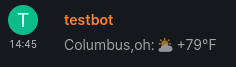
Entering !weather in the chat will display the default server location setting
and display the single-line version of the weather from wttr.in.
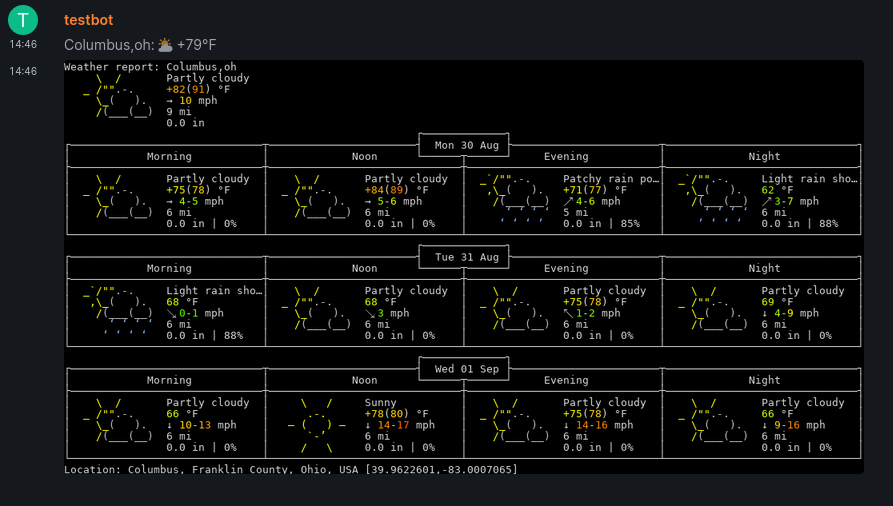
If the show_image setting is true in the settings, the bot will return the
png image of the current weather with the forecast
Entering the !moon command in the chat will display a oneline version of the
lunar phase:

-
Download the current
com.arachnitech.weather-vX.Y.Z.mbpfile from the Releases page. -
Follow the Maubot instructions which boils down to:
- In your maubot manager, click the plus sign next to plugins
- Upload the plugin you downloaded from step 1 above
Basically the same as the Installation, except since you already have it installed:
- Click on the
com.arachnitech.weatherunder the plugins - Upload the new version
If you would like to mess with the source code to add your own stuff, or clean up some python atrocity I have committed, please clone/fork this repo and have at it.
I have built everything using poetry, so the easiest path is:
- clone/fork the repo
- run
poetry shell - run
poetry installto add all the dependent packages - Make changes.

I have created a dedicated #maubot-weather:arachnitech.com channel. I also follow the #maubot:maubot.xyz channel.