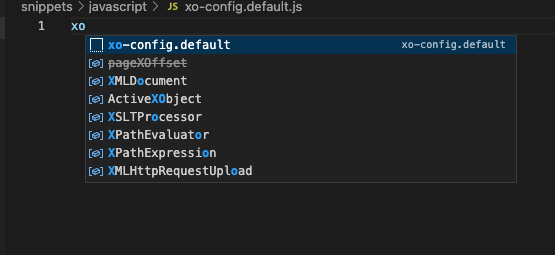
dotsnippets allows you to manage your VSCode snippets in .snippets directory.
brew tap kaiinui/dotsnippetsbrew install dotsnippets
Just dotsnippets
(optionally you can add --dir option to bring another snippets directory.)
This command assumes you have the following directory structure. Please note that the filename will be used as VSCode snippet prefix, which allows you to autocomplete the snippet with it.
$HOME
└.snippets
 └typescript
  └best-prefix-you-want-to-autocomplete.ts
  └pretty-nice-prefix.ts
  └nice-prefix.ts
 └javascript
  └some-nice-prefix.js
 └python
  ...
It will produce VSCode snippets JSONs and write them into the VSCode snippets directory.
{
  "xo-config.default": {
    "prefix": "xo-config.default",
    "body": [
      "module.exports = {",
      "    rules: {",
      "        \"import/extensions\": \"off\",",
      "    }",
      "}"
    ]
  },
  "jest.config.default": {
    "prefix": "jest.config.default",
    "body": [
      "/** @type {import('ts-jest').JestConfigWithTsJest} */",
      "const config = {",
      "\tpreset: 'ts-jest',",
      "\ttestEnvironment: 'node',",
      "};",
      "export default config;",
      ""
    ]
  }
}
You can use the snippets as follows.