Touchdesigner Render Engine by Jeremy dePrisco
Intro video here: https://youtu.be/zD9IgoFOWsg
Example #1 (Static Scenes) https://youtu.be/yj0T0lFZFjM
Example #2 (Dynamic Scenes) https://youtu.be/e9p1JZSkeGc
Example #3 (Silly cats!!) https://youtu.be/_-jHfp5MnnQ
Yellowcake (album by Breakfast) https://www.jeremydeprisco.net/blog/yellow-cake-collaboration-with-breakfast
V2 Highlights https://youtu.be/vlgfvEC05_I
V2 PostFX example: https://youtu.be/3rOBjpJ7p-Y
V3 Pulsed video feature: https://youtu.be/4-eD2Yh0VTs
A quick way to render time-synced audio/visual content in Touchdesigner.
I came to Touchdesigner from timeline-based video editing in programs like iMovie, Adobe Premiere and Davinci Resolve. For a few years I also built patches in Magic Music Visualizer. I was always frustrated by the UI of iMovie and similar programs. I never found their UX very good coming from the audio world. I also disliked how they managed project data, creating a whole new project with every iteration of a piece.
I liked the scene creation features of Magic Music Visualizer, though these too were quirky. As primarily an audio artist, I wanted a quick way to render content I was creating in Touchdesigner. Out of the box, Touchdesigner didn't have anything that checked the boxes for me, so I decided to build something.
As I dove deeper into Touchdesigner during a 6-month intensive study under lockdown, I realized that I could mostly replace iMovie or similar tools. I probably wouldn't go back to Magic (though I still think it's a brilliant program, and I still liked the scene creation/logic features.
Of course, all of these tools could still be used in various combinations depending on the creative need, but I was looking for a “one stop shop”.
Thus my work began, in January 2021, on what I would call the “Render Engine”, specifically to solve certain problems I was encountering for content development. By March 2021 I had a working proof of concept, and opened up testing with a fellow audio artist (Breakfast). By working on visual content for him, I was able to refine the tool further.
If you like this tool, then buy me a coffee: https://www.buymeacoffee.com/jeremydeprisco

The primary use case for the JDRenderEngine is for an audio artist who has a piece of music/audio that they want to sync to visuals. Those visuals may be prepared within Touchdesigner or elsewhere. The JDRender Engine is mostly geared toward the generation of a final file from generative content that you've already programmed elsewhere, but want to present in some scene-based format.
I know what you are thinking... there are already numerous VJ and Movie Scene transition tools out there. Yes, there are. I've tried most of them, and found many to be brilliant in their own right. Many were also over (or under) built for what I needed, and some simply didn't approach the problem from the same angle. almost every tool that I came across assumed that the user wanted to work with pre-rendered content. And while you can still do that here, that is not the focus.
This tool does not include an audio reactivity component. There are dozens of audio reactivity approaches out there. I've explored most of the ones on YouTube and the Touchdesigner site. I've made a few of my own, and of course there's the audioAnalysis tool from the palette. My goal is not to repeat that work here. The JDRenderEngine can be used with an audio reactive component of your choice simply by tapping off the audio coming in (see the ForReact Null CHOP).
As the artist will find, audio reactivity is very program dependent because each piece of audio is different. A pulse/beat-driven audio reactive technique simply doesn't make sense for ambient music. If you want a more generative or random approach, then you might try different techniques. In my own work, I usually combine a beat-oriented approach with something that uses frequencies. But again, that material is covered elsewhere.
The JDRenderEngine is designed for quick generation of a completed piece after you have done all the creative work on the audio and visuals to your liking. JDRenderEngine is really a utility that allows you to quickly audition changes as you render a project, stop if you don't like what you see, and quickly make adjustments. As a creative programmer and multimedia artist, I've always seen these sorts of utilities as creative tools that can be bent to the creator's will just as much as any other tool.
- Single-key render (after you've done some setup).
- Crucially, I provided a "panic button" so you can stop and re-render easily. Lots of under the hood scripting is taken care of so you can focus on the creative part!
- Scene and current time (in seconds) are provided via a heads-up display that can be used as a preview or rendered with the actual content. The default output for the Moviefileout TOP does not include this overlay, but it's easy to change.
- Scene time calculations are handled by scripts.
- Options for running test audio in a loop without rendering.
- Optional post FX section that can be controlled per scene. By default this is turned off, and the default effect is Edge.
- Everything is intentionally independent of the Touchdesigner timeline.
More features are added from time to time, so see updates below.
Watch the intro video here: https://youtu.be/zD9IgoFOWsg
Download the TOX and WAV file first so you can run the examples. You will need the demo WAV file to get started, otherwise you will get an error on the audio file CHOP and the example won't line up. Once you've watched the example a few times, then move on with your own content.
A "Scene" is any separate piece of content that you want to appear at a specific time. A single Scene can of course contain many different objects, like generative content, stills, etc. If you want to transition from one static piece of content to another, you can do that as well. A Scene can hold your intro title slide, your outro credits, or a black out screen. It's up to you.
I've started with 10-12 scenes because I was creating material based on songs that were 3-4 minutes long. But the tool is scalable if you pay attention to the construction. I've tried to comment as much as possible within the scripts.
Scene defaults: Scene 0 is not used, except as a Constant TOP set to black. Actual scene content begins at 1, not 0. Scene 1 is a title slide, which runs for 300 frames (5 sec) with no music. Scene 2 music starts Scene 10 is the credits slide, which runs for 300 frames (5 sec) by default. Scene 11 is a blackout slide, usually set for 1 sec.
All of these parameters can be changed, but there is no UI yet to do so.
With proper setup, the JDRenderEngine will produce reproducible rendering of a project. You should only come to the JDRenderEngine after you have:
- Complete audio track
- Timings for your scene changes (if any)
- Visual content prepared elsewhere. This can be other Touchdesigner project output or generative components saved as their own containers.
- Intro and outro content (title slide, credits, etc.
Set up your project:
- Select your audio file from the RENDERAUDIO node. Note the length of your original audio file.
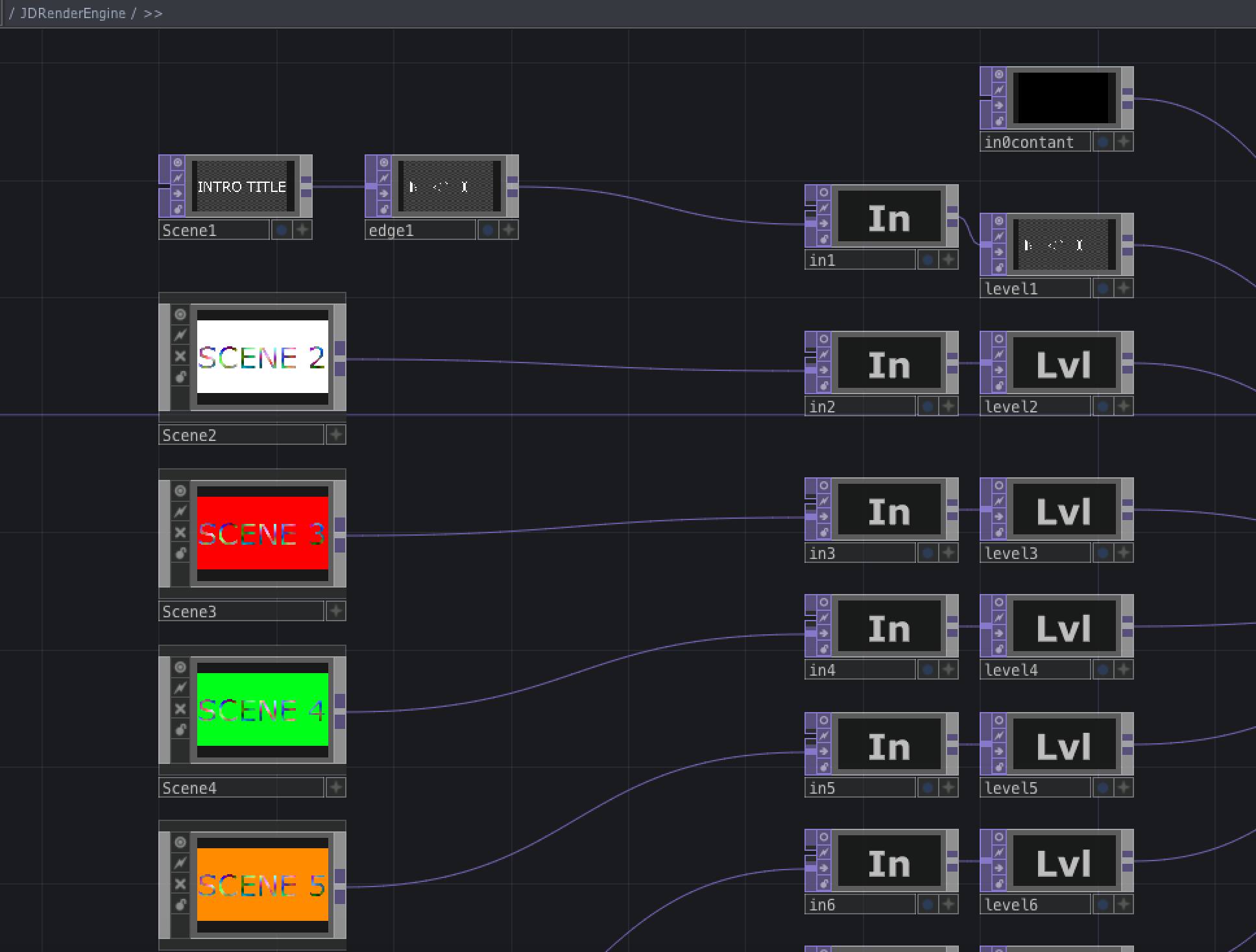
- Replace the Scene placeholders with your content
- Set any additional time for intro/outro in the "addtime" Math CHOP. Default is 300 frames (5 sec) for intro, and 300 frames for outro, totalling 600 frames.
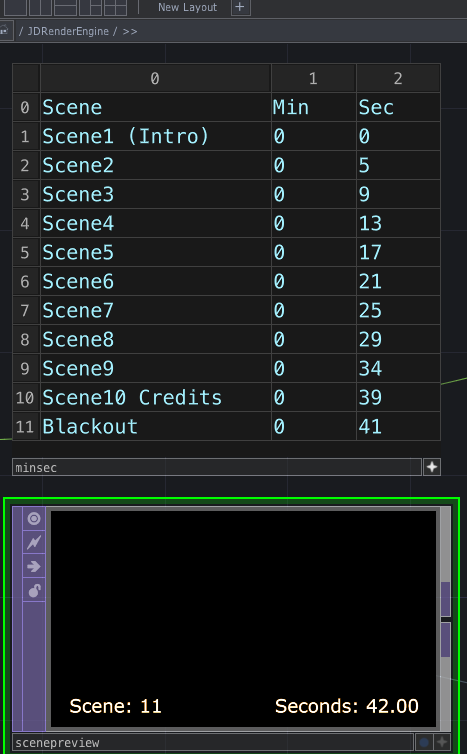
- Set your scene time transitions in the "minsec" table provided. All the other tables are caluclated.
- Locate the scenepreview node and set it to view (handy for previewing on a second monitor to watch your render).
- Use Keyboard 2 key to reset all of the scripts.
- Use Keyboard 1 to start the render process.
- Watch your render take place!
- Use Keyboard 2 key to STOP before end of song, or allow render to finish until end (it will auto stop).
- Output files appear in the same folder as the project file.
I usually like to set the preview output to full screen on another monitor while I render.
The panic button (Key 2) is critical because your timing may not be correct at first. Rather than waiting for the entire piece to render, you can stop as soon as you see an issue. Then you can tweak the results, reset (Keyboard Key 2) and start the render again (Keyboard Key 1). If you've ever rendered something in iMovie or Davinci, then you know that those tools only reveal issues after the entire file is rendered. Not so here!
Alternate workflow If you don't want to render the file right away, add your audio to the TestAudio node and use the supplied switch to use that pathway instead. The TestAudio node is set to loop. This will allow the audio to loop so you can just work on the visuals, work out any audio reactivity you want to add (not included), etc. Change the switch back when you want to render, then follow the above steps.
See the example render MOV on Github. I had to downgrade it to 480p for Github, but otherwise this is a good start.
Example #1 (Static Scenes) https://youtu.be/yj0T0lFZFjM
Example #2 (Dynamic Scenes) https://youtu.be/e9p1JZSkeGc
Example #3 (Silly cats!!) https://youtu.be/_-jHfp5MnnQ
This is where most of the timing setup is done (manual entry). Preview screen shown here as well.
In V1, this is where you would add your own content. Scene placeholders for demo only.
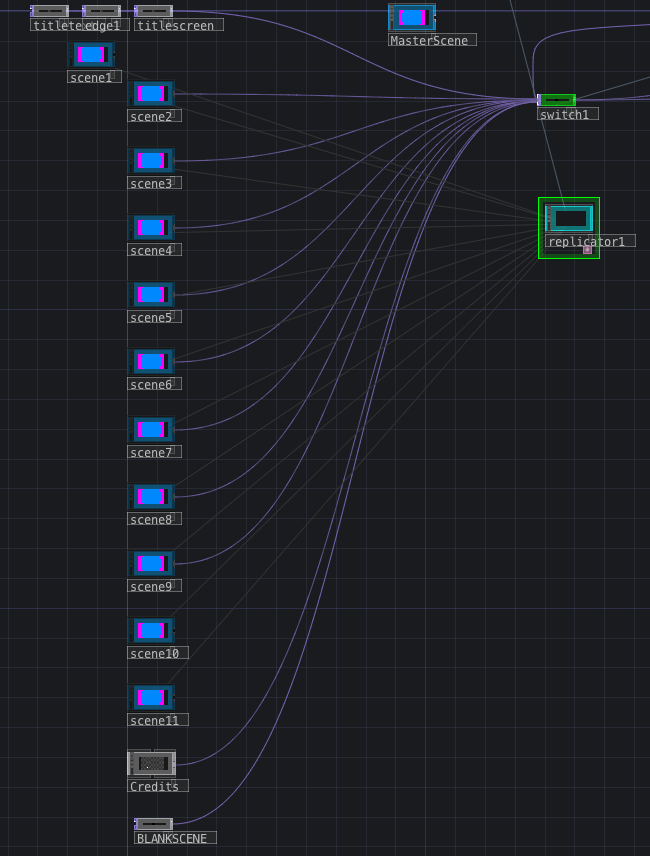
In V2, a replicator aids in scene layout:
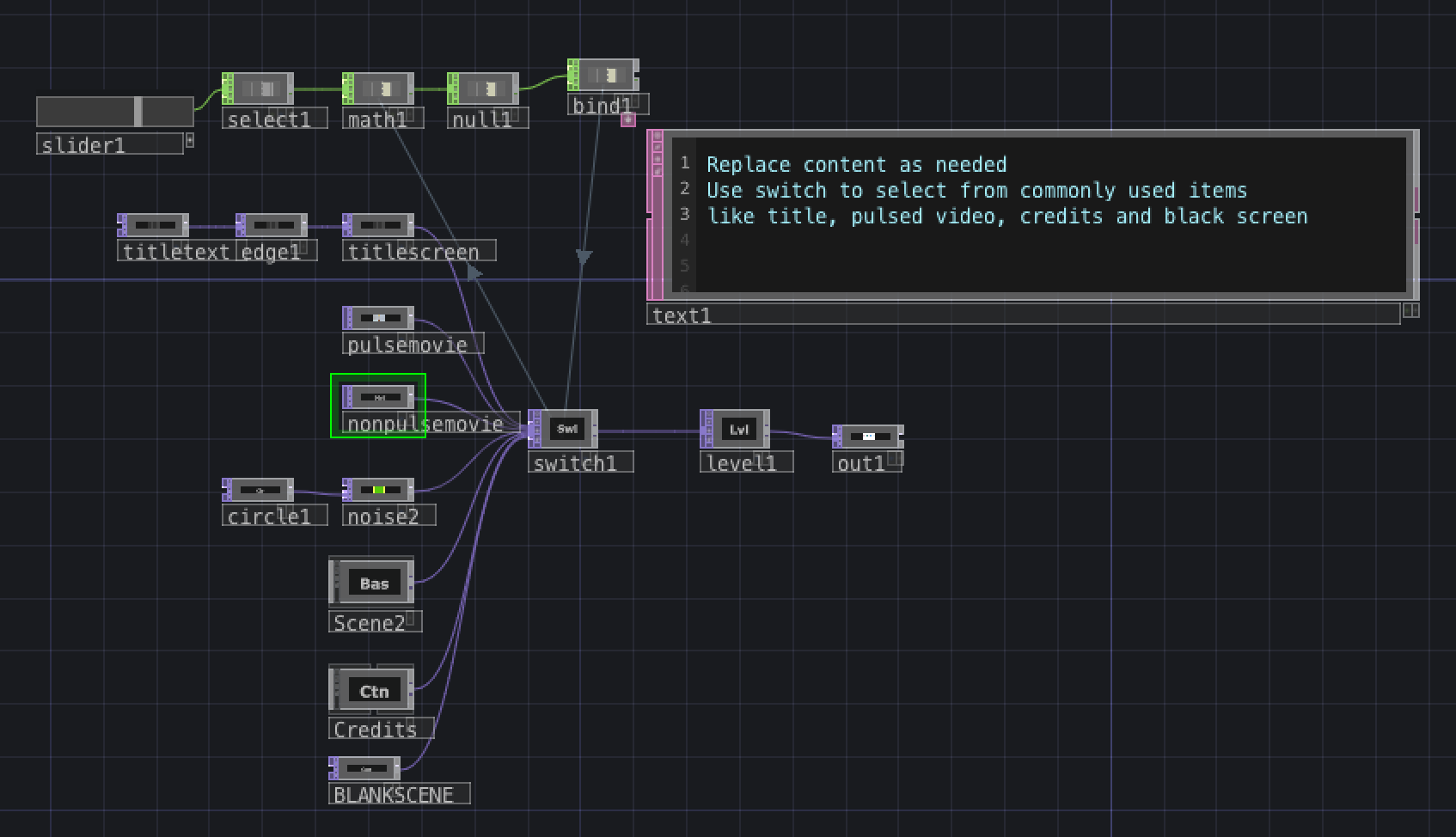
In V3, capability to run pulsed and non-pulsed videos within each scene was added. Some additional enhancements to scene setup were also added.
I already have a list of possible enhancements: https://github.com/jjdeprisco/JDRenderEngine/blob/main/todolist
For example, the fade times are mainly controlled by the blend settings of a single switch. I'd like to make that more flexible. If you would like to see enhancements to the JDRenderEngine, then buy me a coffee: https://www.buymeacoffee.com/jeremydeprisco
Depending on interest, I will endeavor to expand this tool with some other ideas I've had while making the initial release. If you'd like to collaborate on this project, then feel free to get in touch as well.
Current released version 3.0 - Aug 2021
This tool was built on the non-commercial version of Touchdesigner
Latest version compatible: 2021.14360 on Mac on High Sierra
V1.1 March 2021
- Made minor change to make sure Exec CHOP was active so that audio starts as OFF and no movie recording happens until triggered.
- Added an additional line to the main script to make sure audio is turned off upon completion of render.
Both of these changes were needed to prevent odd behavior if you closed/saved the project in the middle of rendering or otherwise interrupted rendering (by pressing space bar) and then saved and reopened. Kind of a niche issue, but worth fixing.
V2.0 July 2021
- Scene length is now calculated automatically from minsec table once start times are entered. No more manual tweaking of scripts!
- Per-scene post FX switch is also available (in minsec table). Example: https://youtu.be/3rOBjpJ7p-Y
- Delay times can also be entered in the minsec table (no longer buried in a script).
- You can still connect scenes to the main switch directly, but an even better way is to use the new replicator method provided. See the ReadMe within the component for full details. This is a very powerful option!
- Added a timecode preview display node. This gives a running preview of time details that makes editing a bit easier. A switch is provided to turn this on/off.
- Highlight video here: https://youtu.be/vlgfvEC05_I
V3.0 Aug 2021
-
Added capability for pulsed and non-pulsed (free-running) videos in each scene.
-
Master scene now includes: Pulsed video (sample hourglass video) This node always plays video from beginning. Swap video out to add your own content.
Non-pulsed video (sample frog video) This video is free-running, and will just constantly loop. Swap video out to add your own content. Works best for long clips that are used as background.
Title slide Edit text as needed, or provide your own title content.
Credit slide Edit text as needed, or provide your own credit content.
Blackout slide Provided for a clean ending. Intended to always be the last slide.
-
See V3 demo: https://youtu.be/4-eD2Yh0VTs
Special thanks to Dr. Matthew Ragan for his many tutorials. Dr. Ragan is one of (if not the) best Touchdesigner teacher hands-down. The OP Snippet for series segment timing was used, but a lot more work was done before (and after) I even discovered that example. The V2 timecode preview display node includes code from a time code converter example posted by Greg Hermanovic on the TD forum in 2008.
I also used the Zap Studio frame calculator during initial testing, and you may find it helpful as well: https://www.zapstudio.net/framecalc/
Also, I still think Magic Music Visualizer is a great, affordable tool. Their support is also awesome. Here's the link to their site: https://magicmusicvisuals.com/
The JDRenderEngine graphic was made with Adobe Spark.
Since we are artists/programmers and not lawyers, I trust you will give credit where credit is due and respect the licence:
GNU General Public License v3 (GPL-3)
This means that if at some point you would like to use this tool in a commercial endeavour or you do not want to disclose the source code you will get in touch first, so a fair arrangement can be made. Contact info below.
You can learn more about my other projects here:
Music: https://jeremydeprisco.bandcamp.com/
https://www.jeremydeprisco.net/
Other stuff: https://www.jeremydeprisco.com/
Twitter https://twitter.com/jeremydeprisco
Contact: https://www.jeremydeprisco.net/contact
LinkedIn: https://www.linkedin.com/in/jjdeprisco/
Indeed: https://my.indeed.com/p/jeremyd-180u8qq
Fiverr: https://www.fiverr.com/shivasongster?up_rollout=true