connection quality indicator always shown as poor even when it is fine #1318

Description

Whenever a participant is joining our jitsi instance, it is only a matter of time until the connection quality indiciator is dropping to "connection: poor", no matter how good the actually picture quality and bitrate is at that moment. I hoped, that 8d5a9cf from the latest stable-7827-2 would fix this bug but it didn't help either.
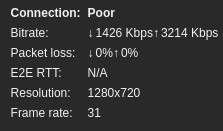
At first I thought that our network may have introduced some new packet losses but I could not reproduce it with iperf though (no packetloss even with high bandwith tests from different locations). Then I suspected my docker setup and configs related to the new jitsi version, however the conferences itself work normally and are fine. jitsi-meet loadbalances to the extra JVB correctly and I couldnt find anything in the logs regarding the "bad" connection quality of the clients.
It also does not matter, if I use it locally, remotely, with or without VPN or different Browsers (tested with firefox and chromium on windows and linux).
The browser developer tool console logs are not showing any errors or suspicious warnings either (like the famous websockets errors I encountered in the beginning).
At this point, I assume it has something to do with my docker-swarm setup: I am using a main jitsi docker meet host (called devjvbmain) and a extra host for a dedicated videobridge (called devjvb2). When I join a conference (3+ users), I can see everything (joining and loadbalancing onto the extra JVB) works as intended:
Jicofo 2022-06-14 14:17:51.563 INFO: [46] [room=testing123@muc.meet.jitsi meeting_id=59ac0c5e-f890-4e66-a4c8-8d9d9bdd90ea] ColibriV2SessionManager.allocate#274: Selected devjvb2, session exists: true
Jicofo 2022-06-14 14:17:52.613 INFO: [46] [room=testing123@muc.meet.jitsi meeting_id=59ac0c5e-f890-4e66-a4c8-8d9d9bdd90ea participant=4f1ecd03] ParticipantInviteRunnable.doInviteOrReinvite#435: Sending session-initiate to: testing123@muc.meet.jitsi/4f1ecd03
Jicofo 2022-06-14 14:17:52.622 INFO: [48] [room=testing123@muc.meet.jitsi meeting_id=59ac0c5e-f890-4e66-a4c8-8d9d9bdd90ea participant=54a9e55f] ParticipantInviteRunnable.doInviteOrReinvite#435: Sending session-initiate to: testing123@muc.meet.jitsi/54a9e55f
Jicofo 2022-06-14 14:17:53.102 INFO: [22] [room=testing123@muc.meet.jitsi meeting_id=59ac0c5e-f890-4e66-a4c8-8d9d9bdd90ea] JitsiMeetConferenceImpl.onSessionAccept#926: Receive session-accept from testing123@muc.meet.jitsi/4f1ecd03
Jicofo 2022-06-14 14:17:53.114 INFO: [22] [room=testing123@muc.meet.jitsi meeting_id=59ac0c5e-f890-4e66-a4c8-8d9d9bdd90ea] JitsiMeetConferenceImpl.onSessionAcceptInternal#1281: Accepted initial sources from 4f1ecd03: {testing123@muc.meet.jitsi/4f1ecd03=[audio=[], video=[626712348, 4012769490, 4041393825, 1211942363, 832334566, 2311850130], groups=[FID[626712348, 4012769490], FID[4041393825, 1211942363], FID[832334566, 2311850130], SIM[626712348, 4041393825, 832334566]]]}
Jicofo 2022-06-14 14:17:53.119 INFO: [22] [room=testing123@muc.meet.jitsi meeting_id=59ac0c5e-f890-4e66-a4c8-8d9d9bdd90ea] ColibriV2SessionManager.updateParticipant#432: Updating Participant[testing123@muc.meet.jitsi/4f1ecd03]@2128327919 with transport=org.jitsi.xmpp.extensions.jingle.IceUdpTransportPacketExtension@1ff68f9, sources={testing123@muc.meet.jitsi/4f1ecd03=[audio=[], video=[626712348, 4012769490, 4041393825, 1211942363, 832334566, 2311850130], groups=[FID[626712348, 4012769490], FID[4041393825, 1211942363], FID[832334566, 2311850130], SIM[626712348, 4041393825, 832334566]]]}
Jicofo 2022-06-14 14:17:53.130 INFO: [22] [room=testing123@muc.meet.jitsi meeting_id=59ac0c5e-f890-4e66-a4c8-8d9d9bdd90ea] ColibriV2SessionManager.updateParticipant#432: Updating Participant[testing123@muc.meet.jitsi/4f1ecd03]@2128327919 with transport=org.jitsi.xmpp.extensions.jingle.IceUdpTransportPacketExtension@15444757, sources=null
Jicofo 2022-06-14 14:17:53.143 INFO: [22] [room=testing123@muc.meet.jitsi meeting_id=59ac0c5e-f890-4e66-a4c8-8d9d9bdd90ea] JitsiMeetConferenceImpl.onSessionAccept#926: Receive session-accept from testing123@muc.meet.jitsi/54a9e55f
Jicofo 2022-06-14 14:17:53.145 INFO: [22] [room=testing123@muc.meet.jitsi meeting_id=59ac0c5e-f890-4e66-a4c8-8d9d9bdd90ea] JitsiMeetConferenceImpl.onSessionAcceptInternal#1281: Accepted initial sources from 54a9e55f: {testing123@muc.meet.jitsi/54a9e55f=[audio=[], video=[1475133752, 2098817597, 3135360099, 2493606201, 2309269328, 3563556754], groups=[FID[1475133752, 2098817597], SIM[1475133752, 3135360099, 2493606201], FID[3135360099, 2309269328], FID[2493606201, 3563556754]]]}
Jicofo 2022-06-14 14:17:53.147 INFO: [22] [room=testing123@muc.meet.jitsi meeting_id=59ac0c5e-f890-4e66-a4c8-8d9d9bdd90ea] ColibriV2SessionManager.updateParticipant#432: Updating Participant[testing123@muc.meet.jitsi/54a9e55f]@735063186 with transport=org.jitsi.xmpp.extensions.jingle.IceUdpTransportPacketExtension@5c10ed6a, sources={testing123@muc.meet.jitsi/54a9e55f=[audio=[], video=[1475133752, 2098817597, 3135360099, 2493606201, 2309269328, 3563556754], groups=[FID[1475133752, 2098817597], SIM[1475133752, 3135360099, 2493606201], FID[3135360099, 2309269328], FID[2493606201, 3563556754]]]}
Jicofo 2022-06-14 14:17:53.157 INFO: [22] [room=testing123@muc.meet.jitsi meeting_id=59ac0c5e-f890-4e66-a4c8-8d9d9bdd90ea participant=54a9e55f] Participant.sendQueuedRemoteSources#575: Sending a queued source-add, sources:{testing123@muc.meet.jitsi/4f1ecd03=[audio=[], video=[626712348, 4012769490], groups=[FID[626712348, 4012769490]]]}
Jicofo 2022-06-14 14:17:53.158 INFO: [22] [room=testing123@muc.meet.jitsi meeting_id=59ac0c5e-f890-4e66-a4c8-8d9d9bdd90ea] ColibriV2SessionManager.updateParticipant#432: Updating Participant[testing123@muc.meet.jitsi/54a9e55f]@735063186 with transport=org.jitsi.xmpp.extensions.jingle.IceUdpTransportPacketExtension@5fa33de5, sources=null
Jicofo 2022-06-14 14:18:32.518 INFO: [51] ConferenceIqHandler.handleConferenceIq#63: Focus request for room: testing123@muc.meet.jitsi
Jicofo 2022-06-14 14:18:32.570 INFO: [20] [room=testing123@muc.meet.jitsi meeting_id=59ac0c5e-f890-4e66-a4c8-8d9d9bdd90ea] JitsiMeetConferenceImpl.onMemberJoined#599: Member joined:601d6407
Jicofo 2022-06-14 14:18:32.572 INFO: [51] DiscoveryUtil.discoverParticipantFeatures#147: Doing feature discovery for testing123@muc.meet.jitsi/601d6407
Jicofo 2022-06-14 14:18:32.573 INFO: [51] DiscoveryUtil.discoverParticipantFeatures#187: Successfully discovered features for testing123@muc.meet.jitsi/601d6407 in 1
Jicofo 2022-06-14 14:18:32.574 INFO: [51] [room=testing123@muc.meet.jitsi meeting_id=59ac0c5e-f890-4e66-a4c8-8d9d9bdd90ea] ColibriV2SessionManager.allocate#249: Allocating for 601d6407
Jicofo 2022-06-14 14:18:32.574 INFO: [51] [room=testing123@muc.meet.jitsi meeting_id=59ac0c5e-f890-4e66-a4c8-8d9d9bdd90ea] ColibriV2SessionManager.allocate#274: Selected devjvb2, session exists: true
Jicofo 2022-06-14 14:18:32.598 INFO: [51] [room=testing123@muc.meet.jitsi meeting_id=59ac0c5e-f890-4e66-a4c8-8d9d9bdd90ea participant=601d6407] ParticipantInviteRunnable.doInviteOrReinvite#435: Sending session-initiate to: testing123@muc.meet.jitsi/601d6407
Jicofo 2022-06-14 14:18:33.475 INFO: [20] [room=testing123@muc.meet.jitsi meeting_id=59ac0c5e-f890-4e66-a4c8-8d9d9bdd90ea] JitsiMeetConferenceImpl.onSessionAccept#926: Receive session-accept from testing123@muc.meet.jitsi/601d6407
Jicofo 2022-06-14 14:18:33.476 INFO: [20] [room=testing123@muc.meet.jitsi meeting_id=59ac0c5e-f890-4e66-a4c8-8d9d9bdd90ea] JitsiMeetConferenceImpl.onSessionAcceptInternal#1281: Accepted initial sources from 601d6407: {testing123@muc.meet.jitsi/601d6407=[audio=[], video=[4205099732, 2785792118, 2111689494, 96107303, 613091946, 3020461909], groups=[FID[4205099732, 2785792118], FID[2111689494, 96107303], FID[613091946, 3020461909], SIM[4205099732, 2111689494, 613091946]]]}
Jicofo 2022-06-14 14:18:33.477 INFO: [20] [room=testing123@muc.meet.jitsi meeting_id=59ac0c5e-f890-4e66-a4c8-8d9d9bdd90ea] ColibriV2SessionManager.updateParticipant#432: Updating Participant[testing123@muc.meet.jitsi/601d6407]@655865828 with transport=org.jitsi.xmpp.extensions.jingle.IceUdpTransportPacketExtension@1f875978, sources={testing123@muc.meet.jitsi/601d6407=[audio=[], video=[4205099732, 2785792118, 2111689494, 96107303, 613091946, 3020461909], groups=[FID[4205099732, 2785792118], FID[2111689494, 96107303], FID[613091946, 3020461909], SIM[4205099732, 2111689494, 613091946]]]}
Jicofo 2022-06-14 14:18:33.479 INFO: [20] [room=testing123@muc.meet.jitsi meeting_id=59ac0c5e-f890-4e66-a4c8-8d9d9bdd90ea] ColibriV2SessionManager.updateParticipant#432: Updating Participant[testing123@muc.meet.jitsi/601d6407]@655865828 with transport=org.jitsi.xmpp.extensions.jingle.IceUdpTransportPacketExtension@31443525, sources=null
looking at the devjb2 videobridge logs itself, I get some warnings about large packet/buffer sizes in the beginning of the conference, but those did exist before the upgrade as well and I dont think is related to my problems with the indicator (as my clients can use jitsi normally and without dropping videostreams etc)
JVB 2022-06-14 14:18:46.819 WARNING: [28] [confId=26aed347b60f5462 conf_name=testing123@muc.meet.jitsi gid=-2 epId=4f1ecd03 stats_id=Lacey-Ral] Transceiver$rtpReceiver$1.invoke#124: Sending large locally-generated RTCP packet of size 15436, first packet of type 205 rc 1.
JVB 2022-06-14 14:18:46.820 WARNING: [83] ByteBufferPool.returnBuffer#226: Received a suspiciously large buffer (size = 15436)
 +java.base/java.lang.Thread.getStackTrace(Thread.java:1602)
I have a docker-swarm setup and it is working normally:
docker node ls
ID                            HOSTNAME                       STATUS    AVAILABILITY   MANAGER STATUS   ENGINE VERSION
pkhwjvask49vl6bxf6sykd34h *   devjvbmain   Ready     Active         Leader           20.10.17
pu7duhxqe090om49uc20cbc9f     devjvb2   Ready     Active                          20.10.17
however, I needed to make small changes to the docker-compose.yml network settings, because the "." character is problematic for docker overlay network names, so I renamed it to "jtisi-meet" and updated the affected parts in the config to:
 # Video bridge
    devjvbmain:
        image: jitsi/jvb:stable-7287-2
        hostname: devjvbmain
        restart: ${RESTART_POLICY}
        ports:
            - '${JVB_PORT}:${JVB_PORT}/udp'
            - '127.0.0.1:8080:8080'
            - '${JVB_TCP_MAPPED_API_PORT}:${JVB_TCP_API_PORT}'
        volumes:
            - ${CONFIG}/jvb:/config:Z
        environment:
            - DOCKER_HOST_ADDRESS
            - ENABLE_COLIBRI_WEBSOCKET
            - ENABLE_OCTO
            - JVB_AUTH_USER
            - JVB_AUTH_PASSWORD
            - JVB_BREWERY_MUC
            - JVB_PORT
            - JVB_MUC_NICKNAME
            - JVB_STUN_SERVERS
            - JVB_OCTO_BIND_ADDRESS
            - JVB_OCTO_PUBLIC_ADDRESS
            - JVB_OCTO_BIND_PORT
            - JVB_OCTO_REGION
            - JVB_WS_DOMAIN
            - JVB_WS_SERVER_ID
            - PUBLIC_URL
            - SENTRY_DSN="${JVB_SENTRY_DSN:-0}"
            - SENTRY_ENVIRONMENT
            - SENTRY_RELEASE
            - COLIBRI_REST_ENABLED
            - SHUTDOWN_REST_ENABLED
            - TZ
            - XMPP_AUTH_DOMAIN
            - XMPP_INTERNAL_MUC_DOMAIN
            - XMPP_SERVER
            - XMPP_PORT
        depends_on:
            - prosody
        networks:
            jitsi-meet:

# Custom network so all services can communicate using a FQDN
networks:
    jitsi-meet:
      external: true
I also added - '${JVB_TCP_MAPPED_API_PORT}:${JVB_TCP_API_PORT}' to the jvb ports because of monitoring.
Since I am runnning a nginx proxy in front, I have it mapped to 127.0.0.1, so the .env looks like:
# Directory where all configuration will be stored
CONFIG=.jitsi-meet-cfg

JVB_WS_SERVER_ID=devjvbmain

# Exposed HTTP port
HTTP_PORT=127.0.0.1:8000

# Exposed HTTPS port
HTTPS_PORT=127.0.0.1:8443

# Public URL for the web service (required)
PUBLIC_URL=https://PUBLIC.DNS.addreses

# IP address of the Docker host
# See the "Running behind NAT or on a LAN environment" section in the Handbook:
# https://jitsi.github.io/handbook/docs/devops-guide/devops-guide-docker#running-behind-nat-or-on-a-lan-environment
DOCKER_HOST_ADDRESS= IP_ADDRESS_OF_DOCKER_HOST

#
# Advanced configuration options (you generally don't need to change these)
#

# Internal XMPP domain
XMPP_DOMAIN=meet.jitsi

# Internal XMPP server
XMPP_SERVER=xmpp.meet.jitsi

# Internal XMPP server URL
XMPP_BOSH_URL_BASE=http://xmpp.meet.jitsi:5280

# Internal XMPP domain for authenticated services
XMPP_AUTH_DOMAIN=auth.meet.jitsi

# XMPP domain for the MUC
XMPP_MUC_DOMAIN=muc.meet.jitsi

# XMPP domain for the internal MUC used for jibri, jigasi and jvb pools
XMPP_INTERNAL_MUC_DOMAIN=internal-muc.meet.jitsi

# XMPP domain for unauthenticated users
XMPP_GUEST_DOMAIN=guest.meet.jitsi

# Comma separated list of domains for cross domain policy or "true" to allow all
# The PUBLIC_URL is always allowed
#XMPP_CROSS_DOMAIN=true

# Custom Prosody modules for XMPP_DOMAIN (comma separated)
XMPP_MODULES=

# Custom Prosody modules for MUC component (comma separated)
XMPP_MUC_MODULES=

# Custom Prosody modules for internal MUC component (comma separated)
XMPP_INTERNAL_MUC_MODULES=

# MUC for the JVB pool
JVB_BREWERY_MUC=jvbbrewery

# XMPP user for JVB client connections
JVB_AUTH_USER=jvb

# STUN servers used to discover the server's public IP

JVB_STUN_SERVERS=stun.server.address

# Media port for the Jitsi Videobridge
JVB_PORT=10000

# XMPP user for Jicofo client connections.
# NOTE: this option doesn't currently work due to a bug
JICOFO_AUTH_USER=focus

# Base URL of Jicofo's reservation REST API
#JICOFO_RESERVATION_REST_BASE_URL=http://reservation.example.com

# Enable Jicofo's health check REST API (http://<jicofo_base_url>:8888/about/health)
#JICOFO_ENABLE_HEALTH_CHECKS=true

# Optional properties for shutdown api
COLIBRI_REST_ENABLED=true
SHUTDOWN_REST_ENABLED=true

#port mappings for prometheus scraper
JVB_TCP_API_PORT=8080
JVB_TCP_MAPPED_API_PORT=8888
I have lastN set to 20 and layerSuspension active but I assume that those are unrelated.
My nginx config looks like:
server {
  listen 443 ssl http2;
  listen [::]:443 ssl http2;
  server_name DNS_NAME_OF_SERVER;
  access_log off;
  error_log /var/log/nginx/DNS_NAME_OF_SERVER.error.log;
  ssl_certificate /etc/ssl/private/DNS_NAME_OF_SERVER_ecc/fullchain.cer;
  ssl_certificate_key /etc/ssl/private/DNS_NAME_OF_SERVER/DNS_NAME_OF_SERVER.at.key;

  ssl_dhparam /etc/nginx/dhparams.pem;
  ssl_buffer_size 1400;
  ssl_session_timeout 1d;
  ssl_session_cache shared:SSL:50m;
  ssl_session_tickets off;
  ssl_protocols TLSv1.2 TLSv1.3;
  # Ab Nginx 1.15.4
  # ssl_early_data on;
  ssl_ciphers ECDHE-ECDSA-AES128-GCM-SHA256:ECDHE-RSA-AES128-GCM-SHA256:ECDHE-ECDSA-AES256-GCM-SHA384:ECDHE-RSA-AES256-GCM-SHA384:ECDHE-ECDSA-CHACHA20-POLY1305:ECDHE-RSA-CHACHA20-POLY1305:DHE-RSA-AES128-GCM-SHA256:DHE-RSA-AES256-GCM-SHA384;
  ssl_prefer_server_ciphers on;
  ssl_stapling on;
  ssl_stapling_verify on;
  ssl_ecdh_curve X25519:P-384:P-256:P-521;
  resolver internal_dns_server1 internal_dns_server2 valid=300s;
  resolver_timeout 5s;

  add_header Strict-Transport-Security "max-age=31536000; includeSubdomains; preload";
  add_header X-Xss-Protection "1; mode=block";
  add_header X-Content-Type-Options nosniff;
  add_header Referrer-Policy same-origin;
  proxy_cookie_path / "/; HTTPOnly; Secure";
  add_header Expect-CT "enforce, max-age=21600";
  add_header Feature-Policy "payment none";

  keepalive_timeout    70;
  sendfile             on;
  client_max_body_size 0;

  gzip on;
  gzip_disable "msie6";
  gzip_vary on;
  gzip_proxied any;
  gzip_comp_level 6;
  gzip_buffers 16 8k;
  gzip_http_version 1.1;
  gzip_types text/plain text/css application/json application/javascript text/xml application/xml application/xml+rss text/javascript;

   location / {
        log_not_found off;
        proxy_cache_valid 200 120m;
        proxy_set_header        Host    $http_host;
        proxy_set_header        X-Real-IP $remote_addr;
        proxy_set_header        X-Forwarded-For $proxy_add_x_forwarded_for;
        proxy_set_header        X-Scheme $scheme;
        proxy_pass http://127.0.0.1:8000/;
        }

   location ~ ^/colibri-ws/([a-zA-Z0-9-\.]+)/(.*) {
        tcp_nodelay on;
        proxy_http_version 1.1;
        proxy_set_header Upgrade $http_upgrade;
        proxy_set_header Connection "upgrade";
        proxy_pass http://127.0.0.1:8000/colibri-ws/$1/$2$is_args$args;
        }

   location /xmpp-websocket {
        tcp_nodelay on;
        proxy_http_version 1.1;
        proxy_set_header Upgrade $http_upgrade;
        proxy_set_header Connection "upgrade";
        proxy_set_header Host $host;
        proxy_pass http://127.0.0.1:8000/xmpp-websocket;
        }
}
the .env on my dedicated JVB (devjvb2) looks similar, but when I deactivate it, the problem still persists. It seems that it is not related to the extra JVB itself (the conference gets loadbalanced onto the existing JVB on the devjvbmain host in the meantime)
I am not sure where I should start to debug this but I can easily reproduce it since every participant shows poor connection quality after some time. The weird thing is, that jitsi is working normally for everyone and I even had a conference with ~35 people but the connection quality indicator always drops to poor, even when I can see the info inside the indicitor with high resolutions, framerate and bandwith.
I think, this problem started with the stable-7210+ version, although it could be later.
Since I can reproduce this easily, I am happy to provide more info or logs if I know where I should look into.