Production-deployed RAG backend supporting text, image, and document queries — powered by GPT-4o LLM with configurable retrieval strategies.








👆 Click to explore Retrivis.AI live
For demo video click here 👉

This is the backend service of the RetrIVis.AI RAG platform — a production-grade, multimodal Retrieval-Augmented Generation (RAG) system built to handle intelligent querying over text, images, and complex documents. It exposes a structured API that the frontend consumes to run document ingestion, retrieval, and generation workflows.
Key capabilities:
- 📄 Document ingestion — PDFs, images, and text files with OCR support via Poppler and Tesseract
- 🌐 URL-based RAG — Web page ingestion via ScrapingBee, enabling RAG over live URLs without manual document upload
- 🔍 Four retrieval modes — Vector Search, Hybrid Search, Multi-Query Vector, and Multi-Query Hybrid, selectable per request
- 🤖 GPT-4o generation — Structured prompt construction with retrieved context, powered by
gpt-4o - 🧮 text-embedding-3-large — OpenAI's highest-quality embedding model for dense vector indexing
- ⚙️ Async task processing — Celery workers + Redis as the message broker for background ingestion jobs
- 🔭 LangSmith observability — End-to-end tracing of every RAG chain execution
🔗 retrivis-ai-client.vercel.app
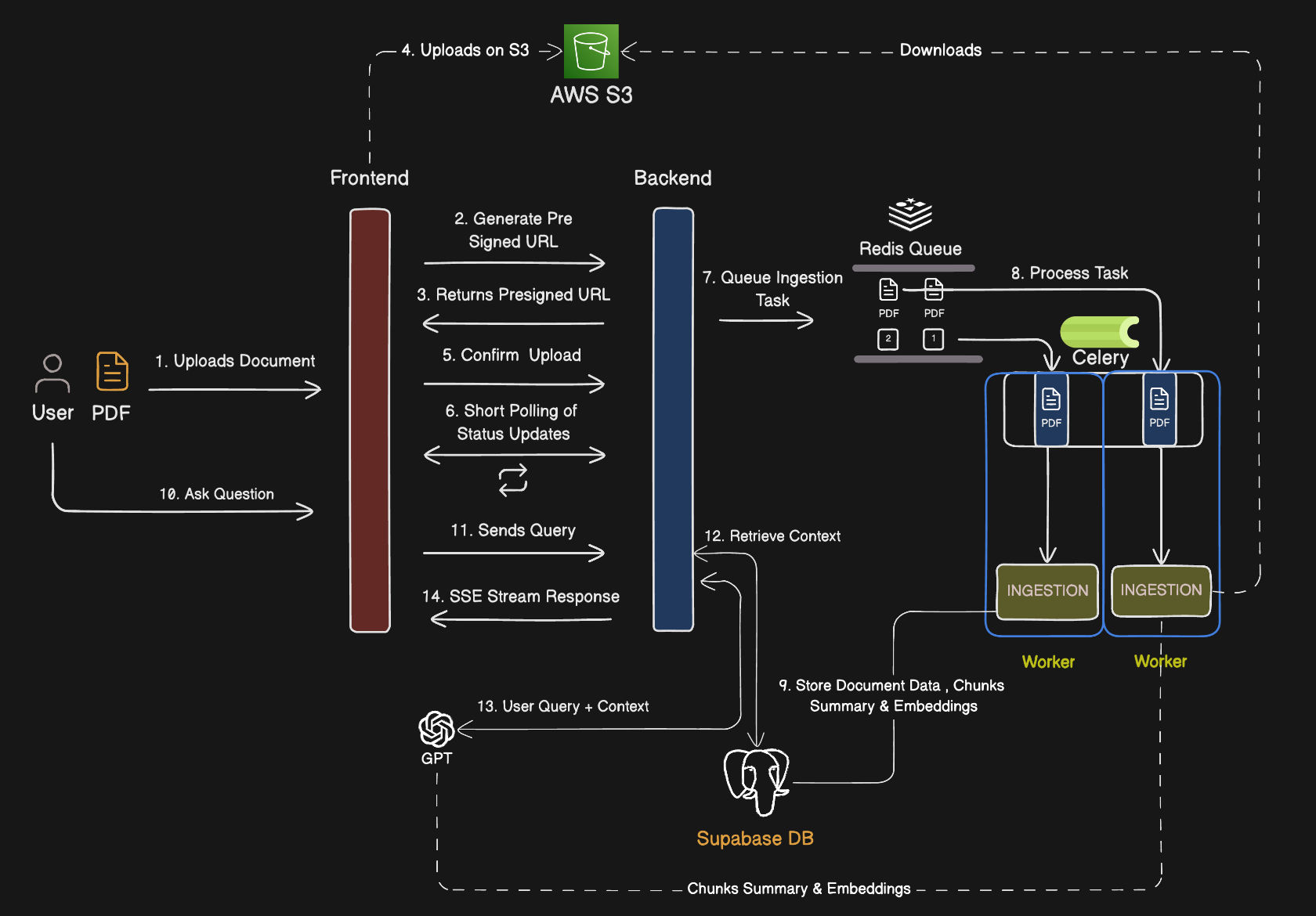
The system is split into three independently running services: the FastAPI server (handles API requests), the Celery worker (processes background document ingestion tasks), and Redis (acts as the message broker between the two). Supabase (PostgreSQL + pgvector) serves as the persistent store for both document metadata and vector embeddings.
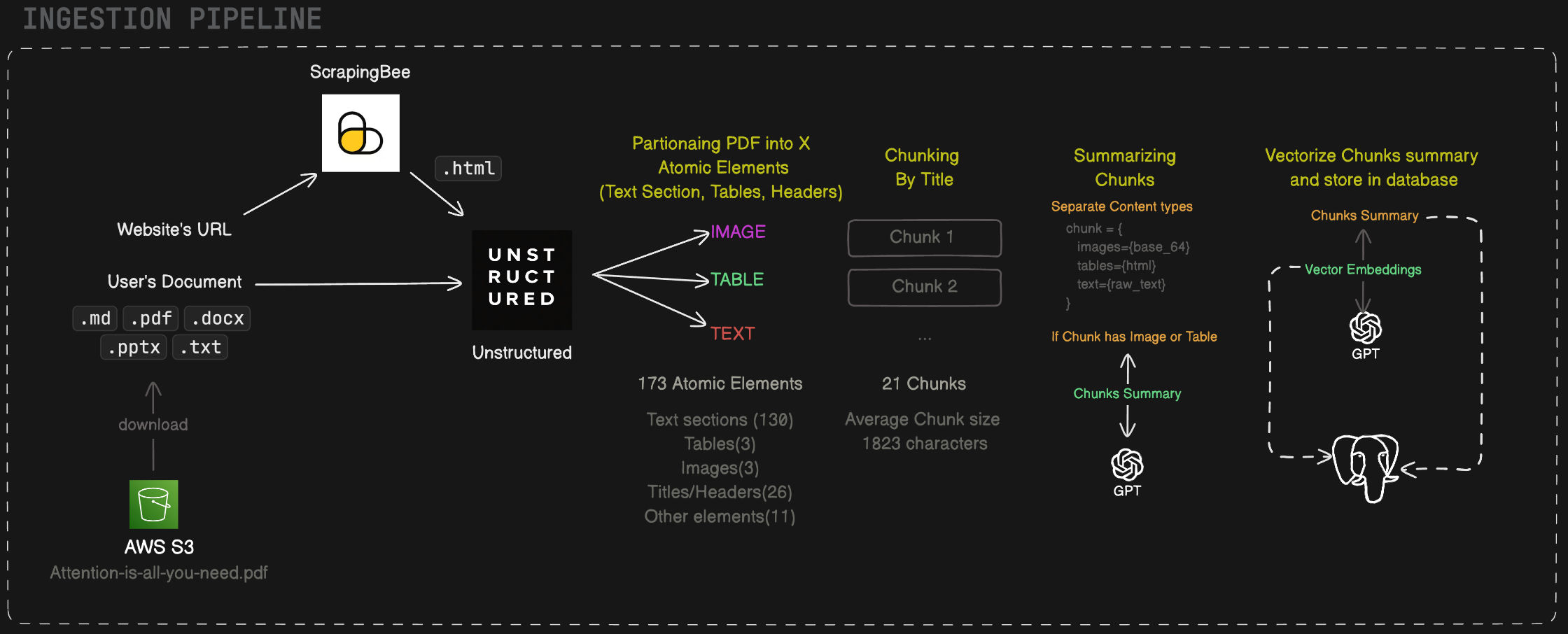
When a document is uploaded, the API immediately enqueues an ingestion task via Redis. The Celery worker picks up the task and runs the full pipeline:
- File type detection via
libmagic - PDF parsing via Poppler (
pdf2image,pdfplumber) or OCR via Tesseract for scanned/image-based files - Text chunking by title and context using Unstructured — documents are split into semantically meaningful sections with atomic elements preserving heading hierarchy and content boundaries, rather than fixed-size character windows
- Embedding generation via OpenAI
text-embedding-3-large - Upsert to Supabase pgvector — both the raw chunk text and its vector are persisted
- Metadata indexing — document title, page number, chunk index, and source type stored for filtering
This async design ensures the API remains non-blocking even for large, multi-page documents.
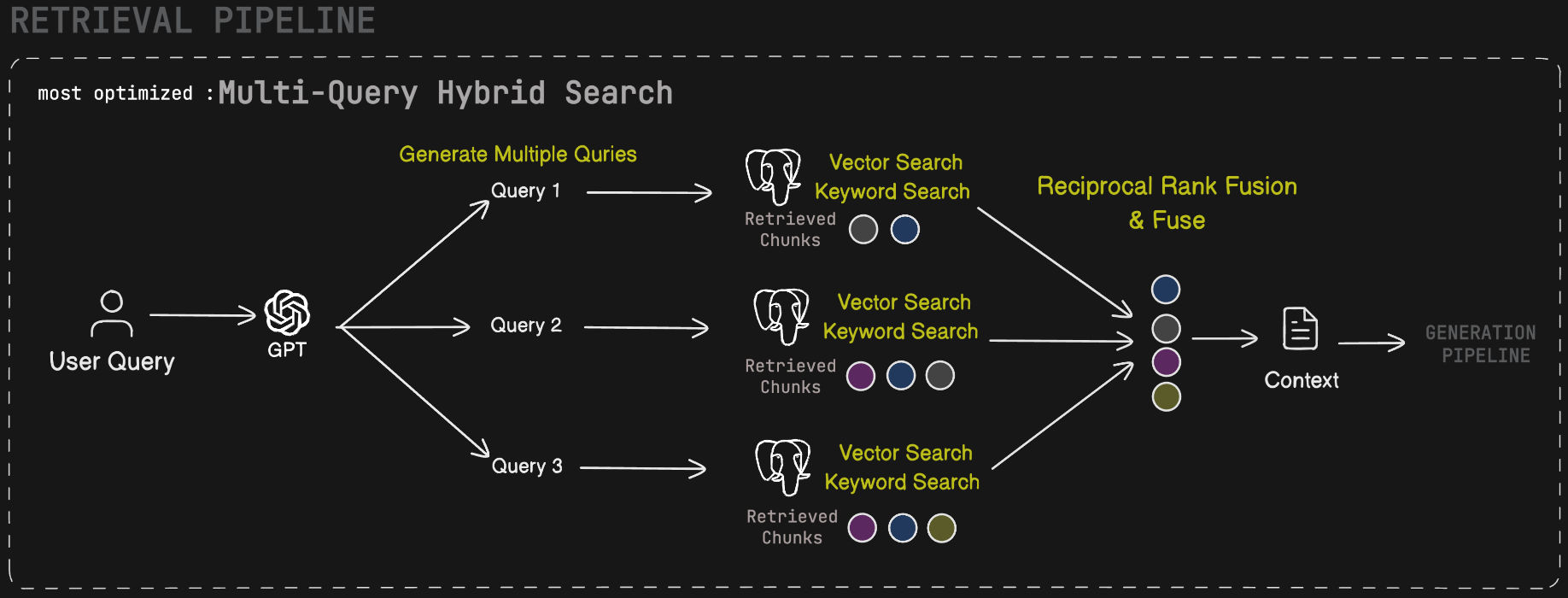
The retrieval stage is user-configurable. Clients can select one of four strategies per query:
| Mode | Description |
|---|---|
| Vector Search | Dense cosine similarity search over pgvector using the query embedding. Powered by the custom Postgres function vector_search_document_chunks. |
| Hybrid Search | Combines dense vector search with sparse BM25-style full-text keyword search (keyword_search_document_chunks), then merges results via Reciprocal Rank Fusion (RRF). |
| Multi-Query Vector | Uses GPT-4o to generate multiple semantically diverse reformulations of the original query, runs vector search for each, and deduplicates results. Improves recall on ambiguous queries. |
| Multi-Query Hybrid | Combines multi-query reformulation with the hybrid retrieval strategy — each reformulated query runs through both vector and keyword search. Highest recall, best for complex or multi-faceted questions. |
All strategies retrieve top-k chunks from Supabase and pass them as structured context to the generation stage.
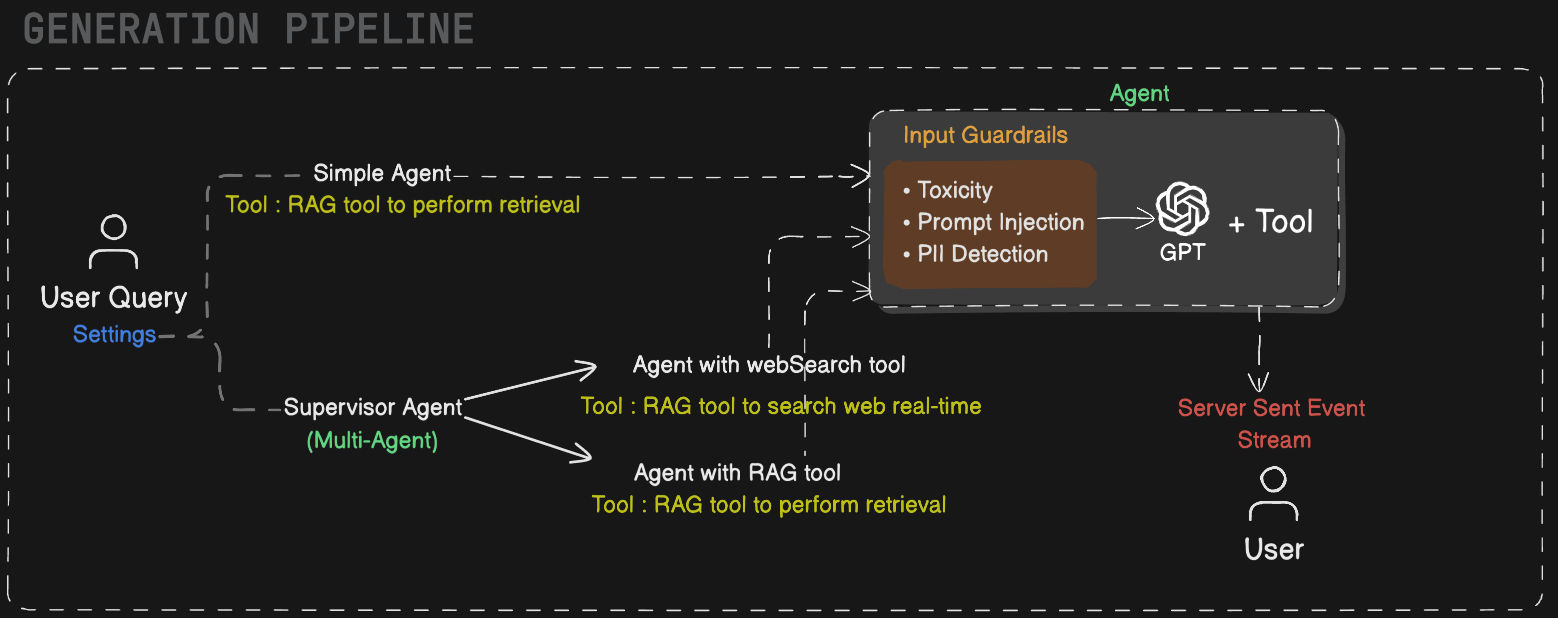
The generation stage is agent-driven. When a user submits a query, the backend routes it to one of two agent modes based on the user's settings.
Simple RAG routes the query directly through a lightweight agent that runs the configured retrieval strategy, then passes the context through guardrails — checking for toxicity, prompt injection, and PII — before generating the final response with gpt-4o.
Agentic RAG hands off to a supervisor agent that decides at runtime whether to invoke the Web Search tool (for current or external knowledge) or the RAG tool (for retrieval over ingested documents). The result passes through the same guardrail layer before generation. This mode is suited for complex, multi-step, or open-domain queries that go beyond the ingested document corpus.
All generation calls are traced end-to-end in LangSmith for debugging and evaluation.
| Layer | Technology |
|---|---|
| API Server | FastAPI (Python 3.11+) |
| RAG Framework | LangChain |
| Chat LLM | GPT-4o (gpt-4o) |
| Embedding Model | OpenAI text-embedding-3-large |
| Vector DB | Supabase (PostgreSQL + pgvector) |
| Retrieval Modes | Vector, Hybrid, Multi-Query Vector, Multi-Query Hybrid |
| Document Parsing | Poppler (PDF), Tesseract (OCR), libmagic (type detection) |
| Web Scraping | ScrapingBee |
| Message Broker | Redis |
| Task Queue | Celery |
| Evaluation | RAGAS |
| Observability | LangSmith tracing |
| Containerization | Docker + Docker Compose |
| Dependency Management | Poetry |
| Database Migrations | Supabase CLI |
| Agents | LangGraph |
RetrIVis.AI is benchmarked using the RAGAS framework over a test set of ~25 real queries. Evaluation scripts are located in the /evaluation directory.
| Metric | Description | Score |
|---|---|---|
| Faithfulness | Are generated answers grounded in the retrieved context, with no hallucination? | 0.95 |
| Answer Relevancy | How directly does the generated answer address the original question? | 0.81 |
| Context Precision | Is the retrieved context focused — i.e. are the top-k chunks actually relevant? | 0.88 |
| Context Recall | Does the retrieved context contain all information needed to answer the question? | 0.82 |
All scores are on a scale of 0–1 (higher is better). The evaluation was run over ~25 real queries using the RAGAS framework.
Prerequisites
- Python 3.10+
- Docker & Docker Compose
- AWS credentials configured
- Supabase CLI (for local DB setup)
Installation
1. Clone the repo
git clone https://github.com/jawahar-singamsetty/retrivis.ai-server.git
cd retrivis.ai-server
2. Configure environment
cp .env.sample .env
# Fill in your keys (see Environment Variables below)
3. Start all services
All services are managed via the Makefile. Run each in a separate terminal:
make redis       # Terminal 1 — starts Redis (message broker)
make worker      # Terminal 2 — starts Celery worker (background ingestion)
make server      # Terminal 3 — starts FastAPI backend
Or check available commands:
make helpServer runs at http://localhost:8000 · Docs at http://localhost:8000/docs
Environment Variables
| Variable | Description | How to get it |
|---|---|---|
OPENAI_API_KEY |
Used for GPT-4o chat and text-embedding-3-large |
platform.openai.com/api-keys |
SUPABASE_API_URL |
Your Supabase project REST URL | Supabase dashboard → Project Settings → API → Project URL |
SUPABASE_SECRET_KEY |
Supabase service role key (full DB access) | Supabase dashboard → Project Settings → API → Secret Key |
CLERK_SECRET_KEY |
Backend auth key for Clerk | clerk.com → Your App → API Keys → Secret Key |
AWS_ACCESS_KEY_ID |
AWS IAM access key for S3 | AWS Console → IAM → Users → Security credentials |
AWS_SECRET_ACCESS_KEY |
AWS IAM secret key for S3 | Same as above (shown once on creation) |
AWS_ENDPOINT_URL_S3 |
S3 endpoint URL (use default or custom) | Default: https://s3.<region>.amazonaws.com |
S3_BUCKET_NAME |
Name of your S3 bucket for file storage | AWS Console → S3 → your bucket name |
SCRAPINGBEE_API_KEY |
Used for URL-based web page ingestion | scrapingbee.com → Dashboard → API Key |
REDIS_URL |
Redis connection URL | Local default: redis://localhost:6379/0 |
DOMAIN |
Frontend origin for CORS | Default: http://localhost:3000 |
LANGSMITH_TRACING |
Enable LangSmith trace logging | Set to true |
LANGSMITH_ENDPOINT |
LangSmith ingestion endpoint | https://api.smith.langchain.com |
LANGSMITH_API_KEY |
LangSmith API key | smith.langchain.com → Settings → API Keys |
LANGSMITH_PROJECT |
Project name for grouping traces | Any string, e.g. retrivis-ai |
TAVILY_API_KEY |
Used by the Agentic RAG web search tool | tavily.com → Dashboard → API Key |
Built and maintained by Jawahar Singamsetty. Open to AI Engineer roles — feel free to reach out via LinkedIn
Built with ❤️ by Jawahar Singamsetty