AI-powered terminal assistant for text, image generation, and CLI automation




A beautiful, feature-rich CLI application that brings AI text generation, image generation, and intelligent CLI automation directly to your terminal. Built with Python and featuring a rich interface powered by Rich library.

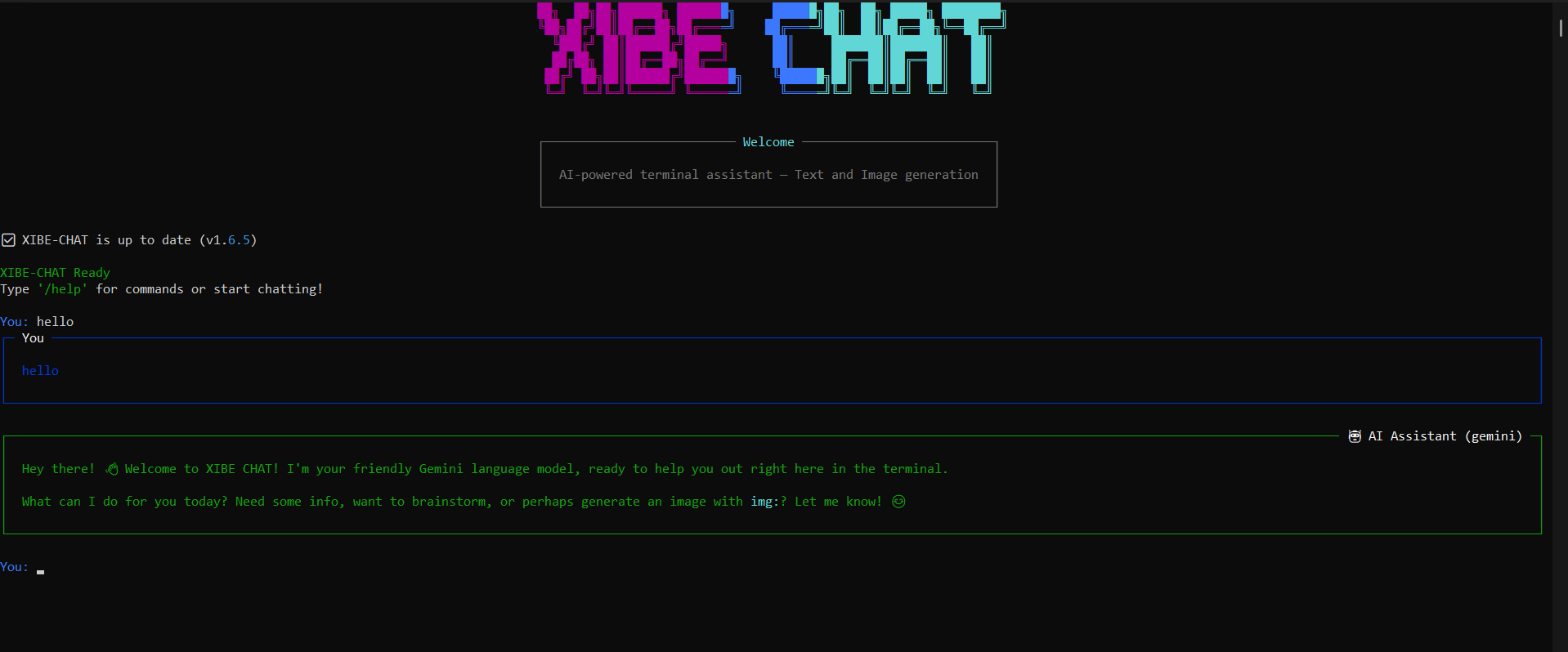
Beautiful chat interface with AI-powered text generation and rich formatting
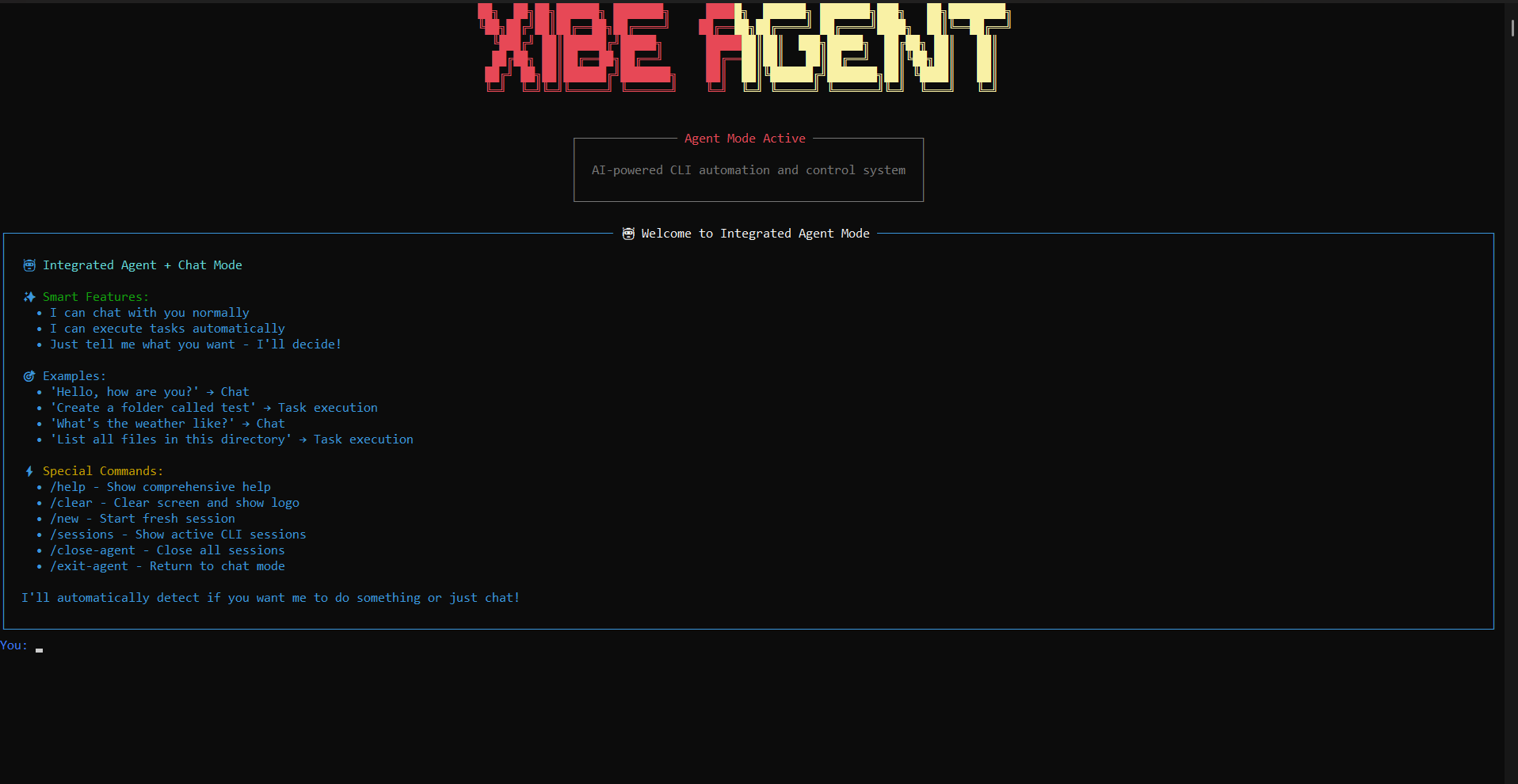
Intelligent CLI automation with smart decision making and task execution
- Free & Unlimited: Still runs completely free thanks to Pollinations AI
- New Models: Access to Gemini 2.5 Flash Lite, OpenAI GPT-5 Mini, and more
- API Key Required: Get your free API key from https://enter.pollinations.ai
- Enhanced Reliability: Improved connection stability and error handling
- Smart Query Analysis: AI automatically understands your intent and decides between text responses or image generation
- Conversational Image Generation: AI responds naturally before creating images (no more "img:" prefixes needed!)
- Enhanced Image Prompts: AI creates detailed, vivid prompts for stunning results
- Natural Language Processing: Just chat naturally - the AI figures out what you want
- Human-like Interactions: AI responds conversationally before generating images
- Contextual Acknowledgments: "Sure! I'd be happy to generate an image of..." + beautiful image
- Intelligent Decision Making: AI understands visual requests in natural language
- Seamless Experience: Feels like chatting with a helpful human assistant who can create images
- No Prefixes Required: Say "show me Paris" instead of "img: show me Paris"
- Faster Interactions: Direct image generation while maintaining conversational flow
- Improved Model Selection: Better AI model integration and performance
- Enhanced Stability: More reliable operation with improved error handling
- Multiple AI Models: Choose from various text generation models
- Conversation Memory: Maintains context across multiple exchanges
- Rich Formatting: Beautiful markdown rendering with syntax highlighting
- Model Switching: Change models on the fly without losing chat history
- Natural Language Understanding: AI automatically understands your intent
- Smart Decision Making: Automatically chooses between text responses and image generation
- Conversational Responses: AI responds like a human assistant before creating images
- No Special Commands: Just chat naturally - AI handles the rest!
- Enhanced Prompts: AI automatically improves your prompts for better results
- Multiple Models: Support for flux, kontext, turbo, nanobanana, and more
- High Quality: 1024x1024 resolution with safety filtering
- Private Generation: Images not shared in public feeds
- Premium Features: No watermarks, NO rate limits!
- Model Preferences: Remembers your preferred AI models
- Auto-Load: Uses saved preferences on startup
- Easy Reset: Reset preferences anytime with
/reset
- Intelligent CLI Automation: AI can execute commands and perform tasks automatically
- Smart Decision Making: AI automatically decides whether to chat or execute tasks
- Visible PowerShell Integration: Watch the AI work in real-time with visible CLI windows
- Natural Language Tasks: Just tell the AI what you want - it figures out how to do it
- Seamless Integration: Switch between chat and agent modes with
/agent - Enhanced Performance: Faster task execution and improved reliability
- Rich Terminal UI: Beautiful ASCII art logo and colorful interface
- Multi-line Input: Support for multi-line messages with
Ctrl+N - Command System: Intuitive slash commands for all features
- Cross-Platform: Works on Windows, macOS, and Linux
- Improved Responsiveness: Faster rendering and smoother interactions
Via pip (recommended):
pip install xibe-chat-cliRun the CLI:
xibe-chat
# or use the short alias
xibe# Start the CLI
xibe-chat
# Chat with AI (NEW: Conversational!)
You: Hello! How are you?
# Generate images naturally (NEW!)
You: show me a beautiful sunset over mountains
🤖 AI: Sure! I'd be happy to generate a stunning sunset scene...
🎨 [Image generates automatically]
# Traditional image generation (still works)
You: img: a beautiful sunset over mountains
# Get help
You: /help| Command | Description |
|---|---|
/help |
Show all commands and usage |
/clear |
Clear terminal and show logo |
/new |
Start a new chat session |
/reset |
Reset saved model preferences |
/image-settings |
View image generation settings |
/agent |
Switch to Agent Mode |
models |
Show available AI models |
switch |
Change AI models |
exit/quit |
End the session |
- Conversational AI: Just chat naturally - AI understands and responds appropriately
- Smart Image Generation: Say "show me a sunset" or "draw a dragon" - AI handles it automatically
- Intelligent Responses: AI responds conversationally before generating images
- Normal Text: Just type and press Enter for regular chat
- Multi-line: Press
Ctrl+Nfor new lines, Enter to send - Direct Image Generation: Use
img:prefix for instant generation (e.g.,img: cute cat)
# Image Generation (Automatic)
You: show me a beautiful sunset over Paris
🤖 AI: Sure! I'd be happy to show you a stunning sunset over Paris...
🎨 [Generates beautiful sunset image]

You: draw a futuristic city
🤖 AI: Great idea! I'll create a futuristic cityscape for you...
🎨 [Generates futuristic city image]

# Text Responses (Automatic)
You: what does quantum physics mean?
🤖 AI: Quantum physics is the study of matter and energy at...
💬 [Provides text explanation]XIBE-CHAT features an intelligent Agent Mode that can execute CLI commands and perform tasks automatically!
# Start the CLI
xibe-chat

# Switch to Agent Mode
/agent

# Now you can:
# 1. Chat normally
You: Hello, how are you?

# 2. Give tasks in natural language
You: Create a folder called "my_project"
You: List all files in this directory
You: Make a Python file with hello world

# 3. Watch the AI work in real-time!The AI automatically decides whether your input should be:
- Chat Response: Normal conversation
- Task Execution: CLI automation
Just tell the AI what you want - it figures out how to do it:
# Examples of tasks the AI can handle:
"Create a new folder called test"
"List all files in the current directory"
"Make a Python script that prints hello world"
"Copy all .txt files to a backup folder"
"Show me the current working directory"
"Install a Python package called requests"- Auto-starts PowerShell when tasks are detected
- Visible windows so you can see what the AI is doing
- Real-time feedback with command execution progress
| Command | Description |
|---|---|
/agent |
Switch to Agent Mode |
/sessions |
Show active CLI sessions |
/close-agent |
Close all agent sessions |
/help |
Show agent mode help |
/clear |
Clear screen and show agent logo |
/new |
Start fresh agent session |
/exit-agent |
Return to chat mode |
agent: open powershell visible |
Start visible PowerShell session |
agent: <command> |
Execute direct command |
- Smart Detection: AI decides when to start CLI sessions
- Auto-Recovery: Gracefully handles session failures
- Session Persistence: Sessions survive mode switches
- Graceful Recovery: Continues working even when commands fail
- User-Friendly Messages: Clear feedback about what's happening
- Fallback Options: Falls back to chat if automation fails
- Decision Indicators: Shows whether AI will chat or execute tasks
- Progress Tracking: Real-time updates on task execution
- Command History: See what commands were executed
When you switch to Agent Mode, you'll see:
- Orange gradient "XIBE AGENT" logo
- Comprehensive welcome screen with examples
- Smart decision indicators for each input
- Real-time task execution with visible PowerShell windows
XIBE-CHAT CLI comes pre-configured with premium API access:
- ✅ No Watermarks: Clean images without logos
- ✅ Enhanced Rate Limits: Higher usage limits for better performance
- ✅ Private Generation: Your images stay private
- ✅ Optimized Performance: Faster response times and improved reliability
Your preferred models are automatically saved in xibe_chat_config.json:
{
  "text_model": "mistral",
  "image_model": "flux",
  "last_updated": "2024-01-15T10:30:45.123456"
}- Enhance: AI improves your prompts automatically
- Safe Mode: Strict NSFW filtering enabled
- Private: Images not shared publicly
- High Quality: 1024x1024 resolution
- No Watermarks: Clean images included
- flux: High-quality general purpose
- kontext: Image-to-image editing
- turbo: Fast generation
- nanobanana: Advanced image editing
- gptimage: GPT-powered generation
- Package: xibe-chat-cli
- Version: 0.9.0 (Latest Release!)
- PyPI: https://pypi.org/project/xibe-chat-cli/
- License: CC BY-NC-SA 4.0
- Author: iotserver24
- Python 3.8+
- Windows, macOS, or Linux
- Internet connection for AI services
- PowerShell (Windows) / Terminal (macOS/Linux) for Agent Mode
- Python 3.8+
- pyfiglet
- python-dotenv
- requests
- rich
- prompt-toolkit
- packaging (for version management)
XIBE-CHAT CLI features a clean, modular architecture:
ai_cli.py: Main chat interface, AI-powered conversational intelligence, and smart image/text generationagent_mode.py: Intelligent CLI automation and task execution- Conversational AI Engine: Natural language understanding and intent recognition
- Smart Decision System: Automatically routes queries to appropriate AI services
- Separate branding: Different logos and interfaces for each mode
- Seamless switching: Switch between modes without losing state
- Smart Decision Engine: AI-powered classification of user intent
- CLI Session Management: Automatic PowerShell/terminal session handling
- Task Execution Engine: Step-by-step command execution with feedback
- Error Recovery System: Graceful handling of failures and edge cases
- Natural Language Processing: AI understands and responds to natural human language
- Smart Intent Recognition: Automatically detects when users want images vs. text responses
- Conversational Responses: AI responds like a human assistant before generating content
- Enhanced Image Prompts: AI creates detailed, vivid prompts for stunning visual results
- No Prefixes Required: Say "show me Paris" instead of "img: show me Paris"
- Faster Interactions: Direct routing to appropriate AI services
- Conversational Flow: Natural back-and-forth like chatting with a human
- Improved Responsiveness: Smoother interactions with intelligent routing
- AI-Powered Decision Making: Eliminates manual command prefixes and routing
- Optimized API Calls: Smart routing reduces unnecessary requests
- Enhanced Error Handling: Better recovery from AI service issues
- Streamlined Architecture: Clean separation of conversational AI and direct commands
If you find XIBE-CHAT useful, consider supporting its development:
Every contribution helps improve XIBE-CHAT for everyone! 🙏
Note
Donations are highly appreciated to keep this project alive and free!
For support, feature requests, or questions:
- 📧 Email: iotserver24@gmail.com
- 🐛 Issues: Contact via email
- 💬 Feedback: We welcome your suggestions
This project is licensed under the Creative Commons Attribution-NonCommercial-ShareAlike 4.0 International License (CC BY-NC-SA 4.0).
You are free to:
- Share — copy and redistribute the material in any medium or format
- Adapt — remix, transform, and build upon the material
Under the following terms:
- Attribution — You must give appropriate credit, provide a link to the license, and indicate if changes were made
- NonCommercial — You may not use the material for commercial purposes
- ShareAlike — If you remix, transform, or build upon the material, you must distribute your contributions under the same license
For more details, see the LICENSE file or visit https://creativecommons.org/licenses/by-nc-sa/4.0/
- Pollinations AI for the amazing AI API
- Rich for the beautiful terminal interface
- Prompt Toolkit for advanced input handling
- OpenAI for the powerful language models that power Agent Mode's intelligent task execution
- 📖 PyPI Package: https://pypi.org/project/xibe-chat-cli/
- 🔄 Updates:
pip install --upgrade xibe-chat-cli
Made with ❤️ by iotserver24
Star this repository if you find it helpful!



