CPS is an AI-powered productivity and cognitive enhancement platform. It generates and adapts personalized work plans in real time, using Google Gemini AI, based on your goals and psychological state.
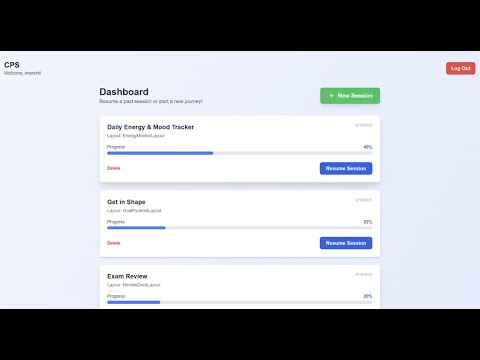
See SNAPSHOTS.md for visual examples of all productivity layouts and the dashboard.
- AI-Powered Planning: Live integration with Google Gemini for dynamic, personalized session plans
- Real-Time Adaptation: Plans and layouts update instantly as your state or context changes
- Multiple Productivity Layouts: Kanban, Pomodoro, Writer, Zen Focus, and more—AI recommends the best fit for your needs
- Secure User Authentication: All data is private and protected
- Session Tracking: Review your progress and session history
- Modern, Responsive UI: Built with React, Tailwind CSS, and Vite
- Log in to your dashboard
- Start a session by entering your goal and psychological state
- AI generates a plan: CPS sends your input to Gemini, which returns a JSON plan (tasks, layout, title)
- Work through your plan in the recommended layout
- Update your state at any time—CPS adapts your plan in real time
- Track your sessions and review your progress
| Frontend | Backend | AI Integration | Database |
|---|---|---|---|
| React, Vite | Node.js, Express | Google Gemini API | SQL (schema.sql) |
| Tailwind CSS | @google/generative-ai |
graph TD
    User[User]
    Frontend[Frontend: React, Vite, Tailwind CSS]
    Backend[Backend: Node.js, Express]
    AIService[AI Service: aiService.js, prompts.js]
    Gemini[Google Gemini API]
    Database[Database: SQL]

    User --> Frontend
    Frontend --> Backend
    Backend --> AIService
    AIService --> Gemini
    Gemini --> AIService
    AIService --> Backend
    Backend --> Database
    Backend --> Frontend
    Frontend --> User
graph TD
    User[User]
    UI[React UI Components]
    API[Express API]
    AIS[AI Service: aiService.js]
    PROMPTS[Prompt Generation: prompts.js]
    GEM[Google Gemini API]
    DB[Database]

    User --> UI
    UI -->|POST /api/generate-ui| API
    API --> AIS
    AIS --> PROMPTS
    AIS -->|Prompt| GEM
    GEM -->|JSON Plan| AIS
    AIS --> API
    API -->|JSON Response| UI
    UI -->|Render| User
    API --> DB
For a detailed architecture and data flow, see
architecture-and-dataflow.md.
- Clone the repo
git clone https://github.com/imsncht/cognitive-performance-system.git
- Install dependencies in both
frontend/andbackend/cd cognitive-performance-system/frontend && npm install cd ../backend && npm install
- Set up environment variables (see
.env.example) - Run backend and frontend dev servers
- More productivity layouts
- Deeper analytics and insights
- Biometric device integration
- Team/collaborative features
See test-prompts.md for a collection of example user prompts you can use to trigger and test different productivity layouts in the system.
Distributed under the MIT License. See LICENSE for details.