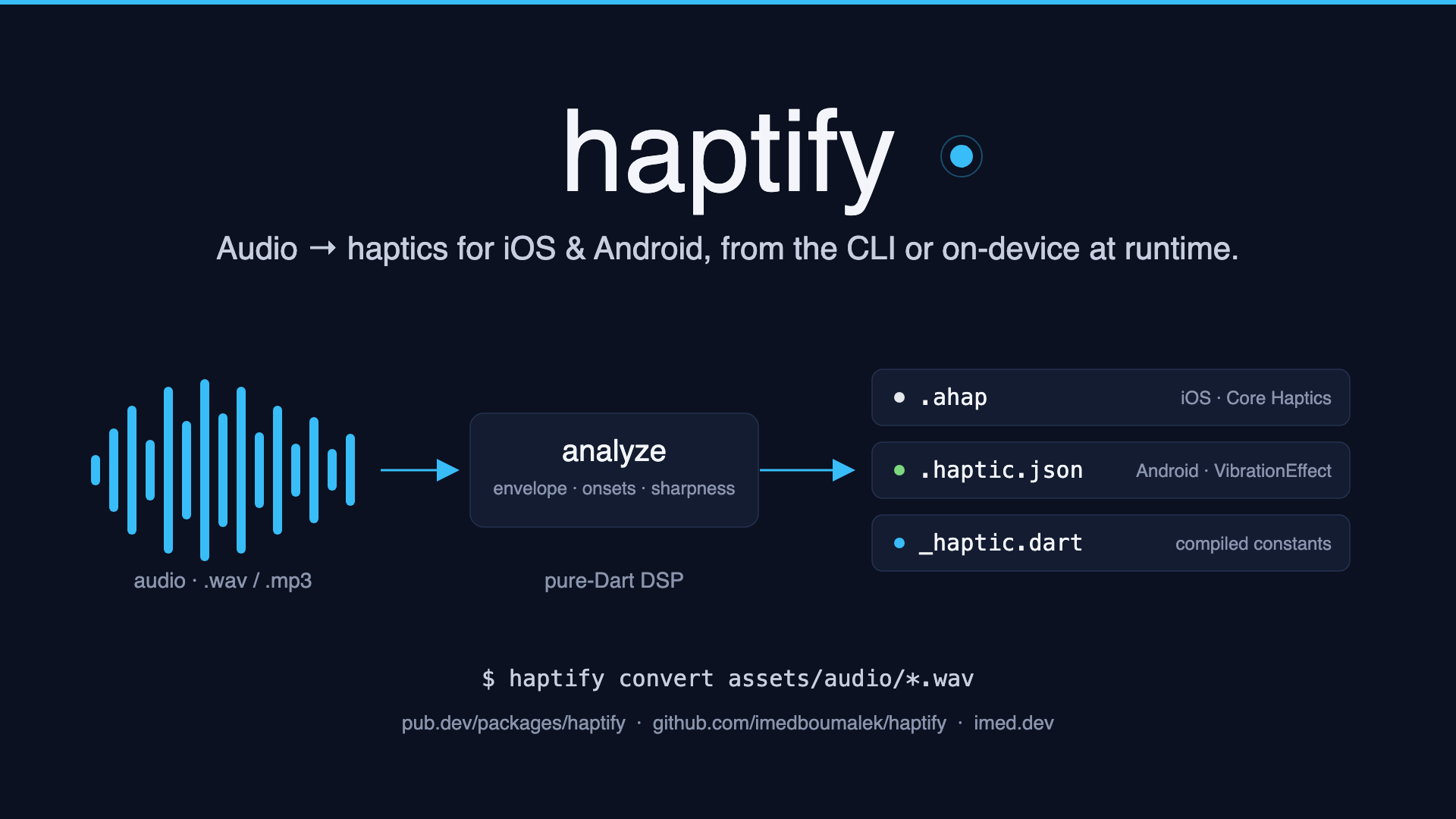
Generate haptic feedback files from audio, in pure Dart.
Dev preview. haptify is published as a prerelease: the CLI and library APIs work end-to-end but may still change before 1.0. Bug reports and feedback are very welcome on the issue tracker.
Point haptify at the sound effects in your Flutter project's assets and it produces haptic patterns that follow the audio — transient taps at every percussive hit, continuous rumbles tracing the loudness envelope. The generated files are consumed by the playback plugins you already use; haptify itself has no platform channels.
$ haptify convert assets/audio/*.wav
assets/audio/explosion.wav -> explosion.ahap, explosion.haptic.json, explosion_haptic.dart
assets/audio/tap.wav -> tap.ahap, tap.haptic.json, tap_haptic.dart
| File | Format | Play it with |
|---|---|---|
<name>.ahap |
Apple Core Haptics (AHAP JSON) | gaimon: Gaimon.pattern(ahapString), or core_haptics |
<name>.haptic.json |
{"timings": [...], "amplitudes": [...], "repeat": -1} |
vibration: Vibration.vibrate(pattern: timings, intensities: amplitudes) |
<name>.primitives.json |
VibrationEffect.Composition primitives (opt-in via --formats primitives) |
Your own platform channel calling Composition.addPrimitive on API 30+ devices |
<name>_haptic.dart |
Dart constants (AHAP string + waveform arrays) | Compile the pattern into your app — no asset loading at runtime |
Inputs don't have to be audio: an existing .ahap file converts straight to
the Android formats (haptify convert pattern.ahap), with no re-analysis —
handy for porting an iOS haptic library to Android.
dart pub global activate haptify

haptify convert assets/audio/*.wav
If your shell cannot find haptify afterwards, add pub's bin directory to
your PATH:
- macOS/Linux:
export PATH="$PATH:$HOME/.pub-cache/bin"(add it to your~/.zshrcor~/.bashrc) - Windows: add
%LOCALAPPDATA%\Pub\Cache\bin
dart pub add dev:haptify        # or: flutter pub add dev:haptify

dart run haptify:haptify convert assets/audio/*.wav
This pins the version in your pubspec so everyone on the team generates identical haptic files.
WAV and MP3 decode natively in pure Dart — no external tools needed. Other
formats (M4A, OGG, FLAC, ...) are converted through ffmpeg — or
afconvert, preinstalled on macOS — when available on the PATH:
- macOS:
brew install ffmpeg(or rely on the built-inafconvert) - Debian/Ubuntu:
sudo apt install ffmpeg - Windows:
winget install ffmpeg
haptify convert [audio files, globs, or folders] [options]

-o, --out                  Put all generated files flat into one directory
                           (default: grouped layout, see below)
-f, --formats              ahap, waveform, primitives, dart
                           (default: ahap, waveform, dart)
    --resolution           Analysis frame / waveform step in ms (default 10)
    --onset-sensitivity    Transient detection threshold; lower finds more
                           taps (default 1.5)
    --min-gap              Minimum ms between transients (default 50)
    --curve-points         Minimum intensity-curve points per segment
                           (default 32)
    --curve-rate           Intensity-curve points per second of audio, which
                           keeps envelope detail in long sounds (default 16)
    --gamma                Envelope exponent; <1.0 boosts quiet passages
                           (default 1.0)
    --silence-threshold    Level under which audio counts as silence
                           (default 0.02)
    --[no-]sharpness-curves
                           Emit time-varying sharpness curves (iOS); on by
                           default, disable to shrink files
-v, --verbose              Print analysis details and conversion warnings
Inputs can be files, globs, or folders (scanned for audio files); with no
input at all, the current directory is scanned. Run bare haptify convert
inside a sounds folder and everything in it converts.
By default the ahap/waveform outputs are grouped by type in a
haptify-output/ folder placed next to the source folder, with Dart
sources going to lib/generated/ (relative to where you run the command,
i.e. your project root) so they are immediately importable:
assets/audio/hit.wav
assets/haptify-output/ahap/hit.ahap
assets/haptify-output/waveform/hit.haptic.json
lib/generated/hit_haptic.dart
(As a guard, haptify-output/ is never placed above your working directory —
a bare haptify convert inside a sounds folder writes into that folder.)
Pass -o some/dir to put everything flat into one directory instead.
The defaults suit typical sound effects. When the result doesn't feel right,
adjust by symptom — run with -v to see what the analyzer found:
| Symptom | Knob | Direction |
|---|---|---|
| Missing taps on drum hits / percussive detail | --onset-sensitivity (1.5) |
Lower it (e.g. 1.0–1.2) — detects softer onsets |
| Too many taps, feels like machine-gun buzzing | --onset-sensitivity / --min-gap (50ms) |
Raise sensitivity, or raise the gap to space taps out |
| Quiet passages barely vibrate | --gamma (1.0) |
Lower it (e.g. 0.6–0.8) — boosts quiet parts perceptually |
| Loud parts feel flat / everything at max | --gamma |
Raise it above 1.0 — spreads the dynamic range down |
| Background hiss triggers haptics | --silence-threshold (0.02) |
Raise it — more audio counts as silence |
| Trailing tails / reverb get cut off | --silence-threshold |
Lower it |
| Long clips feel mushy, envelope detail lost | --curve-rate (16/s) |
Raise it (e.g. 32) — more curve points per second |
| Files too big for very long audio | --curve-rate / --no-sharpness-curves |
Lower the rate; drop sharpness curves (Android ignores them anyway) |
| Haptics feel coarse / stair-steppy on Android | --resolution (10ms) |
Lower it (min 1ms) — finer waveform steps, bigger arrays |
Every flag has a library counterpart on AnalysisOptions with the same
name in camelCase (onsetSensitivity, minOnsetGap, gamma,
silenceThreshold, curvePointsPerSecond, maxCurvePoints,
sharpnessCurves, frameSize), so runtime conversions tune identically:
const analyzer = AudioAnalyzer(
  options: AnalysisOptions(onsetSensitivity: 1.2, gamma: 0.7),
);
final pattern = analyzer.analyzeBytes(bytes);- Decode the audio to mono samples (MP3 decoding is built in via a vendored Dart port of the minimp3 reference decoder, with ID3 handling and LAME gapless trimming so timing matches the original audio).
- Analyze: an RMS loudness envelope is computed per frame; energy-flux onset detection finds percussive hits; the zero-crossing rate estimates how sharp each moment feels — emitted as a time-varying sharpness curve on iOS when the brightness moves.
- Model: hits become transient haptic events, sustained passages become continuous events shaped by an intensity curve (simplified with Ramer-Douglas-Peucker to stay compact).
- Encode: the same pattern is written as lossless AHAP for iOS and sampled into a 0-255 amplitude waveform for Android. Anything Android cannot express (sharpness, non-intensity curves) is reported as a warning, never an error.
The pattern model, DSL, analyzer, and encoders are a plain Dart API, so you can also author patterns by hand or build your own tooling:
import 'package:haptify/haptify.dart';

final tap = HapticPattern.events([
  HapticEvent.transient(at: Duration.zero, intensity: 1.0, sharpness: 0.6),
]);
final rumble = HapticPattern.events([
  HapticEvent.continuous(
    at: Duration.zero,
    duration: 400.ms,
    intensity: 0.8,
    envelope: HapticEnvelope(attack: 50.ms, release: 100.ms),
  ),
]);
final combo = tap.then(rumble, gap: 80.ms).repeat(3, gap: 200.ms);

final ahap = combo.toAhap();          // iOS
final wf = combo.toWaveform();        // Android: wf.timings, wf.amplitudes
Or run the audio pipeline programmatically:
final audio = await const AudioDecoder().decodeFile('assets/audio/hit.wav');
final pattern = const AudioAnalyzer().analyze(audio);For sound provided while the app runs — a user upload, a recording, a
download — decode straight from bytes; no file path, no filesystem, no
ffmpeg. WAV and MP3 are supported and the format is detected from the
bytes.
// e.g. bytes from file_picker, an HTTP response, or rootBundle
final Uint8List bytes = await pickedFile.readAsBytes();

final pattern = const AudioAnalyzer().analyzeBytes(bytes);

final ahap = pattern.toAhap();      // iOS: Gaimon.pattern(ahap)
final wf = pattern.toWaveform();    // Android: Vibration.vibrate(
                                    //   pattern: wf.timings,
                                    //   intensities: wf.amplitudes)
analyzeBytes runs synchronously; for large clips, run it in an
Isolate to keep
the UI thread free. Need the decoded samples separately? Call
decodeAudioBytes(bytes) to get AudioData, then analyze it.
Runtime conversion is the exact same pipeline as the CLI — same analyzer, same defaults. Improvements like time-varying sharpness curves and duration-scaled envelope budgets apply to uploaded audio automatically, no app changes needed.
The repository contains a Flutter demo app under
example_app/
with CC0 sample sounds and their pregenerated haptics, plus a file picker
that converts any WAV/MP3 on the device at runtime. Run it on a real phone
with cd example_app && flutter run.
Android primitive compositions (— shipped as theVibrationEffect.Composition)primitivesoutput formatAHAP parsing (— shipped;HapticPattern.fromAhap).ahapfiles convert directly to the Android formatsAnalyzer sharpness curves (iOS)— shipped; sharpness follows the sound's brightness over time- Preset patterns and an easing/curve library for hand-authoring
Design guidance:
- Apple HIG — Playing haptics — when haptics help, when they annoy, and how to pair them with sound
- Android — Haptics design principles — the Android side of the same story, including the clear/rich/buzzy scale
Platform APIs this package targets:
- Core Haptics and Representing haptic patterns in AHAP files — the AHAP format haptify emits and parses
- Android
VibrationEffect—createWaveform(our waveform JSON) andstartComposition(our primitives JSON)
Talks & courses:
- WWDC19 — Introducing Core Haptics (intensity/sharpness model, transients vs. continuous)
- WWDC21 — Practice audio haptic design (designing haptics from sound — exactly what haptify automates)
- Coursera — Audio Signal Processing for Music Applications (UPF/Stanford; the DSP behind envelopes, onsets, and spectral features)
- The Scientist and Engineer's Guide to DSP — free classic; chapters on convolution and the DFT explain what the analyzer's RMS/ZCR heuristics approximate
- musicinformationretrieval.com
— notebooks on onset detection and audio features, directly relevant to
how
AudioAnalyzerworks
MIT