
I have two kids who are attending Brigham Young University Online High School (BYU OHS). For reasons that I don't understand, their version of Canvas does not correctly show grades for Flex students. So I created this:
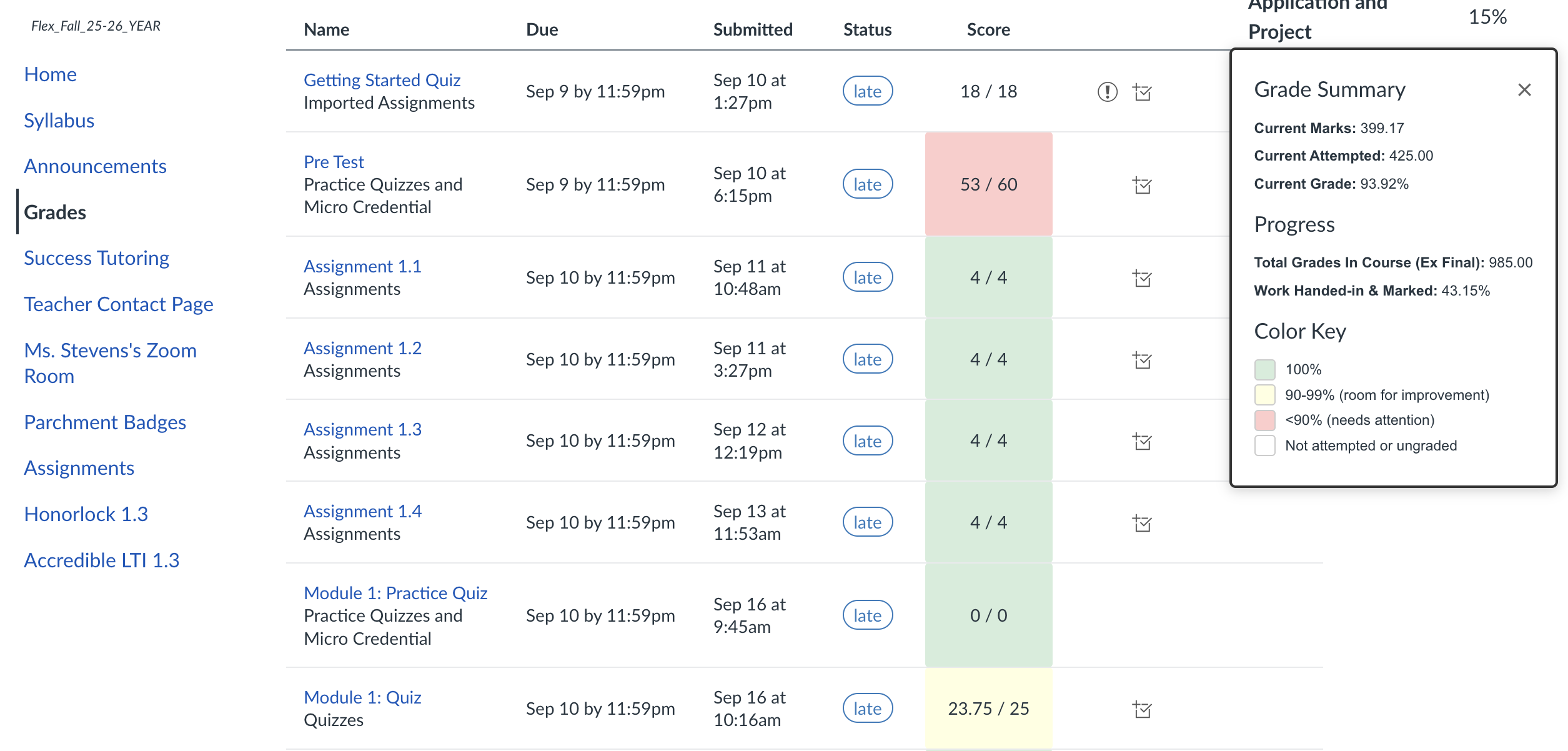
When intalled, the "Grade Summary" window will pop up over the "Grades" page for a course on Canvas.
The window shows the students' current marks for all of the assignments and tests that they have completed. It also shows their progress in the course judged by how much they have handed in, excluding the final exam. Finally, on the grades page, we highlight the marks that have been used to calculate their current mark, along with indications of where they could do better.
A Tampermonkey userscript that enhances the BYU OHS Canvas grade page with automatic grade calculation and visual performance indicators.
- Automatic Grade Calculation: Calculates your total grade and course progress automatically
- Visual Performance Indicators: Color-codes assignment scores to quickly identify areas needing attention:
- 🟢 Light Green: All graded assignments that count toward your final grade
- 🟡 Light Yellow: Assignments scoring 90-99% (room for improvement)
- 🔴 Light Red: Assignments scoring below 90% (needs attention)
- ⚪ No highlight: Perfect scores (100%)
- Grade Summary Panel: Displays total grade, percentage, and progress excluding the final exam
- Smart Filtering: Automatically excludes missing assignments, ungraded work, and assignments that don't count toward the final grade
-
Install Tampermonkey (if you haven't already):
-
Install the Script:
- Click on the Tampermonkey icon in your browser
- Select "Create a new script"
- Delete the default content
- Copy the contents of
Flex Grade Calculator.user.jsfrom this repository - Paste into the editor
- Save (File → Save or Ctrl/Cmd+S)
-
Use the Script:
- Navigate to any BYU OHS Canvas course grades page (
https://byuohs.instructure.com/courses/*/grades*) - The script runs automatically and highlights your assignment scores
- Click the "Show Grades" button in the bottom-right corner to see your grade summary
- Click the × to close the summary panel
- Navigate to any BYU OHS Canvas course grades page (
You can customize the script behavior by editing the configuration flags at the top of the script (lines 17-18):
const showCountedGrades = true;      // Show green highlight on all counted grades
const showUnderPerformance = true;   // Show yellow/red highlights on under-performing assignments