Skip to content

Add Uptime Kuma Integration#59395

Closed
meichthys wants to merge 0 commit intohome-assistant:devfrom
meichthys:uptime_kuma
Closed

Add Uptime Kuma Integration#59395
meichthys wants to merge 0 commit intohome-assistant:devfrom
meichthys:uptime_kuma

Conversation

@meichthys
Copy link
Contributor

@meichthys meichthys commented Nov 9, 2021

Type of change

  • Dependency upgrade
  • Bugfix (non-breaking change which fixes an issue)
  • New integration (thank you!)
  • New feature (which adds functionality to an existing integration)
  • Breaking change (fix/feature causing existing functionality to break)
  • Code quality improvements to existing code or addition of tests

Checklist

  • The code change is tested and works locally.
  • Local tests pass. Your PR cannot be merged unless tests pass
    • I haven't been able to get tox to run on MacOS (what i use for development environment)
  • There is no commented out code in this PR.
  • I have followed the development checklist
  • The code has been formatted using Black (black --fast homeassistant tests)
  • Tests have been added to verify that the new code works.

If user exposed functionality or configuration variables are added/changed:

If the code communicates with devices, web services, or third-party tools:

  • The manifest file has all fields filled out correctly.
    Updated and included derived files by running: python3 -m script.hassfest.
  • New or updated dependencies have been added to requirements_all.txt.
    Updated by running python3 -m script.gen_requirements_all.
  • For the updated dependencies - a link to the changelog, or at minimum a diff between library versions is added to the PR description.
  • Untested files have been added to .coveragerc.

The integration reached or maintains the following Integration Quality Scale:

  • No score or internal
  • 🥈 Silver
  • 🥇 Gold
  • 🏆 Platinum

To help with the load of incoming pull requests:

Copy link
Contributor

@epenet epenet left a comment

Choose a reason for hiding this comment

The reason will be displayed to describe this comment to others. Learn more.

A few comments to get you started... In particular, try to go "type hint all the way"

@MartinHjelmare MartinHjelmare changed the title New Integration: Uptime Kuma Add Uptime Kuma Integration Nov 9, 2021
@meichthys
Copy link
Contributor Author

Could we get this in 2021.12?

@epenet
Copy link
Contributor

epenet commented Nov 18, 2021

Could we get this in 2021.12?

There are currently 398 PRs in progress!

You can also look at the backlog for new integrations: https://github.com/home-assistant/core/projects/5
To give you an idea, I waited almost a year for Renault integration (#39605) to get merged in.

)


class UptimeKumaBinarySensor(BinarySensorEntity, CoordinatorEntity):
Copy link
Member

Choose a reason for hiding this comment

The reason will be displayed to describe this comment to others. Learn more.

Shouldn't this be implementing the available property as well? (If the monitored name isn't in the coordinator data anymore?)

Copy link
Contributor Author

Choose a reason for hiding this comment

The reason will be displayed to describe this comment to others. Learn more.

Doesn't an entity show as unavailable automatically if data is not reported for it?

assert result
assert result.get("type") == data_entry_flow.RESULT_TYPE_FORM
assert result.get("step_id") == "user"
assert result.get("errors") == {"base": "cannot_connect"}
Copy link
Member

Choose a reason for hiding this comment

The reason will be displayed to describe this comment to others. Learn more.

Please continue the tests where the user recovers and does complete successfully (to ensure there are no side-effect caused by this error).

Copy link
Contributor Author

Choose a reason for hiding this comment

The reason will be displayed to describe this comment to others. Learn more.

Is this required to get this merged? TBH, I don't really understand how to test things well. I mostly just addapted the existing tests from other integrations.

Copy link
Contributor Author

Choose a reason for hiding this comment

The reason will be displayed to describe this comment to others. Learn more.

where the user recovers and does complete successfully

Could you explain what you mean by 'recovers'? I'm not quite sure.

Copy link
Member

Choose a reason for hiding this comment

The reason will be displayed to describe this comment to others. Learn more.

Well, the form is shown again, so a user can correct their input and continue and complete the integration setup. That is what the tests need to do as well (to test and ensure that is the case).

@frenck
Copy link
Member

frenck commented Feb 14, 2022

Additionally, please resolve the existing merge conflict (I suggest to rebase the PR) and make sure the tests pass 👍

@meichthys
Copy link
Contributor Author

@frenck I'm not sure how to get this rebased. Could you help or point me in the right direction?

@frenck
Copy link
Member

frenck commented Feb 22, 2022

Basically, you'd run a git pull upstream/dev --rebase to start the rebasing process from the upstream dev.

You'll run into a merge conflict you'll need to resolve, once resolve, run git rebase --continue to complete the rebase process (please note, you can run into multiple conflicts and might need to continue multiple times, until all commits are rebased and resolved).

@meichthys
Copy link
Contributor Author

Ok, Thanks. I'll give it a try 👍

@meichthys
Copy link
Contributor Author

meichthys commented Feb 22, 2022

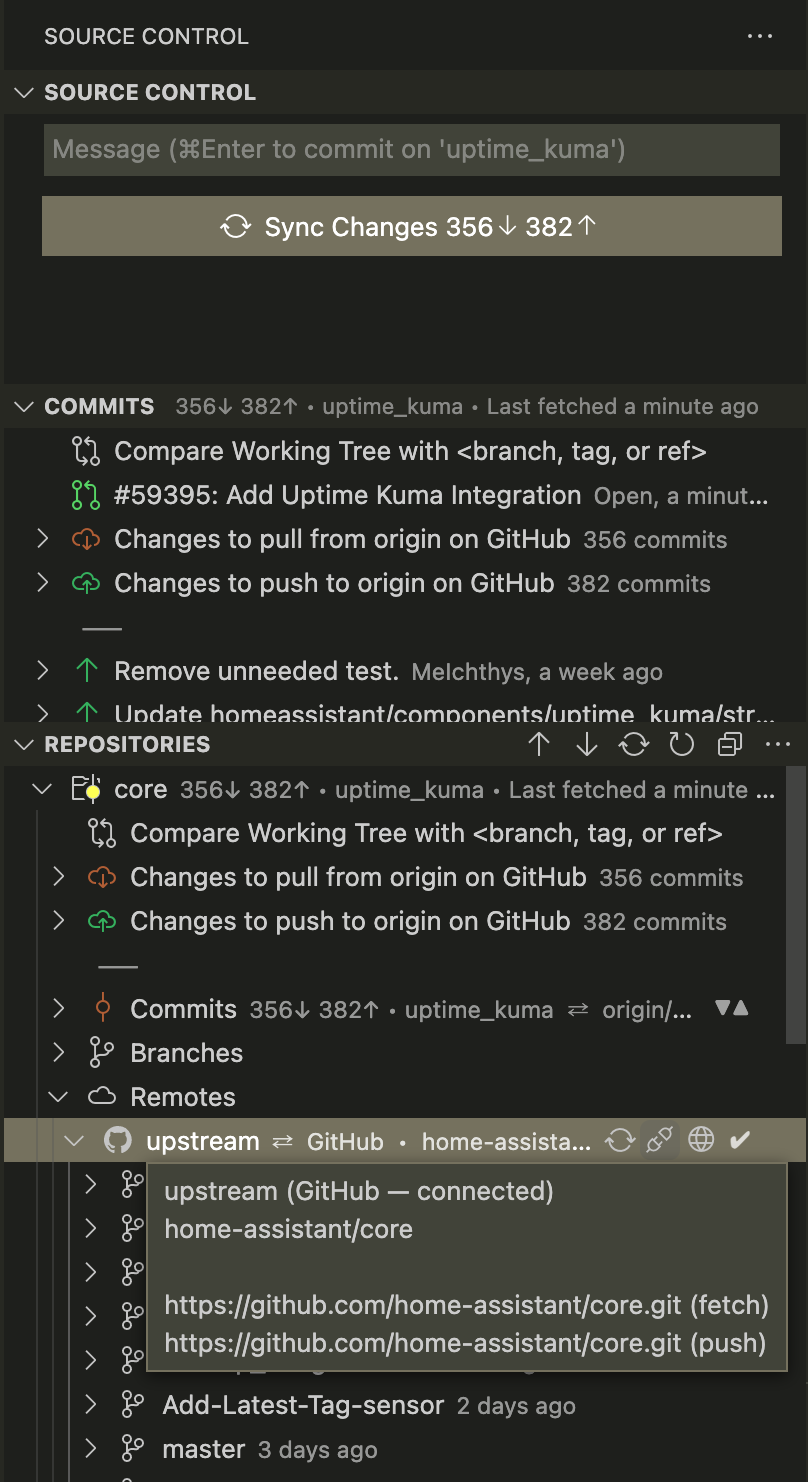
I can't seem to make any progress on the rebase:

>git pull upstream/dev --rebase
fatal: 'upstream/dev' does not appear to be a git repository
fatal: Could not read from remote repository.

Please make sure you have the correct access rights
and the repository exists.

Screen Shot 2022-02-21 at 8 09 41 PM

@homeassistant
Copy link
Contributor

Hi @GitHub-Action,

It seems you haven't yet signed a CLA. Please do so here.

Once you do that we will be able to review and accept this pull request.

Thanks!

@meichthys
Copy link
Contributor Author

@frenck
Something went wrong with the rebase. Is there a way to recover?

@homeassistant
Copy link
Contributor

Hi @GitHub-Action,

It seems you haven't yet signed a CLA. Please do so here.

Once you do that we will be able to review and accept this pull request.

Thanks!

@frenck
Copy link
Member

frenck commented Feb 23, 2022

Something went wrong with the rebase. Is there a way to recover?

Yes, rebase again just with your commits.

@meichthys
Copy link
Contributor Author

Sorry to waste your time, but i can't seem ti figure out how to rebase with only my commits. It seems to bring along all the other changes as well (It shows like 250 conflicts).

@homeassistant
Copy link
Contributor

Hello @meichthys,

When attempting to inspect the commits of your pull request for CLA signature status among all authors we encountered commit(s) which were not linked to a GitHub account, thus not allowing us to determine their status(es).

The commits that are missing a linked GitHub account are the following:

Unfortunately, we are unable to accept this pull request until this situation is corrected.

Here are your options:

  1. If you had an email address set for the commit that simply wasn't linked to your GitHub account you can link that email now and it will retroactively apply to your commits. The simplest way to do this is to click the link to one of the above commits and look for a blue question mark in a blue circle in the top left. Hovering over that bubble will show you what email address you used. Clicking on that button will take you to your email address settings on GitHub. Just add the email address on that page and you're all set. GitHub has more information about this option in their help center.

  2. If you didn't use an email address at all, it was an invalid email, or it's one you can't link to your GitHub, you will need to change the authorship information of the commit and your global Git settings so this doesn't happen again going forward. GitHub provides some great instructions on how to change your authorship information in their help center.

    • If you only made a single commit you should be able to run
      git commit --amend --author="Author Name <email@address.com>"
      
      (substituting Author Name and email@address.com for your actual information) to set the authorship information.
    • If you made more than one commit and the commit with the missing authorship information is not the most recent one you have two options:
      1. You can re-create all commits missing authorship information. This is going to be the easiest solution for developers that aren't extremely confident in their Git and command line skills.
      2. You can use this script that GitHub provides to rewrite history. Please note: this should be used only if you are very confident in your abilities and understand its impacts.
    • Whichever method you choose, I will come by to re-check the pull request once you push the fixes to this branch.

We apologize for this inconvenience, especially since it usually bites new contributors to Home Assistant. We hope you understand the need for us to protect ourselves and the great community we all have built legally. The best thing to come out of this is that you only need to fix this once and it benefits the entire Home Assistant and GitHub community.

Thanks, I look forward to checking this PR again soon! ❤️

@meichthys meichthys closed this Mar 11, 2022
@meichthys meichthys deleted the uptime_kuma branch March 11, 2022 07:14
@github-actions github-actions bot locked and limited conversation to collaborators Mar 12, 2022
Sign up for free to subscribe to this conversation on GitHub. Already have an account? Sign in.

Projects

None yet

Development

Successfully merging this pull request may close these issues.

4 participants