



freeRASP for React Native is a mobile in-app protection and security monitoring plugin. It aims to cover the main aspects of RASP (Runtime App Self Protection) and application shielding.
- Overview
- Requirements
- Usage
- (Optional) Create a new React Native demo application
- Step 1: Install the plugin
- Step 2: Set up the dependencies
- Step 3: Dev vs Release version
- Step 4: Import freeRASP into the app
- Step 5: Setup the configuration, callbacks and initialize freeRASP
- Step 6: Additional note about obfuscation
- Step 7: User Data Policies
- Security Report
- Enterprise Services
The freeRASP is available for Flutter, Cordova, React Native, Android, and iOS developers. We encourage community contributions, investigations of attack cases, joint data research, and other activities aiming to make better app security and app safety for end-users.
freeRASP plugin is designed to combat
- Reverse engineering attempts
- Re-publishing or tampering with the apps
- Running application in a compromised OS environment
- Malware, fraudsters, and cybercriminal activities
Key features are the detection and prevention of
- Root/Jailbreak (e.g., unc0ver, check1rain)
- Hooking framework (e.g., Frida, Shadow)
- Untrusted installation method
- App/Device (un)binding
Additional freeRASP features include low latency, easy integration and a weekly Security Report containing detailed information about detected incidents and potential threats, summarizing the state of your app security.
The commercial version provides a top-notch protection level, extra features, support and maintenance. One of the most valued commercial features is AppiCrypt® - App Integrity Cryptogram.
It allows easy to implement API protection and App Integrity verification on the backend to prevent API abuse:
- Bruteforce attacks
- Botnets
- Session-hijacking
- DDoS
It is a unified solution that works across all mobile platforms without dependency on external web services (i.e., without extra latency, an additional point of failure, and maintenance costs).
Learn more about commercial features at https://talsec.app.
Learn more about freemium freeRASP features at GitHub main repository.
Following minimal version requirements has to be met in order to run freeRASP in your app:
react-native>=0.65.3
We will guide you step-by-step, but you can always check the expected result in the example.
Create a new React Native project:
$ npx react-native init AwesomeProject
$ npm install https://github.com/talsec/Free-RASP-ReactNative.git
or
$ yarn add https://github.com/talsec/Free-RASP-ReactNative.git
freeRASP needs to have access to the maven repository containing freeRASP. Add following lines into the android/build.gradle file, in the allprojects.repositories section:
allprojects {
    repositories {
        google()
        mavenCentral()
        ... your repositories
        maven{url = uri("https://nexus3-public.monetplus.cz/repository/ahead-talsec-free-rasp")}
        maven{url = uri("https://developer.huawei.com/repo/")}
        maven{url = uri("https://jitpack.io")}
    }
}freeRASP React Native plugin uses Pods. Navigate to the ios folder and run:
$ pod install
The Dev version is used to not complicate the development process of the application, e.g. if you would implement killing of the application on the debugger callback. It disables some checks which won't be triggered during the development process:
- Emulator-usage (simulator)
- Debugging (debug)
- Signing (appIntegrity)
- Unofficial store (unofficialStore)
Which version of freeRASP is used is tied to the application's development stage - more precisely, how the application is compiled.
Android implementation of the React Native plugin detects selected development stage and automatically applies the suitable version of the library.
npx react-native run-android(debug) -> uses dev version of freeRASPnpx react-native run-android --variant release(release) -> uses release version of freeRASP
For the iOS implemtation, it's neccesary to add script into the Xcode environment, that automatically switches between the library dev/release versions according to selected development stage. Then, it is necessary to embedd a symlink to correct TalsecRuntime.xcframework.
- Add pre-built script for changing the Debug and Release versions of the framework:
- Open up the .xcworkspace file
- Go to Product -> Scheme -> Edit Scheme... -> Build (dropdown arrow) -> Pre-actions
- Hit + and then New Run Script Action
- Set Provide build setting from to your application
- Copy-paste following script:
cd "${SRCROOT}/../node_modules/freerasp-react-native/ios"
if [ "${CONFIGURATION}" = "Release" ]; then
    rm -rf ./TalsecRuntime.xcframework
    ln -s ./Release/TalsecRuntime.xcframework/ TalsecRuntime.xcframework
else
    rm -rf ./TalsecRuntime.xcframework
    ln -s ./Debug/TalsecRuntime.xcframework/ TalsecRuntime.xcframework
fi
- Close
- Add dependency on the symlink
- Go to your Target -> Build Phases -> Link Binary With Libraries
- Add dependency (drag & drop right after libPods) on the symlink on the following location: AwesomeProject/node_modules/freerasp-react-native/ios/TalsecRuntime.xcframework
- If there is no symlink, try to create it manually in that folder by the following command:
-
$ ln -s ./Debug/TalsecRuntime.xcframework/ TalsecRuntime.xcframework
Followingly:
npx react-native run-ios(debug) -> uses dev version of freeRASPnpx react-native run-ios --configuration Release(release) -> uses release version of freeRASP
We provide a custom hook that handles all required logic as registration of freeRASP, mounting and unmounting of listeners for you. Import the hook into your app:
import { useFreeRasp } from 'freerasp-react-native';First, the configuration and callbacks will be explained. Then the Initialization chapter shows the implementation.
You need to provide configuration for freeRASP to work properly and initialize it. The freeRASP configuration contains configs for both Android and iOS. You must fill all the required values for the plugin to work.
For Android:
packageName- package name of your app you chose when you created itcertificateHashes- hash of the certificate of the key which was used to sign the application. Hash which is passed here must be encoded in Base64 form. If you are not sure how to get your certificate hash, you can check out the guide on our Github wiki. Multiple hashes are supported, e.g. if you are using a different one for the Huawei App Gallery.supportedAlternativeStores(optional) - If you publish on the Google Play Store and/or Huawei AppGallery, you don't have to assign anything there as those are supported out of the box.
For iOS similarly to Android, appBundleId and appTeamId are required.
Lastly, pass a mail address to watcherMail to be able to get reports. Mail has a strict form name@domain.com which is passed as String.
freeRASP executes periodical checks when the application is running. Handle the detected threats in the listeners. For example, you can log the event, show a window to the user or kill the application. Visit our wiki to learn more details about the performed checks and their importance for app security.
You should initialize the freeRASP in the entry point to your app, which is usually in App.jsx or App.tsx. Just copy & paste this code inside your root component / function, then setup the configuration and reactions to listeners:
// app configuration
const config = {
  androidConfig: {
    packageName: 'com.awesomeproject',
    certificateHashes: ['your_signing_certificate_hash_base64'],
    // supportedAlternativeStores: ['storeOne', 'storeTwo'],
  },
  iosConfig: {
    appBundleId: 'com.awesomeproject',
    appTeamId: 'your_team_ID',
  },
  watcherMail: 'your_email_address@example.com',
};

// reactions for detected threats
const actions = {
  // Android & iOS
  'privilegedAccess': () => {
    console.log('privilegedAccess');
  },
  // Android & iOS
  'debug': () => {
    console.log('debug');
  },
  // Android & iOS
  'simulator': () => {
    console.log('simulator');
  },
  // Android & iOS
  'appIntegrity': () => {
    console.log('appIntegrity');
  },
  // Android & iOS
  'unofficialStore': () => {
    console.log('unofficialStore');
  },
  // Android & iOS
  'hooks': () => {
    console.log('hooks');
  },
  // Android & iOS
  'device binding': () => {
    console.log('device binding');
  },
  // Android & iOS
  'secureHardwareNotAvailable': () => {
    console.log('secureHardwareNotAvailable');
  },
  // Android & iOS
  'passcode': () => {
    console.log('passcode');
  },
  // iOS only
  'deviceID': () => {
    console.log('deviceID');
  },
  // iOS only
  'passcodeChange': () => {
    console.log('passcodeChange');
  },
};

useFreeRasp(config, actions);
When freeRASP initializes correctly, you should see freeRASP initialized message in logs. Otherwise, you'll see warning with description of what went wrong.
You can override this default behavior by extending the actions object with 'started' key (to change action after successful initialization), and 'initializationError' key (to set up action after unsuccessful initialization)
The freeRASP contains public API, so the integration process is as simple as possible. Unfortunately, this public API also creates opportunities for the attacker to use publicly available information to interrupt freeRASP operations or modify your custom reaction implementation in threat callbacks. In order for freeRASP to be as effective as possible, it is highly recommended to apply obfuscation to the final package/application, making the public API more difficult to find and also partially randomized for each application so it cannot be automatically abused by generic hooking scripts.
The majority of Android projects support code shrinking and obfuscation without any additional need for setup. The owner of the project can define the set of rules that are usually automatically used when the application is built in the release mode. For more information, please visit the official documentation
- https://developer.android.com/studio/build/shrink-code
- https://www.guardsquare.com/manual/configuration/usage
You can make sure, that the obfuscation is enabled by checking the value of minifyEnabled property in your module's build.gradle file.
android {
    ...

    buildTypes {
        release {
            minifyEnabled true
            shrinkResources true
            proguardFiles getDefaultProguardFile('proguard-android.txt'), 'proguard-rules.pro'
        }
    }
}Google Play requires all app publishers to declare how they collect and handle user data for the apps they publish on Google Play. They should inform users properly of the data collected by the apps and how the data is shared and processed. Therefore, Google will reject the apps which do not comply with the policy.
Apple has a similar approach and specifies the types of collected data.
You should also visit our Android and iOS submodules to learn more about their respective data policies.
And you're done 🎉!
If you encounter any other issues, you can see the list of solved issues here, or open up a new one.
Solution:
- In
package.json, updatereact-nativeto a higher patch version and runnpm install(oryarn install). - See this issue to find out which patch version is relevant for you.
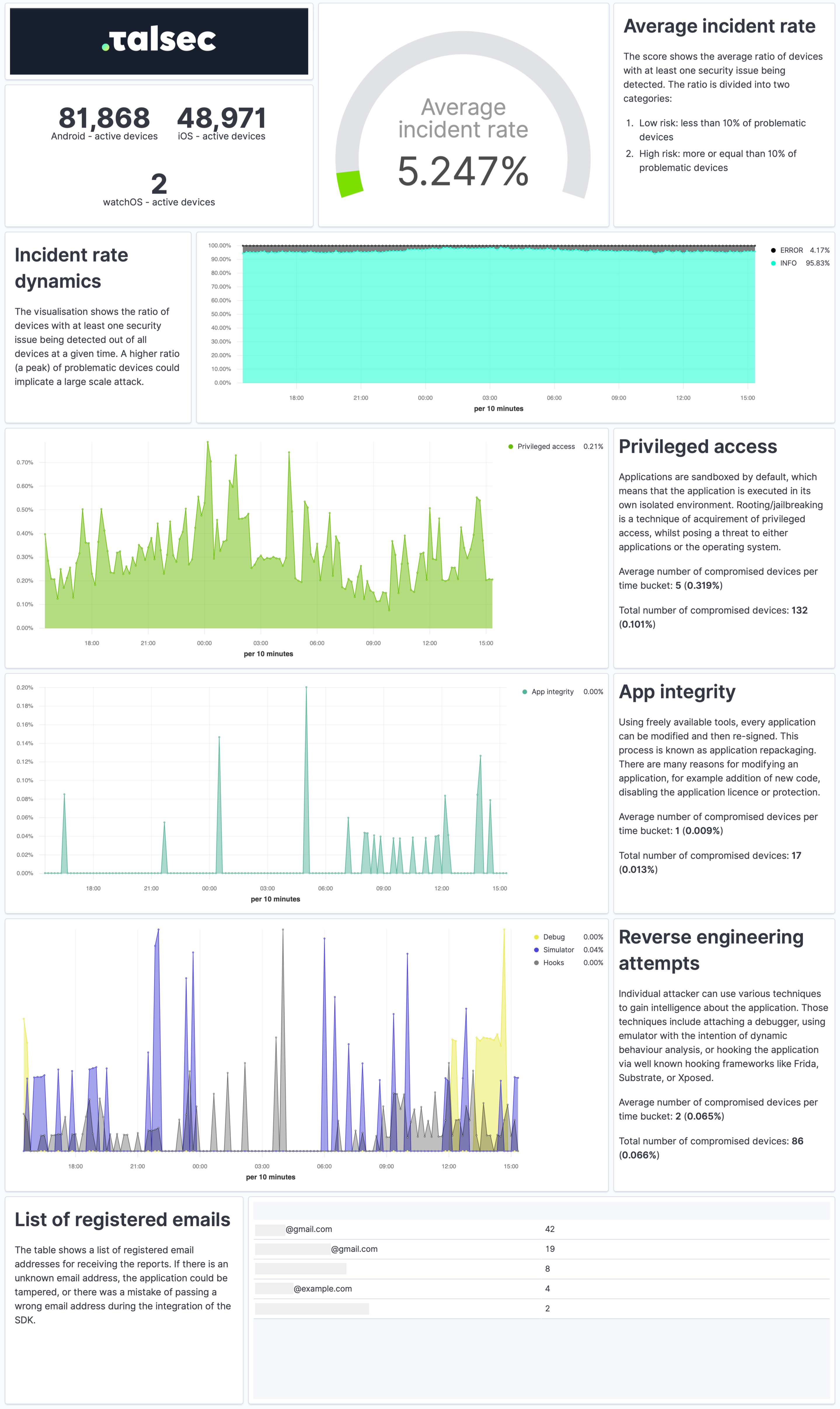
The Security Report is a weekly summary describing the application's security state and characteristics of the devices it runs on in a practical and easy-to-understand way.
The report provides a quick overview of the security incidents, their dynamics, app integrity, and reverse engineering attempts. It contains info about the security of devices, such as OS version or the ratio of devices with screen locks and biometrics. Each visualization also comes with a concise explanation.
To receive Security Reports, fill out the watcherMail field in config.
We provide app security hardening SDK: i.e. AppiCrypt®, Customer Data Encryption (local storage), End-to-end encryption, Strings protection (e.g. API keys) and Dynamic Certificate Pinning to our commercial customers as well. To get the most advanced protection compliant with PSD2 RT and eIDAS and support from our experts, contact us at talsec.app.
The commercial version provides a top-notch protection level, extra features, support, and maintenance. One of the most valued commercial features is AppiCrypt® - App Integrity Cryptogram.
It allows easy to implement API protection and App Integrity verification on the backend to prevent API abuse:
- Bruteforce attacks
- Botnets
- Session-hijacking
- DDoS
It is a unified solution that works across all mobile platforms without dependency on external web services (i.e., without extra latency, an additional point of failure, and maintenance costs).
Learn more about commercial features at https://talsec.app.
TIP: You can try freeRASP and then upgrade easily to an enterprise service.
| freeRASP | Business RASP+ | |||
|---|---|---|---|---|
| Runtime App Self Protection (RASP, app shielding) | ||||
| Advanced root/jailbreak protections | basic | advanced | ||
Runtime reverse engineering controls
|
basic | advanced | ||
Runtime integrity controls
|
basic | advanced | ||
Device OS security status check
|
yes | yes | ||
UI protection
|
no | yes | ||
| Hardening suite | ||||
Security hardening suite
|
no | yes | ||
| AppiCrypt® - App Integrity Cryptogram | ||||
| API protection by mobile client integrity check, online risk scoring, online fraud prevention, client App integrity check. The cryptographic proof of app & device integrity. | no | yes | ||
| Monitoring | ||||
| AppSec regular email reporting | yes (up to 100k devices) | yes | ||
| Data insights and auditing portal | no | yes | ||
| Embed code to integrate with portal | no | yes | ||
| API data access | no | yes | ||
| Fair usage policy | ||||
| Mentioning of the app name in Talsec marketing communication (e.g. "Trusted by Talsec section" on social media) | over 100k downloads | no | ||
| Threat signals data collection to Talsec database for processing and product improvement | yes | no | ||
For further comparison details (and planned features), follow our discussion.