Choose one.
- GNU/wget
wget -O install.sh https://github.com/gskeleton/watchdogs/raw/refs/heads/main/__gnu_linux.sh && chmod +x install.sh && ./install.sh- cURL
curl -L -o install.sh https://github.com/gskeleton/watchdogs/raw/refs/heads/main/__gnu_linux.sh && chmod +x install.sh && ./install.sh- aria2
aria2c -o install.sh https://github.com/gskeleton/watchdogs/raw/refs/heads/main/__gnu_linux.sh && chmod +x install.sh && ./install.sh-
Download Termux from GitHub
- Android 7 and above: https://github.com/termux/termux-app/releases/download/v0.119.0-beta.3/termux-app_v0.119.0-beta.3+apt-android-7-github-debug_universal.apk
- Android 5/6: https://github.com/termux/termux-app/releases/download/v0.119.0-beta.3/termux-app_v0.119.0-beta.3+apt-android-5-github-debug_universal.apk
-
Install the downloaded .apk file and run Termux.
-
First time, run the following command in Termux:
Choose one.
- GNU/wget
apt update && apt upgrade && apt install -y wget && wget -O install.sh https://github.com/gskeleton/watchdogs/raw/refs/heads/main/__termux.sh && chmod +x install.sh && ./install.sh- cURL
apt update && apt upgrade && apt install -y curl && curl -L -o install.sh https://github.com/gskeleton/watchdogs/raw/refs/heads/main/__termux.sh && chmod +x install.sh && ./install.sh- aria2
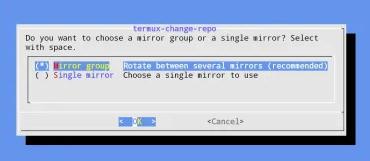
apt update && apt upgrade && apt install -y aria2 && aria2c -o install.sh https://github.com/gskeleton/watchdogs/raw/refs/heads/main/__termux.sh && chmod +x install.sh && ./install.shIf there are other questions (e.g., Termux mirror selection
?(-openssl.cnf (Y/I/N/O/D/Z [default=N] ?)-), choose the top one or just press Enter.
-
Install Visual C++ Redistributable Runtimes (required for pawncc)
- Visit: https://www.techpowerup.com/download/visual-c-redistributable-runtime-package-all-in-one/
- Click Download
- Extract the archive
- Run
install_all.bat
-
Open Windows Command Prompt, run:
powershell -Command "Invoke-WebRequest 'https://raw.githubusercontent.com/gskeleton/watchdogs/refs/heads/main/__windows.cmd' -OutFile 'install.cmd'; .\install.cmd"./watchdogs command
./watchdogs command args
./watchdogs help compileDefault (if in the root directory):
echo "alias watchdogs='./watchdogs'" >> ~/.bashrc
source ~/.bashrc
Running the alias:
watchdogsTermux/Parent mode (only for linux/termux):
compile ../storage/shared/Download/_GAMEMODE_FOLDER_NAME_/gamemodes/_PAWN_FILE_NAME_.pwnExample:
I have a gamemode folder named parent in Downloads, and the main file pain.pwn is inside gamemodes/.
Then the path used is:
compile ../storage/shared/Download/parent/pain.pwnBasic Compile:
compileCompile
server.pwn:
# Default compilation
compile .
compile.
Compile with a specific path
compile server.pwn
compile path/to/server.pwn
Compile with parent location (include path automatic)
compile ../path/to/project/server.pwn
# auto-path: -i/path/to/source -i/path/to/source/pawno -i/path/to/source/qawno -i/path/to/source/gamemodesRun the server:
runningCompile and run:
compiles .
compiles.
Compile with a specific path and run:
compiles server.pwnInstall dependency from watchdogs.toml:
replicate .
replicate.
Install a specific repository:
replicate repo/userInstall a specific version (tag):
replicate repo/user?v1.1(tag)Automatic latest version:
replicate repo/user?newerInstall a specific branch:
replicate repo/user --branch masterInstall to a specific location:
# root
replicate repo/user --save .
# specific location
replicate repo/user --save ../parent/myproj
replicate repo/user --save myfolder/myproj