Mobile Bridge #1746
Mobile Bridge #1746
Conversation


|
tagging @mounirlamouri for visibility |

|
design doc: (go/modelviewer-mobile-bridge) |
…the editor knows when mobile is ready

| import {ConnectedLitElement} from '../../connected_lit_element/connected_lit_element.js'; | ||
|
|
||
| @customElement('mobile-modal') | ||
| export class MobileModal extends ConnectedLitElement { |
There was a problem hiding this comment.
Modal for displaying the QR Code & link
| * The view loaded at /editor/view/?id=xyz | ||
| */ | ||
| @customElement('mobile-view') | ||
| export class MobileView extends ConnectedLitElement { |
There was a problem hiding this comment.
What gets rendered when we are looking at editor/view/id?=1234 on mobile
| async fetchLoop() { | ||
| await fetch(this.updatesPipeUrl) | ||
| .then(response => response.json()) | ||
| .then(json => this.waitForData(json)) |
There was a problem hiding this comment.
json is the initial object sent that has properties that determine what has changed: i.e.:
{gltfChanged: boolean, stateChanged: boolean, envChanged: boolean, envIsHdr: boolean}
and is how we dynamically know what to GET
There was a problem hiding this comment.
Generally you either use .then or await but not both, since they do the same thing. Let's stick with await.
| * Section for displaying QR Code and other info related to mobile | ||
| */ | ||
| @customElement('open-mobile-view') | ||
| export class OpenMobileView extends ConnectedLitElement { |
There was a problem hiding this comment.
New section underneath the file manager for displaying the ar & mobile features
| ` | ||
| } | ||
|
|
||
| render() { |
There was a problem hiding this comment.
after deployed: https://screenshot.googleplex.com/5G9AFik727gbzyS.png
There was a problem hiding this comment.
not refreshed: https://screenshot.googleplex.com/BaUSavVQFqQuEwh.png
There was a problem hiding this comment.
sending data: https://screenshot.googleplex.com/7tSHxWr7FkN6oiD.png
| this.isOpen = false; | ||
| } | ||
|
|
||
| render() { |
There was a problem hiding this comment.
| export const getArConfig = (state: State) => | ||
| state.entities.modelViewerSnippet.arConfig; | ||
|
|
||
| export function arReducer( |
There was a problem hiding this comment.
As more things are added, this reducer may become the "mobileReducer" to house all of the snippet config without a home and relevant to mobile, like iosSrc
| @query('me-import-card') importCard!: ImportCard; | ||
|
|
||
| isTestingMobile(): boolean { | ||
| return window.location.search === '?id=testingMobile'; |
There was a problem hiding this comment.
The mobile view section is only visible at
/editor/?id=testingMobile
|
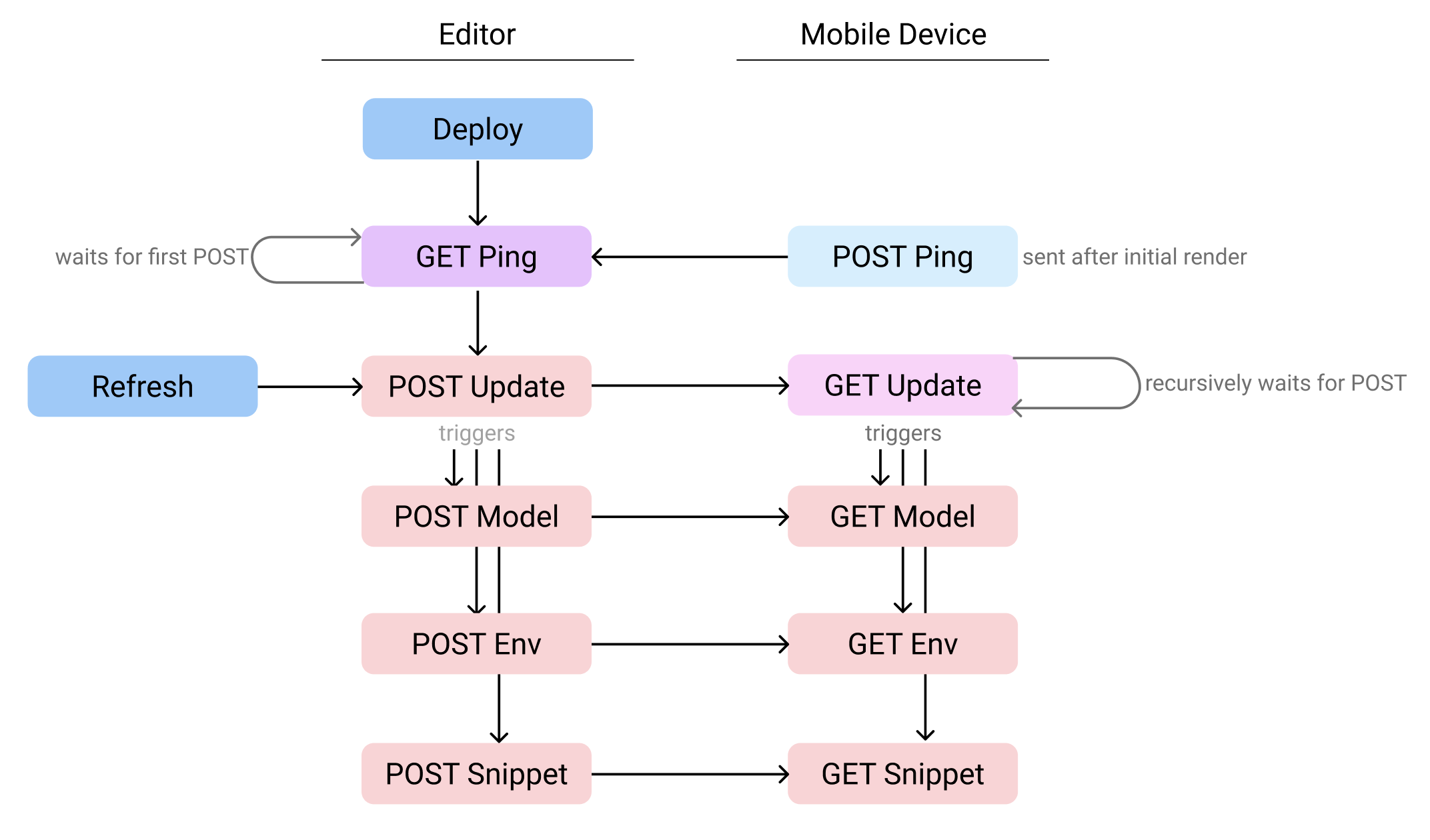
Added a Logical Flow section to the design doc: https://docs.google.com/document/d/1JHWioVxrhfwZyPMccRUyYqP4cl2Z0YggcpXl4UFyTmo/edit#heading=h.uh3hs9gwqhmu Detailing the GET/POSTs that are being sent and listened for. Importantly: |

 elalish
left a comment
elalish
left a comment
elalish
left a comment
There was a problem hiding this comment.
I'd like these comments addressed, but I think it's good enough to merge as-is, especially since it's behind a flag. I'd like to get testing it in it's deployed state sooner than later.
| <!-- Web animations for paper-dropdown --> | ||
| <script src="../../node_modules/web-animations-js/web-animations-next-lite.min.js"></script> | ||
| <script src="../../node_modules/js-beautify/js/lib/beautify-html.js"></script> | ||
| <script src="../../node_modules/js-beautify/js/lib/beautify-css.js"></script> |
There was a problem hiding this comment.
Are these dependencies needed when there's no UI?
| .then(blob => { | ||
| // simulating createBlobUrlFromEnvironmentImage | ||
| const addOn = envIsHdr ? '#.hdr' : ''; | ||
| const envUrl = URL.createObjectURL(blob) + addOn; |
There was a problem hiding this comment.
Looks like you're working around one of model-viewer's hacks here. We should really fix up how we recognize HDRs someday...
| await this.waitForState(json.envChanged); | ||
| } | ||
| if (json.envChanged) { | ||
| await this.waitForEnv(json.envIsHdr); |
There was a problem hiding this comment.
Do these really happen one after the other, or should they be in parallel?
There was a problem hiding this comment.
One after another. The important part is when the state snippet needs to be dispatch its data. It overrides information of the gltf and environment url.
| async fetchLoop() { | ||
| await fetch(this.updatesPipeUrl) | ||
| .then(response => response.json()) | ||
| .then(json => this.waitForData(json)) |
There was a problem hiding this comment.
Generally you either use .then or await but not both, since they do the same thing. Let's stick with await.
| await fetch(this.updatesPipeUrl) | ||
| .then(response => response.json()) | ||
| .then(json => this.waitForData(json)) | ||
| .catch((error) => { |
There was a problem hiding this comment.
Can you use .catch outside of a try block?
| const dropdown = event.target as Dropdown; | ||
| const key = dropdown.selectedItem?.getAttribute('value') || undefined; | ||
| if (key === 'default' || key === 'webxr') { | ||
| reduxStore.dispatch(dispatchArModes('webxr scene-viewer quick-look')); |
There was a problem hiding this comment.
Let's simplify this. Maybe just a checkbox to default to scene-viewer instead of webxr? Quicklook can be always enabled, since it's the only option on iphones, and it's really controlled by the presence of an ios-src.


2 participants


Design doc: (go/modelviewer-mobile-bridge)
Looking for a code review and a feature review. Especially interested in the usability of Scene Viewer.