Pull Request Filtering #732
Conversation


| ObservableCollection<IAccount> Assignees { get; } | ||
| IAccount SelectedAssignee { get; set; } | ||
| string FilterText { get; set; } | ||
| bool IsLoaded { get; } |
There was a problem hiding this comment.
I get the feeling IsLoaded should be here.

|
This is pretty neat! 😄 |
|
It looks good. Just needs some 🏋️ from @donokuda |

|
This looks great! A few things:
|
|
Ah, testing against a repo with a lot of pull requests is something I need to start doing then. |
|
Updated the gif above. Let me know if you find the "#" functionality odd.. |

|
|
||
| <ui:FilterTextBox x:Name="filterText" | ||
| IsEnabled="{Binding IsLoaded}" | ||
| IsEnabled="{Binding IsLoaded, Delay=500}" |

There was a problem hiding this comment.
This delay should be on the Text property, not IsEnabled ;)
|
No, I think the "#" works as you've implemented it. I just wonder whether it should be a full string search on the PR number instead of a substring search. For example in |
|
Fixed up |
|
Yea, I tried it with exact number matching, I can push a branch if you wanna try it out. |
|
Hmm yeah, I see what you're saying. One thing I tried (to see if it'd work) was adding a space after the number to see if that forced exact matching - I'm not sure how many people would think to try that though? |


|
could you not use both searching methods? |
|
That's a really good idea @tocsoft ! |
|
I think that's actually a sort not a filter. We would have to land the sorting pull request to see how to integrate the logic. I'm willing to check it out, but I'm afraid a user wouldn't be able to ascertain what it's doing. |

|
I'm assuming that if someone is searching for a PR by its number, then they would know exactly which number they're looking for. If that's the case, then I'm not convinced of the value spent trying to refine filtering for PR numbers beyond how it currently works. I also can't remember the last time when I went "Oh, I need to search for PR #732." Rather, I'm probably going to be searching for keywords like "pull request filtering" instead. That said, I would love to hear your experiences when searching for a specific pull request number is more useful and quicker (perhaps in tandem with an issue tracker 😄) However, if matching worked on something like branch names (which could be considered out of scope for this pull request), then searching for a number would be more useful when I know a branch is fixing a specific issue ( |
I do this all the time: for example if someone mentions a PR by number in slack. In addition if I'm looking at a PR on github.com and want to find that PR in Visual Studio I'll likely want to search by number, |
|
So I think we are agreeing? |
|
Yeah, I've just tried out the PR with the exact matching, and while I can see your problem with it, I think the behavior is more useful. So personally I think exact number matching is best, though I can't speak for anyone else. |
…ience

# Conflicts:
#	src/GitHub.App/ViewModels/PullRequestListViewModel.cs
…t as a pull request number filter
|
Agreed. Exact matching is best. |
|
Let's go with that and see how it goes 😄 |

|
This seems to work well. 😄 For consistency, it would be good to use the magnifying glass icon:
It looks like standard icons can be accessed via |

 Conflicts:
	src/GitHub.App/SampleData/PullRequestListViewModelDesigner.cs
	src/GitHub.App/ViewModels/PullRequestListViewModel.cs
	src/GitHub.Exports.Reactive/ViewModels/IPullRequestListViewModel.cs
 Conflicts:
	src/GitHub.App/ViewModels/PullRequestListViewModel.cs
|
@jcansdale yes that would be nice, to properly fit in with other VS search boxes I think we need a completely different control (as the one we're using is styled for our dialog which uses a different color scheme etc). This also has the downside that the search box is white on a dark theme. I think that would be another PR tbh... |
Instead of displaying our own search box in the PR list, use the built-in search box provided by `ToolWindowPane`.
|
I've updated the PR to use the built-in VS search functionality, which works around the styling issues. Now looks like this:
|
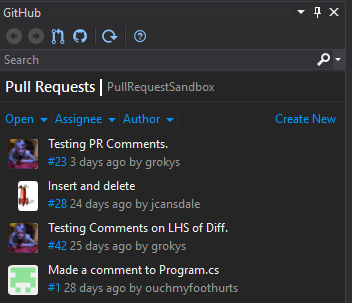
|
Moved to #1312. |
6 participants


As requested in #722, functionality to filter pull requests by title or number.