English | 한국어
Your code has a soundtrack. Show it.
Turn a YouTube link into a music taste badge for your GitHub profile.
[NEW] Receipt Template — A multi-track ticket for your profile!




Your GitHub profile says a lot about you — your languages, your contributions, your streak. But it says nothing about what's playing in your headphones right now.
SoundBadge fixes that. Paste a YouTube link, pick a style, and drop a live music card into your README. It renders on-the-fly as an SVG — no build step, no tokens, no auth.
1. Go to the SoundBadge Builder, paste a YouTube URL, pick a theme, and copy the code.
2. Or just copy this directly:
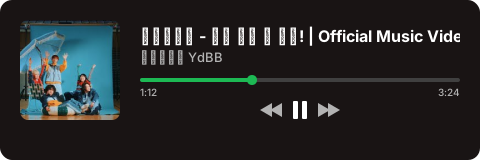3. Paste it into your GitHub README.md.
That's it.
Five purpose-built templates — from minimal badges to full player UIs.
One-line inline badge. Fits anywhere.

Color variants
| Variant | Preview |
|---|---|
blue |
 |
green |
 |
red |
 |
purple |
 |
orange |
 |
A clean, minimal card. Supports all layouts and multi-track.

Streaming player UI with animated equalizer and progress bar.

Color variants
| Variant | Preview |
|---|---|
green |
 |
purple |
 |
blue |
 |
pink |
 |
red |
 |
For the devs. Monospace font, terminal chrome, cursor blink.

Glowing neon with glassmorphism grid and pulsing border.

Color variants
| Variant | Preview |
|---|---|
green |
 |
pink |
 |
cyan |
 |
Vertical multi-track layout mimicking a store receipt or concert ticket.
Color variants
| Variant | Preview |
|---|---|
receipt |
 |
dark_ticket |
 |
Eight classic card themes with thumbnail, title, and channel info.
| Minimal | Mono | Pastel |
 |
 |
 |
| Sunset | Midnight | Glass |
 |
 |
 |
| Retro | Neon (Legacy) | |
 |
 |
Note: The classic neon theme is now
neon-legacysinceneonrefers to the new Neon template.
Classic themes and the Clean template support three layout sizes:
| Compact (320×80) | Regular (420×120) | Wide (600×160) |
|---|---|---|
 |
 |
 |
Add context with tags and a custom label:

?tags=kpop,chill,vibe&label=Now Playing
- Tags: Up to 3 comma-separated tags
- Label: Up to 40 characters
The stream, terminal, neon, clean, and receipt templates support multiple YouTube URLs — pass multiple url parameters:

?url=https://www.youtube.com/watch?v=VIDEO_1&url=https://www.youtube.com/watch?v=VIDEO_2&theme=stream
Up to 5 tracks per card.
Dynamically generates an SVG card image.
| Parameter | Required | Default | Description |
|---|---|---|---|
url |
Yes | — | YouTube URL (video or playlist). Repeat for multi-track (&url=...&url=...). |
theme |
No | minimal |
Theme or template name (see Examples) |
layout |
No | regular |
Card size: compact, regular, or wide |
tags |
No | — | Comma-separated tags (max 3) |
label |
No | — | Card label text (max 40 chars) |
variant |
No | — | Color variant for templates that support it |
Base URL:
https://sound-badge.vercel.app/api/card.svg
Theme values:
| Type | Values |
|---|---|
| Classic | minimal, mono, neon-legacy, pastel, sunset, midnight, glass, retro |
| Templates | badge, clean, stream, terminal, neon, receipt |
Variant values:
| Template | Variants |
|---|---|
badge |
blue, green, red, purple, orange |
stream |
green, purple, blue, pink, red |
neon |
green, pink, cyan |
receipt |
receipt, dark_ticket |
<a href="https://www.youtube.com/watch?v=27KI1NUxpFA">
<img src="https://sound-badge.vercel.app/api/card.svg?url=https://www.youtube.com/watch?v=27KI1NUxpFA&theme=stream" alt="Now Playing" />
</a>Wrapping with
<a>makes the card clickable — it opens the YouTube video.
GitHub supports theme-specific images. Show different cards for dark and light mode:
<a href="https://www.youtube.com/watch?v=27KI1NUxpFA">
<picture>
<source media="(prefers-color-scheme: dark)" srcset="https://sound-badge.vercel.app/api/card.svg?url=https://www.youtube.com/watch?v=27KI1NUxpFA&theme=mono" />
<source media="(prefers-color-scheme: light)" srcset="https://sound-badge.vercel.app/api/card.svg?url=https://www.youtube.com/watch?v=27KI1NUxpFA&theme=minimal" />
<img src="https://sound-badge.vercel.app/api/card.svg?url=https://www.youtube.com/watch?v=27KI1NUxpFA&theme=minimal" alt="Now Playing" />
</picture>
</a>Don't want to write URLs by hand? Use the SoundBadge Builder.
Paste a YouTube link, pick a theme, tweak the options, and copy the ready-to-use code for your README.
- Node.js 18+
- bun
- YouTube Data API v3 key
# 1. Clone the repo
git clone https://github.com/gguip1/SoundBadge.git
cd SoundBadge

# 2. Install dependencies
bun install

# 3. Set up environment variables
cp .env.example .env.local
# Edit .env.local and add your YouTube API key

# 4. Start development server
bun dev| Variable | Required | Description |
|---|---|---|
YOUTUBE_API_KEY |
Yes | YouTube Data API v3 key |
- Next.js 16 — App Router + Edge Runtime
- TypeScript — Strict mode
- Tailwind CSS 4 — Builder UI styling
- Vercel Edge Functions — Low-latency SVG generation
- YouTube Data API v3 — Video metadata
Contributions welcome — new themes, templates, bug fixes, anything goes.
See CONTRIBUTING.md for details.
Stop hiding your music taste behind your commit history.