Signals and Callbacks
The callback mechanism is essential for developing applications with
FINAL CUT. Callback routines allow the programmer to connect different
objects without them needing to know each other. Connected objects
inform each other when an action occurs on a widget. The framework uses
signal strings to uniquely identify widget actions. For example, when
an FButton is clicked using a mouse or a keyboard, it emits the string
"clicked". A dedicated callback function or method processes this signal.
A callback function does not return a value and can have various arguments:
void cb_function (FWidget* w, int* i, double* d, ...)
{...}
A callback method has the same signature:
void ClassName::cb_method (FWidget* w, int* i, double* d, ...)
{...}
We use the addCallback() method of the FWidget class to bind widgets
together.
- To call functions or static methods using a pointer:
template< typename Function
        , typename FunctionPointer<Function>::type = nullptr
        , typename... Args >
void FWidget::addCallback ( const FString& cb_signal
                          , Function&&     cb_function
                          , Args&&...      args)
{...}- To call functions or static methods via a reference:
template< typename Function
        , typename FunctionReference<Function>::type = nullptr
        , typename... Args >
void FWidget::addCallback ( const FString& cb_signal
                          , Function&      cb_function
                          , Args&&...      args)
{...}- To call a member method of a specific instance:
template< typename Object
        , typename Function
        , typename ObjectPointer<Object>::type = nullptr
        , typename MemberFunctionPointer<Function>::type = nullptr
        , typename... Args >
void FWidget::addCallback ( const FString& cb_signal
                          , Object&&       cb_instance
                          , Function&&     cb_member
                          , Args&&...      args)
{...}- To call a std::bind wrapper or a lambda expression:
template< typename Function
        , typename ClassObject<Function>::type = nullptr
        , typename... Args >
void FWidget::addCallback ( const FString& cb_signal
                          , Function&&     cb_function
                          , Args&&...      args)
{...}- To call a std::bind wrapper on a specific instance:
template< typename Object
        , typename Function
        , typename ObjectPointer<Object>::type = nullptr
        , typename ClassObject<Function>::type = nullptr
        , typename... Args >
void FWidget::addCallback ( const FString& cb_signal
                          , Object&&       cb_instance
                          , Function&&     cb_function
                          , Args&&...      args)
{...}- To call a lambda expression assigned to a variable:
template< typename Function
        , typename ClassObject<Function>::type = nullptr
        , typename... Args >
void FWidget::addCallback ( const FString& cb_signal
                          , Function&      cb_function
                          , Args&&...      args)
{...}
You can remove a connection to a signal handler or a widget instance
with delCallback(...). Alternatively, you can use delCallbacks()
to remove all existing callbacks from an object.
- To delete callbacks of functions or static methods via a pointer:
template< typename FunctionPtr
        , typename FunctionPointer<FunctionPtr>::type = nullptr >
void FWidget::delCallback (FunctionPtr&& cb_func_ptr)
{...}- To delete callbacks of functions or static methods via a reference:
template< typename Function
        , typename FunctionReference<Function>::type = nullptr >
void FWidget::delCallback (Function& cb_function)
{...}- To delete all callbacks from a specific instance:
template< typename Object
        , typename ObjectPointer<Object>::type = nullptr >
void FWidget::delCallback (Object&& cb_instance)
{...}- To delete all callbacks of a signal:
void delCallback (const FString& cb_signal)
{...}- To delete all callbacks of a signal and specific instance:
template< typename Object
        , typename ObjectPointer<Object>::type = nullptr >
void delCallback (const FString& cb_signal, Object&& cb_instance)
{...}- To delete all callbacks from a widget:
void delCallback()
{...}- FApplication
- "first-dialog-opened"
"last-dialog-closed" - FButton
- "clicked"
- FCheckMenuItem
- "clicked"
"toggled" - FLineEdit
- "activate"
"changed" - FListBox
- "changed"
"clicked"
"row-changed"
"row-selected" - FListView
- "changed"
"clicked"
"row-changed" - FMenu
- "activate"
- FMenuItem
- "activate"
"clicked"
"deactivate" - FRadioMenuItem
- "clicked"
"toggled" - FScrollBar
- "change-value"
- FSpinBox
- "changed"
- FStatusBar
- "activate"
- FTextView
- "changed"
- FToggleButton
- "clicked"
"toggled" - FWidget
- "destroy"
"enable"
"disable"
"focus-in"
"focus-out"
"mouse-press"
"mouse-release"
"mouse-move"
"mouse-wheel-down"
"mouse-wheel-up"
File: callback-function.cpp
#include <final/final.h>

using namespace finalcut;

void cb_changeText (const FButton& button, FLabel& label)
{
  label.clear();
  label << "The " << button.getClassName() << " was pressed";
  label.redraw();
}

auto main (int argc, char* argv[]) -> int
{
  FApplication app(argc, argv);
  FDialog dialog(&app);
  dialog.setText ("A dialog with callback function");
  dialog.setGeometry (FRect{25, 5, 45, 9});
  FLabel label (&dialog);
  label = "The button has never been pressed before";
  label.setGeometry (FPoint{2, 2}, FSize{41, 1});
  FButton button (&dialog);
  // The '&' prefix defines the accelerator key
  // (here the shortcut is Meta-C)
  button = "&Click me";
  button.setGeometry (FPoint{15, 5}, FSize{14, 1});

  // Connect the button signal "clicked" to the callback function
  button.addCallback
  (
    "clicked",          // Callback signal
    &cb_changeText,     // Function pointer
    std::cref(button),  // First function argument
    std::ref(label)     // Second function argument
  );

  FWidget::setMainWidget(&dialog);
  dialog.show();
  return app.exec();
}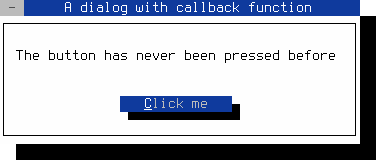
Figure 1: Button with a callback function
Note
To close the dialog, use the mouse or press Shift+F10 or Ctrl+^
Save the code as callback-function.cpp and compile it using the following GCC command:
g++ callback-function.cpp -o callback-function -O2 -lfinal
File: callback-lambda.cpp
#include <final/final.h>

using namespace finalcut;

auto main (int argc, char* argv[]) -> int
{
  FApplication app(argc, argv);
  FDialog dialog(&app);
  dialog.setText ("Lambda expression as callback");
  dialog.setGeometry (FRect{25, 5, 45, 9});
  FButton button ("&bottom", &dialog);
  button.setGeometry (FPoint{15, 5}, FSize{14, 1});

  // Connect the button signal "clicked" to the lambda expression
  button.addCallback
  (
    "clicked",                          // Callback signal
    [] (FButton& button, FDialog& dgl)  // Lambda function
    {
      if ( button.getY() != 2 )
      {
        button.setPos (FPoint{15, 2});
        button.setText("&top");
      }
      else
      {
        button.setPos (FPoint{15, 5});
        button.setText("&bottom");
      }

      dgl.redraw();
    },
    std::ref(button),                   // First function argument
    std::ref(dialog)                    // Second function argument
  );

  FWidget::setMainWidget(&dialog);
  dialog.show();
  return app.exec();
}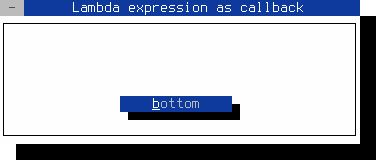
Figure 2: Button with lambda expression callback.
Note
To close the dialog, use the mouse or press Shift+F10 or Ctrl+^
Save the code as callback-lambda.cpp and compile it using the following GCC command:
g++ callback-lambda.cpp -o callback-lambda -O2 -lfinal -std=c++14
File: callback-method.cpp
#include <final/final.h>

using namespace finalcut;

class DialogWidget : public FDialog
{
  public:
    explicit DialogWidget (FWidget* parent = nullptr)
      : FDialog{parent}
    {
      // Connect the button signal "clicked" to the callback method
      button.addCallback
      (
        "clicked",                            // Callback signal
        finalcut::getFApplication(),          // Class instance
        &finalcut::FApplication::cb_exitApp,  // Method pointer
        this                                  // Function argument
      );
    }

  private:
    void initLayout()
    {
      setText ("Callback method");
      setGeometry (FPoint{25, 5}, FSize{25, 7});
      button.setGeometry (FPoint{7, 3}, FSize{10, 1});
      FDialog::initLayout();
    }

    FButton button{"&Quit", this};
};

auto main (int argc, char* argv[]) -> int
{
  FApplication app(argc, argv);
  DialogWidget dialog(&app);
  FWidget::setMainWidget(&dialog);
  dialog.show();
  return app.exec();
}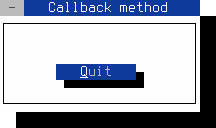
Figure 3: Button with a callback method
Note
To close the dialog, use the mouse or press Shift+F10 or Ctrl+^
Save the code as callback-method.cpp and compile it using the following GCC command:
g++ callback-method.cpp -o callback-method -O2 -lfinal -std=c++14
You can use the emitCallback() method to generate a user-defined
signal. You can later connect this signal to a user-defined handler
with the addCallback() method.
File: emit-signal.cpp
#include <final/final.h>

using namespace finalcut;

class DialogWidget : public FDialog
{
  public:
    explicit DialogWidget (FWidget* parent = nullptr)
      : FDialog{parent}
    {
      label.setAlignment (Align::Right);
      label.setForegroundColor (FColor::Black);
      plus.setNoUnderline();
      minus.setNoUnderline();

      // Connect the button signal "clicked" to the callback method
      plus.addCallback ("clicked", this, &DialogWidget::cb_plus);
      minus.addCallback ("clicked", this, &DialogWidget::cb_minus);

      // Connect our own signals
      addCallback ("hot", this, &DialogWidget::cb_set_red);
      addCallback ("normal", this, &DialogWidget::cb_set_black);
      addCallback ("cold", this, &DialogWidget::cb_set_blue);
    }

  private:
    void initLayout()
    {
      setGeometry (FPoint{25, 5}, FSize{22, 7});
      setText ("Emit signal");
      const FSize size{5, 1};
      label.setGeometry (FPoint{8, 1}, size);
      plus.setGeometry (FPoint{3, 3}, size);
      minus.setGeometry (FPoint{3, 3} + FPoint{10, 0}, size);
      FDialog::initLayout();
    }

    void cb_plus()
    {
      if ( t < 100 )
        t++;

      if ( t == 30 )
        emitCallback("hot");
      else if ( t == 1 )
        emitCallback("normal");

      setTemperature();
    }

    void cb_minus()
    {
      if ( t > -99 )
        t--;

      if ( t == 0 )
        emitCallback("cold");
      else if ( t == 29 )
        emitCallback("normal");

      setTemperature();
    }

    void cb_set_blue()
    {
      label.setForegroundColor (FColor::Blue);
    }

    void cb_set_black()
    {
      label.setForegroundColor (FColor::Black);
    }

    void cb_set_red()
    {
      label.setForegroundColor (FColor::Red);
    }

    void setTemperature()
    {
      label.clear();
      label << t << "°C";
      label.redraw();
    }

    int t = 20;
    FLabel label{std::move(FString() << t << "°C"), this};
    FButton plus {"&+", this};
    FButton minus {"&-", this};
};

auto main (int argc, char* argv[]) -> int
{
  FApplication app(argc, argv);
  DialogWidget dialog(&app);
  FWidget::setMainWidget(&dialog);
  dialog.show();
  return app.exec();
}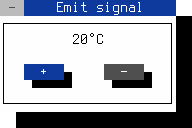
Figure 4: Callbacks with custom signals
Note
To close the dialog, use the mouse or press Shift+F10 or Ctrl+^
Save the code as emit-signal.cpp and compile it using the following GCC command:
g++ emit-signal.cpp -o emit-signal -O2 -lfinal -std=c++14