Colorir438 is a tiny editor for its own simple image format made to draw and visualize small images/pixel arts on the Command Prompt by mimicking pixels using two ASCII 219 characters together (██).
- Editor
- The Colorir438 (
.c438) file format - Additional features
- Opening and running the project
- Download
- Built with
- Acknoledgements
You can edit images by using the editor commands. Use a command by pressing its case insensitive key shortcuts:
- A (Help): Show a list of commands and its shortcuts.
- 1 or P (Point): Paints one pixel.
- 2 or L (Line): Draws an one pixel wide line from a pixel to another.
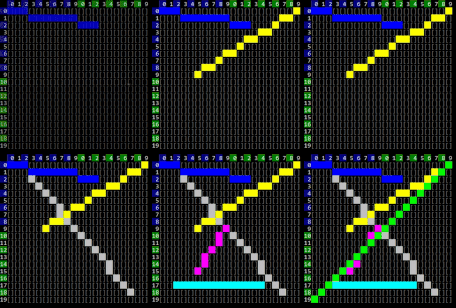
- 4 or B (Background): Changes the background color.
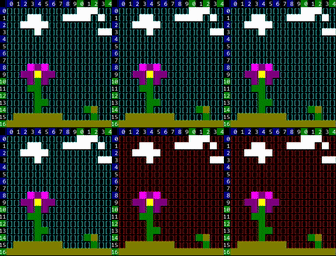
- Arrow keys (Change size): Resizes the image from the right or bottom corner.
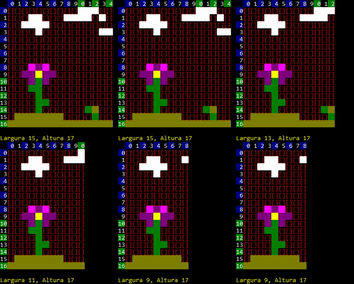
- 5 or M (Move): Move the entire image to one direction.
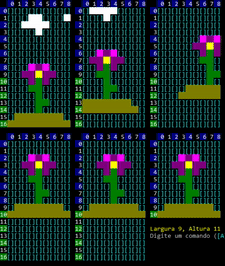
- 8 or V (Visualize): Displays the image with its color background and without the editor's rulers.

- Esc or S (Exit): Exits the editor and returns to the main menu.
Sometimes editing with the editor can be slow, but with the Colorir438 format it's easy to edit the images manually with any text editor.
When you open a .c438 file with a text editor, you will find something within this format:
Colorir438 <Image height> <Image width> <Background color>
<Matrix of pixels (characters)>
-
Colorir438: Case sensitive characters sequence thatColorir438.exeuses to identify the file and start reading it with the Colorir438 format. -
Image height: A positive integer which tells the height in "pixels" of the image. Recommended to be <= 300.
-
Image width: A positive integer which tells the width in "pixels" of the image. Recommended to be <= 100.
-
Background color: The character that represents a color that the Command Prompt will change its background to while visualizing the image. The available characters are:
[0-9]|[A-F]: An hexadecimal digit. Available colors:0
1
2
3
4
5
6
7
8
A
B
C
D
E
F.
-(dash): You can disable the change in the background color by using a dash instead of one of the above. The background then will not change and it will be the normal current color of the cmd's background.
-
Matrix of pixels: A sequence of characters where each character represents a pixel. Line breaks are ignored. The available characters are:
[0-9]|[A-F]: An hexadecimal digit. Available colors:- (space): You can mark a pixel as transparent with an space, it will then be covered by the background color.
Using the definitions above, a .c438 file containing the below will result on the image:
Colorir438 16 16 F
     000000
   00CCCCFF00
  0FFCCCCFFFF0
 0FFCCCCCCFFFF0
 0FCCFFFFCCFFF0
0CCCFFFFFFCCCCC0
0CCCFFFFFFCCFFC0
0FCCFFFFFFCFFFF0
0FFCCFFFFCCFFFF0
0FFCCCCCCCCCFFC0
0FCC00000000CCC0
 000FF0FF0FF000
  0FFF0FF0FFF0
  0FFFFFFFFFF0
   0FFFFFFFF0
    00000000
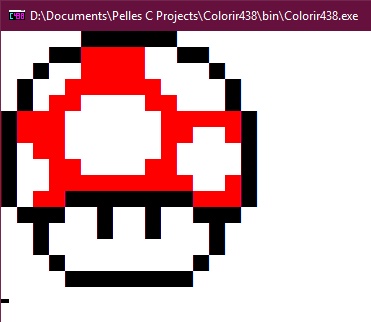
You can find more examples in the samples/ project folder.
Colorir438 supports most bitmap files (.bmp) through wernsey/bitmap, see specific compatibility.
You can quickly open a pop-up console to visualize a image file:
- Right click on the file, click on "Open With" and select
Colorir438.exe - Drag the file on the executable

Colorir438.exe will try to open the image located in the path given by the first argument,
so running in the cmd the command Colorir438 path/to/image will launch a pop-up console showing the image. Example:

- Install Pelles C (compatible with 9.0.0).
- Open
Colorir438.ppj. - Click on Execute (Ctrl+F5).
Direct Download v0.4.1 | Releases
_textcolorand_textbackgroundfunctions from the Pelles Cconio.h.- wernsey/bitmap
This project was inspired by the Coloring (IED-001) slideshow by Prof. Dr. Silvio do Lago Pereira of FATEC-SP's TI dept.