A lightweight web app that rates how well a portrait meets the shoulder‑presentation requirement of ISO/IEC 39794‑5. The scoring happens entirely in‑browser using only the left & right shoulder landmarks produced by MediaPipe Pose ‑ so it still works if the face is blurred or partially outside the crop.
| Capability | Notes | |
|---|---|---|
| 🎥 | Live Camera | Real‑time overlay + scores while you adjust posture |
| 🖼️ | Image Upload | Drag‑n‑drop a batch of photos and get per‑image metrics |
| 📤 | CSV Export | One click → ready for DET / EDC curve plotting |
| 🔬 | Debug Panel | Shows raw landmark values, angles, visibility, etc. |
| 🧾 | Manual Label OCR (opt‑in) | Uses GPT‑Vision to read your ground‑truth label if present |
The app works without an OpenAI key. The key is only needed if you enable the optional OCR‐label helper.
For the full methodology, data set description, and evaluation results, see the companion
paper:
“A Quantitative Method for Shoulder Presentation Evaluation” (PDF)
(Accepts the upcoming ISO/IEC 29794-5 definition of shoulder presentation and shows
≈ 0.80 Pearson correlation with human labels)
Two independent scalar quality metrics are computed from the shoulder pair (landmark 11 = L, 12 = R).
Algorithm 1 – horizontalScore   // "Shoulders square to camera" (yaw)
Input : L(x,y,z,v), R(x,y,z,v)
Output: score ∈ [0,1]
———————————————————————————————————————
  dx ← L.x − R.x        // horizontal gap
  dz ← L.z − R.z        // depth gap
  if √(dx²+dz²) < ε:    return 0

  geom ← |dx| / √(dx²+dz²)         // cos(θ_yaw)
  vis  ← 1 − |v_L − v_R|           // symmetry penalty 0…1
  return geom * vis

Algorithm 2 – shoulderTiltScore   // "Shoulders level in image" (roll)
Input : L(x,y,z,v), R(x,y,z,v)
Output: score ∈ [0,1]
———————————————————————————————————————
  dx ← L.x − R.x
  dy ← L.y − R.y
  if max(|dx|,|dy|) < ε:  return 0

  angle ← atan(|dy| / |dx|)     // 0 (rad) when perfectly level
  return 1 − angle / (π/2)      // normalise to 1 (level) … 0 (vertical)
Both functions are pure, numerically robust (ε safeguards), and execute in <<1 ms on a laptop. A convenience wrapper returns both scores at once.
The SPE algorithm is effective across a diverse range of subjects and poses. The following figure shows seven examples from a test set, comparing the algorithm's horizontalScore to the manually assigned ground-truth label.
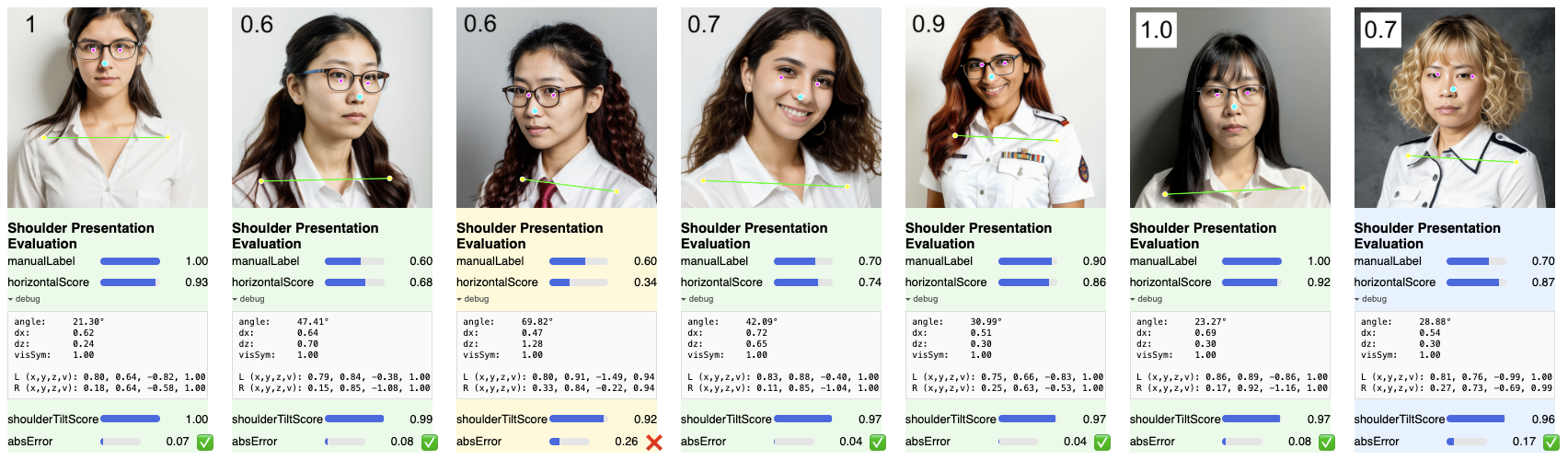
Figure 1: Example results of the Shoulder-Presentation Evaluation (SPE) algorithm. Each panel displays a test image with MediaPipe Pose landmarks, the human-annotated manualLabel (top number and slider), the computed horizontalScore and shoulderTiltScore, and the absolute error (absError). The examples range from fully compliant (left, score ≈ 1.0) to significantly rotated torsos, demonstrating a strong correlation between the algorithm's scores and perceptual judgments.
# 1 – Clone & install deps
$ git clone https://github.com/fonCki/shoulder-presentation‑eval.git
$ cd shoulder‑presentation‑eval
$ npm install

# 2 – Run dev server (Vite)
$ npm run dev # ➜ open the printed URL# .env
VITE_OPENAI_KEY=sk‑...The key is only used for reading the white number you might overlay on sample images (manual label). Scoring works fine without it.
src/
  components/
    CameraInput.tsx       ← live webcam pipeline
    ImageUpload.tsx       ← batch image pipeline
    ScoreDisplay.tsx      ← per‑frame card UI
    ExportButton.tsx      ← CSV generator
  hooks/
    usePoseLandmarker.ts  ← loads & caches MediaPipe wasm
    useOcrLabel.ts        ← GPT‑Vision wrapper (optional)
  lib/
    postureMetrics.ts     ← ★ the algorithm above ★
    exportData.ts         ← CSV serializer
    labelParser.ts        ← tiny helper for OCR’d labels
index.html                ← single‑page entry
vite.config.ts, tsconfig.* ← build config
- Alfonso Ridao
For support, email alfonso@ridao.ar
I’m a time traveler.
© 2025 — Technical University of Denmark — Course 02238 Biometric Systems