Problems with CJK noto fonts #1106

Description

Bug Report
I have problems rendering chinese/japanese/korean characters with this library.
Description of the problem
I'm trying to create a pdf with chinese characters and some do not display.
I managed to reproduce the issue with a very minimal setup:
Using this font NotoSansCJKsc-Regular.otf.zip
(remember to unzip it) (it comes from google noto fonts https://www.google.com/get/noto/help/cjk/)
And this script:
const fs = require('fs');
const PDFDocument = require('pdfkit');
const doc = new PDFDocument();
doc.pipe(fs.createWriteStream('output.pdf'));
doc.font('NotoSansCJKsc-Regular.otf').fontSize(25);
doc.text('间。楼', 100, 100);
doc.end();
I get this in the output.pdf

Note the missing last character
========================================================
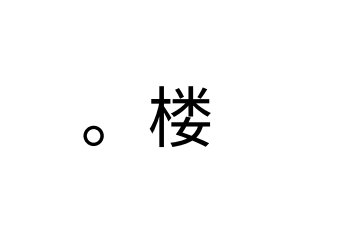
If I remove the first character, the last character displays 🤔
doc.text('。楼', 100, 100);
========================================================
If I render both texts, the last character doesn't display in any of them 🤷
doc.text('间。楼', 100, 100);
doc.text('。楼', 100, 200);

========================================================
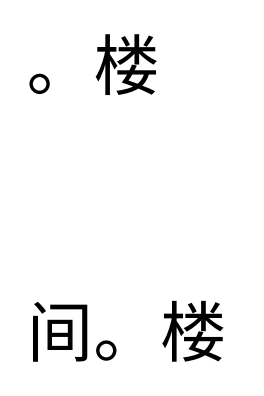
If I just change the order in the last 2 texts, it displays correctly 🥴
doc.text('。楼', 100, 100);
doc.text('间。楼', 100, 200);
Your environment
- pdfkit version: 0.11.0
- fontkit version: 1.8.0
- Node version: 10.16.0
- Operating System: MacOS 10.14.6