Proposal for a specific CASE element editor #915


Description

For the creation of (and even more for the manipulation of existing) CASE elements, a dedicated editor layout might be more self-explaining and helpful:
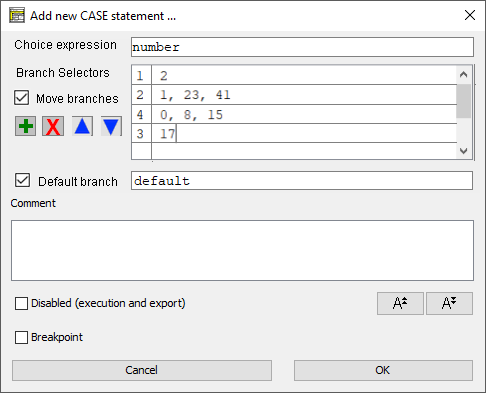
The multi-line text is not unintelligible and has worked for the entire Structorizer history, of course, but it had a specific weakness: What happens with existing branches if we insert / delete / reorder lines?
The new editor could address this via a controlled line manipulation in the branch selector table (via the coloured-icon buttons). The first column would keep track of the original line numbers and if the check box "Move branches" is selected (should be disabled for a new CASE element, of course) on committing then the existing branches would be rearranged according to the new line number permutation. Inserted new lines would not get such line numbers - the respective field remains empty. The first column wouldn't be editable therefore, just the second table column.
Via the checkbox "Default branch" it would be more obvious what is to happen. The label field would be disabled in case the checkbox is not selected (internally, the "%" line will be appended then).
On the Element level, nothing would change: It would still be the same text content, it would just be converted to and fro on editing.