Chat Rabbit with file transfer. The Chat Client reads (allocates in memory) a file from the local disk and sends it to the server. The server, in turn, receives the file, and writes it to the local disk. To receive messages, clients must consult the server from time to time (polling).
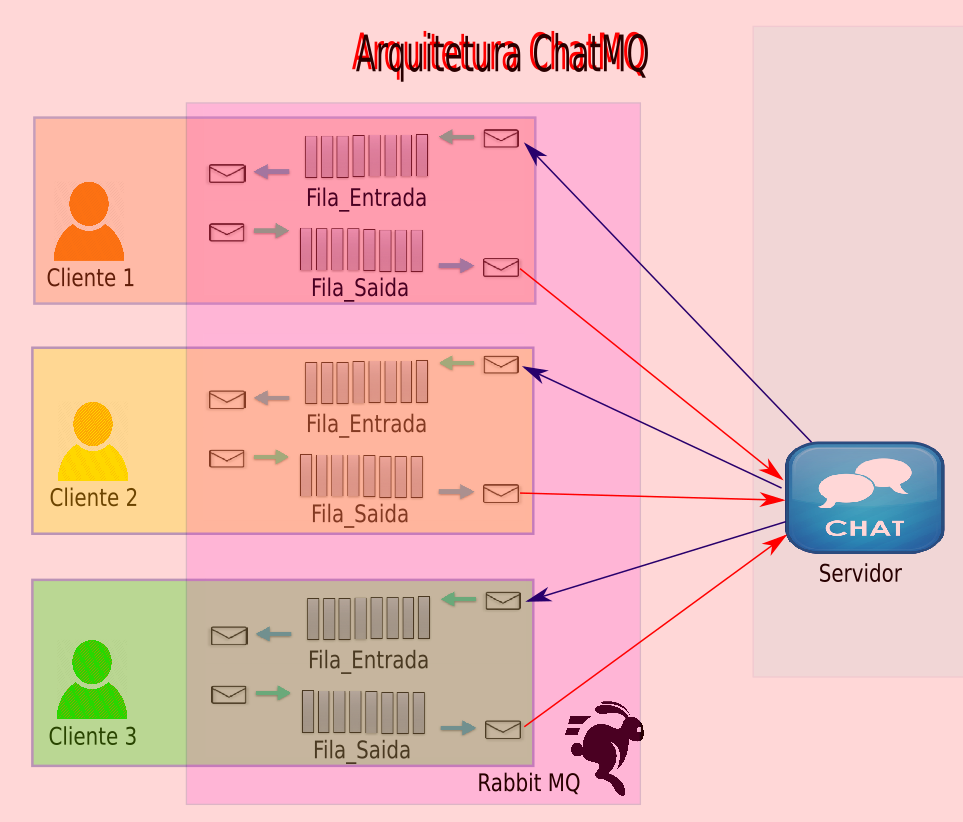
- Linguagem usada: Python 2.7.18
- Versão Pika: 0.10.0 (or later)
Instalação Pika:
pip install pika==0.10.0
1. Extract all files
2. Start the server - python Server.py
3. Start clients - python Client.py
4. For the client to send a message, he must inform his name (login), and then inform the name of the file to be transferred. This message is passed on to all logged in users.
File format:
Server -> username-numberFiles.serv Client -> usernameReceiver-usernameDispatcher-idUserDispatcher
Test case instructions:
1. A localhost/server
    1.1 python Server.py
2. Three localhost/server clients logged in (paul, john and mary)
    2.1 python Client.py
        2.1.2 paul
    2.2 python Client.py
        2.2.2 john
    2.3 python Client.py
        2.3.2 mary
3. Sending the message by paul, with the file file1M.txt / file1K.txt / file created.
4. The end.
- Paul forwards the message to his outgoing queue, and the server forwards to the incoming queue of logged in users.
- Automatic receipt of the message sent by paul by the other logged-in users.