⚠️ In the past this functionality has been provided out-of-the-box for all EWC tenancies running on the EUMETSAT site. However, this is no longer the case; after October 2025, EWC tenant admins wishing to integrate IPA enrollment with Morpheus VM provisioning can use this template to enable said functionality for newly onboarded tenancies, on both EUMETSAT or ECMWF sites.
IPA (identity, policy and audit) is a software stack that serves both as an LDAP user management system and as your internal DNS nameserver.
Morpheus UI, on the other hand, is a web-based cloud orchestration tool that lets you manage your EWC resources via a graphical interface. It has built-in Automation features you may use for arranging sets of individual Tasks and accomplishing some useful behavior, when managing with cloud resources via Morpheus.
This configuration template (i.e. an Ansible Playbook) customizes your environment in the European Weather Cloud (EWC), such that it crates a Morpheus Automation to simplify the administration of a fleet of IPA-aware EWC compute instances.
💡 To provision and configure a VM as an IPA server from scratch and with fully-managed state (i.e. safe for resizing or upgrading), you may deploy the IPA Server Provisioning Community Hub Item.
💡 To configure an existing VM as an IPA server, you can deploy the IPA Server Flavour Community Hub Item.
Once an IPA server is successfully provisioned and configured within your EWC environment, this template reduces the Morpheus configuration required to achieve the following behavior:
- New VMs created via the Morpheus UI, within a user-defined Morpheus Network Domain, will enroll onto an IPA server's provided DNS and LDAP services, enabling users to log into any VM with the same username and password.

- Users may access any newly enrolled VMs with their existing LDAP credentials.

- Enrolled VMs will disenroll from the IPA server upon their deletion via Morpheus UI, to ensure a clean and healthy internal DNS table.
- Install git (version 2.0 or higher )
- Install python (version 3.9 or higher)
- Install ansible (version 2.15 or higher)
- Install jmespath (version 1.0 or higher)
- Get an Morpheus API credentials (see API access section in the official Morpheus documentation)
git clone https://github.com/ewcloud/ewc-ansible-playbook-ipa-enroll-automation-via-morpheus.gitcd ewc-ansible-playbook-ipa-enroll-automation-via-morpheus
⚠️ Make sure to replacex.y.zin the command below, with your version of preference.
git checkout x.y.z
By running the following command, you can trigger an interactive session that prompts you for the necessary user inputs, and then applies changes to your target EWC environment:
ansible-playbook ipa-enroll-automation.yml💡 To learn more about defining variables at runtime, checkout the official Ansible documentation.
You can also run in non-interactive mode by passing the --extra-vars or -e flag, followed by a map of key-value pairs; one for each and every available input (see inputs section below). For example:
ansible-playbook \
  -e '{ "morpheus_api_token":"<api-token>",
        "morpheus_api_url":"https://morpheus.ecmwf.int",
        "morpheus_tenant_name":"eumetsat-sandbox-ewc",
        "update_morpheus_cypher":"yes",
        "morpheus_cypher_ipa_domain":"eumetsat.sandbox.ewc",
        "morpheus_cypher_ipa_server_hostname":"ipa-server-1",
        "morpheus_cypher_ipa_admin_username":"ipaadmin",
        "morpheus_cypher_ipa_admin_password":"my-secret-password"
  }' \
  ipa-enroll-automation.yml
⚠️ As of 17.07.2025, technical limitations on the side of the Morpheus API lead to unreliable configuration of links between workflows and domains. As a workaround, manual action over the Morpheus UI is required.
⛔ This step must be performed every time you update the template input values and apply them.

Finalize the configuration over the Morpheus UI:
- Login to the Morpheus UI of your EWC environment
- From the top navigation bar, go to
Infrastructure > Network. - Select
Domainsfrom the sub navigation bar. - A table will be displayed in the lower portion of the view port, and
containing details of available domains in your EWC environment. Click on the
edit icon (
🖉) on the same row where your defined domain is listed. - Within the pop-up edit form, click on the
Select Workflowdrop-down menu and selectIPA Client Enroll Automation Via Morpheus. - Click on
SAVE CHANGESat the bottom of the form to finalize the setup.
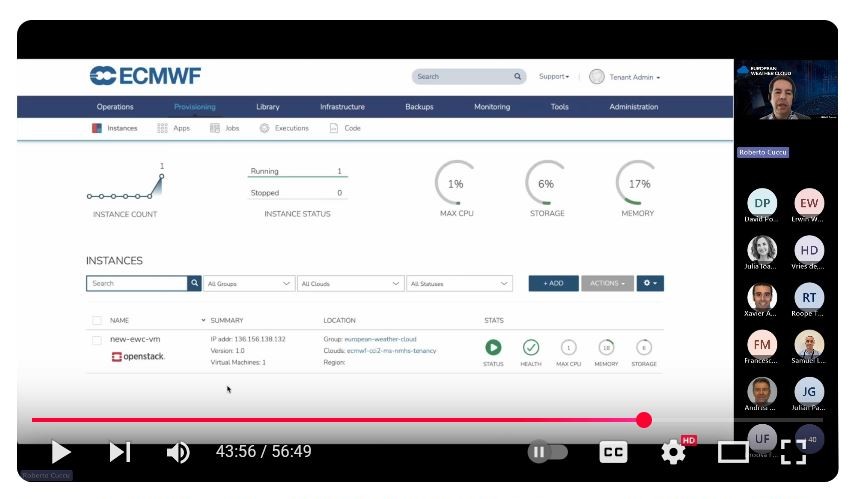
VMs provisioned via Morpheus UI, such as the ones you may have created before applying this template or those you'll create afterwards (which will automatically become part of your IPA-managed fleet), are equipped with a Morpheus Agent, a daemon that provide statistics for the guest operating system and resource utilization, to enable monitoring and log aggregations.
If you are fond of such Morpheus monitoring functionality, watch minutes 40:22-44:10 of this EWC webminar to learn about how you can turn instances provisioned via Community Hub Item templating, or alternative deployment methods, into Morpheus-monitored VMs.
⚠️ If set, theupdate_morpheus_cypherflag will trigger the creation/edition of secrets within Morpheus Cypher. To avoid unexpected behavior during IPA clients enrollment, ensure the values of all input secrets (i.e. those withmorpheus_cypher_prefix) are set and match to the values used during the initial IPA server configuration in your EWC environment.
| Name | Description | Type | Default | Required |
|---|---|---|---|---|
| morpheus_api_token | access token of the Morpheus API | string |
n/a | yes |
| morpheus_api_url | Morpheus API URL. Example: https://morpheus.ecmwf.int |
string |
n/a | yes |
| morpheus_tenant_name | Morpheus tenant name. Example: eumetsat-sandbox-ewc |
string |
n/a | yes |
| update_morpheus_cypher | flag to update IPA administration data kept in Morpheus Cypher. Only yes will be accepted to approve |
string |
n/a | yes |
| morpheus_cypher_ipa_domain | name of domain managed by the IPA server. Will be ignored if update_morpheus_cypher!=yes. If set, should match with the value set used during configuration of an existing IPA server within the EWC environment. Example: eumetsat.sandbox.ewc |
string |
n/a | yes |
| morpheus_cypher_ipa_server_hostname | hostname of the IPA server. Will be ignored if update_morpheus_cypher!=yes. If set, should match the value used during configuration of an existing IPA server within the EWC environment. Example: ipa-server-1 |
string |
n/a | no |
| morpheus_cypher_ipa_admin_username | username of the administrator account from the IPA server. Will be ignored if update_morpheus_cypher!=yes. If set, should match the value used during configuration of an existing IPA server within the EWC environment. Example: ipaadmin |
string |
n/a | no |
| morpheus_cypher_ipa_admin_password | password of the administrator account from the IPA server. Will be ignored if update_morpheus_cypher!=yes. If set, should match the value set used during configuration of an existing IPA server within the EWC environment |
string |
n/a | no |
| Name | Type | Description |
|---|---|---|
IPA Client Enroll Automation Via Morpheus |
Morpheus Integration | Links to EWC Community Hub's GitHub repository where Ansible Playbooks for IPA client enrollment/disenrollment are published |
Enroll IPA Client |
Morpheus Task | Executes an Ansible Playbook to carry out IPA client enrollment |
Disenroll IPA Client |
Morpheus Task | Executes an Ansible Playbook to perform IPA client disenrollment |
IPA Client Enroll Automation Via Morpheus |
Morpheus Workflow | Orchestrates tasks to run specifically during provision and teardown stages of a virtual machine's life cycle |
<user defined> |
Morpheus Domain | Encapsulates virtual machines and automates workflow triggering |
secret/ipa_domain |
Morpheus Cypher Secret | Read during enrollment/disenrollment Ansible Playbooks execution |
secret/ipa_server_hostname |
Morpheus Cypher Secret | Read during enrollment/disenrollment Ansible Playbooks execution |
secret/ipa_admin_username |
Morpheus Cypher Secret | Read during enrollment/disenrollment Ansible Playbooks execution |
secret/ipa_admin_password |
Morpheus Cypher Secret | Read during enrollment/disenrollment Ansible Playbooks execution |
| Name | Home URL |
|---|---|
| ewc-ansible-role-ipa-client-enroll | https://github.com/ewcloud/ewc-ansible-role-ipa-client-enroll |
| ewc-ansible-role-ipa-client-disenroll | https://github.com/ewcloud/ewc-ansible-role-ipa-client-disenroll |
Checkout the following how-to guides to learn about managing resources after initial setup:
Checkout the troubleshooting documentation for information on common problems and how to troubleshoot them.
All notable changes (i.e. fixes, features and breaking changes) are documented in the CHANGELOG.md.
Thanks for taking the time to join our community and start contributing! Please make sure to:
- Familiarize yourself with our Code of Conduct before contributing.
- See CONTRIBUTING.md for instructions on how to request or submit changes.
European Weather Cloud <support@europeanweather.cloud>
Copyright © EUMETSAT 2025.
The provided code and instructions are licensed under the MIT license. They are intended to automate the setup of an environment that includes third-party software components. The usage and distribution terms of the resulting environment are subject to the individual licenses of those third-party libraries.
Users are responsible for reviewing and complying with the licenses of all third-party components included in the environment.
Contact EUMETSAT for details on the usage and distribution terms.