
A fast, rootless, open-source local PHP development environment.
Serve your projects on .test domains over HTTP and HTTPS, run a different
PHP version per site, and manage it all from one tiny daemon - no Docker, no
sudo for everyday work, no subscription.


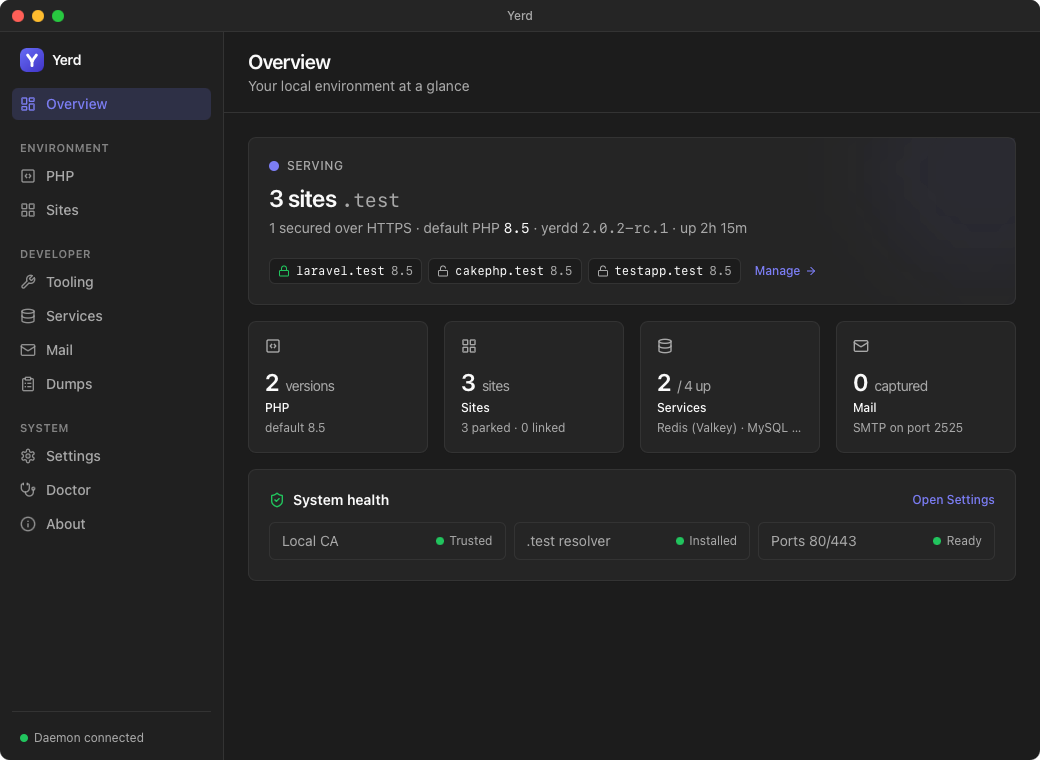
Yerd is a single desktop app for macOS and Linux - the daemon, the yerd
CLI, and a privileged one-shot helper are all bundled inside it; nothing is
downloaded at runtime. The tray-first GUI is a thin client over a tiny (~8 MB)
background daemon: a live dashboard of what's running, with one-click control of
PHP versions, .test sites, databases, mail capture, dumps, and per-site HTTPS.
A guided onboarding journey gets you
from install to serving sites in a couple of minutes. Every button maps to the
same daemon the CLI drives, so the app and the
terminal never drift out of sync - and if you prefer the keyboard, yerd does
everything the app does.
- 🚀 Zero-config sites - drop a project in a parked folder, it's live at
<name>.test. - 🔒 Trusted HTTPS per site from a local CA - no
mkcert, no browser warnings. - 🐘 Multiple PHP versions, pinned per site.
- 🗄️ Native MySQL · MariaDB · PostgreSQL · Redis - no Docker.
- 🪶 One ~8 MB daemon - no containers, no VM, no Electron.
- 🛡️ Rootless - setup elevates once; daily use never does.
- 🔌 Works without admin - can't route
.test? Reach any site athttp://localhost:8080/~<name>.test. - 🔍 Self-diagnosing with
yerd statusandyerd doctor.
| Laravel Herd | Lerd | Yerd | |
|---|---|---|---|
| Free | ✅ (Pro is paid) | ✅ | ✅ |
| Open source | ❌ | ✅ | ✅ |
| Linux support | ❌ | ✅ | ✅ |
| macOS support | ✅ | ✅ | ✅ |
| Windows support | ✅ | ❌ | ❌ * |
Automatic .test domains |
✅ | ✅ | ✅ |
| HTTPS with a trusted local CA | ✅ | ✅ | ✅ |
| Multiple PHP versions | ✅ | ✅ | ✅ |
| PHP version per site | ✅ | ✅ | ✅ |
| First-class CLI | ✅ | ✅ | ✅ |
| Menu-bar / tray GUI | ✅ | ✅ | ✅ |
| Database & cache services (MySQL · MariaDB · PostgreSQL · Redis) | ✅ (Pro) | ✅ | ✅ |
| Local mail capture (catch outgoing email) | ✅ (Pro) | ❌ | ✅ |
| Laravel dump / query inspector | ✅ (Pro) | ❌ | ✅ |
| Runs rootless day-to-day | ✅ | ✅ † | ✅ |
| No Docker / Podman / containers required | ✅ | ❌ | ✅ |
| Lightweight (no VM, no container images) | ✅ | ❌ | ✅ |
Built-in health checks (doctor) |
❌ | ❌ | ✅ |
| Under the hood | Native app (nginx + dnsmasq) | Containers (rootless Podman) | Native Rust (rustls proxy + embedded DNS) |
❌* = Windows isn't supported yet - it's planned (coming soon). Yerd runs today on macOS and Linux.
Lerd runs your stack in containers via rootless Podman (Linux +
macOS; no Docker) - so it trivially adds database/cache services, but it pulls and
runs container images rather than native processes. † Rootless by design on
Podman.
On Laravel Valet: Valet is the original macOS-only Laravel dev tool
(nginx + dnsmasq, installed via Homebrew/Composer). None of the three require it -
Herd is the native standalone successor that bundles its own nginx (and reuses
Valet's framework "drivers"), Lerd runs everything in containers, and Yerd uses
its own Rust proxy + DNS. No Valet, no Homebrew.
Release status — Release Candidate. Yerd is currently shipping Release Candidate builds, available from the releases page. We're tracking a stable v2.0.2 release on 8 July 2026. The RCs are ready for everyday use — please report any bugs on GitHub.
Yerd is a single desktop app - the daemon (yerdd), the yerd CLI, and the
privileged yerd-helper are all embedded inside it (nothing is downloaded at
runtime). Grab the latest Release Candidate build from the
releases page:
| Platform | Download | Install |
|---|---|---|
| macOS (Apple Silicon) | Yerd_MacOS_AppleSilicon_v<ver>.dmg |
open, drag to Applications |
| Linux (x86-64) | Yerd_Linux_x86_64_v<ver>.deb |
sudo apt install ./Yerd_Linux_x86_64_v<ver>.deb |
| Linux (arm64) | Yerd_Linux_Arm64_v<ver>.deb |
sudo apt install ./Yerd_Linux_Arm64_v<ver>.deb |
On first launch the app starts its bundled daemon - so on macOS setup is
essentially drag-and-drop. It then walks you through a one-time
sudo yerd elevate to trust the local CA, route *.test, and bind ports 80/443.
Everything after runs as your user - never as root.
The yerd command ships with the app: on Linux the .deb puts it on your
PATH; on macOS open Settings → Terminal CLI → Install. Then the one-time
setup is available from the terminal too:
sudo yerd elevate # trust the CA · route *.test · allow 80/443Yerd is GUI-first: the desktop app drives everything from a few clicks. Each
step below shows the app, with the equivalent yerd CLI commands as an
alternative - both are clients of the same daemon, so anything you do in one
shows up in the other.
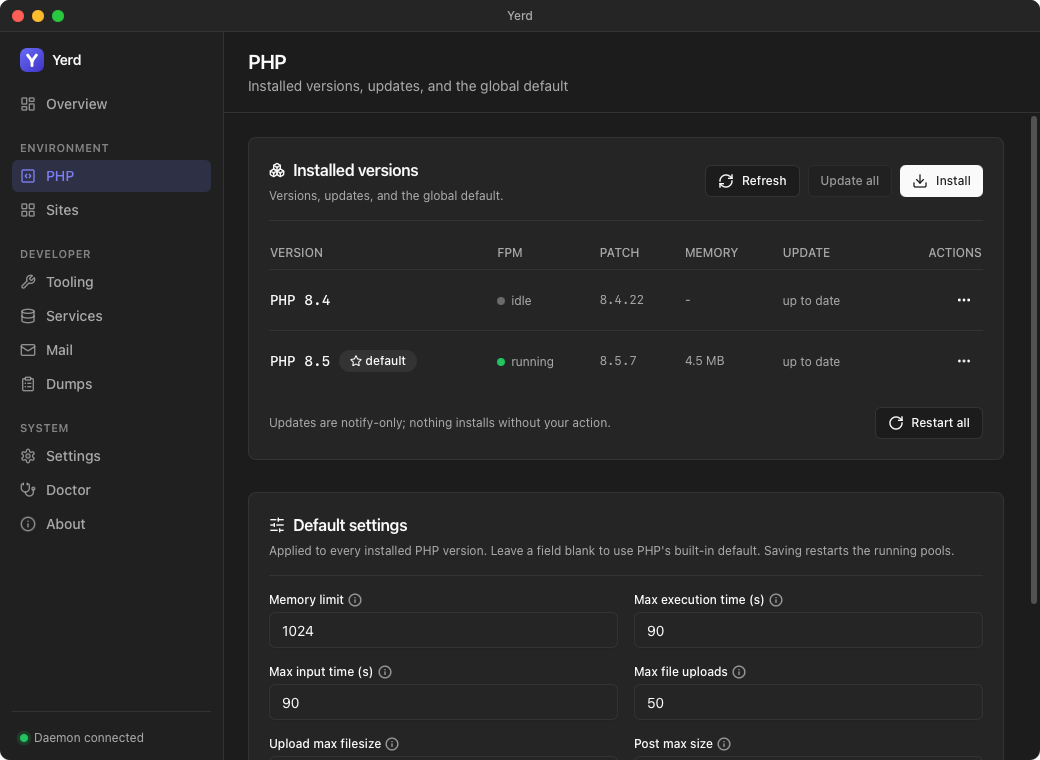
On the PHP page, click Install, pick a version, and it becomes your default (the first one always does). Manage updates and the global default from the same page.
Alternative - the CLI:
yerd install php 8.5    # download + install a PHP version
yerd use 8.5            # make it the global default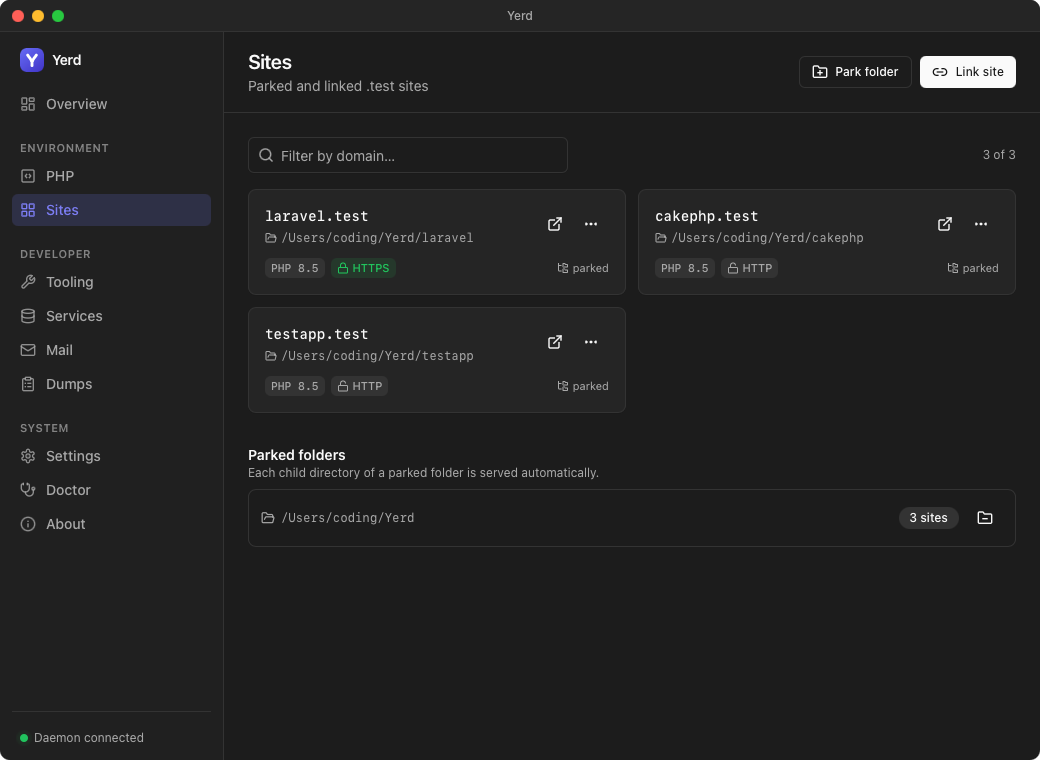
On the Sites page, park a folder (every sub-folder becomes
<name>.test) or link a single project, flip HTTPS on or off per site, and
pick a PHP version per site - no commands.
Alternative - the CLI:
yerd park ~/Sites            # ~/Sites/blog -> http://blog.test
yerd link my-app ~/code/my-app   # -> http://my-app.test
yerd secure my-app           # -> https://my-app.test (trusted local CA)
yerd use my-app 8.3          # pin just this site to a PHP version
Open https://my-app.test in your browser - that's it.
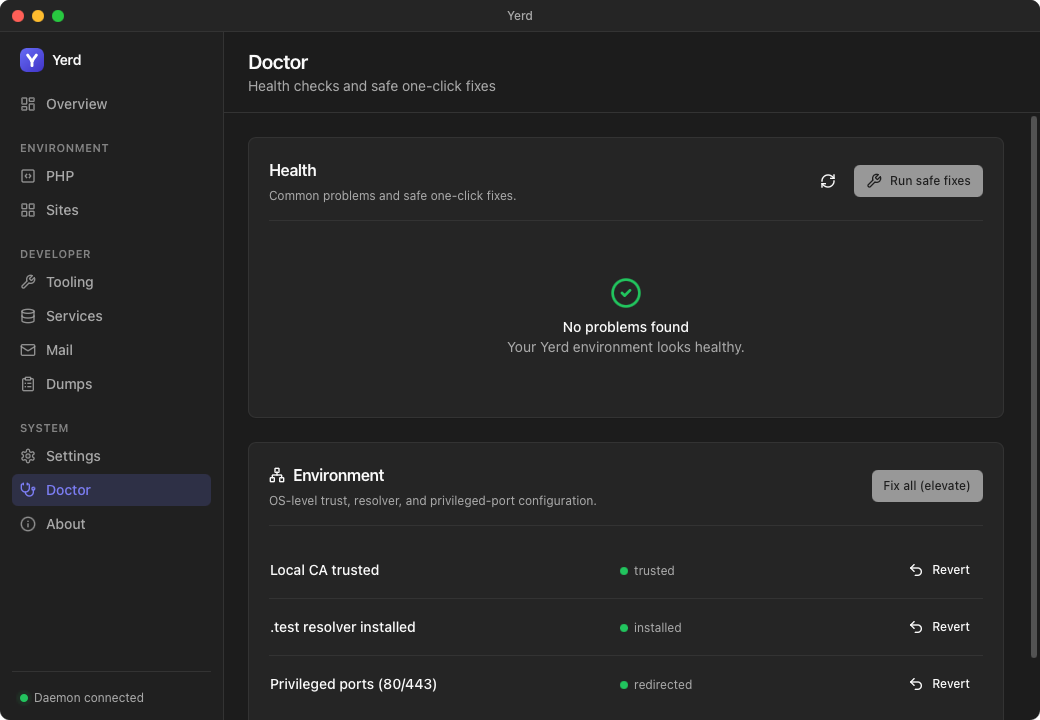
The Doctor page checks your setup (CA trust, the .test resolver,
privileged ports, PHP, sites) and offers one-click fixes.
Alternative - the CLI:
yerd status        # what's running
yerd doctor        # diagnose problems
yerd doctor fix # apply the safe fixes| Command | What it does |
|---|---|
yerd park <dir> |
Park a directory; each child folder is served at <name>.test. |
yerd unpark <dir> |
Stop serving a previously parked directory. |
yerd link <name> <dir> |
Serve a single directory as a named site. |
yerd unlink <name> |
Remove a linked site. |
yerd sites |
List every known site (kind, PHP version, HTTPS, doc-root). |
yerd root <site> [path] |
Set a site's served web root (or --auto to re-detect). |
yerd use <version> |
Set the global default PHP version. |
yerd use <site> <version> |
Set one site's PHP version. |
yerd secure <site> / unsecure <site> |
Turn HTTPS on / off for a site. |
yerd install php <version> |
Download + install a PHP version. |
yerd list php [--check] [--available] |
List installed PHP versions (and updates), or what's installable. |
yerd update php [<version>] |
Update one (or all) installed PHP versions. |
yerd set php <setting> <value> / unset php <setting> |
Set / clear a global PHP ini default (all versions). |
yerd restart php [<version>] / restart daemon |
Restart a PHP pool (or all), or the daemon. |
yerd services |
List local database / cache services and their status. |
yerd service available |
List installable service versions for your platform. |
yerd service install <svc> <version> |
Install a service (redis/mysql/mariadb/postgres) from a prebuilt build. |
yerd service start|stop|restart <svc> |
Start, stop, or restart a service (start also enables auto-start). |
yerd service set-port <svc> <port> / logs <svc> |
Set a service's loopback port; tail its log. |
yerd service change-version|uninstall <svc> … |
Switch a service's version, or remove one (--purge deletes its data). |
yerd db list|create|drop <svc> [<name>] |
List, create, or drop databases in a running SQL service. |
yerd db backup|restore <svc> <name> <file> |
Dump a database to / restore it from a plain-SQL file. |
yerd status |
Snapshot: daemon, ports, DNS, CA trust, PHP pools (PID/RAM), load. |
yerd doctor / yerd doctor fix |
Diagnose common problems; auto-repair the safe ones. |
yerd elevate [trust|resolver|ports] |
One-time privileged setup (run with sudo). |
yerd unelevate [...] |
Reverse what elevate configured. |
Add --json to any command for machine-readable output.
Yerd is built around a few deliberate decisions that make it safe, fast, and maintainable.
Yerd runs as three pieces, and the GUI/daemon never run as root:
yerdd- the unprivileged per-user daemon. It owns all runtime state and serves the proxy, DNS, and PHP-FPM pools.yerd- the CLI, a thin client that just talks to the daemon over a per-user socket.yerd-helper- a strict, auditable one-shot binary for the handful of operations that genuinely need root (trust the CA, configure the DNS resolver, grant the port capability). It takes typed arguments, never shells out, never touches the network, does exactly one thing, and exits.
Setup may elevate once; daily use never does. And if you can't elevate at
all - a locked-down machine where .test can't be routed - sites stay reachable
over plain http://localhost:8080/~<name>.test (Yerd pins that origin to the
site, or shows a picker), so you're never blocked. See
Localhost Access.
Yerd generates a local certificate authority and issues a leaf certificate per
site on demand, terminated by a hand-rolled rustls reverse proxy.
sudo yerd elevate trust adds the CA to your system trust store - after that,
every .test site is green-padlock valid. No OpenSSL anywhere.
The daemon owns state. The CLI and the GUI are both clients - they never reimplement daemon logic, so the CLI and GUI can never disagree.
Pure logic lives in library crates. I/O and OS calls are pushed to the edges behind traits.
Business logic is unit-tested with in-memory fakes; real filesystem, network,
process, and OS calls live behind traits (ProcessSpawner, TrustStore,
ResolverInstaller, PortBinder, Clock, …) with one implementation per OS.
The result: a large, fast test suite and behaviour that's identical across
platforms.
Yerd makes no network calls except the ones you explicitly ask for (downloading the PHP builds you install). PHP updates are notify-only - Yerd tells you when a newer patch exists, but never installs anything behind your back.
Yerd v2 is a ground-up rewrite of our own v1 package
(LumoSolutions/yerd) - the Go tool we
first built to scratch this itch. Shipping v1 taught us a lot, and we rebuilt Yerd
from scratch in Rust to make it cross-platform, rootless, and far easier to
maintain. v1 is reference-only: there's no command-surface or config-format
compatibility. Where v1 built PHP from source and leaned on sudo for most
operations, v2 ships prebuilt PHP and runs unprivileged.
Licensed under the MIT License.
A Forjed project · github.com/forjedio/yerd