Introduce shortcuts to focus/open applications #585
Conversation


possible to toggle focus for builtin applications:

- terminal: super+t
- files   : super+m
- epiphany: super+b
- code    : super+e

compare app_id with wm_class to filter applications

|
I agree with the use case and I like the idea of toggling through windows. But in terms of shortcuts, I prefer the way this is handled in Ubuntu (I think starting in Unity?): the first dock icon is always cmd+1, the second is cmd+2, etc. That makes shortcuts workflow-agnostic and even easier to customize. And you can assist the user by showing tiny numbers in the dock while cmd is held down. cmd+n is already bound to workspace switching in elementary; maybe cmd+F1, cmd+F2, ... would work? (Changing cmd+T to open my existing terminal rather than opening new ones would be ❤️) |

|
Thanks for the feedback! Would it be crazy to allow both? Super+Key for the favorite applications and Super+FKey for the current applications. Some reasons why I think the "dock-position" approach alone would not be enough:
The idea with the tiny indicators sounds nice, but I could imagine it could be irritating when pressing other shortcuts. Maybe one could implement these number-indicators in the Alt-Tab view or window overview? Could you maybe explain why you think the "dock-position" approach would be easier to customize? All the keyboard shortcuts would also be customize-able through settings. Also the shortcuts already use the current default applications. You could even change these to manually Super+FKey so the will visually match order of the dock... Also the
shortcuts were just for demonstration purposes. I personally wouldn't mind to change them (or even deactivated them by default) as long as I can change them through settings. |
|
I don't think that everyone lives in the same set of apps. I don't jump to my default editor (Code) very often, instead I'd love to have shortcuts for Android Studio and gitg. With the "dock position" approach, I only need to make sure they are among the first twelve dock icons, and my shortcut setup is done. That's the sort of "customization" I was thinking of. But sorry, you are of course right that we could totally have both. I'll open a separate ticket after some more consideration. By the way, what do you think about adding case 4: when the app only has one window and it is already focused, then pressing the shortcut again hides the window -- similar to clicking a Plank icon twice. That could be great to bring up an app and dismiss it with minimal finger movements, just to check a log in the Terminal etc. |
That is a good point, I will in addition to the default applications introduce an option to bind this shortcut directly to a given
This would not be difficult to implement, but a fourth case could also make this feature more confusing for a normal user. BTW, You can already achieve the same behavior by focusing the application with Should in this fourth case the application be hidden or just moved back to its last z position? |
 felix-andreas
changed the title
felix-andreas
changed the title
|
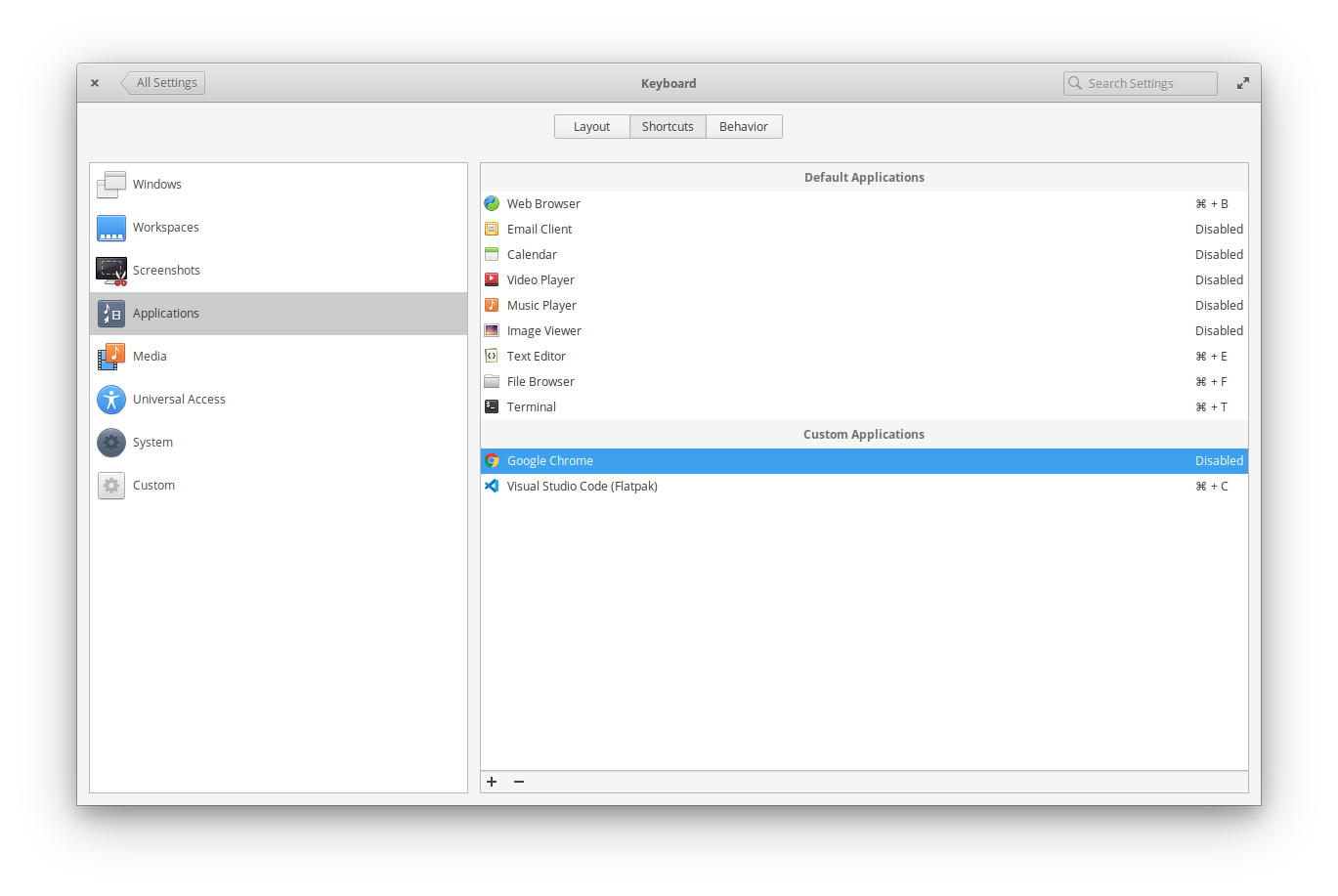
@jlnr I have now added a possibility to bind custom applications and I also did a first implementation (elementary/settings-keyboard#233) for the settings-keyboard plug. It would be nice to get some feedback! When switching back to master don't forget to remove the plugin:
|

|
I also have the urgent need for a shortcut to switch between windows of the same app. I have the same frustrations as the topic opener. If Im not wrong, you can do this in OSX by pressing super+’. Anyways lets not discuss which keycombinations we should use for this functionallity. Just take a sensible default and give the option to change it in the settings. |
felix-andreas
changed the title
 felix-andreas
changed the title
felix-andreas
changed the title
4 participants


Fixes elementary/terminal#319
TL;DR: A simple plugin to bind keyboard shortcuts to open/focus specific applications.
Motivation
With increasing number of different windows (often multiple instances of the same application), I always feel (in all major desktops, not only elementary) not being able to efficiently switch focus between them anymore.
As 95% of the time I only use 5 different applications, I always wanted a shortcut to directly switch focus to one of them. Alt+Esc and Alt+Tab are great for the most recent applications but get tedious for applications more than 3 key presses away.
The idea is to introduce the possibility to bind a keyboard shortcut to a single application. Pressing this shortcut would focus this application. Pressing it multiple times would toggle focus between the different windows of this application. In other words: an application-specific Alt-Tab shortcut.
Behavior
The Application shortcut behaves in that way that if ..
The most important applications (like files, terminal, browser, ...) get all bond to a combination of Super+Key.
Additionally Super+Ctrl+Key will always open a new window of the application regardless if another instance is already running. (not implemented yet)
In this first implementation the default applications are bind to the following shortcuts:
Productivity/Workflow
This feature would imo increase the productivity for different scenarios:
Also I think this feature would not only be useful for a keyboard-driven workflows as it also can reduce the mouse movement in some cases. For example, if the mouse is on top of the screen and one wants to do a web search, one has to move the cursor down to plank and than again up to click the search bar. With the Application-Shortcut one has to press the shortcut and then move the cursor only a short distance to the search bar.
I also recorded a simple Demo video to showcase the workflow for these cases.
Consistency
As it is already possible to open some applications with a shortcut, this feature would simple extend this functionality by the focusing/toggling component. The current behavior which always opens a new window would get bound to Super+Ctrl+Key.
This feature would also be consistent with the current behavior of plank, where a left-click opens a new window when the application is not running and focuses the highest window if the application is running. Also in plank Ctrl-Click opens a new instance of the application regardless if another instance is already running and the toggling behavior between windows of the same application is achieved by scrolling over an item.
This feature could made be more consistent to Alt+Tab by allowing Super+Shift+Key to toggle backwards.
This PR
This PR is only a first implementation to demonstrate this feature. It is not ready for review, but suggestions are welcome!
If the idea gets accepted I would additionally implement, Shift to toggle backwards, Ctrl to always open a new window and maybe make the code a bit more efficient.