[Canvas] Adds argument to open all links in new tab within markdown element #57017
Conversation


 maggieghamry
added
the
Team:Presentation
maggieghamry
added
the
Team:Presentation

|
Pinging @elastic/kibana-canvas (Team:Canvas) |
maggieghamry
added
enhancement

|
This looks awesome and thorough! Just a note can you add "fixes #issuenumber" to the PR comment and tag the issue so it auto-closes when this merges? |

| render(domNode, config, handlers) { | ||
| const html = { __html: md.render(String(config.content)) }; | ||
| const fontStyle = config.font ? config.font.spec : {}; | ||
| const openLinksInNewTab = config.openLinksInNewTab; |

There was a problem hiding this comment.
Rather than copy all of this logic in here, we should import {Markdown} from 'src/legacy/core_plugins/kibana_react/public/markdown'
Then this method can just become something like
ReactDOM.render(
<Markdown className="canvasMarkdown" markdown={config.content} openLinksInNewtabs={config.openLinksInNewTab} />There was a problem hiding this comment.
@crob611 I tried this import, but had to add to the method with an else statement, as using it as-is doesn't account for the default undefined state.
Using the original method, if you toggle to true, the links will open in a new tab, but if you then toggle to false (with the original method), it persists the true value (links still opened in a new tab).
With the modification; adding the the else statement, it accounts for the default (undefined), explicit true, and explicit false conditions.
I'm not sure how best to append the condition to the imported method.
@crob611 do you have any suggestions on how best to append the else condition to the imported method? I'm not sure what the impact of adding the condition to the original method would be.
There was a problem hiding this comment.
@crob611 I've updated the code per your help/recommendation, and got the text not to wrap, but looks like the toggle example from the bar chart is using axisConfig (when I specified argType of axisConfig instead of toggle, it looked just like the Y-axis section, but the toggleArgInput seems to need to be updated with different styling to render it the same way. I'm working to understand this a bit better.


|
Thanks for tackling this! I had envisioned the switch being inside the 'Markdown content' section as opposed to its own section, but is the reason for placing it into its own section due to the fact that there can be many 'Markdown content' sections in the side panel? meaning the single switch then applies to all sections? As for the design, let's make the text fit on one line by increasing the label width and align the switch to the right side (see the Y-axis example below). Additionally, we can shorten the text to 'Open links in new tab'.
|
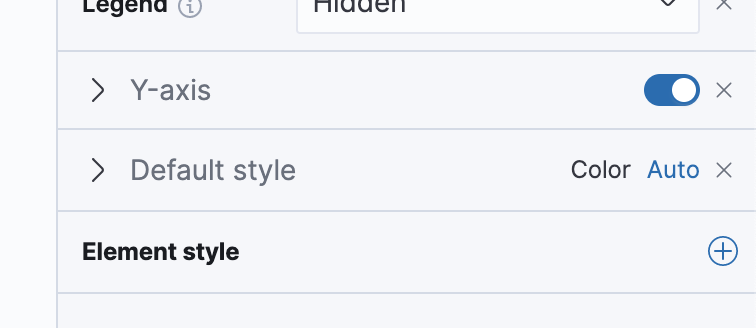
💚 Build SucceededTo update your PR or re-run it, just comment with: |

@ryankeairns yes, based on the Kibana example, the toggle is in its own separate section. Since the markdown content is specific to the code inside of the element, and adding it separately allows for the option to be added to the other options in the view side bar. (see the first screenshot): I'll work on updating the layout for the text as well. @ryankeairns can you please let me know which element you sent the screenshot example from? |
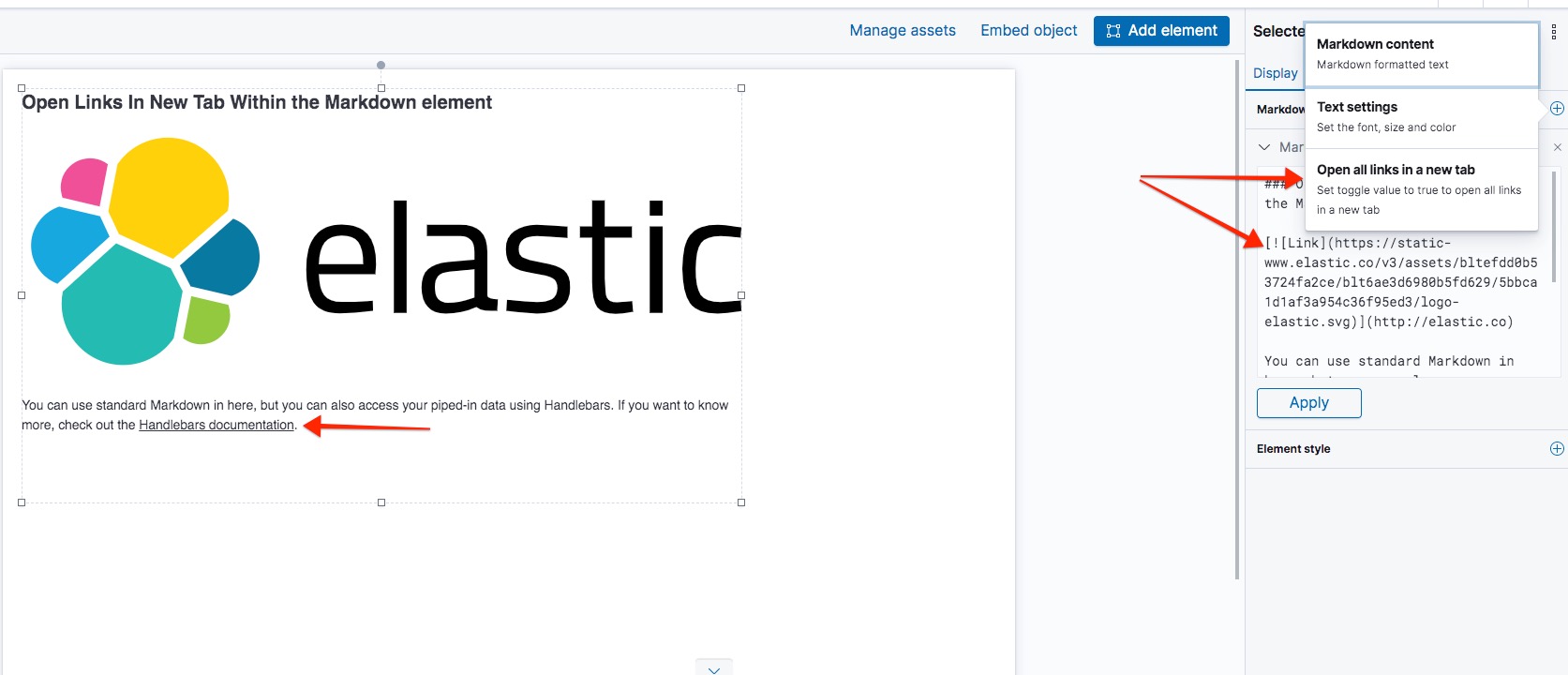

|
@ryankeairns Our default "toggle" argument type that is used in other places is what's causing the text to fill 1/3 of the space and the toggle element to be pushed left. Here it is used elsewhere. Guess it's that way so all the controls align with each other?
Should we alter that toggle type so that everywhere the toggle switch aligns right and the rest of the text can fill in as much space as needed? |
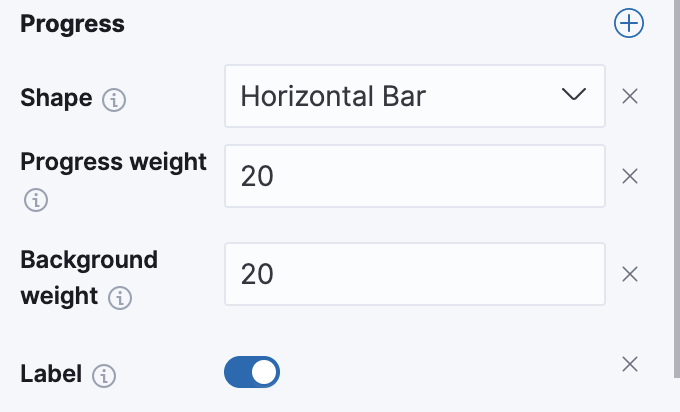
Update to change toggle verbiage per Ryan's request, and reuse the Kibana Markdown per Corey's help and recommendation. Still working on updating the styles (consulting Ryan)
Update to prevent text for "Open links in new tab from wrapping" - the example from the horizontal bar chart is quite differently, and reads from "axisConfig" - when I changed the argType to "axisConfig", the layout was the same, but I'll need some input on which specific styles to add to the "ToggleArgInput" - I think this is where the style updates need to occur to get the toggle to stay on the same line, but may be wrong.
Update to original message string per Ryan's feedback, now that there is no wrapping
|
@crob611 yep. We may want to consider overriding the underlying layout styles and make the label column wider. Maggie and I are working about it for this PR, but I'll keep an eye on it for future consideration. |
|
@ryankeairns @crob611 I've updated the toggle per Ryan's request (also updated screenshots) |
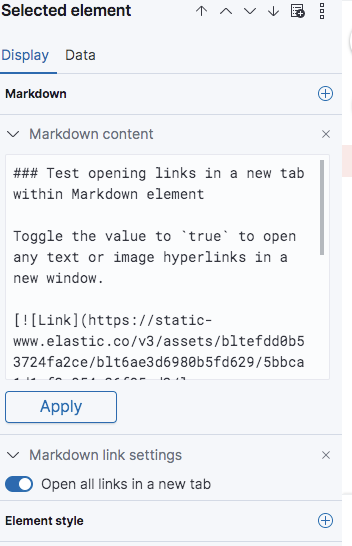

 ryankeairns
left a comment
ryankeairns
left a comment
ryankeairns
left a comment
There was a problem hiding this comment.
Looking great, one small change request for the text in the popover.
I also noticed that the (recently changed in EUI) focus state on the switch gets clipped a bit, but that will require some more thought on how to address since any additional styles will affect all sidebar panels. Anyway, its minor and we can address it later.
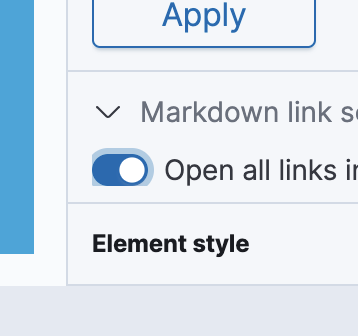

ryankeairns
left a comment
ryankeairns
left a comment
There was a problem hiding this comment.
Thanks for the changes, LGTM
|
@maggieghamry Make sure to merge in my pull request to your branch to use the |
@crob611 sorry, I actually added the code in that you recommended, rather than merging the pull request. Do I still need to merge that in, even though I updated the code? |
Switch to using Markdown Component
update to fix internationalization issues

…lement (elastic#57017)

* Adds toggle to open links in new tab within markdown element

* Updating test for markdown function

* Switch to using Markdown Component

* Update ui.ts

Update to change toggle verbiage per Ryan's request, and reuse the Kibana Markdown per Corey's help and recommendation. Still working on updating the styles (consulting Ryan)

* Update toggle.js

Update to prevent text for "Open links in new tab from wrapping" - the example from the horizontal bar chart is quite differently, and reads from "axisConfig" - when I changed the argType to "axisConfig", the layout was the same, but I'll need some input on which specific styles to add to the "ToggleArgInput" - I think this is where the style updates need to occur to get the toggle to stay on the same line, but may be wrong.

* Update ui.ts

Update to original message string per Ryan's feedback, now that there is no wrapping

* Update to UI styles per Ryan's feedback

* updating message per Ryan's request

* Update ui.ts

update to fix internationalization issues

Co-authored-by: Corey Robertson <crob611@gmail.com>

💚 Build SucceededHistory
To update your PR or re-run it, just comment with: |

…lement (#57017) (#58149)

* Adds toggle to open links in new tab within markdown element

* Updating test for markdown function

* Switch to using Markdown Component

* Update ui.ts

Update to change toggle verbiage per Ryan's request, and reuse the Kibana Markdown per Corey's help and recommendation. Still working on updating the styles (consulting Ryan)

* Update toggle.js

Update to prevent text for "Open links in new tab from wrapping" - the example from the horizontal bar chart is quite differently, and reads from "axisConfig" - when I changed the argType to "axisConfig", the layout was the same, but I'll need some input on which specific styles to add to the "ToggleArgInput" - I think this is where the style updates need to occur to get the toggle to stay on the same line, but may be wrong.

* Update ui.ts

Update to original message string per Ryan's feedback, now that there is no wrapping

* Update to UI styles per Ryan's feedback

* updating message per Ryan's request

* Update ui.ts

update to fix internationalization issues

Co-authored-by: Corey Robertson <crob611@gmail.com>

Co-authored-by: Corey Robertson <crob611@gmail.com>
Co-authored-by: Elastic Machine <elasticmachine@users.noreply.github.com>

6 participants


Summary
Note: will update function reference docs in a separate PR
Checklist
For maintainers