Material labels use too much vertical space when containing certain characters #1605


Description

Describe the bug
If material react labels contain certain characters (e.g. . or - and possibly more), they grab too much vertical space. It seems like the additional space grabbed is the same as if the label were wrapped once due to insufficient horizontal space (see screenshots below).
To Reproduce
Steps to reproduce the behavior:
- Have a UISchema with three (or more) horizontal layouts below each other (e.g. in a vertical layout)
- Have a row which only contains labels without special characters
- Have another row with at least one label containing special characters
- The row with the special character is too high even if there is sufficient horizontal space.
Expected behavior
The labels with special characters don't use excessive space if there is enough horizontal space.
Screenshots
If applicable, add screenshots to help explain your problem.
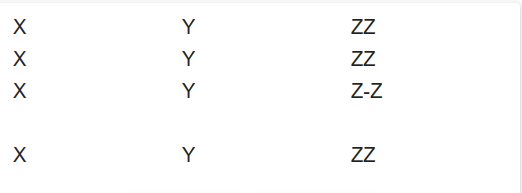
Used ui schema:
const UISCHEMA = {
  type: 'VerticalLayout',
  elements: [
    {
      type: 'HorizontalLayout',
      elements: [
        {
          type: 'Label',
          text: 'X',
        },
        {
          type: 'Label',
          text: 'Y',
        },
        {
          type: 'Label',
          text: 'ZZ',
        },
      ],
    },
    {
      type: 'HorizontalLayout',
      elements: [
        {
          type: 'Label',
          text: 'X',
        },
        {
          type: 'Label',
          text: 'Y',
        },
        {
          type: 'Label',
          text: 'ZZ',
        },
      ],
    },
    {
      type: 'HorizontalLayout',
      elements: [
        {
          type: 'Label',
          text: 'X',
        },
        {
          type: 'Label',
          text: 'Y',
        },
        {
          type: 'Label',
          text: 'Z-Z',
        },
      ],
    },
    {
      type: 'HorizontalLayout',
      elements: [
        {
          type: 'Label',
          text: 'X',
        },
        {
          type: 'Label',
          text: 'Y',
        },
        {
          type: 'Label',
          text: 'ZZ',
        },
      ],
    },
  ],
};
Browser (please complete the following information):
Tested with Chrome and Firefox
Used Setup (please complete the following information):
- Framework: react
- RendererSet: material