This repository is to reproduce CAN communication between the Raspberry Pi (sometimes called Robot) and the micro-controllers on PCB representing systems. This part is what we call the Commander, it's hosted in the Rasberry Pi in the robot, managing the scheduled actions of meals creation.
The robot systems are:
- Box
- Assembler
- Sampling
- Cooking zone
- Sauce
- TER (bringing pasta out of the robot to the food team)
The code is in Python and use AsyncIO to manage infinite loop and async requests.
- Python >= 3.7.11
The goal of this case study is to reproduce the sequence (the picture below) sending CAN message needed to prepare a dish depending on requeriements. A task receiving an arrow on the sequence needs to wait for the end of the previous task to be started let's call it a requirement. A task can have more than 1 requirement like the BRING_BOX_TO_FLIPPER, so you will have to wait for all the requirements acknowledgement to start this task. In your case you are in charge of a part of meal creation, that's why the sequence is short. You will receive STRAINER_TO_FLIPPER acknowledgement message every ARBITRARY_DURATION's value (stored in commander file) from the system Arm and you will have to manage all the tasks until BOX_TO_SAUCE. Print the can message you send and the acknowlegement you receive in the format
Message sent from {system} data: {can_message}
Message recieved data: {acknowledgement}
You will have to:
- fork this project to work on it
- reproduce the sequence sending can message and waiting for their acknowledgement.
- create a system adaptable to additionnal systems
- create a system time efficient
Start the project
python3 main.py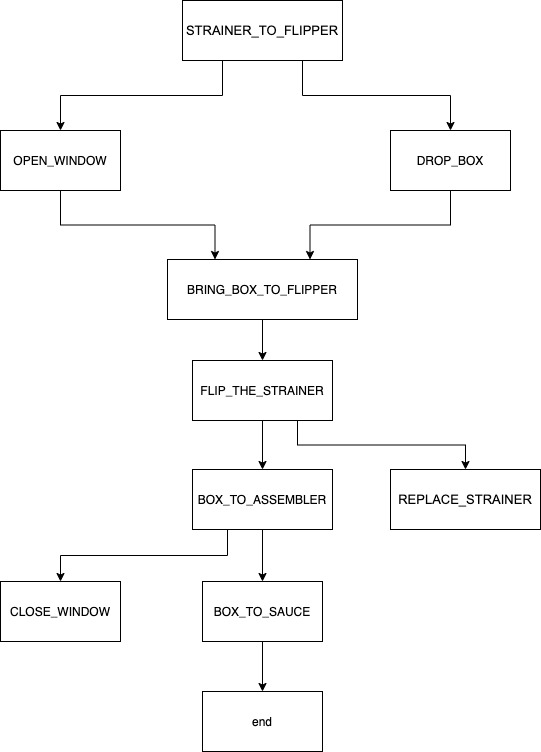
CAN messages and aknowledgements are array of 4 bytes
System code: 0x02
| Name | message[0] | message[1] | message[2] | message[3] |
|---|---|---|---|---|
| OPEN_WINDOW | 0x0 | 0x0 | 0x0 | 0x02 |
| CLOSE_WINDOW | 0x0 | 0x0 | 0x0 | 0x04 |
| Name | message[0] | message[1] | message[2] | message[3] |
|---|---|---|---|---|
| OPEN_WINDOW_DONE | 0x02 | 0x0 | 0x0 | 0x02 |
| CLOSE_WINDOW_DONE | 0x02 | 0x0 | 0x0 | 0x04 |
System code: 0x04
| Name | message[0] | message[1] | message[2] | message[3] |
|---|---|---|---|---|
| FLIP_THE_STRAINER | 0x0 | 0x0 | 0x0 | 0x01 |
| BRING_BOX_TO_FLIPPER | 0x0 | 0x0 | 0x0 | 0x02 |
| BOX_TO_ASSEMBLER | 0x0 | 0x0 | 0x0 | 0x04 |
| BOX_TO_SAUCE | 0x0 | 0x0 | 0x0 | 0x08 |
| Name | message[0] | message[1] | message[2] | message[3] |
|---|---|---|---|---|
| FLIP_THE_STRAINER_DONE | 0x04 | 0x0 | 0x0 | 0x01 |
| BRING_BOX_TO_FLIPPER_DONE | 0x04 | 0x0 | 0x0 | 0x02 |
| BOX_TO_ASSEMBLER_DONE | 0x04 | 0x0 | 0x0 | 0x04 |
| BOX_TO_SAUCE_DONE | 0x04 | 0x0 | 0x0 | 0x08 |
System code: 0x08
| Name | message[0] | message[1] | message[2] | message[3] |
|---|---|---|---|---|
| STRAINER_TO_FLIPPER | 0x0 | 0x0 | 0x0 | 0x01 |
| REPLACE_STRAINER | 0x0 | 0x0 | 0x0 | 0x02 |
| Name | message[0] | message[1] | message[2] | message[3] |
|---|---|---|---|---|
| STRAINER_TO_FLIPPE_DONE | 0x08 | 0x0 | 0x0 | 0x01 |
| REPLACE_STRAINER_DONE | 0x08 | 0x0 | 0x0 | 0x02 |
System code: 0x20
| Name | message[0] | message[1] | message[2] | message[3] |
|---|---|---|---|---|
| DROP_BOX | 0x0 | 0x0 | 0x0 | 0x01 |
| Name | message[0] | message[1] | message[2] | message[3] |
|---|---|---|---|---|
| DROP_BOX_DONE | 0x20 | 0x0 | 0x0 | 0x01 |