Write. It structures itself.
Structure emerges visibly and reversibly; you remain the author.
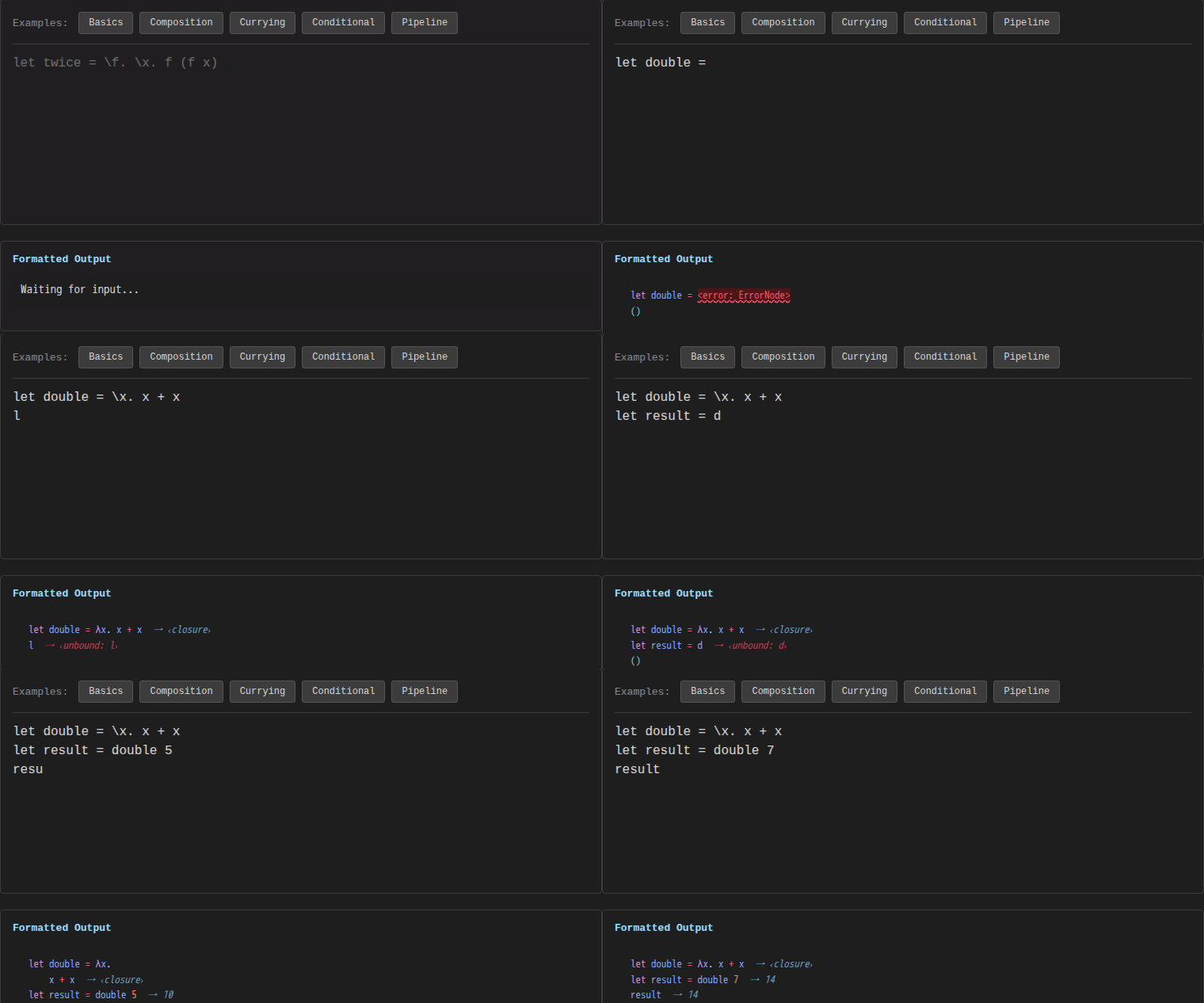
Canopy reads your code as a live structure rather than flat text. As you type, it reparses incrementally, tracks scope and types, evaluates expressions, and formats the result — without breaking your flow. Two people can edit the same document at once with no server, and edits merge automatically.
Try the live demo · Architecture · eg-walker paper
Most editors treat source code as flat text. You type characters, and the tool does its best to guess what you meant — syntax highlighting, auto-complete, error squiggles — all reconstructed after the fact from dead text.
Canopy treats your program as a living structure. Text and syntax tree are two synchronized views of the same document. Type in one, the other updates. Restructure in one, the other follows. The editor exposes an explicit, inspectable semantic model — scope, bindings, types, values — derived from the text rather than substituted for it.
The goal: close the gap between what you think and what the tool can show you. By making its current semantic model visible and correctable through the source — scope, types, values, dependencies — the editor can offer relevant context with reasons, under your control.
The demo language is lambda calculus — small enough to understand fully, rich enough to exercise the full pipeline:
let double = (x) => x + x
let result = double 5
if result then result else 0
As you type this, Canopy:
- Parses incrementally (one character change → one subtree reparse)
- Resolves scope (tracks that
xis bound by the arrow-lambda parameter anddoublerefers to the definition above) - Formats with syntax highlighting through the pretty-printer
- Evaluates
double 5 → 10andif result then result else 0 → 10 - Synchronizes with any connected peer via CRDT
Four stages, each incremental:
Text CRDT → Incremental Parse → Projection → Rendering
    ↑                                            │
    └────── structural edits feed back ──────────┘
-
Text CRDT (event-graph-walker) — The document lives in a FugueMax sequence CRDT. All edits — keystrokes, remote operations, undo/redo — enter here. Peers sync directly, no central server.
-
Incremental parsing (loom) — Only the affected region is reparsed. Unchanged subtrees are reused from the previous parse through position-independent CST nodes.
-
Projection — The syntax tree maps to a projection tree with stable node IDs and source spans. Node identity survives reparses, so UI state (selection, scroll) is preserved.
-
Rendering — The protocol layer computes incremental view patches. Only changed nodes reach the frontend. Multiple representations — formatted text, tree view, graph visualization — render from the same projection.
Requires MoonBit, Node.js, just, and Nushell.
git clone --recursive https://github.com/dowdiness/canopy.git
cd canopy

# Workspace-root tests — moon.work selects members (primary module,
# in-tree reusable modules, deps, and example modules).
# See docs/development/monorepo.md for the full fan-out.
moon test

# Build the JS FFI artifacts the web demo expects.
just build-js

# Run the Waku web demo. Canonical routes: /, /ml, /json, /markdown,
# /journey, /posts, /memo, /resume, /genui.
cd apps/web && npm install && npm run dev
The targets currently exercised in CI are JavaScript (web demo, FFI) and native (CLI, tests). WebAssembly is not a supported build target; see the CI/CD guide for the current target matrix.
Canopy is a framework as much as an editor. Define a grammar for your language, implement a few traits, and you get incremental parsing, structural editing, pretty-printing, and CRDT collaboration out of the box.
But the long-term vision goes further. The code editor is a vertical slice of something larger: a system where you write freely, provisional structure emerges as revisable hypotheses, and relevant context is offered with reasons and under your control. Every layer of the editor — incremental computation, semantic analysis, reactive projections, peer-to-peer sync — is a building block for that system.
Read more: Product Vision · Personal Knowledge Environment Direction · The Projectional Bridge · Multi-Representation System · Human-centered product principles
Text is ground truth, structure is derived. The text CRDT stores the document; everything else is computed. This means collaboration operates on a proven data structure, and the pipeline from text to view is a deterministic function of document state.
Language support is declarative. Adding a new language means providing a grammar and a projection mapping; the framework handles parsing, reconciliation, undo/redo, and collaboration generically. Lambda calculus and JSON share the same core.
Multiple representations from one source. The Printable trait family (Show, Debug, Source, Pretty) gives every language four text representations. Source guarantees parse(to_source(x)) == x. Pretty produces width-aware, syntax-annotated output. Adding a new text format means writing one render function; the language definition stays untouched.
Incremental by construction. Every stage — parsing, projection, rendering — recomputes only what changed. This isn't bolted-on caching; it's the architectural principle the framework is built around.
The primary Canopy module (dowdiness/canopy) lives at modules/canopy/.
The repository is organised into seven zones:
| Zone | Path | Purpose |
|---|---|---|
| Modules | modules/ |
Reusable, publishable MoonBit modules; includes the primary modules/canopy |
| Applications | apps/ |
Runnable or deployable vertical slices |
| Examples | examples/ |
Removable learning and integration examples |
| Adapters | adapters/ |
Non-MoonBit runtime and interface adapters |
| Dependencies | deps/ |
Separately owned Git submodules |
| Rules | rules/ |
Policy definitions |
| Scripts | scripts/ |
Operations and tooling |
Workspace membership is declared by moon.work; Git
submodule ownership by .gitmodules. The two axes
intentionally overlap: a submodule under deps/ can also be a root-workspace
member.
Each zone README explains what belongs there without copying its current
inventory. For concrete ownership, read moon.work, .gitmodules, and the
nearest moon.mod and moon.pkg; use moon ide outline <path> to inspect a
package's public interface. The
Module / Package Map explains
the placement rules and how these sources overlap.
The FFI stability surface is intentionally narrow: JS frontends should consume
the editor through adapters/editor where
practical.
Examples:
| Example | Description | Live demo |
|---|---|---|
| apps/web/ | Waku Worker hosting the lambda, JSON, Markdown, and other editors | deployed as canopy-examples Worker |
| apps/ideal/ | Full-featured editor with inspector and benchmarks | canopy-ideal.pages.dev |
| examples/prosemirror/ | ProseMirror structural-editing integration | canopy-prosemirror.pages.dev |
| apps/canvas/ | Infinite canvas (experimental); nested workspace | canopy-canvas.pages.dev |
| apps/block-editor/ | Block-based structural editing | canopy-block-editor.pages.dev |
| examples/demo-react/ | Minimal React integration | canopy-demo-react.pages.dev |
| apps/relay-server/ | Cloudflare Workers relay (collaboration) | deployed as canopy-relay |
Start with the Documentation Index — it organizes the rest of the docs into a learning path, API/reference, and contributor material. The highlights:
Vision and architecture:
- Product Vision — the full picture: write, negotiate structure, surface context
- Personal Knowledge Environment Direction — resumable technical project memory
- The Projectional Bridge — why: syntax → semantics → intent → mental model
- Multi-Representation System — the Printable trait family and expression problem
- Incremental Hylomorphism — the compositional engine underneath
API / integration:
- API Reference — high-level MoonBit API
- JS Integration Guide — using the editor from JavaScript
Development:
- Development Workflow — how to make changes, run tests, manage submodules
- Conventions — MoonBit coding patterns
- GitHub Issues — active backlog
moon test                    # workspace-root tests (all moon.work members)
moon info && moon fmt        # update interfaces and format
moon bench --release         # benchmarks (always use --release)
For module-local commands, use moon -C modules/canopy ... (or the
corresponding path for other modules). See the
Development Guide for details.
- Eg-walker: CRDTs for Truly Concurrent Sequence Editing — the CRDT algorithm
- MoonBit — the implementation language