Setting up debug environment with readme.md incompleteness #1350

Description

I have couple of question regarding setting up build and debug environment, while reading Readme.md
-
When working with the source inside Visual Studio, it is recommended you use the latest available version.
Does this mean latest stable or latest preview version? -
Reference to
Microsoft.VisualStudio.TemplateWizardInterfaceis hard coded to Enterprise edition of Visual Studio.
<ItemGroup>
    <Reference Include="Microsoft.VisualStudio.TemplateWizardInterface">
      <HintPath>C:\Program Files (x86)\Microsoft Visual Studio\2017\Enterprise\Common7\IDE\PublicAssemblies\Microsoft.VisualStudio.TemplateWizardInterface.dll</HintPath>
    </Reference>
  </ItemGroup>
This will not work for community edition of VS (or anu othrer non enterprise edition)

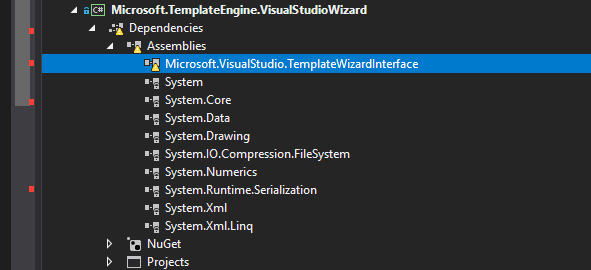
Once I change this reference to Community path C:\Program Files (x86)\Microsoft Visual Studio\2017\Community\Common7\IDE\PublicAssemblies\Microsoft.VisualStudio.TemplateWizardInterface.dll I am able to build the solution.
Open the Microsoft.Templating.sln solution in the application you will use to attach your debugger.
I can't find fileMicrosoft.Templating.sln. Is it maybeMicrosoft.TemplateEngine.sln?
And what does exactly mean this partin the application you will use? What application is this text referring to?