Distinguish present but empty and not present metadata for item functions #8411
Conversation


 ladipro
left a comment
ladipro
left a comment
ladipro
left a comment
There was a problem hiding this comment.
Looks great! Leaving a few comments inline.
src/Build/Definition/ProjectItem.cs
Outdated
| if (value == null) { return false; } | ||
| else { return true; } |
There was a problem hiding this comment.
nit:
| if (value == null) { return false; } | |
| else { return true; } | |
| return value != null; |
| if (string.IsNullOrEmpty(name)) | ||
| { | ||
| ErrorUtilities.VerifyThrowArgumentLength(name, nameof(name)); | ||
| } |
There was a problem hiding this comment.
Isn't this a breaking change? It looks like the method was previously OK with taking an empty string, now it throws.
There was a problem hiding this comment.
Yes, I think it's necessary. HasMetadata parameter and GetMetadata parameter should have the same limitation. If name is null, Dictionary _directMetadata?.Contains(name) will throw exception.
There was a problem hiding this comment.
That doesn't seem to be true. _directMetadata?.Contains(name) does not throw on null.
If there is a path that doesn't handle null, I think it would be reasonable to add a proper argument check here. I would be opposed to checking for an empty string, though, unless there is a good reason. The breaking potential is non-trivial.
Also, changes in the behavior of the public API should always come with the corresponding test coverage.
There was a problem hiding this comment.
That doesn't seem to be true.
_directMetadata?.Contains(name)does not throw on null.
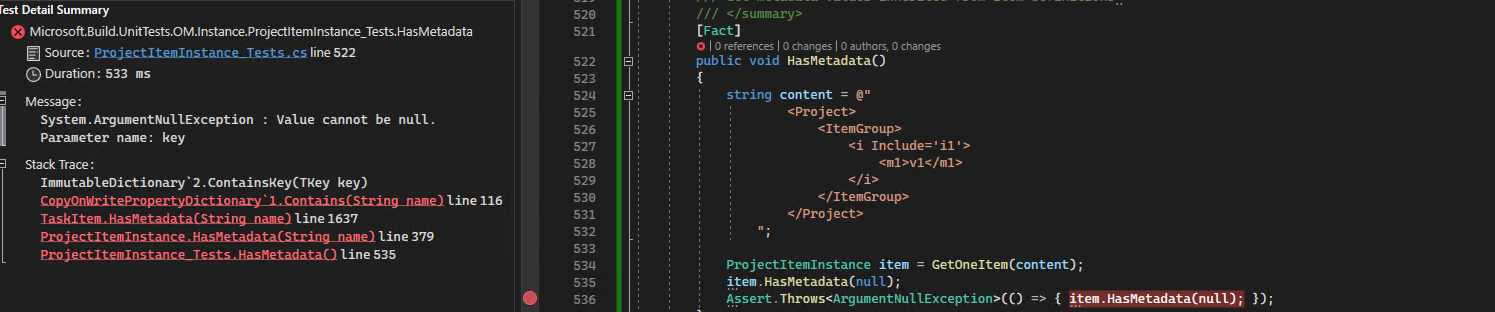
If there is no null check. this will throw the exception as bellow. I think this exception message is not easier to undertand than ErrorUtilities.VerifyThrowArgumentLength(name, nameof(name)); And for empty string check, I think it's same with GetMetadata. but in order to avoid new potential issues, I will only check null currently.
There was a problem hiding this comment.
Have added the tests for the new public API
There was a problem hiding this comment.
Sorry, you're right, it throws on null. Thank you for making the changes in HasMetadata. The new GetMetadataValueEscaped still doesn't take empty string now. Do you think it would make sense to unify the behavior with HasMetadata and validate the argument so it throw only on null?
There was a problem hiding this comment.
The new
GetMetadataValueEscapedstill doesn't take empty string now. Do you think it would make sense to unify the behavior withHasMetadataand validate the argument so it throw only on null?
@Forgind what’s your idea?
src/Build/Definition/ProjectItem.cs
Outdated
| } | ||
|
|
||
| return value ?? String.Empty; | ||
| return GetMetadataValueEscaped(name, false); |
There was a problem hiding this comment.
super-nit:
| return GetMetadataValueEscaped(name, false); | |
| return GetMetadataValueEscaped(name, returnNullIfNotFound: false); |
| if (string.IsNullOrEmpty(name)) | ||
| { | ||
| ErrorUtilities.VerifyThrowArgumentLength(name, nameof(name)); | ||
| } |
There was a problem hiding this comment.
That doesn't seem to be true. _directMetadata?.Contains(name) does not throw on null.
If there is a path that doesn't handle null, I think it would be reasonable to add a proper argument check here. I would be opposed to checking for an empty string, though, unless there is a good reason. The breaking potential is non-trivial.
Also, changes in the behavior of the public API should always come with the corresponding test coverage.
| /// Test metadata item functions with empty string metadata and not present metadata | ||
| /// </summary> | ||
| [Fact] | ||
| public void MetadataFuntionTestingWithEmtpyString() |
src/Build/Evaluation/IItem.cs
Outdated
| /// <summary> | ||
| /// Returns the metadata with the specified key. | ||
| /// Returns null if returnNullIfNotFound is true otherwise returns empty string when metadata not present | ||
| /// </summary> | ||
| string GetMetadataValueEscaped(string name, bool returnNullIfNotFound); |
There was a problem hiding this comment.
nit: Can you please move this up so the two overloads of GetMetadataValueEscaped are next to each other?
| if (string.IsNullOrEmpty(name)) | ||
| { | ||
| ErrorUtilities.VerifyThrowArgumentLength(name, nameof(name)); | ||
| } |
There was a problem hiding this comment.
Sorry, you're right, it throws on null. Thank you for making the changes in HasMetadata. The new GetMetadataValueEscaped still doesn't take empty string now. Do you think it would make sense to unify the behavior with HasMetadata and validate the argument so it throw only on null?
src/Build/Definition/ProjectItem.cs
Outdated
| /// Returns the metadata with the specified key. | ||
| /// Returns null if returnNullIfNotFound is true otherwise returns empty string when metadata not present | ||
| /// </summary> | ||
| public string GetMetadataValueEscaped(string name, bool returnNullIfNotFound) |
There was a problem hiding this comment.
Is it intentional to expose the method publicly? The existing overload is implemented explicitly, which keeps it internal.
| public string GetMetadataValueEscaped(string name, bool returnNullIfNotFound) | |
| string IItem.GetMetadataValueEscaped(string name, bool returnNullIfNotFound) |
There was a problem hiding this comment.
I think it‘s same with HasMetadata,SetMetadata and GetMetada, so make is public
There was a problem hiding this comment.
True, HasMetadata, GetMetadataValue, and SetMetadataValue are public.
But the existing GetMetadataValueEscaped(string name) is not, so unless there's a need to expose the new GetMetadataValueEscaped(string name, bool returnNullIfNotFound), it should stay internal.
There was a problem hiding this comment.
OK. I will update that.

 rainersigwald
left a comment
rainersigwald
left a comment
rainersigwald
left a comment
There was a problem hiding this comment.
I have no problem adding WithoutMetadataValue, but I still don't think there should be a meaningful distinction between "metadata is set to empty" and "metadata is not set". Does the former require the latter?

Yes, the former WithoutMetadataValue require the latter. In the related tests. if there is no distinction, WithoutMetadataValue('A', '') will output [One|Two] but it should be [One|Two|Four] |

I don't think I agree. I think "undefined" and "defined but set to empty string" should be equivalent. Compare how these two work with your changes: <Message Importance="high" Text="WithoutMetadataValueAEmpty: [@(_Item->WithoutMetadataValue('A', ''), '|')]"/>
<Message Importance="high" Text="BatchCondition: [@(_Item, '|')]" Condition=" '%(_Item.A)' != '' "/>$ ./.dotnet/dotnet msbuild foo.proj
MSBuild version 17.6.0-dev-23128-01+cec2cb290 for .NET
WithoutMetadataValueAEmpty: [One|Two|Four]
BatchCondition: [One]
BatchCondition: [Two]I think they should match. |
Starting from this example code. Build as original MSBuild. The results are as following.
After my changes. The outputs as following. But BatchCondition |


|
Team triage: |

|
@JaynieBai - do you plan to update this PR based on Forgind's last comment? |
Thanks for your reminder. I missed that before. I will update this PR soon. |
Add the WithoutMetadataValue function in another PR #8867. So close this PR. |


Fixes #8205 and #1030
Context
The referenced function GetMetadataEscaped of Item metadata function dosen't distinguish between "metadata not present" and "present but set the empty string". Both of them return the same empty string. So the following functions
AnyHaveMetdataValue
HasMetadata
WithMetadataValue
Can't tell between "metadata not present" and "present but set the empty string".
Changes Made
Add GetMetadataValueEscaped with one more parameter returnNullIfNotFound that is true that returns null when not present.
Add one new function WithOutMetadataValue
Testing
MetadataFuntionTestingWithEmtpyString
Notes