A problem of generating a textual description for a given image with using self-supervised learned approaches (SimCLR and Jigsaw Puzzle solving) as a pre-text task is considered in this work.
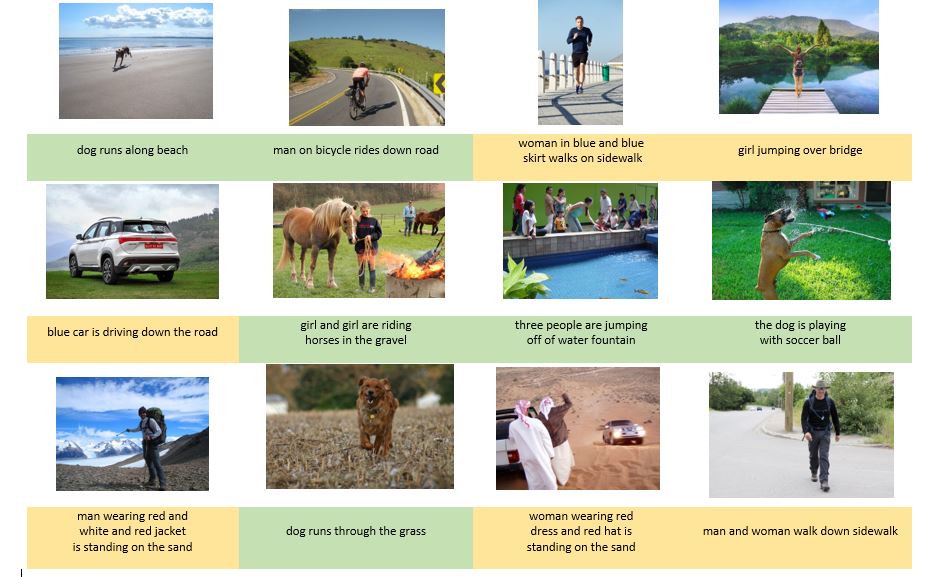
Captions generated by the captioning generator trained with a SimCLR self-supervised model as a pre-text task. We manually marked the generated captions quality as follows: green colour represents good quality, yellow colour - adequate quality, red - unacceptable quality.
The ablation table with specifying detailed model's parameters and theirs captions for random images is published at Ablation table. P. S. The random images that were used in the ablation table for evaluation of captions are available at Images
Originally, the existing solutions utilised fully supervised trained models for the part of image feature extraction. However, our experiments showed that such a complex task as image captioning requires higher level of generalisation than usual models can provide. This problem could be addressed with using self-supervised learning methods, that recently showed their ability to generalise better. In order to explore this property of SSL approaches, we proposed and explored two solutions for the image captioning using two different self-supervised learning models, based on Jigsaw Puzzle solving and SimCLR, as a pre-text task.
For the sake of supervised and self-supervised pre-text tasks comparison, we provide the results of their comprehensive testing on the same downstream task, calculating a BLEU score and validation loss. Our proposed solution with SimCLR model used for image feature extraction achieved the following results: BLEU-1: 0.575, BLEU-2: 0.360, BLEU-3: 0.266, BLEU-4: 0.145, and validation loss of 3.415. These outcomes can be considered as competitive ones with the fully supervised solutions. Along with the code, we also provide pre-trained models for image captionig task, which can be used for any random image.
- The impelementation of the caption generator code is adopted from the Jason's Brownlee work at Machine learning mastery blog.
- The idea of the Jigsaw Puzzle solver implementation is adopted from the Unsupervised Learning of Visual Representations by Solving Jigsaw Puzzles. The impelementation of the code builds on Jeremalloch work in https://github.com/Jeremalloch/Semisupervised_Image_Classifier.
- The idea of the SimCLR implementation is adopted from the A Simple Framework for Contrastive Learning of Visual Representations.
Create an conda environment using the dependencies ".yml" file (for a chosen SSL pre-text task):
conda env create -f dependencies.yml-
The dataset used for training the Jigsaw Puzzle solving pre-text task is MSCOCO unlabeled 2017,from https://cocodataset.org, can be downoaded here MSCOCO unlabeled 2017
-
The dataset used for training the Caption generator model downstream task is Flickr8k, which can be downoaded from the shared folder Flickr8k Dataset
The root folder contains the code and instructions of using SimCLR model as a pretext task for extracting features for the image captioning downstream task. For each of the foolowing step you will need to provide a correct path to a chosen dataset:
- Run "1_data_preprocessor.py" file to extract visual features from the images and textual descriptions from the descriptions in the chosen dataset. They will be put in the "features.pkl" file and "descriptions.txt" file respectively.
- Run "2_train_IC_model.py" file to train the caption generator model with extracted in the previous step features. The trained model will be saved in the same root directory.
- Run "3_BLEU.py" file to evaluate the BLEU score of the pre-trained model.
- Run "4_tokenizer.py" to create a "tokenizer.pkl" file for further encoding generated words for the model while generating a sequence,
- Run "5_test.py" file to generate a caption for any image.
- Download the pre-trained model, extracted features and descriptions, and tokenizer from the shared folder Image_Captioning with_SimCLR and put them all into a "Pre-trained/" folder (does not exist by default).
- Run "3_BLEU.py" file to evaluate the BLEU score of the pre-trained model. (Also provide a correct path to a chosen dataset).
- Run "5_test.py" file to generate a caption for any image.(An image should be in the same code folder, or the full path to it should be provided).
Contains the files neccessary to train jigsaw puzzle solver network following the paper Unsupervised Learning of Visual Representations by Solving Jigsaw Puzzles and use it for image captioning downstream task. The impelementation of the code builds on Jeremalloch work in https://github.com/Jeremalloch/Semisupervised_Image_Classifier. the differences are as follows:
- Using Alex-net as impelemented in the paper and ResNet50 for shared networks instead of the used Resnet34 and trivial net
- Our impelentation includes using gray images in training
- Includes color jittering
- Applaying normalization on patch level
- Create the HDF5 dataset (the model expects the data to be in HDF5 file) using the to_hdf5.py specifing the path and desired image size.
- Create the desired number permutations using maximal_hamming.py in hamming_set by providing number of permutations, which will create a text file with the permutations.
- In the main.py add the dataset path and the hamming_set (number of permutations) text file path and specify the number of permutations (max_hamming_set) to use from the permutations list (choose the same number if you want to use all the created permutations).
- In case of using different image size, need to be specified in the dataset creation, datagenerator creation(image_size parameter) and in image_transform ( where crop size is the size of the random crop, cell size is the size of large patch, and tile size is the final size of the patch).
Generate the puzzle patches using image_processing.py to train the keras model
contains image_transform.py that is used for image preprocessing for jigsaw, which include the functions to create the croppings and to apply the color jittering
- Run Jigsaw_feature_extraction.py, load the trained model and spacify dataset directory, and choose one of two functions to extract the features:
- Full architecture uses the last dense layer before the soft max of the whole architecture for features extraction, must specify the same imgae size parameters used in training.
- Single network intialize a ResNet50 with the trained weights and use the GAP layer for feature extraction (not recommended).
- Run jigsaw_captions.py to extract textual descriptions in the "description.txt" file from the chosen dataset.
- Run Jigsaw__IC_model.py to train the captioning model on the extracted features by spicifying the extracted features file location and the descriptions file.
- Run "Jigsaw_tokenizer.py" to create a "tokenizer.pkl" file for further encoding generated words for the model while generating a sequenc
- Run Jigsaw_test_blue.py to check the model bleu score, requires only the extracted features file location.
- Run Jigsaw_test_images.py to test the trained captioning model on real images, need specify image location and the used image captioning model.
- Pre-trained model for jigsaw with Resnet 50 with 67% accuracy on pretext task Jigsaw_ResNet50
- Pre-trained model of image captioning using the jigsaw extracted features Image_captioning_jigsaw