Design-first AI creation. Think Figma, but the designer is Claude.
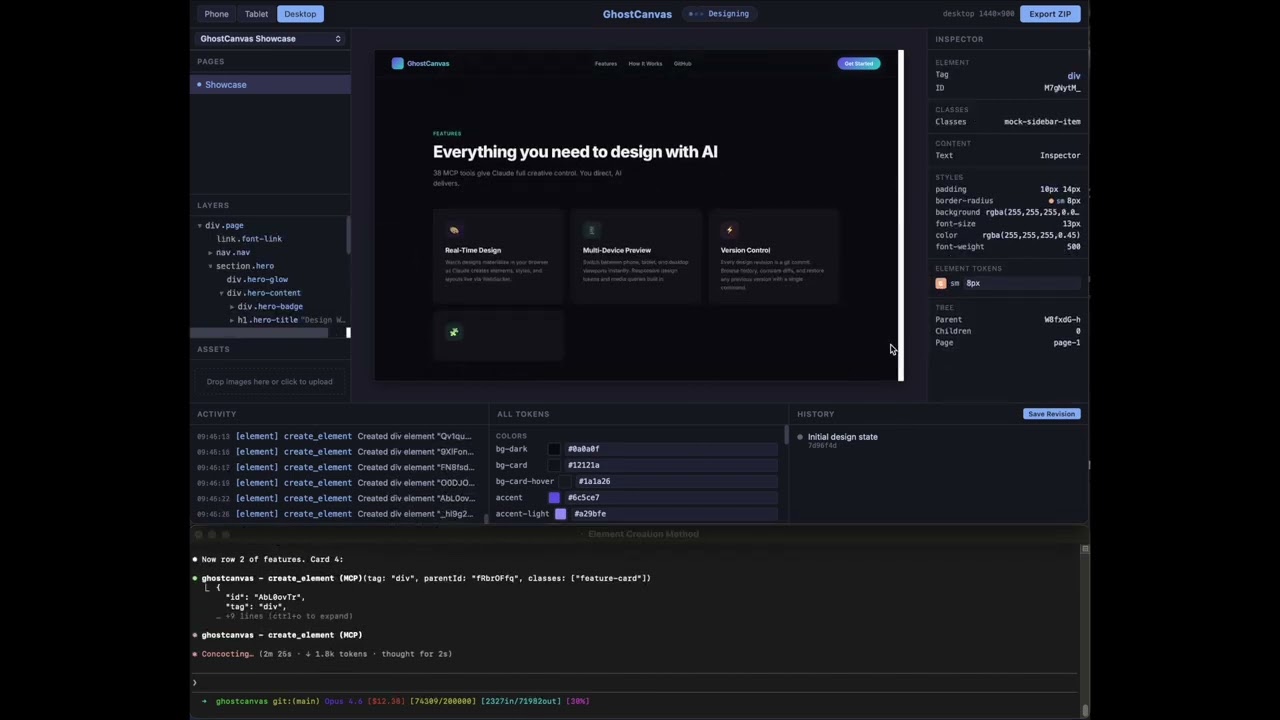
GhostCanvas is a new paradigm for AI-driven design. Instead of prompting an AI to generate code and hoping the result looks right, you start with the design -- like a real design workflow. Claude or https://github.com/ddalcu/agent-orcha creates, iterates, and perfects visual designs in a live canvas while you watch in real time. Low context, low token usage, near-zero error rate, and output quality that feels like working with an actual designer.
Once the design is exactly what you want, export a structured spec and let any AI coding tool rebuild it as a production app. Design first, code second.
GhostCanvas operates through MCP (Model Context Protocol) tools with a read-only browser viewer at localhost:4800. No arbitrary code execution on your system -- the AI can only manipulate designs through a controlled set of 38 tools. Tell it to generate 500 logo variations and let it run. This isn't a chatbot with a canvas bolted on -- it's an AI design employee.
Powered by Claude Opus 4.6 or AgentOrcha Open source. Runs locally.
Youtube Video Demo:
- Node.js (LTS version recommended)
- Git (used for per-project version history)
- An MCP-compatible AI client -- highly recommended: Claude Code with Claude Opus 4.6. Also compatible with Cursor and VS Code (via MCP support).
git clone https://github.com/ddalcu/ghost-canvas.git
cd ghost-canvas
npm installGhostCanvas ships with a .mcp.json config. Claude Code will auto-detect it:
cd ghost-canvas
claude
The MCP server starts automatically. Open http://localhost:4800 in your browser to see the viewer.
To get the best design workflow, load the design skill:
/design
This loads the full design workflow guide with templates, best practices, and tool usage patterns. See .claude/commands/design.md for details.
MCP config is included in .cursor/mcp.json. The server will start when Cursor connects to the MCP server.
The design skill is auto-loaded via .cursor/rules/design.mdc -- no extra setup needed. Cursor will automatically include the design workflow, templates, and best practices in every conversation.
MCP config is included in .vscode/mcp.json. The server will start when VS Code connects to the MCP server.
The design skill is auto-loaded via .github/copilot-instructions.md -- Copilot Chat will automatically include the design workflow in every conversation.
node src/index.jsThis starts the MCP server on stdio and the viewer at http://localhost:4800.
┌─────────────┐     stdio/MCP       ┌──────────────┐     WebSocket       ┌─────────────┐
│  AI Agent   │ ──────────────────> │ GhostCanvas  │ ──────────────────> │   Browser   │
│ (Claude     │ <────────────────── │   Server     │ <────────────────── │   Viewer    │
│  Code, etc) │   tool responses    │ (Node.js)    │   click-to-select   │   :4800     │
└─────────────┘                     └──────────────┘                     └─────────────┘
- AI Agent calls MCP tools to create elements, set styles, manage pages
- GhostCanvas Server processes tool calls, updates state, broadcasts deltas via WebSocket
- Browser Viewer renders the design in real time -- read-only, with click-to-select for inspection
- 38 MCP tools for full design control -- elements, styles, pages, viewports, projects, assets, history, export
- Multi-project support -- create and switch between independent design projects
- Real-time viewer -- every change appears instantly in the browser via WebSocket deltas
- Git version history -- each project has its own git repo; save revisions, browse history, restore previous versions
- Responsive design -- set viewport to mobile (375x812), tablet (768x1024), or desktop (1440x900)
- Asset management -- upload images via drag-drop or API, drag onto canvas elements
- Design tokens -- define colors, fonts, and spacing tokens for consistent design systems
- Export -- standalone HTML with embedded CSS, or structured design specs for AI coding tools
- Screenshot capture -- take PNG screenshots of designs from any device viewport
- IDE integration -- MCP configs included for Claude Code, Cursor, and VS Code
| Variable | Default | Description |
|---|---|---|
GHOSTCANVAS_PORT |
4800 |
HTTP/WebSocket server port |
GHOSTCANVAS_DESIGNS_DIR |
./designs |
Directory for design project data |
| Tool | Description |
|---|---|
batch_create_elements |
Build element trees in one call (preferred for bulk creation) |
create_element |
Add a single element as child of an existing element |
update_element |
Change tag, classes, attributes, or textContent |
delete_element |
Remove element and all children |
move_element |
Reparent or reorder elements |
get_element |
Get full details of an element by ID |
list_elements |
Get full element tree for a page |
get_selected_element |
Get what the user clicked in the viewer (with applied styles) |
| Tool | Description |
|---|---|
create_page |
Create a new page with root element |
clone_page |
Duplicate a page with new IDs |
delete_page |
Remove a page and all its elements |
rename_page |
Change a page's name |
list_pages |
List all pages |
set_active_page |
Switch which page is displayed |
| Tool | Description |
|---|---|
batch_set_styles |
Set multiple CSS rules at once (preferred) |
set_styles |
Set a single CSS rule |
delete_styles |
Remove a CSS rule |
list_styles |
List all defined styles |
set_design_tokens |
Set color, font, or spacing tokens |
get_design_tokens |
Get all design tokens |
| Tool | Description |
|---|---|
create_project |
Create a new project (auto-switches) |
list_projects |
List all projects with active indicator |
switch_project |
Switch to a different project |
delete_project |
Delete a project |
rename_project |
Rename a project |
set_design_type |
Set design type (responsive-web, mobile-app, tablet-app, desktop-app) |
| Tool | Description |
|---|---|
list_assets |
List all uploaded images with URLs |
delete_asset |
Remove an uploaded image |
| Tool | Description |
|---|---|
set_viewport |
Set device size (mobile/tablet/desktop or custom) |
screenshot_page |
Capture PNG of current design |
export_html |
Export standalone HTML with embedded CSS |
export_design_spec |
Export structured spec for AI coding tools |
save_revision |
Save a named version (git commit) |
get_history |
Git commit log |
checkout_version |
Restore a previous version |
get_diff |
Diff against a commit |
get_design_state |
Full state JSON |
get_page_state |
Elements + styles for one page |
GhostCanvas runs as a single Node.js process with two interfaces:
- stdio -- MCP protocol for AI agent communication
- HTTP + WebSocket -- Browser viewer on configurable port
designs/
├── registry.json              # Project list + active project ID
└── <project-slug>/
    ├── .git/                  # Per-project git repo
    ├── project.json           # Name, viewport, design type, tokens
    ├── styles.json            # CSS selector -> properties
    ├── assets/                # Uploaded images
    └── pages/<pageId>.json    # Elements for each page
Instead of sending full state on every change, GhostCanvas broadcasts minimal deltas via WebSocket (~200-500 bytes each). The viewer applies deltas incrementally for instant updates.
State changes are buffered and written to disk every 200ms (only dirty files). Git commits happen only on explicit "Save Revision" -- not on every tool call.
- Fork the repository
- Create your feature branch (
git checkout -b feature/my-feature) - Make your changes
- Test with
node src/index.jsand verify in the browser viewer - Submit a pull request
MIT