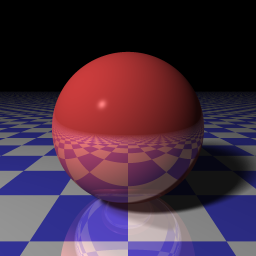


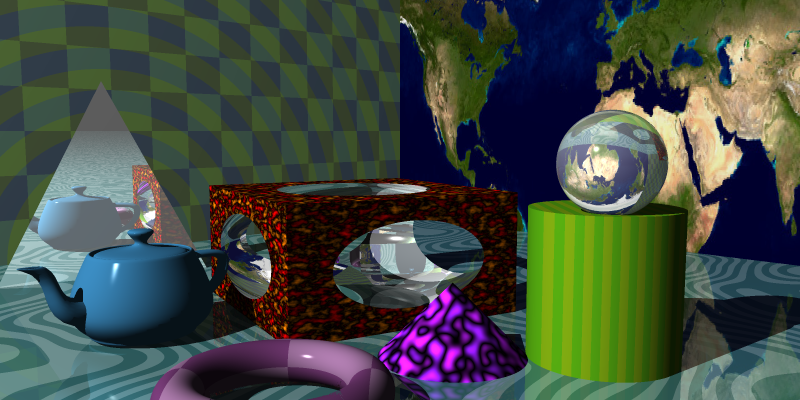
Rray is A raytracer implementation in Rust, following the book "The Ray Tracer Challenge" by Jamis Buck.
Before you begin, ensure you have met the following requirements:
- You have installed the latest version of Rust and Cargo.
To build rray, follow these steps:
cargo build --releaseThe rray executable will be built in the target/release directory.
rray has these arguments:
> rray % ./target/release/rray -h
A simple raytracer

Usage: rray [OPTIONS] --scene <SCENE>

Options:
  -W, --width <WIDTH>    Width of the generated image, default is 800 [default: 800]
  -H, --height <HEIGHT>  Height of the generated image, default is 600 [default: 600]
  -s, --scene <SCENE>    Scene file in YAML format
  -o, --output <OUTPUT>  Name of the output file, default is output.png [default: output.png]
  -a, --aa <AA>          Anti-aliasing level (default 1) (max 5) [default: 1]
  -h, --help             Print help
  -V, --version          Print version
Create your scene file in yaml format. Here is an example:
camera:
  fov: 60
  from: [0, 2.5, -5.0]
  to: [0,1,0]
  up: [0,1,0]
lights:
  - type: point
    color: [1,1,1]
    position: [-10,10,-10]
scene:
  - type: plane
    transforms: []
    material:
      pattern:
        type: checker
        pattern_a:
          type: solid
          color: [0.25, 0.25, 0.75]
          transforms: []
        pattern_b:
          type: solid
          color: [0.75, 0.75, 0.75]
          transforms: []
        transforms:
          - type: scale
            amount: [1, 1, 1]
      ambient: 0.1
      diffuse: 0.9
      specular: 0
      shininess: 200
  - type: sphere
    transforms:
     - type: translate
       amount: [0, 1, 2]
     - type: scale
       amount: [0.5, 0.5, 0.5]
    material:
     pattern:
       type: solid
       color: [1, 0, 0]
       transforms: []
     ambient: 0.1
     diffuse: 0.9
     specular: 0.9
     shininess: 200
     reflective: 0.9
     transparency: 0.1
     refractive_index: 1.5
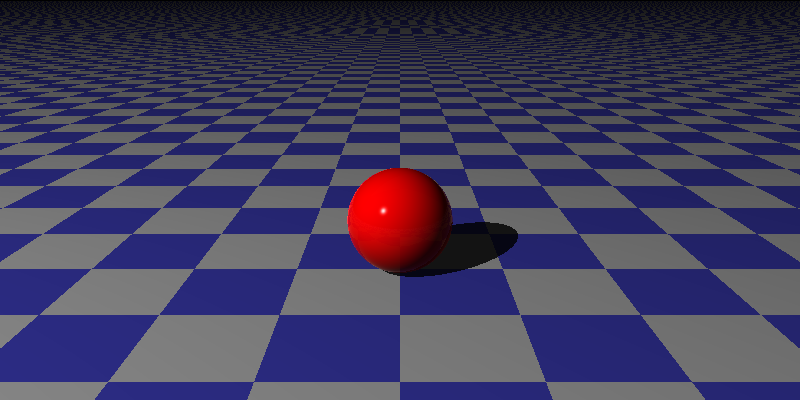
Then run the raytracer with the following command:
./target/release/rray -W 800 -H 400 -s <scene file> -o test.pngGet this image as output:
General structure
camera:
# Camera settings
lights:
# List of lights
scene:
# List of scene objectsThe camera has the following properties:
- fov: Field of view in degrees
- from: Position of the camera
- to: Point the camera is looking at
- up: Up vector of the camera
Example:
camera:
  fov: 60
  from: [0, 2.5, -5.0]
  to: [0,1,0]
up: [0,1,0]The lights section is a list of light sources. Each light source has the following properties:
- type: Type of light source (point or area only for now)
- color: Color of the light source
- position: Position of the light source (only for point lights)
- corner: Corner of the area light source
- uvec: U vector of the area light source
- vvec: V vector of the area light source
- level: sample level for the area light source (default 5), total number of samples will be level squared
Example:
lights:
  - type: point
    color: [1,1,1]
position: [-10,10,-10]lights:
- type: area
color: [1,1,1]
corner: [-1, 10, -1]
uvec: [2, 0, 0]
vvec: [0, 0, 2]
samples: 20The scene section is a list of scene objects.
Each scene object has the following properties:
- type: Type of scene object (sphere, plane, cube, cylinder, cone, triangle, torus, group, csg)
- transforms: List of transformations to apply to the object
- material: Material of the object
- hidden: If the object is hidden (default false)
- type specific properties
Here are the types of scene objects:
The sphere object has no specific properties.
Example:
  - type: sphere
    transforms:
     - type: translate
       amount: [0, 0, 0]
    material:
     pattern:
       type: solid
       color: [1, 0, 0]
     ambient: 0.1
     diffuse: 0.9
     specular: 0.9
     shininess: 200
     reflective: 0.9
     transparency: 0.1
refractive_index: 1.5The plane object has no specific properties.
Example:
  - type: plane
    transforms: []
    material:
      pattern:
        type: checker
        color_a: [ 0.25, 0.5, 0.5 ]
        color_b: [ 0.5, 0.7, 0.7 ]
        transforms:
          - type: scale
            amount: [1, 1, 1]
      ambient: 0.1
      diffuse: 0.9
      specular: 0
shininess: 200The cube object has no specific properties.
Example:
  - type: cube
    transforms:
     - type: translate
       amount: [0, 0, 0]
    material:
     pattern:
       type: solid
       color: [1, 0, 0]
     ambient: 0.1
     diffuse: 0.9
     specular: 0.9
     shininess: 200
     reflective: 0.9
     transparency: 0.1
refractive_index: 1.5The cylinder object has the following properties:
- minimum: Minimum y value of the cylinder (default -infinity)
- maximum: Maximum y value of the cylinder (default infinity)
- closed: If the cylinder has caps (default false)
Example:
  - type: cylinder
    minimum: 0
    maximum: 1
    closed: true
    transforms:
     - type: translate
       amount: [0, 0, 0]
    material:
     pattern:
       type: solid
       color: [1, 0, 0]
     ambient: 0.1
     diffuse: 0.9
     specular: 0.9
     shininess: 200
     reflective: 0.9
     transparency: 0.1
refractive_index: 1.5The cone object has the following properties:
- minimum: Minimum y value of the cone (default -infinity)
- maximum: Maximum y value of the cone (default infinity)
- closed: If the cone has caps (default false)
Example:
  - type: cone
    minimum: 0
    maximum: 1
    closed: true
    transforms:
     - type: translate
       amount: [0, 0, 0]
    material:
     pattern:
       type: solid
       color: [1, 0, 0]
     ambient: 0.1
     diffuse: 0.9
     specular: 0.9
     shininess: 200
     reflective: 0.9
     transparency: 0.1
refractive_index: 1.5The torus object has the following properties:
- minor_radius: Minor radius of the torus
The torus is centered at the origin and has a major radius of 1. It faces the z-axis.
Example:
  - type: torus
    minor_radius: 0.5
    transforms:
     - type: translate
       amount: [0, 0, 0]
    material:
     pattern:
       type: solid
       color: [1, 0, 0]
     ambient: 0.1
     diffuse: 0.9
     specular: 0.9
     shininess: 200
     reflective: 0.9
     transparency: 0.1
refractive_index: 1.5The triangle object has the following properties:
- p1: First point of the triangle
- p2: Second point of the triangle
- p3: Third point of the triangle
Example:
  - type: triangle
    p1: [0, 1, 0]
    p2: [1, 0, 0]
    p3: [0, 0, 1]
    transforms:
     - type: translate
       amount: [0, 0, 0]
    material:
     pattern:
       type: solid
       color: [1, 0, 0]
     ambient: 0.1
     diffuse: 0.9
     specular: 0.9
     shininess: 200
     reflective: 0.9
     transparency: 0.1
refractive_index: 1.5The group object has the following properties:
- children: List of scene objects that are part of the group
Example:
  - type: group
    transforms:
     - type: translate
       amount: [0, 1, 2]
    children:
      - type: sphere
        transforms:
         - type: translate
           amount: [0, 0, 0]
        material:
         pattern:
           type: solid
           color: [1, 0, 0]
         ambient: 0.1
         diffuse: 0.9
         specular: 0.9
         shininess: 200
         reflective: 0.9
         transparency: 0.1
         refractive_index: 1.5
      - type: sphere
        transforms:
         - type: translate
           amount: [0, 1, 0]
        material:
         pattern:
           type: solid
           color: [0, 1, 0]
         ambient: 0.1
         diffuse: 0.9
         specular: 0.9
         shininess: 200
         reflective: 0.9
         transparency: 0.1
refractive_index: 1.5The CSG object has the following properties:
- operation: Type of operation (union, intersection, difference)
- left: Left object
- right: Right object
Example:
  - type: csg
    operation: intersection
    left:
      type: sphere
      transforms:
       - type: translate
         amount: [0, 0, 0]
      material:
       pattern:
         type: solid
         color: [1, 0, 0]
       ambient: 0.1
       diffuse: 0.9
       specular: 0.9
       shininess: 200
       reflective: 0.9
       transparency: 0.1
       refractive_index: 1.5
    right:
      type: sphere
      transforms:
       - type: translate
         amount: [0, 1, 0]
      material:
       pattern:
         type: solid
         color: [0, 1, 0]
       ambient: 0.1
       diffuse: 0.9
       specular: 0.9
       shininess: 200
       reflective: 0.9
       transparency: 0.1
refractive_index: 1.5Each material has the following properties:
- pattern: Pattern of the material
- ambient: Ambient coefficient
- diffuse: Diffuse coefficient
- specular: Specular coefficient
- shininess: Shininess coefficient
- reflective: Reflective coefficient
- transparency: Transparency coefficient
- refractive_index: Refractive index
Example:
    material:
     pattern:
       type: solid
       color: [1, 0, 0]
     ambient: 0.1
     diffuse: 0.9
     specular: 0.9
     shininess: 200
     reflective: 0.9
     transparency: 0.1
refractive_index: 1.5The pattern object has the following properties:
- type: Type of pattern
- solid
- stripe
- gradient
- ring
- checker
- blend
- perturbed
- noise
- image
- color: Color of the pattern (used by solid pattern)
- color_a: color A
- color_b: color B
- pattern_a: sub-pattern A (can be used instead of color_a)
- pattern_b: sub-pattern B (can be used instead of color_b)
- scale: Scale of the pattern (used by perturbed, noise)
- octaves: Number of octaves (used by perturbed, noise)
- persistence: Persistence (used by perturbed, noise)
- image: Image file (used by image pattern)
- transforms: List of transformations to apply to the pattern
Examples:
solid pattern:
     pattern:
       type: solid
       color: [1, 0, 0]
stripe pattern:
     pattern:
       type: stripe
       color_a: [1, 0, 0]
       color_b: [0, 1, 0]
       transforms: []
gradient pattern:
     pattern:
       type: gradient
       color_a: [1, 0, 0]
       color_b: [0, 1, 0]
       transforms: []
ring pattern:
     pattern:
       type: ring
       color_a: [1, 0, 0]
       color_b: [0, 1, 0]
       transforms: []
checker pattern:
     pattern:
       type: checker
       color_a: [ 0.25, 0.5, 0.5 ]
       color_b: [ 0.5, 0.7, 0.7 ]
       transforms:
         - type: scale
           amount: [1, 1, 1]
blend pattern:
     pattern:
       type: blend
       pattern_a:
         type: ring
         color_a: [1, 0, 0]
         color_b: [0, 1, 0]
         transforms: []
       pattern_b:
         type: checker
         color_a: [0, 1, 0]
         color_b: [0, 0, 1]
         transforms: []
       transforms:
         - type: scale
           amount: [1, 1, 1]
perturbed pattern:
     pattern:
       type: perturbed
       scale: 0.1
       octaves: 5
       persistence: 0.5
       pattern_a:
         type: stripe
         color_a: [1, 0, 0]
         color_b: [0, 1, 0]
         transforms: []
       transforms:
         - type: scale
           amount: [0.1, 0.1, 0.1]
noise pattern:
     pattern:
       type: noise
       scale: 0.1
       octaves: 5
       persistence: 0.5
       color_a: [1, 0, 0]
       color_b: [1, 1, 0]
       transforms:
         - type: scale
           amount: [0.1, 0.1, 0.1]
image pattern:
     pattern:
       type: image
       image: "image.png"
       transforms:
         - type: scale
amount: [1, 1, 1]Each transformation has the following properties:
- type: Type of transformation
- translate
- scale
- rotate
- shear
The translate transformation has the following properties:
- amount: Amount of transformation
Example:
    transforms:
     - type: translate
amount: [0, 1, 2]The scale transformation has the following properties:
- amount: Amount of transformation
Example:
    transforms:
     - type: scale
amount: [0.5, 0.5, 0.5]The rotate transformation has the following properties:
- axis: Axis of rotation (x, y, z)
- angle: Angle of rotation in degrees
Example:
    transforms:
     - type: rotate
       axis: y
angle: 45The shear transformation has the following properties:
- xy: Amount of shear in the xy plane
- xz: Amount of shear in the xz plane
- yx: Amount of shear in the yx plane
- yz: Amount of shear in the yz plane
- zx: Amount of shear in the zx plane
- zy: Amount of shear in the zy plane
Example:
    transforms:
     - type: shear
       xy: 1
       xz: 2
       yx: 1
       yz: 3
       zx: 1
zy: 5Contributions are what make the open source community such an amazing place to learn, inspire, and create. Any contributions you make are greatly appreciated.
If you have a suggestion that would make this better, please fork the repo and create a pull request. You can also simply open an issue with the tag "enhancement". Don't forget to give the project a star! Thanks again!
- Fork the Project
- Create your Feature Branch (
git checkout -b feature/AmazingFeature) - Commit your Changes (
git commit -m 'Add some AmazingFeature') - Push to the Branch (
git push origin feature/AmazingFeature) - Open a Pull Request
Distributed under the MIT License. See MIT License for more information.
David Lopez - @davelpz
Project Link: https://github.com/davelpz/rray