
A developer-process cockpit. A TUI you leave open in a pane all day that shows the dev servers and processes you actually care about — resolved into names you recognize:
client-portal · next dev · :3000 · 340MB
Not a system monitor (btop/bottom own that). Not an lsof wrapper. Ruthlessly
developer-process-centric.
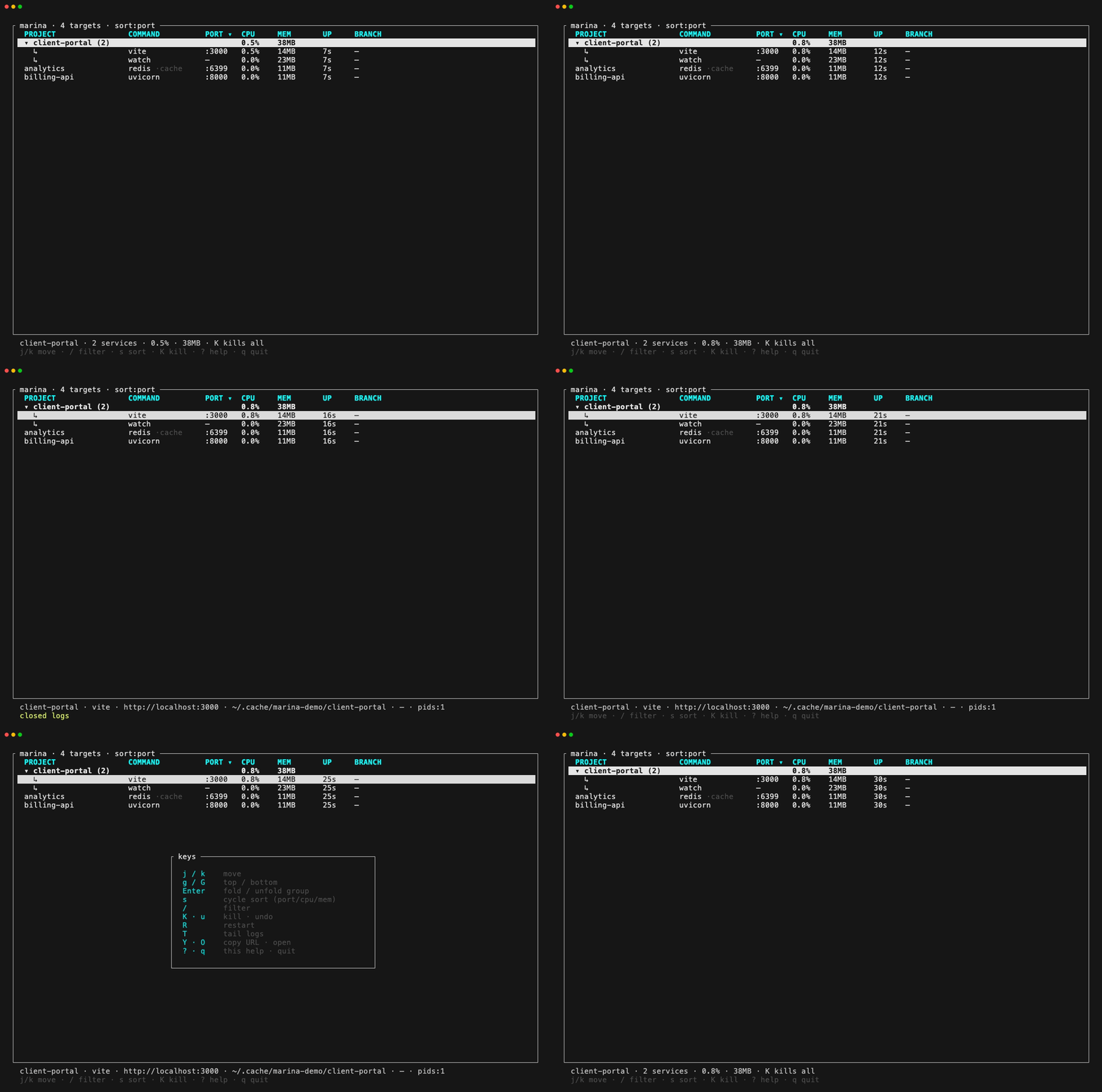
A marina is a harbour full of berthed boats — a cockpit of dev services each occupying a port.
marinaenumerates what's listening, resolves each to a project / tool / URL, groups them, and lets you act on them with one keystroke.
- Live, stable TUI — grouped by project; no flicker, no cursor-jump while you navigate, and it only redraws when something changed — an idle cockpit does near-zero work. Mouse works too (click to select, click a header to sort, wheel to move / scroll logs).
- Smart resolution — infers project + tool from cwd, argv, package manifests
(package.json / Cargo.toml / pyproject / go.mod / …) and git (worktrees and
detached HEADs included); sees through
pnpm/npm/yarn/node/corepack wrappers to the real tool (pnpm dev→vite,pnpm exec vp dev→vp dev,python -m http.server→http.server). - First-class verbs — kill (fingerprint-verified SIGTERM→SIGKILL escalation,
ucancels the force-kill), restart (waits for the port to free, captures the new process's output to a log), tail logs inline, copy URL, open in browser. Docker rows stop/restart/tail via the docker CLI. - Who started it — a
VIAcolumn names the launcher of every server: the coding-agent session (claude,codex,opencode,cursor-agent, …), the editor, or the terminal — even after the agent backgrounded it with&/nohup, via the marker variables agents export (Claude Code, Codex, opencode, Cursor, Copilot, Gemini, Amp, Goose, Cline, Qwen, …). Agent sessions are told apart by session/thread id, pid and working directory, and the inspect panel shows how to get back in (claude --resume <id>,codex resume <id>,opencode --session <id>). A server whose Claude Code session has ended is flaggedclaude·ended— an orphan — and a server nobody owns any more readsdetached.marina kill --orphanedcleans up after finished sessions; an agent can runmarina kill --mineto stop exactly the servers it started. - Honest signals — rows flash green when they appear, turn red while dying,
and if a long-running server vanishes without you killing it, marina says so
(
⚠ client-portal (:3000) exited unexpectedly). A:3000!port badge warns when a server is bound to0.0.0.0(reachable from your LAN). - Grouping — a project's services collapse under one header, and one keystroke kills the whole project. Declared groups bundle an app with its database.
- Session view — press
vto group by who started it instead: one header per agent session (claude·fal-app,codex·api), editor, or terminal, across projects.Kon a session header stops everything that session started. - Orphan notices — when an agent session ends and leaves servers running,
marina says so once —
⚠ claude session in ~/dev/app ended — left 2 servers running (480MB)— in the status line and as a desktop notification (osascript/notify-send; turn off with[notify] desktop = false). - Agent/script CLI —
marina ls --json,marina kill <project>,marina who 3000/marina free 3000, sharing the exact same resolution engine as the TUI.
Homebrew (macOS / Linux):
brew install danfry1/tap/marinaPrebuilt binary — macOS (arm64/x64) and Linux (x64), from Releases:
# macOS (Apple silicon) — adjust the target for your platform
curl -L https://github.com/danfry1/marina/releases/latest/download/marina-aarch64-apple-darwin.tar.gz | tar xz
./marina
From crates.io (package is marina-tui; the installed command is marina):
cargo install marina-tuiNix (flakes):
nix run github:danfry1/marina               # run without installing
nix profile install github:danfry1/marina   # install
From source:
cargo build --release && ./target/release/marinaRuns on macOS and Linux. On Linux, O (open) uses xdg-open and Y (copy)
uses wl-copy/xclip; accurate phys_footprint memory is macOS-only (Linux
falls back to RSS).
However you installed it, the command is marina (on your PATH):
marina        # launch the TUI — leave it open in a pane while you work
marina ls     # or a one-shot list (add --json for scripts/agents)
No flags or config needed — it auto-discovers your running dev servers. Press
? inside the TUI for the full key list.
TUI — marina
| key | action |
|---|---|
j / k, g / G |
move / jump to top·bottom (mouse: click / wheel) |
Enter |
fold / unfold a project group |
v |
group by project ↔ by agent session / launcher |
i |
inspect the selection (command, ports, cwd, launcher, pids) |
/ |
filter (project / command / port / cwd / branch / launcher — /claude, /ended) |
s |
cycle sort (port / cpu / mem) — or click a column header |
K · u |
kill selection · cancel the pending force-kill |
R · T |
restart (output captured to a log) · tail logs |
[ / ], + / - |
scroll / resize the log pane |
Y · O |
copy URL · open in browser |
Esc |
close pane / clear filter |
q / Ctrl+C |
quit |
K/R on a group header act on the whole project. Docker rows map to
docker stop / docker restart / docker logs -f.
CLI (for scripts and agents)
marina ls [sel…] [--json]     # the snapshot — table, or a stable JSON contract
marina ls --mine              # only servers started by the agent session running this
marina kill --orphaned        # stop servers whose agent session has ended
marina kill <selector>        # project name, port (3000 / :3000), or command
marina restart <selector>     # output captured to ~/.local/state/marina/logs/
marina url <selector> [--json]
marina who <port>… [--json]   # what's holding a port — dev target or not
marina free <port>… [--json]  # stop the dev target on a port, wait until it's released
marina port [name] [--json]   # a stable, collision-free port for this project/worktree
marina port --list            # every assigned port · --release [name] gives one back
marina version
port is for running many copies of a project at once — parallel agents in
parallel git worktrees all reaching for :3000:
pnpm dev --port $(marina port)        # in each worktree: its own port, every time
PORT=$(marina port api) cargo run     # several services in one tree: name them
Each project root (each worktree, each package of a monorepo) gets its own port
from 3100–3999 ([ports] range in config), chosen by a stable hash and
remembered in ~/.local/state/marina/ports.json. Assignments are made under a
file lock, so concurrent callers never collide; a port taken over by another
project's process is replaced (with a note on stderr), while this project's own
server keeps it. Assignments for deleted worktrees are dropped automatically.
who and free are for the EADDRINUSE moment:
$ marina who 3000
:3000  client-portal · next dev · pid 4121 · up 3d · feat/x · ~/dev/client-portal
$ marina free 3000 && pnpm dev
:3000  freed — stopped client-portal · next dev
Both take ports only (no name matching). who exits 1 when the port is free.
free is idempotent — an already-free port is success — and it refuses to touch
a holder that isn't a dev target (e.g. macOS ControlCenter on :5000), naming it
instead.
A selector matching a project name acts on every service under it. Exit
codes: 0 ok, 1 no match, 2 usage error — and unknown commands/flags are
errors, they never fall through to the TUI.
The CLI is built to be driven by coding agents. The usage instructions are a tool-neutral Markdown skill — .agents/skills/marina/SKILL.md. Install it into your agent's skills directory:
mkdir -p .agents/skills/marina        # or ~/.agents/skills/marina for every project
curl -fsSL https://raw.githubusercontent.com/danfry1/marina/main/.agents/skills/marina/SKILL.md \
  -o .agents/skills/marina/SKILL.md
Claude Code looks in ~/.claude/skills/ instead — same file, that path. For any
other agent, point it at the file or load the directory however it discovers skills.
Then ask "what's running?", "kill the client-portal project", or "what's on
:3000?" and the agent drives marina ls --json / marina kill <project>.
Optional ~/.config/marina/config.toml (respects $XDG_CONFIG_HOME):
[[rule]]                       # classify a command -> label (+ optional URL)
match_cmd = "next dev"
label     = "next dev"
url       = "http://localhost:{port}"

[[watch]]                      # port-less workloads to surface (e.g. watchers)
match_cmd = "tsc.*--watch|jest|vitest"
label     = "watcher"

[[override]]                   # pin a stubborn target
match_port = 3000
project    = "client-portal"

[[group]]                      # bundle services that don't share a cwd (app + db)
name    = "client-portal"
members = [3000, 5432, "worker"]

[[ignore]]                     # hide noise the heuristics keep picking up
match_cmd  = "OrbStack|CloudSyncAgent"   # and/or match_port = 7000

[notify]
desktop = false # no desktop notification for orphaned serversmarina is deliberately boring on this front:
- Local only — no network, ever. There is no HTTP/TLS or networking client in
the dependency tree, and no code that opens a connection. No telemetry, no
phone-home, no data leaves your machine. (
netstat2/libprocread the OS's socket and process tables locally;miopolls the terminal for keystrokes.) - Almost nothing is persisted. marina reads, displays, and forgets. The only
optional file it reads is
~/.config/marina/config.toml. Its writes are user-triggered and live under~/.local/state/marina/: when you restart a process (R/marina restart), the new process's stdout/stderr is captured tologs/<project>.logsoTcan always tail it; andmarina portrecords its assignments (port, project root, optional service name, timestamps) inports.json. - Your processes, your permissions. It runs unprivileged (no
sudo) and only ever inspects your own user's processes — system/root daemons and anything outside$HOMEare filtered out (and the OS wouldn't let it read others anyway). It also never lists the session it runs in (your shell / terminal /ssh), so you can't accidentally kill your own connection. It's the same class of introspectionps,lsof, and your IDE already do. - What it reads: a process's
cwd, argv, cpu/memory; a fixed allowlist of agent-marker environment variables (CLAUDE_PID,CLAUDE_CODE_SESSION_ID,CODEX_THREAD_ID,OPENCODE_SESSION_ID,AI_AGENT,AGENT, … — the full list isMARKERSin src/launcher.rs), used to attribute a server to its agent session. Of those, only pids and validated session ids are kept; flag values are never read, and no other variable is kept, displayed, or serialized; the nearest project manifest'sname(package.json / Cargo.toml / …);.git/HEADfor the branch; and, only when you pressTto tail logs, its open file descriptors (vialsof) and the discovered log file. - Secrets stay internal. Command-line args can contain tokens/passwords, so
marina never displays, serializes, or logs raw argv — the UI and
ls --jsonshow only derived labels (next dev,vite); even the inspect panel shows just the program path and an arg count. argv is used for classification and captured forrestart, and never leaves the process. - Outbound actions are only the ones you trigger:
Oopens a URL in your browser,Ycopies to the clipboard,K/Rsend signals to your processes. The one unprompted action is a local desktop notification when an agent session leaves servers behind ([notify] desktop = falsedisables it).
See DESIGN.md and the glossary in CONTEXT.md.
macOS + Linux · ~8.3k LOC · 127 tests (CI builds + tests on both). Docker container
naming + verbs are implemented but pending live verification against a running
daemon; container cpu/mem (docker stats), restart env-capture, and an MCP
wrapper are future work.