Skip to content

Conversation

@MattiasGees
Copy link
Contributor

When your Elasticsearch is running inside your VPC, you also need to run your Lambda function inside your VPC. This is the groundwork to make it possible.
We need to do the following:

  • Create securitygroup for Lambda + open ports both on Lambda and Elasticsearch side
  • Extend IAM role to allow VPC execution
  • Add the variables subnet_ids and the elasticsearch securitygroup

When subnet_ids and elasticsearch_sg_id are empty it will create the lambda without VPC support. These changes are backwards compatible and will not break previous behaviour.

I tested this change the following ways
Without VPC

module "es_cleanup" {
  source = "<path_to_module>/aws-lambda-es-cleanup/terraform"

  prefix       = "test-"
  es_endpoint  = "https://es-endpoint.test"
  index        = "cwl"
  delete_after = 31
  index_format = "%Y.%m.%d"
  python_version = "3.6"
}

With VPC support

module "es_cleanup" {
  source = "<path_to_module>/aws-lambda-es-cleanup/terraform"

  prefix       = "test-"
  es_endpoint  = "https://es-endpoint.test"
  es_endpoint  = "${data.terraform_remote_state.elasticsearch.es_logs_endpoint}"
  index        = "cwl"
  delete_after = 31
  index_format = "%Y.%m.%d"
  python_version = "3.6"
  subnet_ids          = ["<subnet_id"]
  elasticsearch_sg_id = "sg-xxxx"
}

Plan of without shows this

  + module.es_cleanup.aws_lambda_function.es_cleanup
      id:                                   <computed>
      arn:                                  <computed>
      environment.#:                        "1"
      environment.0.variables.%:            "5"
      environment.0.variables.delete_after: "31"
      environment.0.variables.es_endpoint:  "https://es-endpoint.test"
      environment.0.variables.index:        "cwl"
      environment.0.variables.index_format: "%Y.%m.%d"
      environment.0.variables.sns_alert:    ""
      filename:                             "/Users/stacks/cwlogs-to-es/.terraform/modules/6894bcd4a8a3d05d502dd16ebb78c508/es-cleanup.zip"
      function_name:                        "test-es-cleanup"
      handler:                              "es-cleanup.lambda_handler"
      invoke_arn:                           <computed>
      last_modified:                        <computed>
      memory_size:                          "128"
      publish:                              "false"
      qualified_arn:                        <computed>
      role:                                 "${aws_iam_role.role.arn}"
      runtime:                              "python3.6"
      source_code_hash:                     "oSpCIkdW1m/XxRRvbD8CC8t2XpXSjI52r1djIT0ZA6E="
      timeout:                              "300"
      tracing_config.#:                     <computed>
      version:                              <computed>
      vpc_config.#:                         "1"
      vpc_config.0.vpc_id:                  <computed>

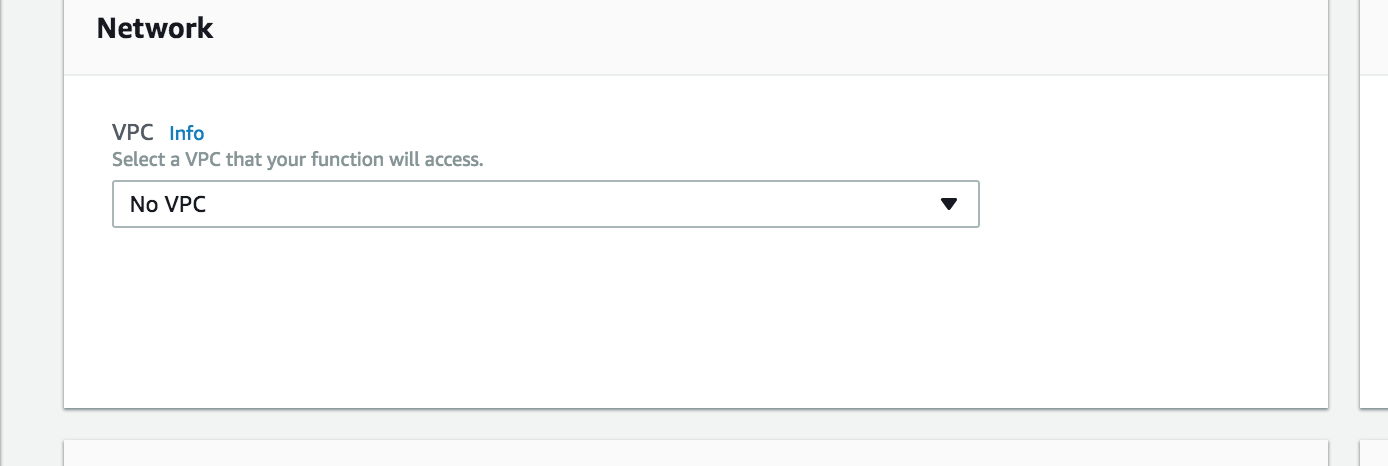
After deploy I checked the Lambda function
screen shot 2018-02-27 at 17 58 19

When your Elasticsearch is running inside your VPC, you also need to run your Lambda function inside your VPC. This is the groundwork to make it possible.
We need to do the following:
- Create securitygroup for Lambda + open ports both on Lambda and Elasticsearch side
- Extend IAM role to allow VPC execution
- Add the variables subnet_ids and the elasticsearch securitygroup
@giuliocalzo
Copy link
Contributor

Hi @MattiasGees thanks again for your PR,
I did some commit to fix some little issue like IAM permission to run on VPC and some var.prefix

I did a simplification on Security Group in order to avoid circular dependency between modules
could be a very nice to have a flag to enabled/disabled the SG creation

@MattiasGees
Copy link
Contributor Author

MattiasGees commented Feb 28, 2018

@giuliocalzolari Reason I like to split up security_group and security_group_rule is that it is easier to add rules afterwards from other places if needed. Circular dependency issues shouldn't be a real problem here.

I also went for the security group to security group approach instead of the 0.0.0.0 is of security reasons. I always try to limit the attack vectors.

IAM is indeed correct and I forgot about it.

@giuliocalzo
Copy link
Contributor

@MattiasGees understood your point about security.
Keep in mind this lambda performs only outgoing connections over https to a specific endpoint. There isn't any public exposure.

just added some if conditions to maintain the compatibility between ES Public vs ES VPC.

Quick example:

module "public_es_cleanup" {
  source       = "github.com/skyscrapers/aws-lambda-es-cleanup.git//terraform?ref=c7c4fc9e9034afa01f13a924f39577ab00d72192"

  prefix       = "public-es"
  es_endpoint  = "search-demo-bue23pz5lzqzoc3m2ipc22554u.eu-central-1.es.amazonaws.com"

}


module "vpc_es_cleanup" {
  source       = "github.com/skyscrapers/aws-lambda-es-cleanup.git//terraform?ref=c7c4fc9e9034afa01f13a924f39577ab00d72192"

  prefix       = "vpc_es_"
  es_endpoint  = "vpc-demo-gloo5rzcdhyiykwdlots2hdjla.eu-central-1.es.amazonaws.com"
  subnet_ids   = ["subnet-d8660da2"]
}

@MattiasGees
Copy link
Contributor Author

@giuliocalzolari the compatibility was working without the if conditions. I explicitly tested this see #10 (comment)

When you don't fill in subnet_ids, the vpc_config block inside the lambda is both times an empty list and the lambda will be created outside of the VPC (same as the original behaviour from before my PR). This is also explained in https://www.terraform.io/docs/providers/aws/r/lambda_function.html#vpc_config

NOTE: if both subnet_ids and security_group_ids are empty then vpc_config is considered to be empty or unset.

I think there is now a lot of code duplication that is not needed.

@MattiasGees
Copy link
Contributor Author

@giuliocalzolari what do you think?

@giuliocalzo
Copy link
Contributor

Hi @MattiasGees I'm testing all use case. Can you tell me which terraform version are you using and which Aws provider version are you using?

@MattiasGees
Copy link
Contributor Author

Terraform v0.11.3
AWS 1.10.0

@giuliocalzo
Copy link
Contributor

Hi @MattiasGees
also without parameters

it means subnet_ids = [] this is the output
terraform try to build create vpc_config with nil value

  vpc_config.#: "0" => "1"

Error: Error applying plan:

1 error(s) occurred:

* module.public_es_cleanup.aws_lambda_function.es_cleanup: 1 error(s) occurred:

* aws_lambda_function.es_cleanup: vpc_config is <nil>

I use the same version of you.

keep in mind with this configuration we can create a function inside or outside the vpc using the same module

@MattiasGees
Copy link
Contributor Author

@giuliocalzolari This is really weird. I just tested my PR an in there it works. Steps I took

main.tf

provider "aws" {
  region = "eu-west-1"
}

module "es_cleanup" {
  source              = "github.com/skyscrapers/aws-lambda-es-cleanup//terraform?ref=3df5e9c52292270e6c4bfc2bfec663aca6c6bc2e"
  prefix              = "testpr-"
  es_endpoint         = "https://127.0.0.1"
  index               = "cwl"
  delete_after        = 31
  index_format        = "%Y.%m.%d"
  python_version      = "3.6"
}

You can see I took my commit of the pr + left out the subnet id and the elasticsearch security group.

terraform init

Initializing modules...
- module.es_cleanup
  Getting source "github.com/skyscrapers/aws-lambda-es-cleanup//terraform?ref=3df5e9c52292270e6c4bfc2bfec663aca6c6bc2e"

Initializing provider plugins...
- Checking for available provider plugins on https://releases.hashicorp.com...
- Downloading plugin for provider "archive" (1.0.0)...
- Downloading plugin for provider "aws" (1.10.0)...
- Downloading plugin for provider "template" (1.0.0)...

The following providers do not have any version constraints in configuration,
so the latest version was installed.

To prevent automatic upgrades to new major versions that may contain breaking
changes, it is recommended to add version = "..." constraints to the
corresponding provider blocks in configuration, with the constraint strings
suggested below.

* provider.archive: version = "~> 1.0"
* provider.aws: version = "~> 1.10"
* provider.template: version = "~> 1.0"

Terraform has been successfully initialized!

You may now begin working with Terraform. Try running "terraform plan" to see
any changes that are required for your infrastructure. All Terraform commands
should now work.

If you ever set or change modules or backend configuration for Terraform,
rerun this command to reinitialize your working directory. If you forget, other
commands will detect it and remind you to do so if necessary.

terraform apply

data.archive_file.es_cleanup_lambda: Refreshing state...
data.template_file.policy: Refreshing state...

An execution plan has been generated and is shown below.
Resource actions are indicated with the following symbols:
  + create

Terraform will perform the following actions:

  + module.es_cleanup.aws_cloudwatch_event_rule.schedule
      id:                                   <computed>
      arn:                                  <computed>
      description:                          "es-cleanup execution schedule"
      is_enabled:                           "true"
      name:                                 "testpr-es-cleanup-execution-schedule"
      schedule_expression:                  "cron(0 3 * * ? *)"

  + module.es_cleanup.aws_cloudwatch_event_target.es_cleanup
      id:                                   <computed>
      arn:                                  "${aws_lambda_function.es_cleanup.arn}"
      rule:                                 "testpr-es-cleanup-execution-schedule"
      target_id:                            "testpr-lambda-es-cleanup"

  + module.es_cleanup.aws_iam_policy.policy
      id:                                   <computed>
      arn:                                  <computed>
      description:                          "Policy for es-cleanup Lambda function"
      name:                                 "testpr-es-cleanup"
      path:                                 "/"
      policy:                               "{\n  \"Version\": \"2012-10-17\",\n  \"Statement\": [\n    {\n      \"Sid\": \"LambdaLogCreation\",\n      \"Effect\": \"Allow\",\n      \"Action\": [\"logs:*\"],\n      \"Resource\": \"arn:aws:logs:*:*:*\"\n    },\n    {\n      \"Sid\": \"ESPermission\",\n      \"Effect\": \"Allow\",\n      \"Action\": [\n        \"es:*\"\n      ],\n      \"Resource\": \"*\"\n    }\n  ]\n}"

  + module.es_cleanup.aws_iam_role.role
      id:                                   <computed>
      arn:                                  <computed>
      assume_role_policy:                   "{\n  \"Version\": \"2012-10-17\",\n  \"Statement\": [\n    {\n      \"Effect\": \"Allow\",\n      \"Principal\": {\n        \"Service\": \"lambda.amazonaws.com\"\n      },\n      \"Action\": \"sts:AssumeRole\"\n    }\n  ]\n}\n"
      create_date:                          <computed>
      force_detach_policies:                "false"
      name:                                 "testpr-es-cleanup"
      path:                                 "/"
      unique_id:                            <computed>

  + module.es_cleanup.aws_iam_role_policy_attachment.policy_attachment
      id:                                   <computed>
      policy_arn:                           "${aws_iam_policy.policy.arn}"
      role:                                 "testpr-es-cleanup"

  + module.es_cleanup.aws_lambda_function.es_cleanup
      id:                                   <computed>
      arn:                                  <computed>
      environment.#:                        "1"
      environment.0.variables.%:            "5"
      environment.0.variables.delete_after: "31"
      environment.0.variables.es_endpoint:  "https://127.0.0.1"
      environment.0.variables.index:        "cwl"
      environment.0.variables.index_format: "%Y.%m.%d"
      environment.0.variables.sns_alert:    ""
      filename:                             "/Users/mattias/Documents/git/skyscrapers/skyscrapers-terraform/stacks/test/.terraform/modules/dd1e28959ebb36594642aef891181702/terraform/es-cleanup.zip"
      function_name:                        "testpr-es-cleanup"
      handler:                              "es-cleanup.lambda_handler"
      invoke_arn:                           <computed>
      last_modified:                        <computed>
      memory_size:                          "128"
      publish:                              "false"
      qualified_arn:                        <computed>
      role:                                 "${aws_iam_role.role.arn}"
      runtime:                              "python3.6"
      source_code_hash:                     "oSpCIkdW1m/XxRRvbD8CC8t2XpXSjI52r1djIT0ZA6E="
      timeout:                              "300"
      tracing_config.#:                     <computed>
      version:                              <computed>
      vpc_config.#:                         "1"
      vpc_config.0.vpc_id:                  <computed>

  + module.es_cleanup.aws_lambda_permission.allow_cloudwatch
      id:                                   <computed>
      action:                               "lambda:InvokeFunction"
      function_name:                        "${aws_lambda_function.es_cleanup.arn}"
      principal:                            "events.amazonaws.com"
      source_arn:                           "${aws_cloudwatch_event_rule.schedule.arn}"
      statement_id:                         "AllowExecutionFromCloudWatch"


Plan: 7 to add, 0 to change, 0 to destroy.

Do you want to perform these actions?
  Terraform will perform the actions described above.
  Only 'yes' will be accepted to approve.

  Enter a value: yes

module.es_cleanup.aws_cloudwatch_event_rule.schedule: Creating...
  arn:                 "" => "<computed>"
  description:         "" => "es-cleanup execution schedule"
  is_enabled:          "" => "true"
  name:                "" => "testpr-es-cleanup-execution-schedule"
  schedule_expression: "" => "cron(0 3 * * ? *)"
module.es_cleanup.aws_iam_role.role: Creating...
  arn:                   "" => "<computed>"
  assume_role_policy:    "" => "{\n  \"Version\": \"2012-10-17\",\n  \"Statement\": [\n    {\n      \"Effect\": \"Allow\",\n      \"Principal\": {\n        \"Service\": \"lambda.amazonaws.com\"\n      },\n      \"Action\": \"sts:AssumeRole\"\n    }\n  ]\n}\n"
  create_date:           "" => "<computed>"
  force_detach_policies: "" => "false"
  name:                  "" => "testpr-es-cleanup"
  path:                  "" => "/"
  unique_id:             "" => "<computed>"
module.es_cleanup.aws_iam_policy.policy: Creating...
  arn:         "" => "<computed>"
  description: "" => "Policy for es-cleanup Lambda function"
  name:        "" => "testpr-es-cleanup"
  path:        "" => "/"
  policy:      "" => "{\n  \"Version\": \"2012-10-17\",\n  \"Statement\": [\n    {\n      \"Sid\": \"LambdaLogCreation\",\n      \"Effect\": \"Allow\",\n      \"Action\": [\"logs:*\"],\n      \"Resource\": \"arn:aws:logs:*:*:*\"\n    },\n    {\n      \"Sid\": \"ESPermission\",\n      \"Effect\": \"Allow\",\n      \"Action\": [\n        \"es:*\"\n      ],\n      \"Resource\": \"*\"\n    }\n  ]\n}"
module.es_cleanup.aws_iam_policy.policy: Creation complete after 0s (ID: arn:aws:iam::847239549153:policy/testpr-es-cleanup)
module.es_cleanup.aws_cloudwatch_event_rule.schedule: Creation complete after 1s (ID: testpr-es-cleanup-execution-schedule)
module.es_cleanup.aws_iam_role.role: Creation complete after 1s (ID: testpr-es-cleanup)
module.es_cleanup.aws_iam_role_policy_attachment.policy_attachment: Creating...
  policy_arn: "" => "arn:aws:iam::847239549153:policy/testpr-es-cleanup"
  role:       "" => "testpr-es-cleanup"
module.es_cleanup.aws_lambda_function.es_cleanup: Creating...
  arn:                                  "" => "<computed>"
  environment.#:                        "" => "1"
  environment.0.variables.%:            "" => "5"
  environment.0.variables.delete_after: "" => "31"
  environment.0.variables.es_endpoint:  "" => "https://127.0.0.1"
  environment.0.variables.index:        "" => "cwl"
  environment.0.variables.index_format: "" => "%Y.%m.%d"
  environment.0.variables.sns_alert:    "" => ""
  filename:                             "" => "/Users/mattias/Documents/git/skyscrapers/skyscrapers-terraform/stacks/test/.terraform/modules/dd1e28959ebb36594642aef891181702/terraform/es-cleanup.zip"
  function_name:                        "" => "testpr-es-cleanup"
  handler:                              "" => "es-cleanup.lambda_handler"
  invoke_arn:                           "" => "<computed>"
  last_modified:                        "" => "<computed>"
  memory_size:                          "" => "128"
  publish:                              "" => "false"
  qualified_arn:                        "" => "<computed>"
  role:                                 "" => "arn:aws:iam::847239549153:role/testpr-es-cleanup"
  runtime:                              "" => "python3.6"
  source_code_hash:                     "" => "oSpCIkdW1m/XxRRvbD8CC8t2XpXSjI52r1djIT0ZA6E="
  timeout:                              "" => "300"
  tracing_config.#:                     "" => "<computed>"
  version:                              "" => "<computed>"
  vpc_config.#:                         "" => "1"
  vpc_config.0.vpc_id:                  "" => "<computed>"
module.es_cleanup.aws_iam_role_policy_attachment.policy_attachment: Creation complete after 2s (ID: testpr-es-cleanup-20180306073946601000000001)
module.es_cleanup.aws_lambda_function.es_cleanup: Still creating... (10s elapsed)
module.es_cleanup.aws_lambda_function.es_cleanup: Creation complete after 17s (ID: testpr-es-cleanup)
module.es_cleanup.aws_cloudwatch_event_target.es_cleanup: Creating...
  arn:       "" => "arn:aws:lambda:eu-west-1:847239549153:function:testpr-es-cleanup"
  rule:      "" => "testpr-es-cleanup-execution-schedule"
  target_id: "" => "testpr-lambda-es-cleanup"
module.es_cleanup.aws_lambda_permission.allow_cloudwatch: Creating...
  action:        "" => "lambda:InvokeFunction"
  function_name: "" => "arn:aws:lambda:eu-west-1:847239549153:function:testpr-es-cleanup"
  principal:     "" => "events.amazonaws.com"
  source_arn:    "" => "arn:aws:events:eu-west-1:847239549153:rule/testpr-es-cleanup-execution-schedule"
  statement_id:  "" => "AllowExecutionFromCloudWatch"
module.es_cleanup.aws_lambda_permission.allow_cloudwatch: Creation complete after 1s (ID: AllowExecutionFromCloudWatch)
module.es_cleanup.aws_cloudwatch_event_target.es_cleanup: Creation complete after 1s (ID: testpr-es-cleanup-execution-schedule-testpr-lambda-es-cleanup)

Apply complete! Resources: 7 added, 0 changed, 0 destroyed.

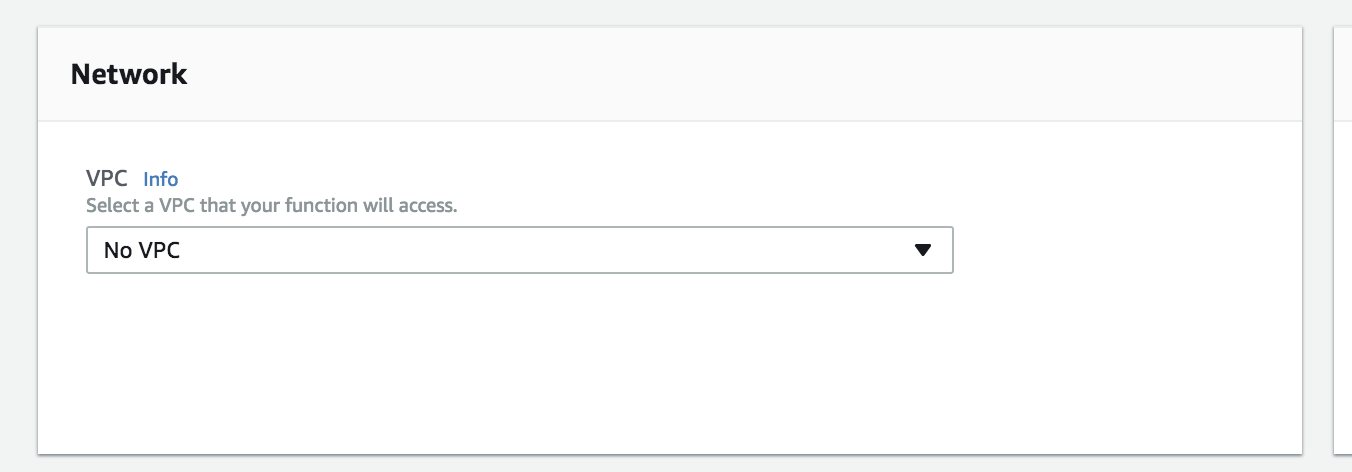
I then looked at the lambda function and there it shows the lambda function without VPC
screen shot 2018-03-06 at 08 43 51

I don't know which commit you tested or with which code, but with my example you should be able to reproduce it.

This is all tested with this commit skyscrapers@3df5e9c

@giuliocalzo
Copy link
Contributor

Hi @MattiasGees
I manage to reproduce the issue

the problem appear only on the second execution
the first is perfect

$ terraform apply
.... omitt...
  statement_id:  "" => "AllowExecutionFromCloudWatch"
module.es_cleanup.aws_lambda_permission.allow_cloudwatch: Creation complete after 0s (ID: AllowExecutionFromCloudWatch)
module.es_cleanup.aws_cloudwatch_event_target.es_cleanup: Creation complete after 0s (ID: testpr-es-cleanup-execution-schedule-testpr-lambda-es-cleanup)

Apply complete! Resources: 7 added, 0 changed, 0 destroyed.

second execution

[10:08:45] gc ~/aws-lambda-es-cleanup $ terraform apply
data.template_file.policy: Refreshing state...
data.archive_file.es_cleanup_lambda: Refreshing state...
aws_iam_role.role: Refreshing state... (ID: testpr-es-cleanup)
aws_iam_policy.policy: Refreshing state... (ID: arn:aws:iam::111111111:policy/testpr-es-cleanup)
aws_cloudwatch_event_rule.schedule: Refreshing state... (ID: testpr-es-cleanup-execution-schedule)
aws_lambda_function.es_cleanup: Refreshing state... (ID: testpr-es-cleanup)
aws_iam_role_policy_attachment.policy_attachment: Refreshing state... (ID: testpr-es-cleanup-20180307100826942900000001)
aws_cloudwatch_event_target.es_cleanup: Refreshing state... (ID: testpr-es-cleanup-execution-schedule-testpr-lambda-es-cleanup)
aws_lambda_permission.allow_cloudwatch: Refreshing state... (ID: AllowExecutionFromCloudWatch)

An execution plan has been generated and is shown below.
Resource actions are indicated with the following symbols:
  ~ update in-place

Terraform will perform the following actions:

  ~ module.es_cleanup.aws_lambda_function.es_cleanup
      vpc_config.#: "0" => "1"


Plan: 0 to add, 1 to change, 0 to destroy.

Do you want to perform these actions?
  Terraform will perform the actions described above.
  Only 'yes' will be accepted to approve.

  Enter a value: yes

module.es_cleanup.aws_lambda_function.es_cleanup: Modifying... (ID: testpr-es-cleanup)
  vpc_config.#: "0" => "1"

Error: Error applying plan:

1 error(s) occurred:

* module.es_cleanup.aws_lambda_function.es_cleanup: 1 error(s) occurred:

* aws_lambda_function.es_cleanup: vpc_config is <nil>

Terraform does not automatically rollback in the face of errors.
Instead, your Terraform state file has been partially updated with
any resources that successfully completed. Please address the error
above and apply again to incrementally change your infrastructure.

this is the reason why I was forced to write more code if multiple if
I believe there is a bug in the module aws_lambda_function I'm going to open an issue on the main terraform-provider-aws repo

thanks for your support

@giuliocalzo
Copy link
Contributor

Sign up for free to join this conversation on GitHub. Already have an account? Sign in to comment

Projects

None yet

Development

Successfully merging this pull request may close these issues.

2 participants