Repository navigation
Api behind Basic authentication and NTLM authentication #39
Description

Hi, I have api on iis server behind basic windows authentication and i cannot use cors. So I tried to use this module but however I configure it I cannot log into api and I get 401 every time
I tried
    server.middleware = proxyMiddleware(
        '/api',
        {
            target: 'API_HOST',
            logLevel: 'debug'
        }
); server.middleware = proxyMiddleware(
'/api',
{
target: 'API_HOST',
logLevel: 'debug',
auth: 'LOGIN:PASS'
}
); server.middleware = proxyMiddleware(
'/api',
{
target: 'http://LOGIN:PASS@API_HOST',
logLevel: 'debug'
}
);
Activity
chimurai commentedon Nov 20, 2015
Hi, I haven't used the
authoption personally yet.the
authoption is provided by the underlying http-proxy library.Did a search in their https://github.com/nodejitsu/node-http-proxy/tree/master/examples, but I could not find any examples how to use the
authoption.But I did found a unit test:
https://github.com/nodejitsu/node-http-proxy/blob/302d981dd2cf06dbf751b1f64e3dfea08d0f9476/test/lib-http-proxy-passes-web-incoming-test.js#L303
Their unit test looks like the 2nd case you've provided.
Is 'API_HOST' really your
target?the
targetshould include thehttp:orhttps:protocolchimurai commentedon Nov 20, 2015
You could try setting
changeOrigintotrueand see if that helps.zychj1 commentedon Nov 25, 2015
Yep API HOST is really my target, when i go to localhost:3000/api uri directly in the browser i get 401 error page and requests are forwarded to correct url but i cannot authorize.
i get something in header like:
from browse ajax request:
chimurai commentedon Nov 25, 2015
http-proxy-middlewareuseshttp-proxyto do the actual proxy work.This is what I found in their NTLM authentication example:
https://github.com/nodejitsu/node-http-proxy/blob/master/examples/http/ntlm-authentication.js
You'll have to modify the headers.
The
http-proxyproxyResevent is exposed via thehttp-proxy-middlwareoption:onProxyRes.Example: https://github.com/chimurai/http-proxy-middleware/blob/master/recipes/onProxyRes.md
If I combine the two examples you'll get this config:
Let me know if this works.
If it doesn't, you might want to ask the question at: https://github.com/nodejitsu/node-http-proxy/issues; since the authentication part is handled by the
http-proxylibrary.zychj1 commentedon Nov 26, 2015
I can see some progress for
right now on going on localhost:3000/api is infinite authorization popup, i will ask on the other project as You suggest
chimurai commentedon Nov 26, 2015
That sounds promising.
I noticed the usage of
agentkeepalivein their example;Did a search on the nuts and bolts of the NTLM Authentication Scheme:
http://www.innovation.ch/personal/ronald/ntlm.htmlhttps://web.archive.org/web/20210126065105/http://www.innovation.ch/personal/ronald/ntlm.html
This explains why 'keep alive' is needed.
Updated configuration:
chimurai commentedon Dec 4, 2015
@zychj1 any progress on this issue?
pierreconstantial commentedon Apr 25, 2016
@chimurai I run in exactly the same problem and I can confirm that the configuration provided in your comment from Nov 26, 2015 (with keepalive and header rewriting) is solving the issue. Many thanks!
chimurai commentedon Apr 25, 2016
@pierreconstantial
Glad to hear the example NTLM configuration solves the issue.
Thanks for the confirmation!
[-]Api behind basic auth[/-][+]Api behind Basic authentication and NTLM authentication[/+]EladBezalel commentedon Nov 14, 2016
hey @chimurai i'm having the same problem discussed on nodejs/node#8004,
I've tried to use the same configuration as here and also use the simple
Agentwith keepAlive option of node'shttpmodule.I'm using
webpack-dev-serverwith the proxy property and having a WebApi server with NTLM authentication.Thanks ahead for your help!
64 remaining items
DustinDSchultz commentedon Jul 18, 2019
@richardtallent, @Perogy, I'm having this issue too. I've been dealing with it for about 3 months and I've been trying to find a pattern to it and haven't been able to come up with anything tangible. I've tried everything recommended here and spent quite a few hours digging into the requests myself. I'm using it to proxy calls through my dev server to our backend API to bypass CORS in development since CORS isn't required by our prod configuration. For some reason the last few days have been pretty unbearable, probably because we recently moved our API to the cloud.
Aaron-Pool commentedon Jul 25, 2019
Bump for the last four comments. I'm in the same boat. The suggestions here work sometimes, but sometimes the connection still putters out and starts throwing authentication prompts. I think it has something to do with keeping the authenticated TCP connection open. But my knowledge of server protocols is pretty limited.
sm-cdecker commentedon Jul 30, 2019
I've had pretty good success with the agentkeepalive module, though for some reason it does NOT like signalr. If I try to route signalr calls through the proxy it just seems to break all the other calls and I wind up with the infinite login prompt. Maybe its an issue of websockets+ntlm?
mgoertz-dev commentedon Feb 19, 2020
I have the same issue as @richardtallent and @Perogy. I am temporarily using the work around that restricts the maxSockets to 1, which seems to minimize the frequency of the issue but am wondering if there is any update on a resolution?
maa105 commentedon Apr 16, 2020
I tried this instead of just fixing the www-authenticate header. it worked intermittently like once it work and 10 times it wont :(
also tried:
sam-michael commentedon Apr 29, 2020
Do not use the simple agentkeepalive use instead agentkeepalive-ntlm
https://github.com/pappan123/agentkeepalive-ntlm
Here is a quick description explaining the issue:
The main motivation for this fork from agentkeepalive was to support user specific NTLM sessions. For NTLM to work, the TCP connection has to be authorized for a user. When we use the base 'agentkeepalive', sockets are authorized using a combination of the host + port. eg yahoo.com:443. However if multiple users are trying to access a NTLM enabled site, the socket connections were getting mixed up between users. Changed the implementation to include 'host+port+cookieName' while assigning sockets
If you use the code shown by mikedevita it must work.
babycasper123 commentedon May 10, 2020
This worked ! You are a gem :) <3
I was having CORS issues with .net core back end API where only windows auth could be enabled and no anonymous auth , this was causing preflight error. Your solution works perfectly with the proxy server.
alexmnv commentedon Mar 30, 2021
I had an issue with NTLM authentication when subsequent auth requests failed (usually after reloading the page). The issue turned out to be that Agent performed NTLM auth requests with different connections from the pool.
Changing maxFreeSockets to 1 solved the issue.
mvpete commentedon Oct 14, 2021
Hello -- I have information on what is causing this issue. My background isn't in the JavaScript/node world, meaning I don't have the relevant experience to go it alone. So if someone wants to chat about this issue. I'd love to tackle it together.
In short, there seems to be two issues. The first solved by
Is that the proxy was collapsing the
www-authenticateheaders into one line. Something likeinto
Seemingly, the browser will not begin the NTLM negotiation when it's collapsed. Even though, I think that's okay as per the standard. But the browser (I was using chrome) doesn't like it and won't reply to the challenge.
The problem with the infinite authentication dialogs comes from the real problem. Which is that NTLM negotiation requires a single TCP connection which is kept alive. The NTLM negotiation happens in 3 parts. The original request, the first challenge, and a second challenge. After the TCP socket is authenticated, as long as it stays alive each successive request will work without auth.
When we're proxying, there doesn't seem to be a connection between the incoming (from the browser), and the outgoing (to the IIS server). Why is this a problem? Because the 3 part handshake which happens in 3 separate requests through the proxy, can happen on 3 different outgoing sockets to the server. So the browser, and the server both get confused.
In order to mitigate this, I was able to set the outgoing agent configuration to use a single socket
maxSockets : 1, and keep alive to true, with a long timeoutkeepAlive : true, timeout : 999999. This tells thehttp.Agentto keep the outgoing sockets alive, for a long time. The maxSockets, tells it to only use one outgoing connection. This works, for the most part. However, it's slow, and it's not quite right. Because if you look at an actual interaction between the browser and IIS server, it'll use the same socket for multiple requests. However, if you wireshark between the browser and the proxy, and the proxy and the server. You see multiple requests on several incoming sockets from the browser, and they all share the single outgoing socket (which is what makes this work) to the server.Ideally, with NTLM the proxy should maintain the browser connection one-to-one, with the server.
Hopefully this makes sense. I empathize with everyone in this thread who's been having this issue.
NiceStepUp commentedon Aug 31, 2022
We are not using http-proxy-middleware. However, maybe you can give me advice where I can ask question or maybe give me advice.
Description of what the bug is
We are developing at Windows 10. Our backend is ASP.NET Core 3.1 MVC
Windows Security dialog window pops up while I am developing an application through React. It is really annoying. We have to refresh page.
At first, this image is shown:
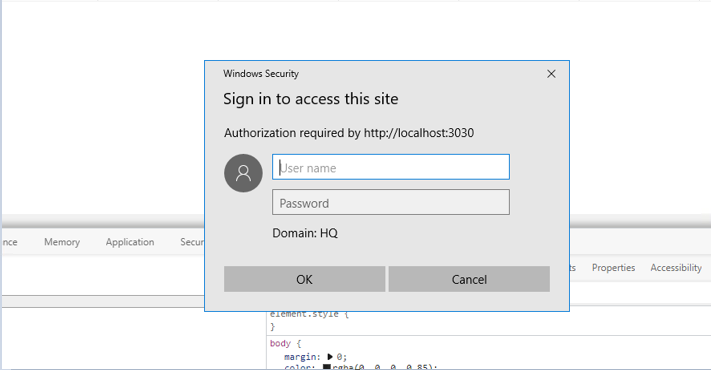
Then the above dialog window is replaced by the following dialog window. It requires smart card credentials:
Settings of our application
package.jsonlooks like this:In addition, we are using proxy. The settings are applied from this official React docs.
Moreover, we are using agentkeepalive.
Config of proxy file looks like this:
The current behavior
Windows Security dialog window sometimes pops up while I am developing an application through React. It is really annoying. We have to refresh page
The expected behavior
Windows Security dialog window sometimes DOES NOT POP UP while we are developing an application through React.
What we tried
We tried to set this option of axios, nevertheless the "Sign in" still pops up
UPDATE:
This is one of the URL that can return the 401 response with www-authenticate header-key:
Moreover, sometimes other methods can return 401 response. It is not always the same method return
401response.wolfie82 commentedon Oct 20, 2022
I was having this problem of re-authentication, even after entering my credentials. It appeared stable at some points, and not at others. Anyways, I finally found a configuration for utilizing a proxy that is communicating with an API utilizing NTLM (that works for me). Since applying this, I have yet to have the constant re-auth issue. Just posting it here in the event it helps anyone else.
Note, this was for an Angular project, but I believe http-proxy-middleware is leveraged. Note, the onProxyReq can be removed. Also, I access the webserver @ https://localhost:4200, not https://127.0.0.1.
adolfox commentedon Jun 11, 2023
This solved the authentication popup issue for me, along with @mvpete 's explanation. The insidious part of this issue for me was that at first the keepaliveagent settings suggested by @chimurai worked, but as I added more API calls to my app, the login/authentication popup started displaying intermittently. After a few refreshes, it would stop popping up. I now understand that per @mvpete explanation there was probably only two or three sockets being used and once the api calls that were causing the login pop got routed through the one socket that had done the NTLM authentication, then the login dialog would stop showing.
adolfox commentedon Jun 11, 2023
I went and read about agentkeepalive-ntlm and it says:
So it's essentially doing the same thing as setting maxSockets: 1. In my case, I only need to use http-proxy-middleware when developing locally. My API runs in Visual Studio and my frontend in VS Code. For me, just the regular keepaliveagent worked by setting the maxSockets to 1. agentkeepalive-ntlm seems to be more if you need this in production and you need to support multiple concurrent users, e.g. cloud environment and such.
dsebata commentedon Apr 4, 2024
Having
followRedirects: truein the proxy config can also cause this error.mvpete commentedon Apr 4, 2024
I'm still open to work on this with someone, I can help with the protocol side.