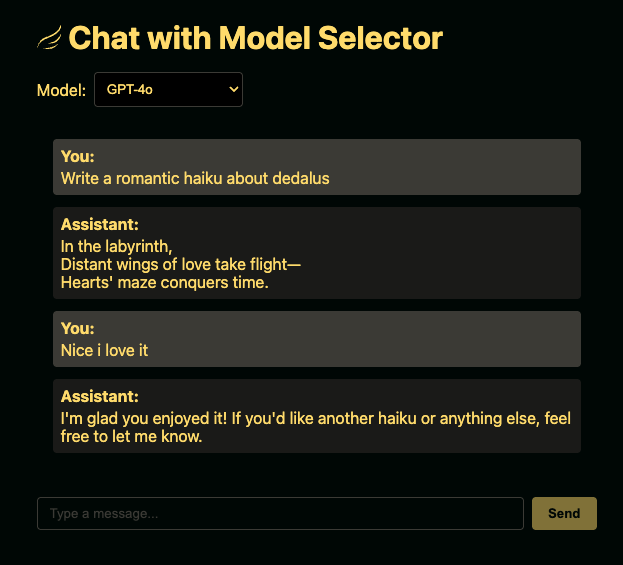
React hooks for building chat interfaces with Dedalus .
pnpm add dedalus-react dedalus-labs import { useChat } from "dedalus-react" ;
function Chat ( ) {
const { messages, sendMessage, status, stop } = useChat ( {
transport : { api : "/api/chat" } ,
} ) ;
return (
< div >
{ messages . map ( ( msg , i ) => (
< div key = { i } >
< strong > { msg . role } :</ strong > { msg . content }
</ div >
) ) }
< button onClick = { ( ) => sendMessage ( "Hello!" ) } > Send</ button >
{ status === "streaming" && < button onClick = { stop } > Stop</ button > }
</ div >
) ;
} Use streamToNodeResponse for Node.js HTTP frameworks like Express, Fastify, or the built-in http module.
import express from "express" ;
import Dedalus , { DedalusRunner } from "dedalus-labs" ;
import { streamToNodeResponse } from "dedalus-react/server" ;
const app = express ( ) ;
const client = new Dedalus ( ) ;
const runner = new DedalusRunner ( client ) ;
app . post ( "/api/chat" , async ( req , res ) => {
const { messages } = req . body ;
const stream = await runner . run ( {
messages,
model : "openai/gpt-4o-mini" ,
stream : true ,
} ) ;
await streamToNodeResponse ( stream , res ) ;
} ) ; Server (Next.js App Router) Use streamToWebResponse for environments using the Web Fetch API, including Next.js App Router, Cloudflare Workers, Deno, and Bun.
import Dedalus , { DedalusRunner } from "dedalus-labs" ;
import { streamToWebResponse } from "dedalus-react/server" ;
const client = new Dedalus ( ) ;
const runner = new DedalusRunner ( client ) ;
export async function POST ( req : Request ) {
const { messages } = await req . json ( ) ;
const stream = await runner . run ( {
messages,
model : "openai/gpt-4o-mini" ,
stream : true ,
} ) ;
return streamToWebResponse ( stream ) ;
}
Option
Type
Description
transportTransportConfigRequired. Transport configuration (see below)
idstringChat session ID
messagesMessage[]Initial messages
generateId() => stringCustom ID generator (defaults to crypto.randomUUID)
onError(error: Error) => voidError callback
onFinish(opts: OnFinishOptions) => voidCompletion callback
onToolCall(opts: OnToolCallOptions) => void | Promise<void>Tool call callback
sendAutomaticallyWhen(opts) => boolean | Promise<boolean>Auto-send condition for agentic flows
Property
Type
Description
idstringChat session ID
messagesMessage[]Current messages
statusstringready, submitted, streaming, or error
errorError | undefinedCurrent error (if any)
sendMessage(message: Message | string, options?: ChatRequestOptions) => Promise<void>Send a message
setMessages(messages: Message[] | (prev: Message[]) => Message[]) => voidUpdate messages
stop() => voidStop streaming
addToolResult(opts: AddToolResultOptions) => voidAdd a tool result to the conversation
Property
Type
Description
apistring | () => stringRequired. API endpoint
headersobject | Headers | () => objectAdditional request headers
credentialsRequestCredentials | () => RequestCredentialsFetch credentials mode
bodyobject | () => objectAdditional body properties merged into requests
fetchtypeof fetchCustom fetch function
prepareRequestBody(opts) => objectTransform the request body before sending
Property
Type
Description
messageMessageThe final assistant message
messagesMessage[]All messages in the conversation including the final assistant message
isAbortbooleanTrue if the request was aborted by the user
isDisconnectbooleanTrue if a network error caused disconnection
isErrorbooleanTrue if an error occurred during streaming
Property
Type
Description
toolCallToolCallThe tool call received from the assistant
Property
Type
Description
idstringUnique identifier for this tool call
type"function"The type of tool call
function{ name: string; arguments: string }The function name and JSON-encoded arguments
SendAutomaticallyWhenOptions
Property
Type
Description
messagesMessage[]Current messages in the conversation
The example/ directory contains working examples for different setups:
cd example/next-simple # or any other example# use .env for Express examples# Add your DEDALUS_API_KEY to the env file# or pnpm start for Express examplesMIT