






A fixed format for end-to-end secure media payloads carried by Media over QUIC (MoQ).
Encryption algorithms:
- ChaCha20-Poly1305
- AES-256-GCM
Signature algorithm:
- Ed25519
Payload-Only Encryption: MoQ is a content-agnostic transport format. MoQ-Secure encrypts only the frame’s media payload bytes. Transport framing and routing remain unchanged. Metadata such as broadcast name, media codec and resolution remains unencrypted and visible to the relay.
People increasingly want to protect their communications from pervasive monitoring and mass surveillance. At the same time, audiences need confidence that media is genuine: in an era of deepfakes, you often can’t tell whether a video or audio clip truly came from the person it claims to be.
MoQ-Secure is designed to provide:
- Privacy for the media payload - so content can’t be inspected in transit
- Integrity - so tampering is detected
- Authenticity - so frames can be verified as coming from a particular publisher
- Flexibility - balancing security and performance
Publishers are able to use any public MoQ CDN, with the hosting provider unable to see the content. Consumers can verify the publisher of the content, wherever they receive it from.
A terminal chat demo using MoQ with end-to-end encryption and Ed25519 message signing via moq-secure-chat.
Install Rust and moq-relay, then start a local relay using the example configuration:
wget https://raw.githubusercontent.com/moq-dev/moq/refs/heads/main/demo/relay/localhost.toml
moq-relay localhost.toml
In another terminal, install and start the publisher:
cargo install moq-secure-chat-cli

moq-secure-chat-cli \
  --relay https://localhost:4443/chat \
  --tls-disable-verify \
  publish
The publisher generates the broadcast name and cryptographic keys, then prints a complete subscriber command. Copy that command into a third terminal and run it.
Type messages in the publisher terminal to send encrypted, signed chat messages.
The default encryption algorithm is ChaCha20-Poly1305. AES-256-GCM is also supported with:
--encryption aes-256-gcmThis is a demonstration application. For production use, harden key management, key distribution, authentication, and TLS configuration.
See the full README.md for complete usage, configuration options, troubleshooting, and security notes.
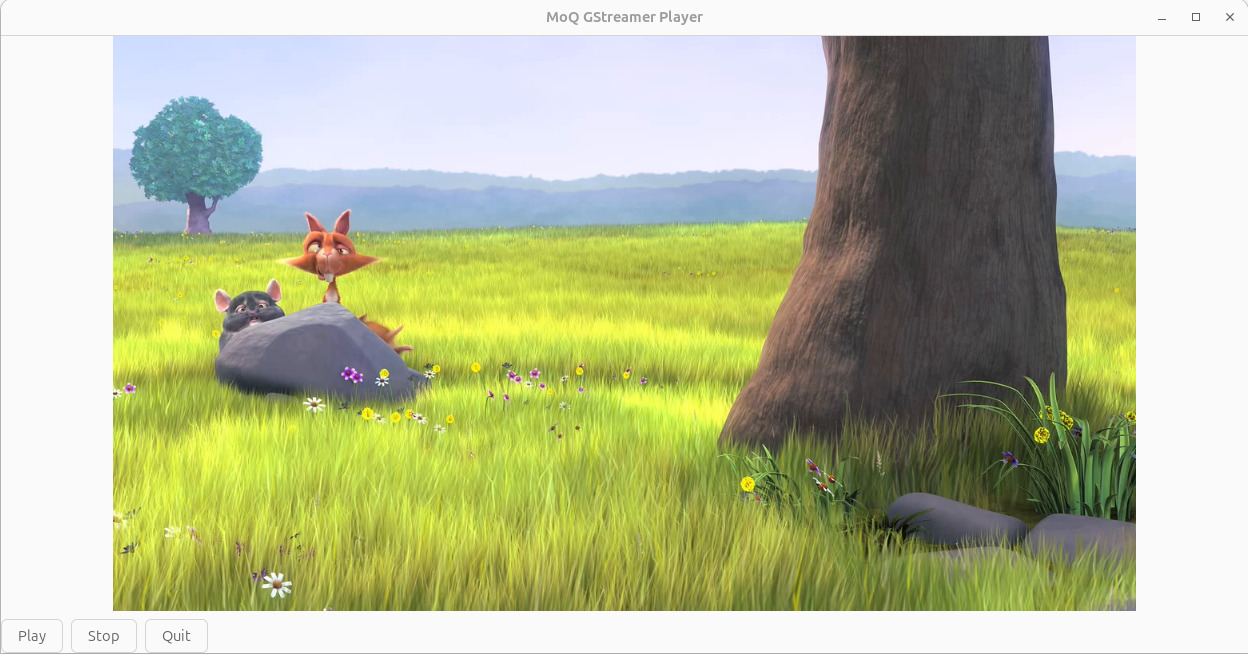


A native desktop player for MoQ streams using Rust, GTK4 and GStreamer.
MoQ-Secure is not yet integrated.
- Ubuntu and Debian
- Fedora, RHEL, Rocky Linux, and AlmaLinux
- macOS on Apple Silicon
Windows is not currently supported.
The application requires:
- Rust
- GTK4
- GStreamer 1.24 or newer
- The MoQ GStreamer plugin
- The GStreamer GTK4 video sink
The MoQ plugin provides:
moqsrcmoqsink
The GTK4 video sink provides:
gtk4paintablesink
Install the required packages:
sudo apt update

sudo apt install -y \
  build-essential \
  curl \
  pkg-config \
  libssl-dev \
  libgtk-4-dev \
  libgstreamer1.0-dev \
  libgstreamer-plugins-base1.0-dev \
  gstreamer1.0-tools \
  gstreamer1.0-plugins-base \
  gstreamer1.0-plugins-good \
  gstreamer1.0-plugins-bad \
  gstreamer1.0-libav \
  gstreamer1.0-gtk4
Install the MoQ GStreamer plugin:
curl -fsSL https://apt.moq.dev/moq-keyring.gpg \
  | sudo tee /usr/share/keyrings/moq-keyring.gpg >/dev/null

echo "deb [signed-by=/usr/share/keyrings/moq-keyring.gpg] https://apt.moq.dev stable main" \
  | sudo tee /etc/apt/sources.list.d/moq.list >/dev/null

sudo apt update
sudo apt install -y gstreamer1.0-moqThese distributions use dnf.
On RHEL, Rocky Linux, and AlmaLinux, ensure that the standard BaseOS and AppStream repositories are enabled.
Install the required packages:
sudo dnf install -y \
  dnf-plugins-core \
  gcc \
  gcc-c++ \
  make \
  curl \
  pkgconf-pkg-config \
  openssl-devel \
  gtk4-devel \
  gstreamer1-devel \
  gstreamer1-plugins-base-devel \
  gstreamer1-plugins-base \
  gstreamer1-plugins-good \
  gstreamer1-plugins-bad-free \
  gstreamer1-plugins-bad-free-extras \
  gstreamer1-libav \
  gstreamer1-plugins-base-tools \
  gstreamer1-plugins-rs
Some distributions use a different package name for the Rust-based GStreamer plugins. If gstreamer1-plugins-rs is unavailable, search for the available package:
dnf search gstreamer gtk4Install the package that provides gtk4paintablesink.
Install the MoQ GStreamer plugin:
sudo dnf config-manager --add-repo https://rpm.moq.dev/moq.repo
sudo dnf install -y gstreamer1-moqThe prebuilt MoQ plugin currently supports Apple Silicon Macs.
Install Homebrew packages:
brew install gtk4 gstreamerThe GTK4 GStreamer sink is provided by the GStreamer Rust plugins. Install the package if it is available for your Homebrew setup:
brew install gst-plugins-rsIf Homebrew does not provide gst-plugins-rs, install the official GStreamer runtime and development packages from:
https://gstreamer.freedesktop.org/download/
Use one GStreamer installation consistently. Do not mix Homebrew GStreamer libraries with the official GStreamer framework unless you configure the library paths carefully.
Download the macOS Apple Silicon moq-gst tarball from the moq project's GitHub releases page.
Extract and install the MoQ plugin:
tar -xzf moq-gst-*.tar.gz
cd moq-gst-*

mkdir -p "$HOME/Library/Application Support/GStreamer/1.0/plugins"

cp lib/gstreamer-1.0/libgstmoq.dylib \
  "$HOME/Library/Application Support/GStreamer/1.0/plugins/"
If GStreamer was installed with the official installer, set the command path:
export PATH="/Library/Frameworks/GStreamer.framework/Versions/1.0/bin:$PATH"If GStreamer was installed with Homebrew, its libraries are normally located at:
/opt/homebrew/lib
If necessary, set:
export DYLD_FALLBACK_LIBRARY_PATH="/opt/homebrew/lib:$DYLD_FALLBACK_LIBRARY_PATH"Same commands on every supported platform:
gst-inspect-1.0 moq
gst-inspect-1.0 gtk4paintablesink
Both commands must succeed.
The MoQ plugin should list:
moqsrc
moqsink
The second command should display information about:
gtk4paintablesink
If either command fails, moq-player will not run correctly. See Troubleshooting below.
Install Rust if it is not already installed:
curl --proto '=https' --tlsv1.2 -sSf https://sh.rustup.rs | shLoad Rust into the current terminal:
source "$HOME/.cargo/env"Verify the installation:
rustc --version
cargo --versioncargo install moq-playermoq-playerA window should open and begin playing the default Big Buck Bunny broadcast.
If macOS cannot find the MoQ plugin, set the plugin path manually:
export GST_PLUGIN_PATH="$HOME/Library/Application Support/GStreamer/1.0/plugins"
gst-inspect-1.0 moqIf a plugin was installed but is not detected, clear the plugin cache.
Linux:
rm -f ~/.cache/gstreamer-1.0/registry-*.binmacOS:
rm -f "$HOME/Library/Caches/GStreamer/1.0/registry-"*.binThen retry:
gst-inspect-1.0 moq
gst-inspect-1.0 gtk4paintablesink
Windows is not currently supported.
The current MoQ plugin releases provide binaries for:
x86_64-unknown-linux-gnu
aarch64-unknown-linux-gnu
aarch64-apple-darwin
The complete field layout, byte concatenation rules, nonce/AAD/digest definitions, and receiver processing order are in specification.
Quick reference format.
Only encrypts the payload so it should work with any MoQ implementation (moq-lite, IETF implementations, etc.).
While aimed at MoQ, with some additional wiring it could encrypt and sign data sent via other transports (such as WebSockets, WebRTC Data Channels, etc).
This repo contains implementations in rust and javascript. Compatability considerations between the two are in interoperability.
Run rust tests, from monorepo root (script generates test vectors first, populating frames.json file in the test-vectors folder):
npm run test-rustRun javascript tests, from monorepo root (script generates test vectors first, populating frames.json file in the test-vectors folder):
npm testThis project is dual-licensed: MIT OR Apache-2.0, choose either. See LICENSE-MIT and LICENSE-APACHE-2.0 in the repository root.