jQuery-plugin to replace large <select> elements with a neat and searchable solution.
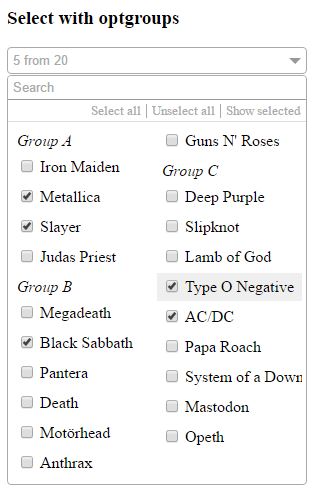
- Search for specific elements
- Select or unselect all elements which are currently shown
- Show only selected elements
- Support for optgroups
- Navigate through elements with arrow keys (up + down)
- Select elements via space key
- Jump directly to search field when pressing a key while navigating in dropdown
To replace a select box with the default selectMe field just call:
$('select').selectMe();A complete customizing of the selectMe field looks like this:
$('select').selectMe({
    cssFile: '../lib/jquery.selectMe.css',
    width: '100%',
    columnCount: 2,
    search: true,
    locale: 'en',
    localeResource: {
        'en': {
            none: 'None selected',
            from: 'from',
            search: 'Search',
            selectAll: 'Select all',
            unselectAll: 'Unselect all',
            showSelected: 'Show selected',
        }
    },
    // Callbacks
    onLoad: function( element ) {},
    onDropdownOpen: function( element ) {},
    onDropdownClose: function( element ) {},
    onSearch: function( element ) {},
    onOptionValueChanged: function( element ) {},
});
You can also override the function which generates the placeholder text:
$.fn.selectMe.getSummaryText = function(selectedOptionsArray, allOptionsCount, messageSource) {
    return 'your individual placeholder text'; // something like '1 from 10' or 'SelectedTextOne, SelectedTextTwo, ...'
}Default: ../lib/jquery.selectMe.css'
Path to the css file.
Default: 100%
Defines the width of the selectMe field. It can be written in every possible css syntax (like 300px, 10em, 100%, etc.).
Default: 1
How many columns should be rendered for the options?
Default: true
Should the search be available?
Default: en
Which language should be used? The language must be defined in 'localeResource'.
Default: english and german descriptions
Contains the descriptions for several labels of the selectMe field.
Available keys are 'none', 'from', 'search', 'selectAll', 'unselectAll' and 'showSelected'.
You can download via npm
npm i jquery-selectme