Get a quick overview of Smart Process Manager (SPM) by watching this introduction video:
🔗 Click the image above to watch the video on YouTube!
Smart Process Manager (SPM) is a lightweight, cross‑platform process management tool written in C++. It provides real‑time process monitoring, control (such as killing or changing process priority), and detailed logging. SPM is built with modular, header‑only components to ensure easy maintenance and portability. It supports both Windows (via MinGW‑w64, 64‑bit) and Linux platforms.
-
Cross‑Platform Compatibility:
- Works on Windows (MinGW‑w64, 64‑bit) and Linux.
- Uses conditional compilation to support OS‑specific APIs.
-
Process Monitoring:
- Retrieves process details including PID, process name, status (e.g., Running, Sleeping/Idle, Stopped, Zombie), and priority.
- Automatically adapts to Unicode builds on Windows, converting process names to UTF‑8.
-
Process Control:
- Kill processes or change their priorities with simple commands.
- Uses native APIs: Toolhelp API on Windows and POSIX signals on Linux.
-
Dynamic Logging:
- ImplementationLogger: Logs overall application events to a dedicated log file.
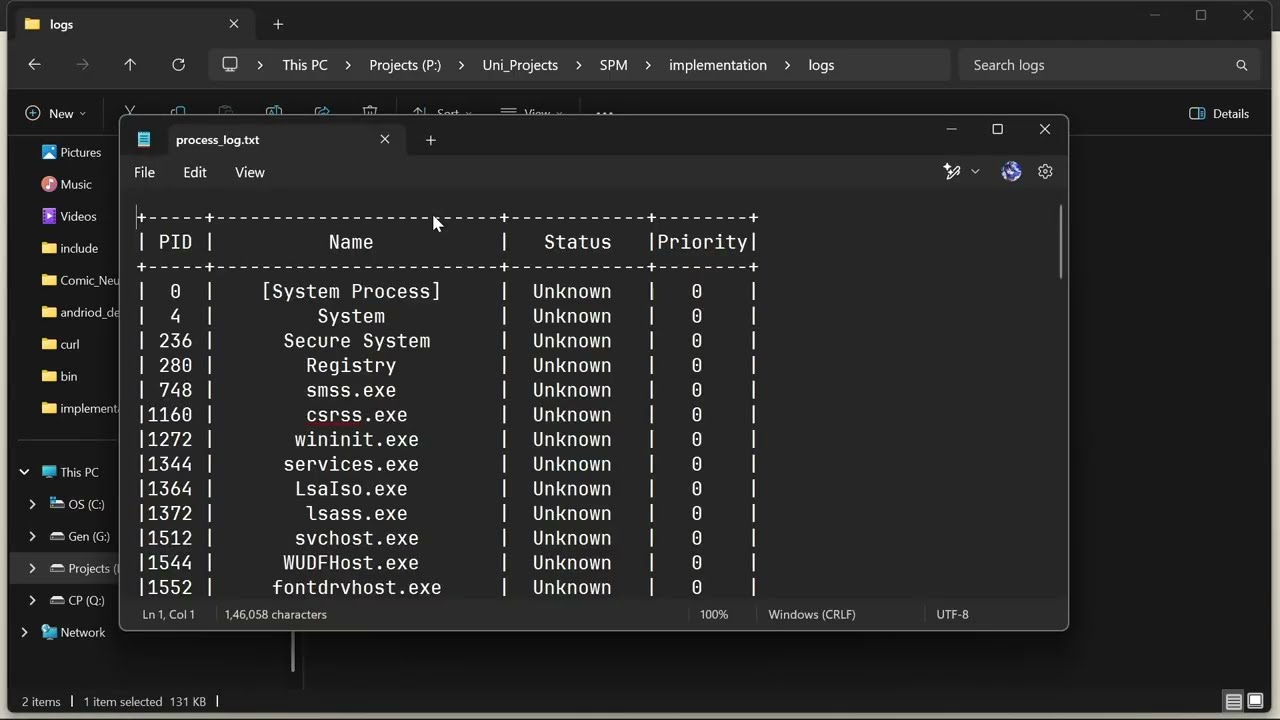
- ProcessLogger: Logs the current process table in a neat, dynamically formatted table (with borders and center‑aligned columns) to a separate log file.
- Both log files are generated in a dedicated
logs/folder.
-
Modern UI Enhancements:
- A switch‑case based CLI menu.
- Dynamic table formatting that truncates long process names (while keeping a fixed column width) and draws vertical/horizontal borders.
- Consistent table layout both on the console and in the log file.
-
Windows:
- MinGW‑w64 (64‑bit) or a compatible 64‑bit toolchain.
-
Linux:
- A standard C++ compiler (e.g., g++).
-
CMake: Version 3.10 or newer.
-
Clone the Repository:
git clone https://github.com/Peeyush-04/SPM.git cd SPM/implementation -
Generate Build Files:
On Linux:
mkdir build && cd build
cmake ..
make
On Windows (using MinGW‑w64):
mkdir build && cd build cmake -G "MinGW Makefiles" .. mingw32-make -
Run the Executable:
- The generated executable (
spmorspm.exe) can be run from the build directory. - The program creates a
logsfolder with two log files:implementation_log.txt– for general SPM events.process_log.txt– for the detailed process table.
- The generated executable (
When you run SPM, you are presented with a simple CLI menu:
- List Processes: Displays the current process table (with vertical/horizontal borders, center‑aligned PID, Status, and Priority columns, and a fixed-width Name column with truncation if needed).
- Kill Process: Enter a process ID (PID) to terminate that process.
- Change Process Priority: Enter a process ID and the new priority value. (For Windows, use values 1–5; for Linux, the nice value between -20 and 19.)
- Update Process Log: Logs the current process table (in the same table format) to the
process_log.txtfile. - Exit: Closes the application.
SPM/
├── changelog.md
└── implementation/
    ├── build/                # Generated build artifacts.
    ├── include/              # Header-only modules:
    │   ├── ProcessMonitor.h  # Process retrieval & monitoring.
    │   ├── ProcessControl.h  # Process control functions.
    │   └── Logger.h          # Logging modules.
    ├── src/
    │   └── main.cpp          # Main CLI interface.
    └── CMakeLists.txt        # Build configuration.
Contributions are welcome! Please fork the repository and submit pull requests with clear descriptions of your changes.