A simple desktop app displaying a customizable Zoidberg image.
Edit this file to set default text, text color, and background type (solid or gradient) and colors. It's created automatically if missing.
Override config.ini settings for a single session. Use quotes for multi-word text or colors.
| Command | Shorthand | Description |
|---|---|---|
Zoidberg.exe --text "Text" |
-t "Text" |
Sets display text. |
Zoidberg.exe --text-color "Color" |
-tc "Color" |
Sets text color. |
Zoidberg.exe --background-color "Color" |
-bg "Color" |
Sets solid background color. |
Zoidberg.exe --background-gradient1 "Color1" and Zoidberg.exe --background-gradient2 "Color2" |
-bgg1 "Color1" and -bgg2 "Color2" |
Sets gradient start/end colors (both required). |
Zoidberg.exe --static-hue-offset <offset_value> |
-sho <offset_value> |
Sets the hue shifting amount, 0 to 360. |
- Extract
Zoidberg.App.zipto a folder (e.g.,C:\ZoidbergApp, This is required for thePath.batfiles to work.) - Run
Zoidberg.exeby double-clicking or from a terminal. - To run from any terminal location, right-click
System Path.batin the app folder and run as administrator.
- Pillow (PIL): For image loading and manipulation.
- How To Install: Run
pip install Pillowin Command Prompt.
- How To Install: Run
- Pygame: For playing sound effects.
- How to install: Run
pip install pygamein Command Prompt.
- How to install: Run
Note: You do not need to install these dependencies to run the compiled .exe file.
- Operating System: Windows (Compiled for Windows).
- Python
Python Install Tutorial
Python.Install.Guide.mp4
In this video, learn to download and install Python 3.13.5 on Windows 11. We will also run a sample Python code.
Python Tutorial (English): https://bit.ly/3znnb1y
Python Tutorial (Hindi): https://youtu.be/b97WsOM9BYg
Python Study Material: https://studyopedia.com/tutorials/python3/
Google Colab Tutorial: https://youtu.be/iMlMfrXJYSg
Anaconda Tutorial: https://youtu.be/ovlID7gefzE
Jupyter Notebook Tutorial: https://youtu.be/Ou-7G9VQugg
PyCharm Tutorial: https://youtu.be/nixcq6mEGWQ
Pandas Tutorial (English): https://youtu.be/yFoVs3_wvPo
Pandas Tutorial (Hindi): https://youtu.be/57POFzZ7f60
NumPy Tutorial (English): https://youtu.be/WsENswmSz6M
NumPy Tutorial (Hindi): https://youtu.be/roqStVWNR7Q
Matplotlib Tutorial (English): https://youtu.be/DFBkTIhptOQ
Matplotlib Tutorial (Hindi): https://youtu.be/vBCXsAd_swk
✔️My Website - https://studyopedia.com
✔️Join Us at 59/month: https://bit.ly/3WV9sXK
✔️Data Analytics Tutorial: https://bit.ly/48MxVTU
✔️Web Dev Tutorial: https://bit.ly/3tl9nlp
✔️Free Study Material: https://bit.ly/3K7lzbP
👉 Follow me LinkedIn - https://bit.ly/3C1CY4v Instagram - https://bit.ly/3z8Fg1d
Tableau Tutorial⭐️https://youtu.be/4aTvjpdOMT4
Power BI Tutorial⭐️https://youtu.be/OITCW7ETz-M
Generative AI Course (English)⭐️https://bit.ly/3Vhsbxv
Generative AI Course (Hindi) ⭐️ https://bit.ly/3V76ZKp
Python Tutorial (English)⭐️ https://youtu.be/HakXpkXcjdI
Python Tutorial (Hindi)⭐️ https://youtu.be/b97WsOM9BYg
Pandas Tutorial (English)⭐️https://youtu.be/yFoVs3_wvPo
Pandas Tutorial (Hindi)⭐️https://youtu.be/57POFzZ7f60
NumPy Tutorial (English)⭐️https://youtu.be/WsENswmSz6M
NumPy Tutorial (Hindi)⭐️https://youtu.be/roqStVWNR7Q
Matplotlib Tutorial (English)⭐️https://youtu.be/DFBkTIhptOQ
Matplotlib Tutorial (Hindi)⭐️https://youtu.be/vBCXsAd_swk
Google Colab Tutorial ⭐️https://youtu.be/iMlMfrXJYSg
Anaconda Tutorial ⭐️ https://youtu.be/ovlID7gefzE
PyCharm Tutorial ⭐️https://youtu.be/nixcq6mEGWQ
SQL Tutorial ⭐️https://youtu.be/7dcYlJcGhqk
MySQL Tutorial⭐️https://youtu.be/sgpDAiF-18o
MySQL Workbench Tutorial: https://youtu.be/UzodkZUt5JY
HTML Tutorial ⭐️https://bit.ly/3VHaUvq
jQuery Tutorial (English)⭐️https://youtu.be/5BTWmXFOKlc
jQuery Tutorial (Hindi)⭐️https://youtu.be/bvmAsDvQ1NM
Bootstrap Tutorial⭐️https://youtu.be/nahewStckVU
► Programming - Free Study Material (Downloadable)
Machine Learning⭐️ https://studyopedia.com/tutorials/machine-learning
Deep Learning⭐️https://studyopedia.com/tutorials/deep-learning
Tableau ⭐️https://studyopedia.com/tutorials/tableau
Power BI ⭐️https://studyopedia.com/tutorials/power-bi
Python ⭐️https://studyopedia.com/tutorials/python3
Numpy ⭐️https://studyopedia.com/tutorials/numpy
Pandas ⭐️https://studyopedia.com/tutorials/pandas
Matplotlib ⭐️https://studyopedia.com/tutorials/matplotlib
Java ⭐️https://studyopedia.com/tutorials/java
C ⭐️https://studyopedia.com/tutorials/c-programming
C++ ⭐️https://studyopedia.com/tutorials/cpp/
C# ⭐️https://studyopedia.com/tutorials/csharp/
Android ⭐️https://studyopedia.com/tutorials/android R ⭐️https://studyopedia.com/tutorials/r-tutorial
Bootstrap⭐️https://studyopedia.com/tutorials/bootstrap/
HTML5 ⭐️https://studyopedia.com/tutorials/html5
JavaScript⭐️https://studyopedia.com/tutorials/javascript/
jQuery⭐️https://studyopedia.com/tutorials/jquery/
► Database - Free Study Material (Downloadable) SQL ⭐️https://studyopedia.com/tutorials/sql
MySQL ⭐️https://studyopedia.com/tutorials/mysql
MongoDB⭐️https://studyopedia.com/tutorials/mongodb
Python🔥https://studyopedia.com/java/java-interview-questions-and-answers
Java 🔥https://studyopedia.com/python3/python-multiple-choice-questions/
Android🔥https://studyopedia.com/android/android-interview-questions/
ReactJS🔥https://studyopedia.com/reactjs/react-interview-questions
Bootstrap 🔥https://studyopedia.com/bootstrap/bootstrap-interview-questions
SQL 🔥https://studyopedia.com/sql/sql-interview-questions
MongoDB 🔥https://studyopedia.com/mongodb/mongodb-interview-questions
MySQL 🔥https://studyopedia.com/mysql/mysql-interview-questions
👉 About Amit Thinks YouTube Channel I am Amit Diwan, a self-made Entrepreneur, running "Amit Thinks", a Tech YouTube Channel. Also running an E-Learning website "studyopedia.com". We publish videos in English and Hindi on Programming, Databases, and Web Dev Technologies. I have left a job offer from Accenture and 3 government jobs to follow my dream of being an entrepreneur.
Join this channel to get access to the perks: https://www.youtube.com/channel/UCgnr2Lkl1LZf0IOKRDAoJ2g/join
► Subscribe https://www.youtube.com/@Amit.Thinks/
- "Image not found" Error: Ensure the main Zoidberg image (
Zoidberg Icon.png) is located in a subfolder namedZoidberg/next to yourZoidberg.exefile. For example:C:\ZoidbergApp\Zoidberg\Zoidberg Icon.png. - "Config Created" Repeatedly:
config.inimight be missing or misplaced; ensure it's in the same folder asZoidberg.exe. - Command-line Arguments Not Working: Check quotes for multi-word/color values, and ensure you're using a new terminal window after PATH changes.
- Antivirus Warnings: Compiled
.exefiles can be flagged. If this occurs, you may need to add an exception forZoidberg.exein your antivirus settings.
Zoidberg.exe -t "All Glory to the Hypnotoad!" -tc "#FF0000" -bgg1 "#00FF00" -bgg2 "#FF00FF"
- Description: This sets text to "All Glory to the Hypnotoad!", text color to bright red, and a gradient from neon green to bright pink.
Zoidberg.exe -t "The shadows awaken..." -tc "#c0c0c0" -bgg1 "#1a0a2e" -bgg2 "#0a0a0a"
- Description: This sets text to "The shadows awaken...", text color to silver/gray, and a gradient from dark purple to black.
Zoidberg.exe -t "Woop woop woop!" -tc "#6f47ff" -s -ls "Woop woop woop!.mp3" -sho 90.0 -bg "#c93047"
- Description: You can find more details on these and other arguments in Command-Line Arguments
- Drop a
.inifile onto the app to launch with its settings.
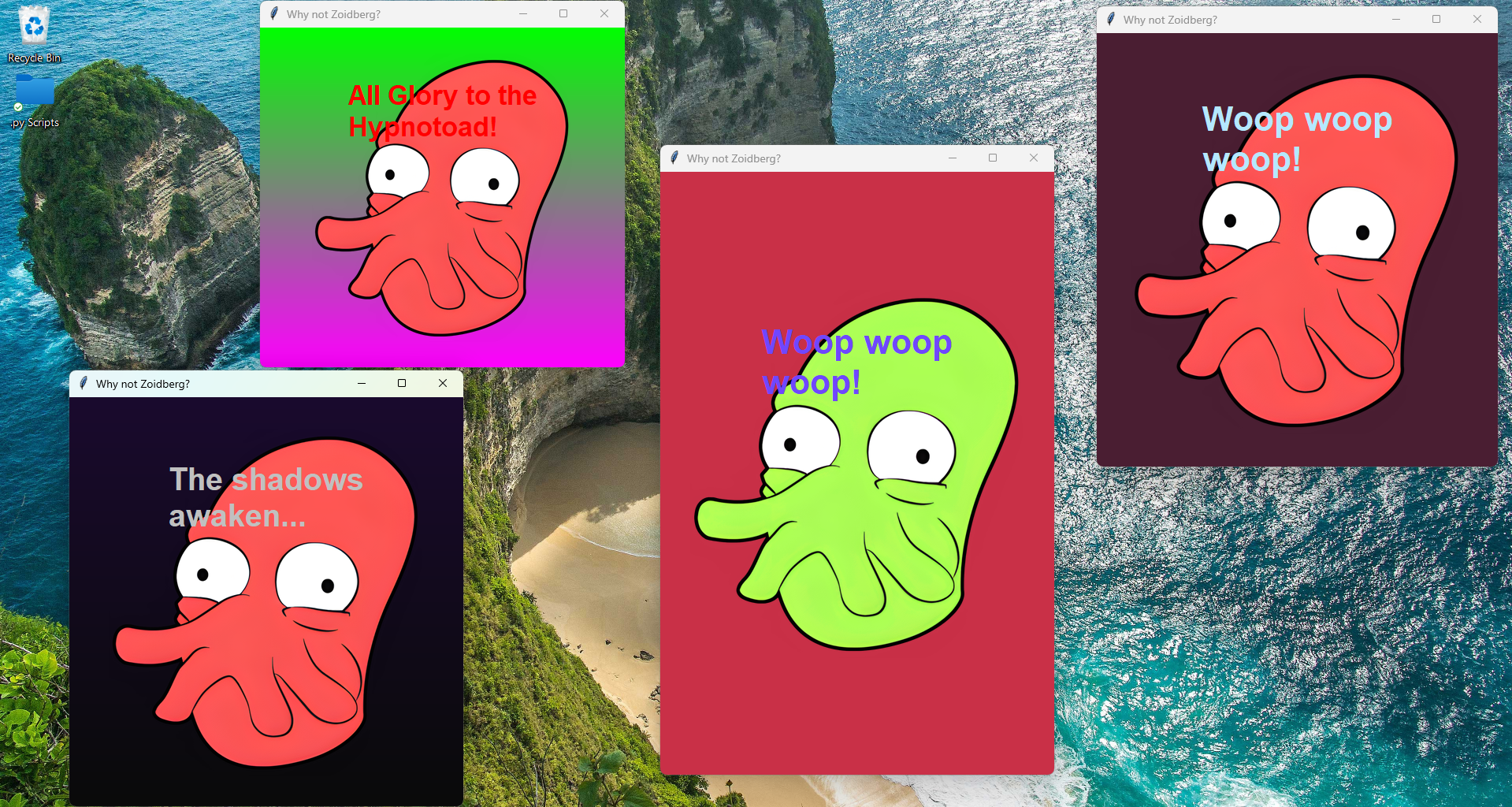
- Visit the Gallery to see more visuals.
Misc Info
Python Code
import tkinter as tk
import tkinter.font as tkfont
from tkinter import messagebox
from PIL import Image, ImageTk
import configparser
import os
import sys
import argparse
import threading
import pygame.mixer as mixer # Correctly imports and aliases mixer
# --- Color Utility Functions ---
def get_rgb_from_color_string(widget, color_string):
"""
Converts a color string (name or hex) to an RGB tuple (0-255 range).
Uses Tkinter's winfo_rgb for robustness with color names.
Args:
widget: A Tkinter widget (e.g., root window or canvas) to call winfo_rgb on.
color_string: The color name (e.g., "red", "darkblue") or hex code (e.g., "#RRGGBB").
Returns:
An RGB tuple (R, G, B) where each component is 0-255. Defaults to black if invalid.
"""
try:
# winfo_rgb returns 16-bit values, so divide by 256 for 8-bit (0-255)
r, g, b = widget.winfo_rgb(color_string)
return (r // 256, g // 256, b // 256)
except tk.TclError:
# If winfo_rgb fails (invalid color name or malformed hex), fallback to black
return (0, 0, 0) # Default to black if all else fails
def rgb_to_hex(rgb_tuple):
"""Converts an RGB tuple (R, G, B) to a hex color string (e.g., '#RRGGBB')."""
# Ensure values are within 0-255 range
r = max(0, min(255, rgb_tuple[0]))
g = max(0, min(255, rgb_tuple[1]))
b = max(0, min(255, rgb_tuple[2]))
return '#%02x%02x%02x' % (r, g, b)
def interpolate_color(color1_rgb, color2_rgb, ratio):
"""
Interpolates smoothly between two RGB colors based on a ratio.
Ratio should be a float between 0.0 (fully color1) and 1.0 (fully color2).
"""
r = int(color1_rgb[0] + (color2_rgb[0] - color1_rgb[0]) * ratio)
g = int(color1_rgb[1] + (color2_rgb[1] - color1_rgb[1]) * ratio)
b = int(color1_rgb[2] + (color2_rgb[2] - color1_rgb[2]) * ratio)
return (r, g, b)
class ZoidbergApp:
def __init__(self, master):
self.master = master
master.title("Why not Zoidberg?")
master.geometry("500x550")
master.minsize(300, 350)
self.config = configparser.ConfigParser()
# Initialize all config-related instance variables with defaults
self.display_text = ""
self.text_color = "black"
self.background_type = "solid"
self.background_color = "#F0F0F0"
self.gradient_start_color = "#ADD8E6"
self.gradient_end_color = "#87CEEB"
self.sound_enabled = False # Sound feature flag
self.launch_sound_filename = "woop.wav" # Default launch sound filename
self.config_loaded_from_dropped_file = False # Flag to track if config came from a dropped file
self.color_shift_enabled = False # Controls if *any* static shift is applied
self.static_hue_offset = 0.0 # NEW: Degrees for static hue shift (0-360)
# Determine the application base path
if getattr(sys, 'frozen', False):
# Running from a PyInstaller executable
self.application_base_path = os.path.dirname(sys.executable)
else:
# Running as a .py script
self.application_base_path = os.path.dirname(os.path.abspath(__file__))
# Determine the primary config file path to use based on sys.argv
# This allows drag-and-drop to set the config file BEFORE loading
self.config_file = os.path.join(self.application_base_path, 'config.ini') # Default config file
if len(sys.argv) > 1 and sys.argv[1].lower().endswith('.ini') and os.path.isfile(sys.argv[1]):
self.config_file = sys.argv[1] # Use the dropped .ini as the primary config source
self.config_loaded_from_dropped_file = True # Set flag
self._load_config() # Loads from self.config_file
self._parse_and_apply_command_line_args() # Applies overrides or skips if dropped .ini was primary
# DEBUG: Print final loaded color shift settings
print(f"DEBUG APP INIT: Color Shift Enabled: {self.color_shift_enabled}, Static Hue Offset: {self.static_hue_offset}")
# Image related instance variables
self.original_zoidberg_pil = None
# Path to the image relative to the application base path
image_path = os.path.join(self.application_base_path, "Zoidberg", "Zoidberg Icon.png")
print(f"DEBUG __init__: Attempting to load image from: '{image_path}'") # DEBUG: Print image path
if not os.path.exists(image_path):
messagebox.showerror("Image Error", (f"Zoidberg image not found at '{image_path}'.\n"
"Please ensure the image path is correct."))
master.destroy()
return
try:
self.original_zoidberg_pil = Image.open(image_path)
self.original_zoidberg_pil = self.original_zoidberg_pil.convert("RGBA") # Ensure it has an alpha channel initially
print(f"DEBUG __init__: Image loaded. Original dimensions: {self.original_zoidberg_pil.size}") # DEBUG: Print original dims
except Exception as e:
messagebox.showerror("Image Error", f"Failed to load Zoidberg image: {e}")
print(f"ERROR: Failed to load Zoidberg image: {e}") # DEBUG: Print error to console too
master.destroy()
return
self.canvas = tk.Canvas(master, highlightthickness=0)
self.canvas.pack(fill=tk.BOTH, expand=True)
self.canvas_image_id = None
self.canvas_text_id = None
self.zoidberg_photo = None # Initialize as None; will be created/updated in _draw_content
self._resize_job = None
self.canvas.bind("<Configure>", self._on_resize_debounced)
self.master.protocol("WM_DELETE_WINDOW", self._on_closing)
self.master.update_idletasks()
self._draw_content() # Initial draw
# Initialize pygame mixer only if sound is enabled (remains here)
if self.sound_enabled:
try:
mixer.init()
except Exception as e:
print(f"Warning: Could not initialize pygame mixer: {e}")
self.sound_enabled = False # Disable sound if mixer fails to init
# Play launch sound if enabled
if self.sound_enabled:
sound_path = os.path.join(self.application_base_path, "Zoidberg", "Sounds", self.launch_sound_filename)
self._play_sound(sound_path)
# No more animation loop to start here. Static shift is applied on draw.
def _on_closing(self):
"""Handler for window closing event to properly quit pygame mixer."""
if self.sound_enabled:
if mixer.get_init():
mixer.quit()
# No color_shift_job to cancel here anymore.
self.master.destroy()
def _play_sound(self, sound_file_path):
"""Plays a sound file in a separate thread using pygame.mixer. (Basic implementation)"""
# Ensure mixer is initialized before trying to play sound
if not self.sound_enabled or not mixer.get_init():
return
print(f"DEBUG: Attempting to load and play sound from: '{sound_file_path}'")
if not os.path.exists(sound_file_path):
print(f"Warning: Sound file not found at '{sound_file_path}'")
return
# Define the threaded function that loads and plays the sound
def play_threaded_sound():
try:
sound = mixer.Sound(sound_file_path) # Load the sound
sound.play() # Play the sound
except Exception as e:
print(f"Error playing sound '{sound_file_path}': {e}")
# Start the sound playback in a new thread
threading.Thread(target=play_threaded_sound, daemon=True).start()
def _parse_and_apply_command_line_args(self):
"""
Parses command-line arguments and applies them as overrides.
If the app was launched by dropping an .ini file, those settings are
already loaded, and command-line flags would override them.
"""
# Determine which arguments to parse
args_to_parse = sys.argv[1:] # All arguments after the script/exe name
# If the app was launched by dropping an .ini, that path is sys.argv[1].
# We should remove it from the list of arguments argparse will try to parse
# as regular flags, as its content has already been handled by _load_config.
if self.config_loaded_from_dropped_file and len(args_to_parse) > 0 and args_to_parse[0] == self.config_file:
print(f"DEBUG: Removing dropped INI file path '{self.config_file}' from argparse arguments.")
args_to_parse = args_to_parse[1:] # Skip the INI file path
# Standard argument parsing for normal launches or launches with additional args
parser = argparse.ArgumentParser(
description="Launch Zoidberg application with custom settings."
)
parser.add_argument(
"-t", "--text",
type=str,
help="Set the display text for Zoidberg."
)
parser.add_argument(
"-bg", "--background-color",
type=str,
help="Set the single background color (e.g., 'red', '#RRGGBB')."
)
parser.add_argument(
"-bgg1", "--gradient-color1",
type=str,
help="Set the first gradient color."
)
parser.add_argument(
"-bgg2", "--gradient-color2",
type=str,
help="Set the second gradient color."
)
parser.add_argument(
"-tc", "--text-color",
type=str,
help="Set the color of the display text (e.g., 'white', '#RRGGBB')."
)
# Argument for sound
parser.add_argument(
"-s", "--enable-sound",
action="store_true", # This makes it a boolean flag (true if present)
help="Enable sound effects (e.g., launch sound)."
)
parser.add_argument(
"-ls", "--launch-sound",
type=str,
help="Specify a custom launch sound filename (e.g., 'custom.wav'). Must be in Zoidberg/Sounds/."
)
# Arguments for static color shift
parser.add_argument(
"-cs", "--color-shift", # Re-purposing this flag to just enable static shift
action="store_true",
help="Enable static color shifting for Zoidberg."
)
parser.add_argument(
"-sho", "--static-hue-offset", # NEW: Argument for static hue offset
type=float,
help="Apply a static hue shift to Zoidberg (degrees, 0-360)."
)
# Parse only the relevant arguments
args = parser.parse_args(args_to_parse)
# Apply command line arguments as overrides
if args.text:
self.display_text = args.text
if args.text_color:
self.text_color = args.text_color
if args.enable_sound:
self.sound_enabled = True # Command-line -s overrides config setting to True
if args.launch_sound:
self.launch_sound_filename = args.launch_sound
# Apply new color shift settings from command line
# If static_hue_offset is provided, it automatically enables color_shift_enabled
if args.static_hue_offset is not None:
self.static_hue_offset = args.static_hue_offset
self.color_shift_enabled = True # Automatically enable if offset is given
# If --color-shift flag is explicitly set (and static_hue_offset didn't already enable it)
# This order ensures that if -sho is present, color_shift_enabled is True.
# If -sho is NOT present, but -cs IS, then color_shift_enabled is still True.
elif args.color_shift:
self.color_shift_enabled = True
# Determine background type and colors based on command-line arguments
# Gradient arguments take precedence if both are given.
if args.gradient_color1 and args.gradient_color2:
self.background_type = "gradient"
self.gradient_start_color = args.gradient_color1
self.gradient_end_color = args.gradient_color2
elif args.background_color:
self.background_color = args.background_color
self.background_type = "solid"
# If neither explicit background argument is provided,
# the background_type and colors will remain as loaded from config.ini,
# which is the desired fallback.
def _sanitize_config_value(self, value_string):
"""
Removes potential inline comments, leading/trailing whitespace,
and ensures consistent line endings from a config string.
"""
if not isinstance(value_string, str):
value_string = str(value_string)
value_string = value_string.replace('\r', '').replace('\n', '')
if ';' in value_string:
value_string = value_string.split(';', 1)[0]
if '#' in value_string and not value_string.strip().startswith('#'):
value_string = value_string.split('#', 1)[0]
return value_string.strip()
def _load_config(self):
"""
Loads all settings from the determined config file (self.config_file).
Creates default sections if the default config.ini doesn't exist.
"""
config_modified = False
if self.config_file and os.path.exists(self.config_file):
print(f"DEBUG: Loading configuration from: '{self.config_file}'")
try:
self.config.read(self.config_file)
except Exception as e:
messagebox.showerror("Config Error", f"Failed to read config file '{self.config_file}': {e}")
# Fallback to default if primary config is invalid/unreadable
self.config_file = os.path.join(self.application_base_path, 'config.ini')
self.config_loaded_from_dropped_file = False # Reset flag as we're falling back
print(f"DEBUG: Falling back to default config.ini: '{self.config_file}'")
self.config.read(self.config_file)
# If the determined config_file still doesn't exist (e.g., it was a bad dropped path, or default.ini is missing)
if not os.path.exists(self.config_file):
# This only happens if self.config_file was initially a non-existent dropped file,
# OR if the default config.ini itself is missing.
print(f"DEBUG: Config file '{self.config_file}' not found. Creating default config.")
self.config['Settings'] = {
'display_text': "Woop woop woop!",
'text_color': "#c5d8ed",
'sound_enabled': 'False', # Default to False
'launch_sound': 'woop.wav', # Default launch sound
'color_shift_enabled': 'False', # Default to False
'static_hue_offset': '0.0' # NEW
}
self.config['Background'] = {
'type': 'gradient', # Changed default to gradient to demonstrate
'color': '#1a0c11',
'start_color': '#87CEEB', # Lighter blue for better contrast
'end_color': '#4682B4' # Steel blue for clear gradient
}
config_modified = True
messagebox.showinfo("Config Created", f"'{self.config_file}' was not found and has been created with default settings.\n"
"You can edit its sections ([Settings], [Background]) to customize text and background.")
else: # Config file found, ensure all options are present (for older configs)
if not self.config.has_section('Settings'):
self.config['Settings'] = {
'display_text': "Woop woop woop!", 'text_color': "#c5d8ed",
'sound_enabled': 'False', 'launch_sound': 'woop.wav',
'color_shift_enabled': 'False', 'static_hue_offset': '0.0'
}
config_modified = True
else:
if not self.config.has_option('Settings', 'sound_enabled'):
self.config['Settings']['sound_enabled'] = 'False'
config_modified = True
if not self.config.has_option('Settings', 'launch_sound'):
self.config['Settings']['launch_sound'] = 'woop.wav'
config_modified = True
if not self.config.has_option('Settings', 'color_shift_enabled'): # NEW
self.config['Settings']['color_shift_enabled'] = 'False'
config_modified = True
if not self.config.has_option('Settings', 'static_hue_offset'): # NEW
self.config['Settings']['static_hue_offset'] = '0.0'
config_modified = True
if not self.config.has_section('Background'):
self.config['Background'] = {
'type': 'gradient', 'color': '#1a0c11',
'start_color': '#87CEEB', 'end_color': '#4682B4'
}
config_modified = True
if config_modified and not self.config_loaded_from_dropped_file: # Only write if we're managing the default config.ini
self._write_config_with_comments()
# Load values into instance variables from the (potentially updated) in-memory config
self.display_text = self._sanitize_config_value(self.config.get('Settings', 'display_text', fallback="Default Text"))
self.text_color = self._sanitize_config_value(self.config.get('Settings', 'text_color', fallback="#1a1a1a"))
self.sound_enabled = self.config.getboolean('Settings', 'sound_enabled', fallback=False)
self.launch_sound_filename = self._sanitize_config_value(self.config.get('Settings', 'launch_sound', fallback='woop.wav'))
# NEW: Load color shift settings
self.color_shift_enabled = self.config.getboolean('Settings', 'color_shift_enabled', fallback=False)
self.static_hue_offset = float(self._sanitize_config_value(self.config.get('Settings', 'static_hue_offset', fallback='0.0')))
self.background_type = self._sanitize_config_value(self.config.get('Background', 'type', fallback='solid'))
self.background_color = self._sanitize_config_value(self.config.get('Background', 'color', fallback='#F0F0F0'))
self.gradient_start_color = self._sanitize_config_value(self.config.get('Background', 'start_color', fallback='#ADD8E6'))
self.gradient_end_color = self._sanitize_config_value(self.config.get('Background', 'end_color', fallback='#87CEEB'))
def _write_config_with_comments(self):
"""
Writes the config to file, manually adding desired comments.
Only writes to the default config.ini, not to a dropped config file.
"""
# Only write if we are managing the default config.ini (i.e., not a temporary dropped file)
if not self.config_loaded_from_dropped_file:
with open(self.config_file, 'w') as f:
f.write('[Settings]\n')
f.write(f'display_text = {self.config.get("Settings", "display_text")}\n')
f.write(f'text_color = {self.config.get("Settings", "text_color")}\n')
f.write(f'sound_enabled = {self.config.get("Settings", "sound_enabled")}\n')
f.write('; Set to True to enable sound effects.\n')
f.write(f'launch_sound = {self.config.get("Settings", "launch_sound")}\n')
f.write('; Filename of the sound to play on app launch (e.g., "woop.wav"). Must be in Zoidberg/Sounds/.\n')
f.write(f'color_shift_enabled = {self.config.get("Settings", "color_shift_enabled")}\n')
f.write('; Set to True to apply a static color shift to Zoidberg.\n')
f.write(f'static_hue_offset = {self.config.get("Settings", "static_hue_offset")}\n') # NEW
f.write('; Static hue offset in degrees (0-360) applied to Zoidberg if color_shift_enabled is True.\n') # NEW
f.write('\n')
f.write('[Background]\n')
f.write(f'type = {self.config.get("Background", "type")}\n')
f.write('; To use a solid background, change \'type\' to \'solid\' and adjust \'color\':\n')
f.write(f'color = {self.config.get("Background", "color")}\n')
f.write('; Default Maroon Background Color (used if type = solid)\n')
f.write('\n')
f.write('; For gradient background, ensure \'type\' is \'gradient\' and adjust colors:\n')
f.write(f'start_color = {self.config.get("Background", "start_color")}\n')
f.write('; Light Blue (Start of Gradient)\n')
f.write(f'end_color = {self.config.get("Background", "end_color")}\n')
f.write('; Steel Blue (End of Gradient)\n')
else:
print(f"DEBUG: Not writing to config file, as a dropped INI was used: '{self.config_file}'")
def _on_resize_debounced(self, event):
"""
Handles the resize event with debouncing.
Only calls _draw_content after a short delay (250ms), canceling previous pending calls.
This prevents continuous redrawing during an active drag operation.
"""
if self._resize_job:
self.master.after_cancel(self._resize_job)
self._resize_job = self.master.after(250, self._draw_content)
def _draw_content(self):
"""
Handles scaling the Zoidberg image and drawing it along with the text on the canvas.
This function now also draws the background (solid or gradient).
It applies a static color shift if enabled.
"""
if not self.original_zoidberg_pil:
return
canvas_width = self.canvas.winfo_width()
canvas_height = self.canvas.winfo_height()
if canvas_width <= 0 or canvas_height <= 0:
print(f"DEBUG _draw_content: Canvas size is invalid: {canvas_width}x{canvas_height}. Skipping draw.")
return
self.canvas.delete("all") # Clear the canvas (removes the old red rectangle too)
# --- Draw Background (Solid or Gradient) ---
# This will now correctly draw the background without the red overlay
if self.background_type == 'solid':
self.canvas.config(bg=self.background_color)
elif self.background_type == 'gradient':
start_rgb = get_rgb_from_color_string(self.master, self.gradient_start_color)
end_rgb = get_rgb_from_color_string(self.master, self.gradient_end_color)
for i in range(canvas_height):
ratio = i / (canvas_height - 1) if canvas_height > 1 else 0
interpolated_rgb = interpolate_color(start_rgb, end_rgb, ratio)
interpolated_hex = rgb_to_hex(interpolated_rgb)
self.canvas.create_rectangle(0, i, canvas_width, i + 1,
fill=interpolated_hex, outline="")
else:
self.canvas.config(bg='#F0F0F0') # Fallback to a default color
# --- Prepare Zoidberg Image (apply static color shift if enabled) ---
current_zoidberg_pil = self.original_zoidberg_pil.copy()
if self.color_shift_enabled:
print(f"DEBUG _draw_content: Applying static color shift with hue offset {self.static_hue_offset}")
# --- START Transparency Preservation Logic (Refined) ---
# 1. Split the original RGBA image into its RGB and Alpha components
# Ensure the original image is RGBA (handled in __init__)
if current_zoidberg_pil.mode == 'RGBA':
r_orig, g_orig, b_orig, a_orig = current_zoidberg_pil.split()
else: # Handle cases where original image might not have had an alpha channel, treat as fully opaque
r_orig, g_orig, b_orig = current_zoidberg_pil.split()
a_orig = Image.new('L', current_zoidberg_pil.size, 255) # Create a full opaque alpha channel
# 2. Convert the RGB part to HSV
rgb_image_for_hsv = Image.merge("RGB", (r_orig, g_orig, b_orig))
hsv_image = rgb_image_for_hsv.convert("HSV")
h, s, v = hsv_image.split()
# 3. Apply hue offset to the hue band
pil_hue_offset = int(self.static_hue_offset / 360 * 255)
hue_lut = [(x + pil_hue_offset) % 256 for x in range(256)]
h_shifted = h.point(hue_lut)
# 4. Merge shifted HSV back to RGB
hsv_shifted = Image.merge("HSV", (h_shifted, s, v))
rgb_shifted_result = hsv_shifted.convert("RGB") # Convert back to RGB
# 5. Merge the shifted RGB with the ORIGINAL alpha channel
current_zoidberg_pil = Image.merge("RGBA", (rgb_shifted_result.split()[0], rgb_shifted_result.split()[1], rgb_shifted_result.split()[2], a_orig))
# --- END Transparency Preservation Logic ---
# --- Draw Zoidberg Image ---
original_width, original_height = current_zoidberg_pil.size
width_scale = canvas_width / original_width
height_scale = canvas_height / original_height
scale_factor = min(width_scale, height_scale) * 0.85
new_width = int(original_width * scale_factor)
new_height = int(original_height * scale_factor)
if new_height < 1: new_height = 1
if new_width < 1: new_width = 1
print(f"DEBUG _draw_content: Scaled Zoidberg dimensions: {new_width}x{new_height}")
scaled_zoidberg_pil = current_zoidberg_pil.resize((new_width, new_height), Image.LANCZOS)
image_x = canvas_width / 2
image_y = canvas_height / 2
self.zoidberg_photo = ImageTk.PhotoImage(scaled_zoidberg_pil)
if self.canvas_image_id:
if self.canvas.find_withtag(self.canvas_image_id):
self.canvas.itemconfig(self.canvas_image_id, image=self.zoidberg_photo)
print(f"DEBUG _draw_content: Updated existing canvas image item {self.canvas_image_id}.")
else: # Item was deleted, recreate it
self.canvas_image_id = self.canvas.create_image(image_x, image_y,
image=self.zoidberg_photo,
anchor=tk.CENTER)
print(f"DEBUG _draw_content: Recreated canvas image item {self.canvas_image_id}.")
else:
self.canvas_image_id = self.canvas.create_image(image_x, image_y,
image=self.zoidberg_photo,
anchor=tk.CENTER)
print(f"DEBUG _draw_content: Created new canvas image item {self.canvas_image_id}.")
# --- Draw Text ---
text_offset_y_ratio = 0.20
text_y_on_image = new_height * text_offset_y_ratio
final_text_y = (image_y - new_height / 2) + text_y_on_image
final_text_x = image_x
base_font_size = 20
base_image_width_for_font = 300
font_size = max(8, int(base_font_size * (new_width / base_image_width_for_font)))
font_style = ("Helvetica", font_size, "bold")
text_wrap_width_pixels = new_width * 0.8
if text_wrap_width_pixels < 10: text_wrap_width_pixels = 10
# Update or create the text item
if self.canvas_text_id:
if self.canvas.find_withtag(self.canvas_text_id):
self.canvas.itemconfig(self.canvas_text_id,
text=self.display_text,
font=font_style,
fill=self.text_color,
width=text_wrap_width_pixels)
self.canvas.coords(self.canvas_text_id, final_text_x, final_text_y)
print(f"DEBUG _draw_content: Updated existing canvas text item {self.canvas_text_id}.")
else:
self.canvas_text_id = self.canvas.create_text(final_text_x, final_text_y,
text=self.display_text,
font=font_style,
fill=self.text_color,
anchor=tk.CENTER,
width=text_wrap_width_pixels)
print(f"DEBUG _draw_content: Recreated canvas text item {self.canvas_text_id}.")
else:
self.canvas_text_id = self.canvas.create_text(final_text_x, final_text_y,
text=self.display_text,
font=font_style,
fill=self.text_color,
anchor=tk.CENTER,
width=text_wrap_width_pixels)
print(f"DEBUG _draw_content: Created new canvas text item {self.canvas_text_id}.")
# --- Main Application Execution ---
if __name__ == "__main__":
# Initialize pygame mixer at the very start
try:
mixer.init()
except Exception as e:
print(f"Warning: Could not initialize pygame mixer: {e}")
# If mixer fails here, subsequent sound calls inside app might still fail.
root = tk.Tk()
app = ZoidbergApp(root)
root.mainloop()
# Quit pygame mixer when the application closes
if mixer.get_init():
mixer.quit()


