





Python and Django functions, classes and settings re-used across different OpenWISP modules, stored here with the aim of avoiding code duplication and ease maintenance.
Don't repeat yourself!

- Configurable admin theme
- OpenWISP Dashboard
- Configurable navigation menu
- Improved admin filters
- OpenAPI / Swagger documentation
- Model utilities
- Storage utilities
- Admin utilities
- Code utilities
- Admin Theme utilities
- REST API utilities
- Test utilities
- Quality assurance checks
Table of Contents:
- Current features
- Install stable version from pypi
- Install development version
- Using the
admin_theme - OpenWISP Dashboard
- Main navigation menu
- Admin filters
- Model utilities
- Custom Fields
- Admin utilities
openwisp_utils.admin.TimeReadonlyAdminMixinopenwisp_utils.admin.ReadOnlyAdminopenwisp_utils.admin.AlwaysHasChangedMixinopenwisp_utils.admin.CopyableFieldsAdminopenwisp_utils.admin.UUIDAdminopenwisp_utils.admin.ReceiveUrlAdminopenwisp_utils.admin.HelpTextStackedInlineopenwisp_utils.admin_theme.filters.InputFilteropenwisp_utils.admin_theme.filters.SimpleInputFilteropenwisp_utils.admin_theme.filters.AutocompleteFilter
- Code utilities
- Storage utilities
- Admin Theme utilities
- REST API utilities
- Test utilities
- Database backends
- Quality Assurance Checks
- Settings
OPENWISP_ADMIN_SITE_CLASSOPENWISP_ADMIN_SITE_TITLEOPENWISP_ADMIN_SITE_HEADEROPENWISP_ADMIN_INDEX_TITLEOPENWISP_ADMIN_DASHBOARD_ENABLEDOPENWISP_ADMIN_THEME_LINKSOPENWISP_ADMIN_THEME_JSOPENWISP_ADMIN_SHOW_USERLINKS_BLOCKOPENWISP_API_DOCSOPENWISP_API_INFOOPENWISP_SLOW_TEST_THRESHOLDOPENWISP_STATICFILES_VERSIONED_EXCLUDEOPENWISP_HTML_EMAILOPENWISP_EMAIL_TEMPLATEOPENWISP_EMAIL_LOGOOPENWISP_CELERY_SOFT_TIME_LIMITOPENWISP_CELERY_HARD_TIME_LIMITOPENWISP_AUTOCOMPLETE_FILTER_VIEW
- Installing for development
- Contributing
- Support
- Changelog
- License
- Attribution
Install from pypi:
pip install openwisp-utils

# install optional dependencies for REST framework
pip install openwisp-utils[rest]

# install optional dependencies for tests (flake8, black and isort)
pip install openwisp-utils[qa]

# or install everything
pip install openwisp-utils[rest,qa]
Install tarball:
pip install https://github.com/openwisp/openwisp-utils/tarball/masterAlternatively you can install via pip using git:
pip install -e git+git://github.com/openwisp/openwisp-utils#egg=openwisp-utilsThe admin theme requires Django >= 2.2..
Add openwisp_utils.admin_theme to INSTALLED_APPS in settings.py:
INSTALLED_APPS = [
    'django.contrib.auth',
    'django.contrib.contenttypes',
    'django.contrib.sessions',
    'django.contrib.messages',
    'django.contrib.staticfiles',

    'openwisp_utils.admin_theme',    # <----- add this
    # add when using autocomplete filter
    'admin_auto_filters',    # <----- add this

    'django.contrib.sites',
    # admin
    'django.contrib.admin',
]Add the list of all packages extended to EXTENDED_APPS in settings.py.
For example, if you've extended django_x509:
EXTENDED_APPS = ['django_x509']This is a static finder which looks for static files in the static
directory of the apps listed in settings.EXTENDED_APPS.
Add openwisp_utils.staticfiles.DependencyFinder to STATICFILES_FINDERS
in settings.py.
STATICFILES_FINDERS = [
    'django.contrib.staticfiles.finders.FileSystemFinder',
    'django.contrib.staticfiles.finders.AppDirectoriesFinder',
    'openwisp_utils.staticfiles.DependencyFinder',    # <----- add this
]This is a template loader which looks for templates in the templates
directory of the apps listed in settings.EXTENDED_APPS.
Add openwisp_utils.loaders.DependencyLoader to
template loaders in settings.py as shown below.
TEMPLATES = [
    {
        'BACKEND': 'django.template.backends.django.DjangoTemplates',
        'DIRS': [],
        'OPTIONS': {
            'loaders': [
                # ... other loaders ...
                'openwisp_utils.loaders.DependencyLoader',    # <----- add this
            ],
            'context_processors': [
                # ... omitted ...
            ],
        },
    },
]Add openwisp_utils.admin_theme.context_processor.admin_theme_settings to
template context_processors in settings.py as shown below.
This will allow to set OPENWISP_ADMIN_THEME_LINKS
and OPENWISP_ADMIN_THEME_JS settings
to provide CSS and JS files to customise admin theme.
TEMPLATES = [
    {
        'BACKEND': 'django.template.backends.django.DjangoTemplates',
        'DIRS': [],
        'OPTIONS': {
            'loaders': [
                # ... omitted ...
            ],
            'context_processors': [
                # ... other context processors ...
                'openwisp_utils.admin_theme.context_processor.admin_theme_settings'    # <----- add this
            ],
        },
    },
]
Note
You will have to deploy these static files on your own.
In order to make django able to find and load these files
you may want to use the STATICFILES_DIR setting in settings.py.
You can learn more in the Django documentation.
Allows adding items to OPENWISP_ADMIN_THEME_LINKS.
This function is meant to be used by third party apps or OpenWISP modules which aim to extend the core look and feel of the OpenWISP theme (eg: add new menu icons).
Syntax:
register_theme_link(links)| Parameter | Description |
links |
(list) List of link items to be added to
OPENWISP_ADMIN_THEME_LINKS |
Allows removing items from OPENWISP_ADMIN_THEME_LINKS.
This function is meant to be used by third party apps or OpenWISP modules which aim additional functionalities to UI of OpenWISP (eg: adding a support chatbot).
Syntax:
unregister_theme_link(links)| Parameter | Description |
links |
(list) List of link items to be removed from
OPENWISP_ADMIN_THEME_LINKS |
Allows adding items to OPENWISP_ADMIN_THEME_JS.
Syntax:
register_theme_js(js)| Parameter | Description |
js |
(list) List of relative path of js files to be added to
OPENWISP_ADMIN_THEME_JS |
Allows removing items from OPENWISP_ADMIN_THEME_JS.
Syntax:
unregister_theme_js(js)| Parameter | Description |
js |
(list) List of relative path of js files to be removed from
OPENWISP_ADMIN_THEME_JS |
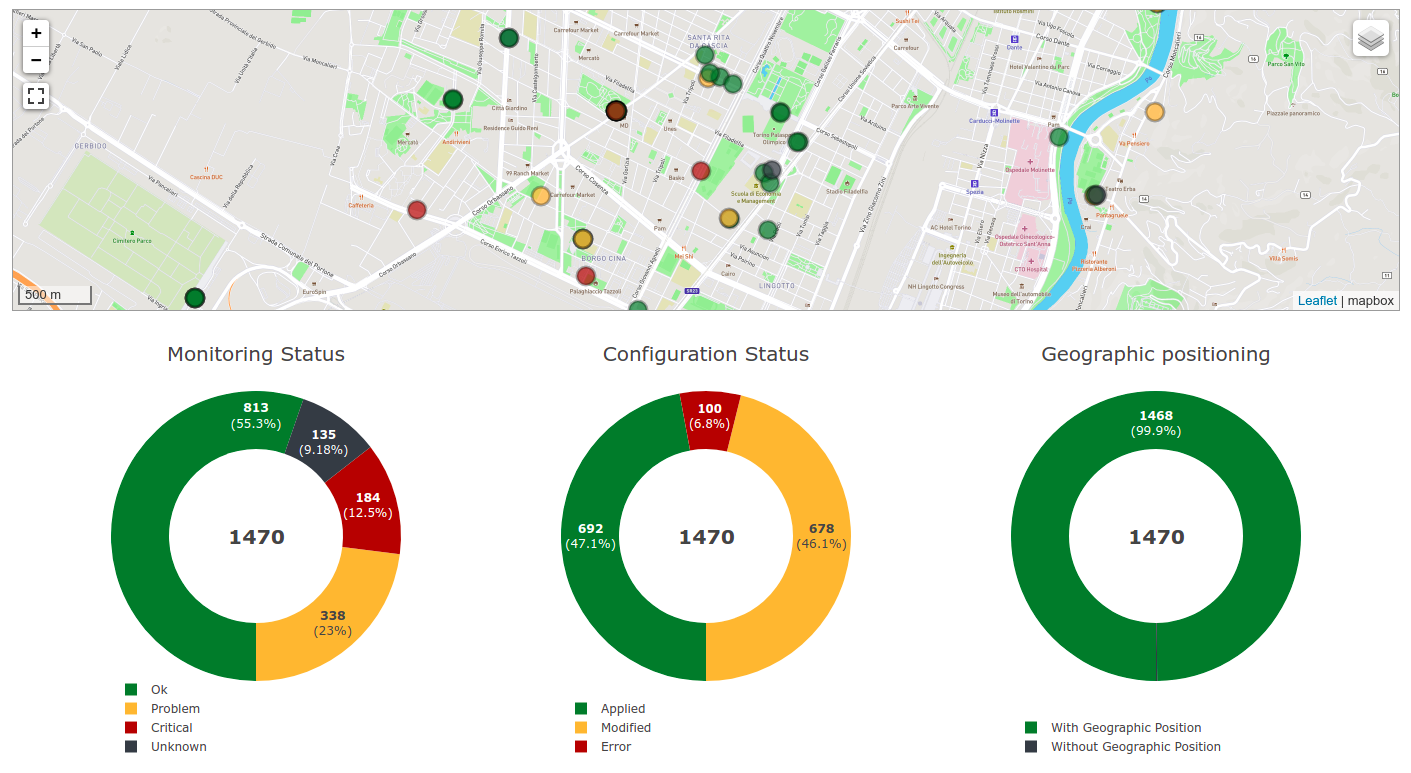
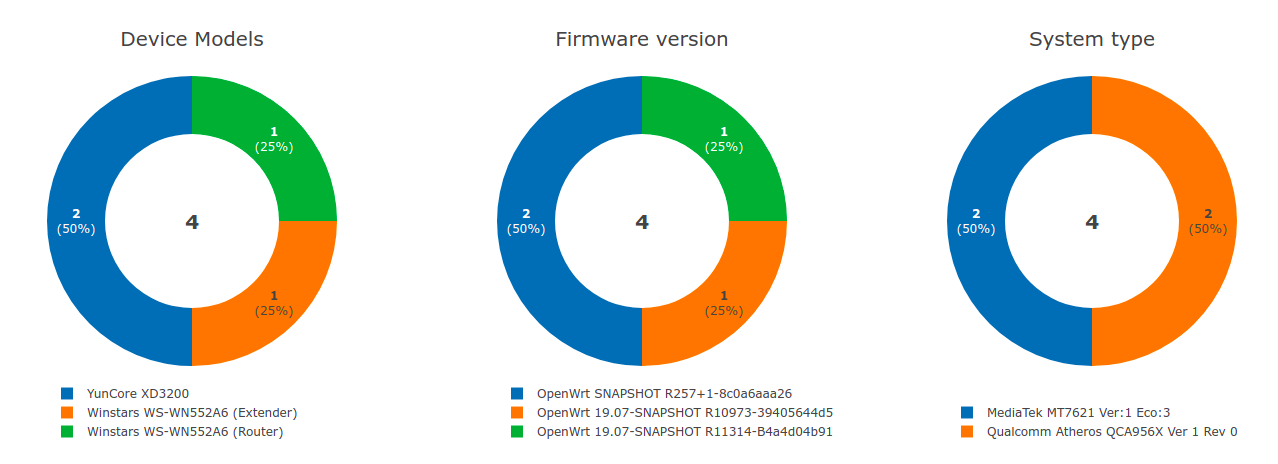
The admin_theme sub app of this package provides an admin dashboard
for OpenWISP which can be manipulated with the functions described in
the next sections.
Example 1, monitoring:
Example 2, controller:
Allows including a specific django template in the OpenWISP dashboard.
It is designed to allow the inclusion of the geographic map shipped by OpenWISP Monitoring but can be used to include any custom element in the dashboard.
Note: it is possible to register templates to be loaded
before or after charts using the after_charts keyword argument
(see below).
Syntax:
register_dashboard_template(position, config)| Parameter | Description |
position |
(int) The position of the template. |
config |
(dict) The configuration of the template. |
extra_config |
optional (dict) Extra configuration you want to pass to custom template. |
after_charts |
optional (bool) Whether the template should be loaded after dashboard
charts. Defaults to False, i.e. templates are loaded before dashboard
charts by default. |
Following properties can be configured for each template config:
| Property | Description |
template |
(str) Path to pass to the template loader. |
css |
(tuple) List of CSS files to load in the HTML page. |
js |
(tuple) List of Javascript files to load in the HTML page. |
Code example:
from openwisp_utils.admin_theme import register_dashboard_template

register_dashboard_template(
    position=0,
    config={
        'template': 'admin/dashboard/device_map.html',
        'css': (
            'monitoring/css/device-map.css',
            'leaflet/leaflet.css',
            'monitoring/css/leaflet.fullscreen.css',
        ),
        'js': (
            'monitoring/js/device-map.js',
            'leaflet/leaflet.js',
            'leaflet/leaflet.extras.js',
            'monitoring/js/leaflet.fullscreen.min.js'
        )
    },
    extra_config={
        'optional_variable': 'any_valid_value',
    },
    after_charts=True,
)
It is recommended to register dashboard templates from the ready
method of the AppConfig of the app where the templates are defined.
This function can be used to remove a template from the dashboard.
Syntax:
unregister_dashboard_template(template_name)| Parameter | Description |
template_name |
(str) The name of the template to remove. |
Code example:
from openwisp_utils.admin_theme import unregister_dashboard_template

unregister_dashboard_template('admin/dashboard/device_map.html')Note: an ImproperlyConfigured exception is raised the
specified dashboard template is not registered.
Adds a chart to the OpenWISP dashboard.
At the moment only pie charts are supported.
The code works by defining the type of query which will be executed, and optionally, how the returned values have to be colored and labeled.
Syntax:
register_dashboard_chart(position, config)| Parameter | Description |
position |
(int) Position of the chart. |
config |
(dict) Configuration of chart. |
Following properties can be configured for each chart config:
| Property | Description | ||||||||||||||||||
query_params |
It is a required property in form of
|
||||||||||||||||||
colors |
An optional dict which can be used to define colors for each distinct
value shown in the pie charts. |
||||||||||||||||||
labels |
An optional dict which can be used to define translatable strings for each distinct
value shown in the pie charts. Can be used also to provide fallback human readable values for
raw values stored in the database which would be otherwise hard to understand for the user. |
||||||||||||||||||
filters |
An optional dict which can be used when using aggregate and annotate in
query_params to define the link that will be generated to filter results (pie charts are
clickable and clicking on a portion of it will show the filtered results). |
||||||||||||||||||
main_filters |
An optional dict which can be used to add additional filtering on the target link. |
||||||||||||||||||
filtering |
An optional str which can be set to 'False' (str) to disable filtering on target links.
This is useful when clicking on any section of the chart should take user to the same URL. |
||||||||||||||||||
quick_link |
An optional NOTE: The chart legend is disabled if configuration for quick link button is provided.
|
Code example:
    from openwisp_utils.admin_theme import register_dashboard_chart

register_dashboard_chart(
    position=1,
    config={
        'query_params': {
            'name': 'Operator Project Distribution',
            'app_label': 'test_project',
            'model': 'operator',
            'group_by': 'project__name',
        },
        'colors': {'Utils': 'red', 'User': 'orange'},
        'quick_link': {
            'url': '/admin/test_project/operator',
            'label': 'Open Operators list',
            'title': 'View complete list of operators',
            'custom_css_classes': ['negative-top-20'],
        },
    },
)
For real world examples, look at the code of OpenWISP Controller and OpenWISP Monitoring.
Note: an ImproperlyConfigured exception is raised if a
dashboard element is already registered at same position.
It is recommended to register dashboard charts from the ready method
of the AppConfig of the app where the models are defined.
Checkout app.py of the test_project
for reference.
This function can used to remove a chart from the dashboard.
Syntax:
unregister_dashboard_chart(chart_name)| Parameter | Description |
chart_name |
(str) The name of the chart to remove. |
Code example:
from openwisp_utils.admin_theme import unregister_dashboard_chart

unregister_dashboard_chart('Operator Project Distribution')Note: an ImproperlyConfigured exception is raised the
specified dashboard chart is not registered.
The admin_theme sub app of this package provides a navigation menu that can be
manipulated with the functions described in the next sections.
Add openwisp_utils.admin_theme.context_processor.menu_groups to
template context_processors in settings.py as shown below.
TEMPLATES = [
    {
        'BACKEND': 'django.template.backends.django.DjangoTemplates',
        'DIRS': [],
        'OPTIONS': {
            'loaders': [
                # ... omitted ...
            ],
            'context_processors': [
                # ... other context processors ...
                'openwisp_utils.admin_theme.context_processor.menu_groups'    # <----- add this
            ],
        },
    },
]Allows registering a new menu item or group at the specified position in the Main Navigation Menu.
Syntax:
register_menu_group(position, config)| Parameter | Description |
position |
(int) Position of the group or item. |
config |
(dict) Configuration of the goup or item. |
Code example:
from django.utils.translation import ugettext_lazy as _
from openwisp_utils.admin_theme.menu import register_menu_group

register_menu_group(
    position=1,
    config={
        'label': _('My Group'),
        'items': {
            1: {
                'label': _('Users List'),
                'model': 'auth.User',
                'name': 'changelist',
                'icon': 'list-icon',
            },
            2: {
                'label': _('Add User'),
                'model': 'auth.User',
                'name': 'add',
                'icon': 'add-icon',
            },
        },
        'icon': 'user-group-icon',
    },
)
register_menu_group(
    position=2,
    config={
        'model': 'test_project.Shelf',
        'name': 'changelist',
        'label': _('View Shelf'),
        'icon': 'shelf-icon',
    },
)
register_menu_group(
    position=3, config={'label': _('My Link'), 'url': 'https://link.com'}
)
Note
An ImproperlyConfigured exception is raised if a menu element is already registered at the same position.
An ImproperlyConfigured exception is raised if the supplied configuration does not match with the different types of
possible configurations available (different configurations will be discussed in the next section).
It is recommended to use register_menu_group in the ready method of the AppConfig.
register_menu_items is obsoleted by register_menu_group and will be removed in
future versions. Links added using register_menu_items will be shown at the top
of navigation menu and above any register_menu_group items.
To add a link that contains a custom URL the following syntax can be used.
Syntax:
register_menu_group(position=1, config={
    "label": "Link Label",
    "url": "link_url",
    "icon": "my-icon"
})
Following is the description of the configuration:
| Parameter | Description |
label |
(str) Display text for the link. |
url |
(str) url for the link. |
icon |
An optional str CSS class name for the icon. No icon
is displayed if not provided. |
To add a link that contains URL of add form or change list page of a model then following syntax can be used. Users will only be able to see links for models they have permission to either view or edit.
Syntax:
# add a link of list page
register_menu_group(
    position=1,
    config={
        'model': 'my_project.MyModel',
        'name': 'changelist',
        'label': 'MyModel List',
        'icon': 'my-model-list-class',
    },
)

# add a link of add page
register_menu_group(
    position=2,
    config={
        'model': 'my_project.MyModel',
        'name': 'add',
        'label': 'MyModel Add Item',
        'icon': 'my-model-add-class',
    },
)
Following is the description of the configuration:
| Parameter | Description |
model |
(str) Model of the app for which you to add link. |
name |
(str) url name. eg. changelist or add. |
label |
An optional str display text for the link. It is
automatically generated if not provided. |
icon |
An optional str CSS class name for the icon. No icon
is displayed if not provided. |
To add a nested group of links in the menu the following syntax can be used. It creates a dropdown in the menu.
Syntax:
register_menu_group(
    position=1,
    config={
        'label': 'My Group Label',
        'items': {
            1: {'label': 'Link Label', 'url': 'link_url', 'icon': 'my-icon'},
            2: {
                'model': 'my_project.MyModel',
                'name': 'changelist',
                'label': 'MyModel List',
                'icon': 'my-model-list-class',
            },
        },
        'icon': 'my-group-icon-class',
    },
)
Following is the description of the configuration:
| Parameter | Description |
label |
(str) Display name for the link. |
items |
(dict) Items to be displayed in the dropdown.
It can be a dict of custom links or model links
with key as their position in the group. |
icon |
An optional str CSS class name for the icon. No icon
is displayed if not provided. |
Allows adding an item to a registered group.
Syntax:
register_menu_subitem(group_position, item_position, config)| Parameter | Description |
group_position |
(int) Position of the group in which item should be added. |
item_position |
(int) Position at which item should be added in the group |
config |
(dict) Configuration of the item. |
Code example:
from django.utils.translation import ugettext_lazy as _
from openwisp_utils.admin_theme.menu import register_menu_subitem

# To register a model link
register_menu_subitem(
    group_position=10,
    item_position=2,
    config={
        'label': _('Users List'),
        'model': 'auth.User',
        'name': 'changelist',
        'icon': 'list-icon',
    },
)

# To register a custom link
register_menu_subitem(
    group_position=10,
    item_position=2,
    config={'label': _('My Link'), 'url': 'https://link.com'},
)
Note
An ImproperlyConfigured exception is raised if the group is not already
registered at group_position.
An ImproperlyConfigured exception is raised if the group already has an
item registered at item_position.
It is only possible to register links to specific models or custom URL.
An ImproperlyConfigured exception is raised if the configuration of
group is provided in the function.
It is recommended to use register_menu_subitem in the ready
method of the AppConfig.
Create a CSS file and use the following syntax to provide the image for each
icon used in the menu. The CSS class name should be the same as the icon
parameter used in the configuration of a menu item or group. Also icon being used
should be in svg format.
Example:
.icon-class-name {
    mask-image: url(imageurl);
    -webkit-mask-image: url(imageurl);
}
Follow the instructions in Supplying custom CSS and JS for the admin theme to know how to configure your OpenWISP instance to load custom CSS files.

The admin_theme sub app provides an improved UI for the changelist filter
which occupies less space compared to the original implementation in django:
filters are displayed horizontally on the top (instead of vertically on the side)
and filter options are hidden in dropdown menus which are expanded once clicked.
Multiple filters can be applied at same time with the help of "apply filter" button. This button is only visible when total number of filters is greater than 4. When filters in use are less or equal to 4 the "apply filter" button is not visible and filters work like in the original django implementation (as soon as a filter option is selected the filter is applied and the page is reloaded).
Model class which provides a UUID4 primary key.
Model class inheriting UUIDModel which provides two additional fields:
createdmodified
Which use respectively AutoCreatedField, AutoLastModifiedField from model_utils.fields
(self-updating fields providing the creation date-time and the last modified date-time).
Model mixin that implements get_field_value method which can be used
to get value of fallback fields.
This section describes custom fields defined in openwisp_utils.fields
that can be used in Django models:
A model field which provides a random key or token, widely used across openwisp modules.
This field extends Django's BooleanField
and provides additional functionality for handling choices with a fallback value.
The field will use the fallback value whenever the field is set to None.
This field is particularly useful when you want to present a choice between enabled and disabled options, with an additional "Default" option that reflects the fallback value.
from django.db import models
from openwisp_utils.fields import FallbackBooleanChoiceField
from myapp import settings as app_settings

class MyModel(models.Model):
    is_active = FallbackBooleanChoiceField(
        null=True,
        blank=True,
        default=None,
        fallback=app_settings.IS_ACTIVE_FALLBACK,
)This field extends Django's CharField
and provides additional functionality for handling choices with a fallback value.
The field will use the fallback value whenever the field is set to None.
from django.db import models
from openwisp_utils.fields import FallbackCharChoiceField
from myapp import settings as app_settings

class MyModel(models.Model):
    is_first_name_required = FallbackCharChoiceField(
        null=True,
        blank=True,
        max_length=32,
        choices=(
            ('disabled', _('Disabled')),
            ('allowed', _('Allowed')),
            ('mandatory', _('Mandatory')),
        ),
        fallback=app_settings.IS_FIRST_NAME_REQUIRED,
)This field extends Django's CharField and provides additional functionality for handling text fields with a fallback value.
It allows populating the form with the fallback value when the actual value is set to null in the database.
from django.db import models
from openwisp_utils.fields import FallbackCharField
from myapp import settings as app_settings

class MyModel(models.Model):
    greeting_text = FallbackCharField(
        null=True,
        blank=True,
        max_length=200,
        fallback=app_settings.GREETING_TEXT,
)This field extends Django's URLField and provides additional functionality for handling URL fields with a fallback value.
It allows populating the form with the fallback value when the actual value is set to null in the database.
from django.db import models
from openwisp_utils.fields import FallbackURLField
from myapp import settings as app_settings

class MyModel(models.Model):
    password_reset_url = FallbackURLField(
        null=True,
        blank=True,
        max_length=200,
        fallback=app_settings.DEFAULT_PASSWORD_RESET_URL,
)This extends Django's TextField and provides additional functionality for handling text fields with a fallback value.
It allows populating the form with the fallback value when the actual value is set to null in the database.
from django.db import models
from openwisp_utils.fields import FallbackTextField
from myapp import settings as app_settings

class MyModel(models.Model):
    extra_config = FallbackTextField(
        null=True,
        blank=True,
        max_length=200,
        fallback=app_settings.EXTRA_CONFIG,
)This extends Django's PositiveIntegerField and provides additional functionality for handling positive integer fields with a fallback value.
It allows populating the form with the fallback value when the actual value is set to null in the database.
from django.db import models
from openwisp_utils.fields import FallbackPositiveIntegerField
from myapp import settings as app_settings

class MyModel(models.Model):
    count = FallbackPositiveIntegerField(
        blank=True,
        null=True,
        fallback=app_settings.DEFAULT_COUNT,
    )
Admin mixin which adds two readonly fields created and modified.
This is an admin mixin for models inheriting TimeStampedEditableModel
which adds the fields created and modified to the database.
A read-only ModelAdmin base class.
Will include the id field by default, which can be excluded by supplying
the exclude attribute, eg:
from openwisp_utils.admin import ReadOnlyAdmin

class PostAuthReadOnlyAdmin(ReadOnlyAdmin):
exclude = ['id']A mixin designed for inline items and model forms, ensures the item is created even if the default values are unchanged.
Without this, when creating new objects, inline items won't be saved unless users change the default values.
An admin class that allows to set admin fields to be read-only and makes it easy to copy the fields contents.
Useful for auto-generated fields such as UUIDs, secret keys, tokens, etc.
This class is a subclass of CopyableFieldsAdmin which
sets uuid as the only copyable field. This class is kept
for backward compatibility and convenience, since different models
of various OpenWISP modules show uuid as the only copyable field.
An admin class that provides an URL as a read-only input field (to make it easy and quick to copy/paste).

A stacked inline admin class that displays a help text for entire inline object. Following is an example:
from openwisp_utils.admin import HelpTextStackedInline

class SubnetDivisionRuleInlineAdmin(
    MultitenantAdminMixin, TimeReadonlyAdminMixin, HelpTextStackedInline
):
    model = Model
    # It is required to set "help_text" attribute
    help_text = {
        # (required) Help text to display
        'text': _(
            'Please keep in mind that once the subnet division rule is created '
            'and used, changing "Size" and "Number of Subnets" and decreasing '
            '"Number of IPs" will not be possible.'
        ),
        # (optional) You can provide a link to documentation for user reference
        'documentation_url': (
            'https://github.com/openwisp/openwisp-utils'
        )
        # (optional) Icon to be shown along with help text. By default it uses
        # "/static/admin/img/icon-alert.svg"
        'image_url': '/static/admin/img/icon-alert.svg'
}The admin_theme sub app of this package provides an input filter that can be used in changelist page
to filter UUIDField or CharField.
Code example:
from django.contrib import admin
from openwisp_utils.admin_theme.filters import InputFilter
from my_app.models import MyModel

@admin.register(MyModel)
class MyModelAdmin(admin.ModelAdmin):
    list_filter = [
        ('my_field', InputFilter),
        'other_field'
        ...
    ]
By default InputFilter use exact lookup to filter items which matches to the value being
searched by the user. But this behavior can be changed by modifying InputFilter as following:
from django.contrib import admin
from openwisp_utils.admin_theme.filters import InputFilter
from my_app.models import MyModel

class MyInputFilter(InputFilter):
    lookup = 'icontains'


@admin.register(MyModel)
class MyModelAdmin(admin.ModelAdmin):
    list_filter = [
        ('my_field', MyInputFilter),
        'other_field'
        ...
    ]
To know about other lookups that can be used please check Django Lookup API Reference
A stripped down version of openwisp_utils.admin_theme.filters.InputFilter that provides
flexibility to customize filtering. It can be used to filter objects using indirectly
related fields.
The derived filter class should define the queryset method as shown in following example:
from django.contrib import admin
from openwisp_utils.admin_theme.filters import SimpleInputFilter
from my_app.models import MyModel

class MyInputFilter(SimpleInputFilter):
    parameter_name = 'shelf'
    title = _('Shelf')

    def queryset(self, request, queryset):
        if self.value() is not None:
            return queryset.filter(name__icontains=self.value())


@admin.register(MyModel)
class MyModelAdmin(admin.ModelAdmin):
    list_filter = [
        MyInputFilter,
        'other_field'
        ...
]The admin_theme sub app of this package provides an auto complete
filter that uses django autocomplete widget to load filter data asynchronously.
This filter can be helpful when the number of objects is too large to load all at once which may cause the slow loading of the page.
from django.contrib import admin
from openwisp_utils.admin_theme.filters import AutocompleteFilter
from my_app.models import MyModel, MyOtherModel

class MyAutoCompleteFilter(AutocompleteFilter):
    field_name = 'field'
    parameter_name = 'field_id'
    title = _('My Field')

@admin.register(MyModel)
class MyModelAdmin(admin.ModelAdmin):
    list_filter = [
        MyAutoCompleteFilter,
        ...
    ]

@admin.register(MyOtherModel)
class MyOtherModelAdmin(admin.ModelAdmin):
    search_fields = ['id']
To customize or know more about it, please refer to the django-admin-autocomplete-filter documentation.
Generates an random string of 32 characters.
Returns a new dict which is the result of the merge of the two dictionaries,
all elements are deep-copied to avoid modifying the original data structures.
Usage:
from openwisp_utils.utils import deep_merge_dicts

mergd_dict = deep_merge_dicts(dict1, dict2)If the program is being executed during automated tests the value supplied in
the test argument will be returned, otherwise the one supplied in the
value argument is returned.
from openwisp_utils.utils import default_or_test

THROTTLE_RATE = getattr(
    settings,
    'THROTTLE_RATE',
    default_or_test(value='20/day', test=None),
)default colors: ['white_bold', 'green_bold', 'yellow_bold', 'red_bold']
If you want to print a string in Red Bold, you can do it as below.
from openwisp_utils.utils import print_color

print_color('This is the printed in Red Bold', color_name='red_bold')
You may also provide the end arguement similar to built-in print method.
Extends collections.SortedDict and implements logic to sort inserted
items based on key value. Sorting is done at insert operation which
incurs memory space overhead.
A custom celery task class that sets hard and soft time limits of celery tasks using OPENWISP_CELERY_HARD_TIME_LIMIT and OPENWISP_CELERY_SOFT_TIME_LIMIT settings respectively.
Usage:
from celery import shared_task

from openwisp_utils.tasks import OpenwispCeleryTask

@shared_task(base=OpenwispCeleryTask)
def your_celery_task():
    pass
Note: This task class should be used for regular background tasks but not for complex background tasks which can take a long time to execute (eg: firmware upgrades, network operations with retry mechanisms).
A static storage backend for compression inheriting from django-compress-staticfiles's CompressStaticFilesStorage class.
Adds support for excluding file types using OPENWISP_STATICFILES_VERSIONED_EXCLUDE setting.
To use point STATICFILES_STORAGE to openwisp_utils.storage.CompressStaticFilesStorage in settings.py.
STATICFILES_STORAGE = 'openwisp_utils.storage.CompressStaticFilesStorage'This function allows sending email in both plain text and HTML version (using the template and logo that can be customised using OPENWISP_EMAIL_TEMPLATE and OPENWISP_EMAIL_LOGO respectively).
In case the HTML version if not needed it may be disabled by
setting OPENWISP_HTML_EMAIL to False.
Syntax:
send_email(subject, body_text, body_html, recipients, **kwargs)| Parameter | Description |
subject |
(str) The subject of the email template. |
body_text |
(str) The body of the text message to be emailed. |
body_html |
(str) The body of the html template to be emailed. |
recipients |
(list) The list of recipients to send the mail to. |
extra_context |
optional (dict) Extra context which is passed to the template.
The dictionary keys call_to_action_text and call_to_action_url
can be passed to show a call to action button.
Similarly, footer can be passed to add a footer. |
**kwargs |
Any additional keyword arguments (e.g. attachments, headers, etc.)
are passed directly to the django.core.mail.EmailMultiAlternatives. |
Note: Data passed in body should be validated and user supplied data should not be sent directly to the function.
A model serializer which calls the model instance full_clean().
If you're creating an OpenWISP module which provides a REST API built with Django REST Framework, chances is that you may need to define some default settings to control its throttling or other aspects.
Here's how to easily do it:
from django.conf import settings
from django.utils.translation import ugettext_lazy as _
from openwisp_utils.api.apps import ApiAppConfig


class MyModuleConfig(ApiAppConfig):
    name = 'my_openwisp_module'
    label = 'my_module'
    verbose_name = _('My OpenWISP Module')

    # assumes API is enabled by default
    API_ENABLED = getattr(settings, 'MY_OPENWISP_MODULE_API_ENABLED', True)
    # set throttling rates for your module here
    REST_FRAMEWORK_SETTINGS = {
        'DEFAULT_THROTTLE_RATES': {'my_module': '400/hour'},
    }
Every openwisp module which has an API should use this class to configure its own default settings, which will be merged with the settings of the other modules.
This method can be used to mock a signal call inorder to easily verify that the signal has been called.
Usage example as a context-manager:
from openwisp_utils.tests import catch_signal

with catch_signal(openwisp_signal) as handler:
    model_instance.trigger_signal()
    handler.assert_called_once_with(
        arg1='value1',
        arg2='value2',
        sender=ModelName,
        signal=openwisp_signal,
    )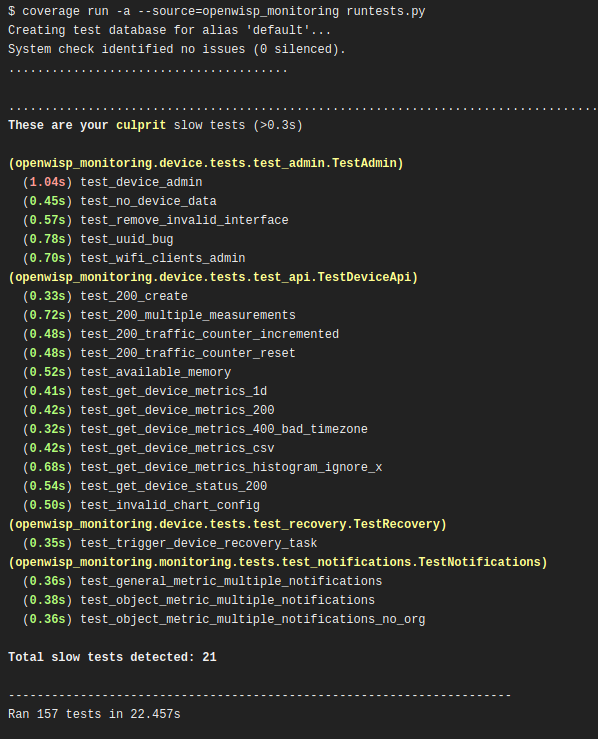
This class extends the default test runner provided by Django and logs the time spent by each test, making it easier to spot slow tests by highlighting time taken by it in yellow (time shall be highlighted in red if it crosses the second threshold).
By default tests are considered slow if they take more than 0.3 seconds but you can control this with OPENWISP_SLOW_TEST_THRESHOLD.
In order to switch to this test runner you have set the following in your settings.py:
TEST_RUNNER = 'openwisp_utils.tests.TimeLoggingTestRunner'This decorator can be used to capture standard output produced by tests, either to silence it or to write assertions.
Example usage:
from openwisp_utils.tests import capture_stdout

@capture_stdout()
def test_something(self):
    function_generating_output() # pseudo code

@capture_stdout()
def test_something_again(self, captured_ouput):
    # pseudo code
    function_generating_output()
    # now you can create assertions on the captured output
    self.assertIn('expected stdout', captured_ouput.getvalue())
    # if there are more than one assertions, clear the captured output first
    captured_error.truncate(0)
    captured_error.seek(0)
    # you can create new assertion now
self.assertIn('another output', captured_ouput.getvalue())Notes:
- If assertions need to be made on the captured output, an additional argument
(in the example above is named
captured_output) can be passed as an argument to the decorated test method, alternatively it can be omitted. - A
StingIOinstance is used for capturing output by default but if needed it's possible to pass a customStringIOinstance to the decorator function.
Equivalent to capture_stdout, but for standard error.
Example usage:
from openwisp_utils.tests import capture_stderr

@capture_stderr()
def test_error(self):
    function_generating_error() # pseudo code

@capture_stderr()
def test_error_again(self, captured_error):
    # pseudo code
    function_generating_error()
    # now you can create assertions on captured error
    self.assertIn('expected error', captured_error.getvalue())
    # if there are more than one assertions, clear the captured error first
    captured_error.truncate(0)
    captured_error.seek(0)
    # you can create new assertion now
self.assertIn('another expected error', captured_error.getvalue())Equivalent to capture_stdout and capture_stderr, but captures both types of
output (standard output and standard error).
Example usage:
from openwisp_utils.tests import capture_any_output

@capture_any_output()
def test_something_out(self):
    function_generating_output() # pseudo code

@capture_any_output()
def test_out_again(self, captured_output, captured_error):
    # pseudo code
    function_generating_output_and_errors()
    # now you can create assertions on captured error
    self.assertIn('expected stdout', captured_output.getvalue())
self.assertIn('expected stderr', captured_error.getvalue())This mixin overrides the
assertNumQueries
assertion from the django test case to run in a subTest so that the
query check does not block the whole test if it fails.
Example usage:
from django.test import TestCase
from openwisp_utils.tests import AssertNumQueriesSubTestMixin


class MyTest(AssertNumQueriesSubTestMixin, TestCase):
    def my_test(self):
        with self.assertNumQueries(2):
            MyModel.objects.count()

        # the assertion above will fail but this line will be executed
print('This will be printed anyway.')This mixin provides basic setup for Selenium tests with method to open URL and login and logout a user.
This backend extends django.contrib.gis.db.backends.spatialite
database backend to implement a workaround for handling
issue with sqlite 3.36 and spatialite 5.
This package contains some common QA checks that are used in the automated builds of different OpenWISP modules.
This shell script automatically formats Python and CSS code according to the OpenWISP coding style conventions.
It runs isort and black to format python code
(these two dependencies are required and installed automatically when running
pip install openwisp-utils[qa]).
The stylelint and jshint programs are used to perform style checks on CSS and JS code respectively, but they are optional:
if stylelint and/or jshint are not installed, the check(s) will be skipped.
Shell script to run the following quality assurance checks:
- checkmigrations
- checkcommit
- checkendline
- checkpendingmigrations
- checkrst
flake8- Python code linterisort- Sorts python imports alphabetically, and seperated into sectionsblack- Formats python code using a common standardcsslinter- Formats and checks CSS code using stylelint common standardjslinter- Checks Javascript code using jshint common standard
If a check requires a flag, it can be passed forward in the same way.
Usage example:
openwisp-qa-check --migration-path <path> --message <commit-message>
Any unneeded checks can be skipped by passing --skip-<check-name>
Usage example:
openwisp-qa-check --skip-isort
For backward compatibility csslinter and jslinter are skipped by default.
To run them in checks pass arguements in this way.
Usage example:
# To activate csslinter
openwisp-qa-check --csslinter

# To activate jslinter
openwisp-qa-check --jslinter
You can do multiple checkmigrations by passing the arguments with space-delimited string.
For example, this multiple checkmigrations:
checkmigrations --migrations-to-ignore 3 \
        --migration-path ./openwisp_users/migrations/ || exit 1

checkmigrations --migrations-to-ignore 2 \
        --migration-path ./tests/testapp/migrations/ || exit 1
Can be changed with:
openwisp-qa-check --migrations-to-ignore "3 2" \
        --migration-path "./openwisp_users/migrations/ ./tests/testapp/migrations/"
Ensures the latest migrations created have a human readable name.
We want to avoid having many migrations named like 0003_auto_20150410_3242.py.
This way we can reconstruct the evolution of our database schemas faster, with less efforts and hence less costs.
Usage example:
checkmigrations --migration-path ./django_freeradius/migrations/
Ensures the last commit message follows our commit message style guidelines.
We want to keep the commit log readable, consistent and easy to scan in order to make it easy to analyze the history of our modules, which is also a very important activity when performing maintenance.
Usage example:
checkcommit --message "$(git log --format=%B -n 1)"
If, for some reason, you wish to skip this QA check for a specific commit message
you can add #noqa to the end of your commit message.
Usage example:
[qa] Improved #20

Simulation of a special unplanned case
#noqa
Ensures that a blank line is kept at the end of each file.
Ensures there django migrations are up to date and no new migrations need to be created.
It accepts an optional --migration-module flag indicating the django app
name that should be passed to ./manage.py makemigrations, eg:
./manage.py makemigrations $MIGRATION_MODULE.
Checks the syntax of all ReStructuredText files to ensure they can be published on pypi or using python-sphinx.
default: openwisp_utils.admin_theme.admin.OpenwispAdminSite
If you need to use a customized admin site class, you can use this setting.
default: OpenWISP Admin
Title value used in the <title> HTML tag of the admin site.
default: OpenWISP
Heading text used in the main <h1> HTML tag (the logo) of the admin site.
default: Network administration
Title shown to users in the index page of the admin site.
default: True
When True, enables the OpenWISP Dashboard.
Upon login, the user will be greeted with the dashboard instead of the default
Django admin index page.
default: []
Note: this setting requires the admin_theme_settings context processor in order to work.
Allows to override the default CSS and favicon, as well as add extra <link> HTML elements if needed.
This setting overrides the default theme, you can reuse the default CSS or replace it entirely.
The following example shows how to keep using the default CSS, supply an additional CSS and replace the favicon.
Example usage:
OPENWISP_ADMIN_THEME_LINKS = [
    {'type': 'text/css', 'href': '/static/admin/css/openwisp.css', 'rel': 'stylesheet', 'media': 'all'},
    {'type': 'text/css', 'href': '/static/admin/css/custom-theme.css', 'rel': 'stylesheet', 'media': 'all'},
    {'type': 'image/x-icon', 'href': '/static/favicon.png', 'rel': 'icon'}
]default: []
Allows to pass a list of strings representing URLs of custom JS files to load.
Example usage:
OPENWISP_ADMIN_THEME_JS = [
    '/static/custom-admin-theme.js',
]default: False
When True, enables Django user links on the admin site.
i.e. (USER NAME/ VIEW SITE / CHANGE PASSWORD / LOG OUT).
These links are already shown in the main navigation menu and for this reason are hidden by default.
default: True
Whether the OpenAPI documentation is enabled.
When enabled, you can view the available documentation using the
Swagger endpoint at /api/v1/docs/.
You also need to add the following url to your project urls.py:
urlpatterns += [
    url(r'^api/v1/', include('openwisp_utils.api.urls')),
]default:
{
    'title': 'OpenWISP API',
    'default_version': 'v1',
    'description': 'OpenWISP REST API',
}
Define OpenAPI general information.
NOTE: This setting requires OPENWISP_API_DOCS = True to take effect.
For more information about optional parameters check the drf-yasg documentation.
default: [0.3, 1] (seconds)
It can be used to change the thresholds used by TimeLoggingTestRunner to detect slow tests (0.3s by default) and highlight the slowest ones (1s by default) amongst them.
default: ['leaflet/*/*.png']
Allows to pass a list of Unix shell-style wildcards for files to be excluded by CompressStaticFilesStorage.
By default Leaflet PNGs have been excluded to avoid bugs like openwisp/ansible-openwisp2#232.
Example usage:
OPENWISP_STATICFILES_VERSIONED_EXCLUDE = [
    '*png',
]| type | bool |
| default | True |
If True, an HTML themed version of the email can be sent using
the send_email function.
| type | str |
| default | openwisp_utils/email_template.html |
This setting allows to change the django template used for sending emails with the send_email function. It is recommended to extend the default email template as in the example below.
{% extends 'openwisp_utils/email_template.html' %}
{% block styles %}
{{ block.super }}
<style>
  .background {
    height: 100%;
    background: linear-gradient(to bottom, #8ccbbe 50%, #3797a4 50%);
    background-repeat: no-repeat;
    background-attachment: fixed;
    padding: 50px;
  }

  .mail-header {
    background-color: #3797a4;
    color: white;
  }
</style>
{% endblock styles %}
Similarly, you can customize the HTML of the template by overriding the body block.
See email_template.html
for reference implementation.
| type | str |
| default | OpenWISP logo |

This setting allows to change the logo which is displayed in HTML version of the email.
Note: Provide a URL which points to the logo on your own web server. Ensure that the URL provided is publicly accessible from the internet. Otherwise, the logo may not be displayed in the email. Please also note that SVG images do not get processed by some email clients like Gmail so it is recommended to use PNG images.
| type | int |
| default | 30 (in seconds) |
Sets the soft time limit for celery tasks using OpenwispCeleryTask.
| type | int |
| default | 120 (in seconds) |
Sets the hard time limit for celery tasks using OpenwispCeleryTask.
| type | str |
| default | 'openwisp_utils.admin_theme.views.AutocompleteJsonView' |
Dotted path to the AutocompleteJsonView used by the
openwisp_utils.admin_theme.filters.AutocompleteFilter.
Install the system dependencies:
sudo apt-get install sqlite3 libsqlite3-dev

# For running E2E Selenium tests
sudo apt install chromium
Install your forked repo:
git clone git://github.com/<your_fork>/openwisp-utils
cd openwisp-utils/
pip install -e .[qa,rest]
Install test requirements:
pip install -r requirements-test.txtInstall node dependencies used for testing:
npm install -g stylelint jshintSet up the pre-push hook to run tests and QA checks automatically right before the git push action, so that if anything fails the push operation will be aborted:
openwisp-pre-push-hook --installInstall WebDriver for Chromium for your browser version from https://chromedriver.chromium.org/home
and Extract chromedriver to one of directories from your $PATH (example: ~/.local/bin/).
Create database:
cd tests/
./manage.py migrate
./manage.py createsuperuser
Run development server:
cd tests/
./manage.py runserver
You can access the admin interface of the test project at http://127.0.0.1:8000/admin/.
Run tests with:
./runtests.py --parallelPlease refer to the OpenWISP contributing guidelines.
See OpenWISP Support Channels.
See CHANGES.
See LICENSE.
- Wireless icon is licensed by Gregbaker, under CC BY-SA 4.0 , via Wikimedia Commons.
- Roboto webfont is licensed under the Apache License, Version 2.0. WOFF files extracted using https://github.com/majodev/google-webfonts-helper.

