Preamble
As the soul user group grows larger and larger, enterprises attach importance to gateway configuration permissions. The
following is a list of added functions:
- Authentication for soul-admin login
- Menu permission control
- Single-page function button permission control
Preparations
- JWT (Json Web Token)
- Shiro
Program Logic
- Login logic
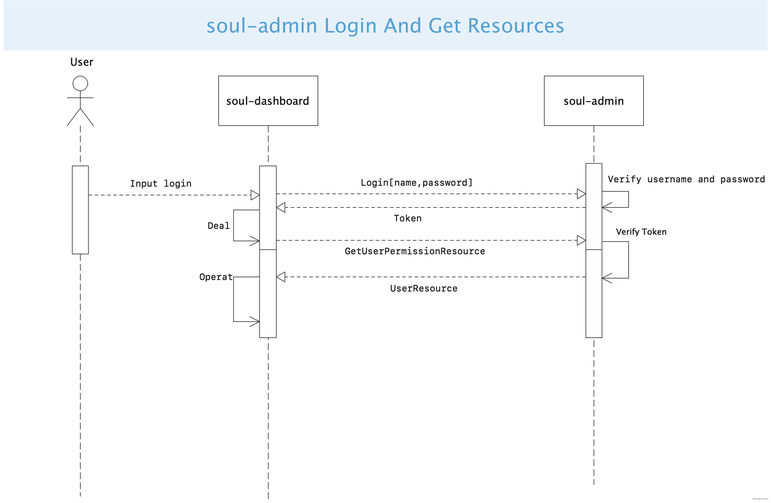
- The user name and password of the front-end POST are logged in to/login. If an encrypted token is returned, the logon page is redirected if the token fails.
- After that, you must add the X-Access-Token field to the header to Access each URL request that requires permissions. For example, X-Access-Token: token, the token is the key.
- Logic after successful login
- After the login is successful, the frontend sends a Token to the backend to request the user to use the resource interface. The backend obtains the user name from the token, retrieves the resource and returns it to the frontend.
Sequence Diagram of login and resource acquisition
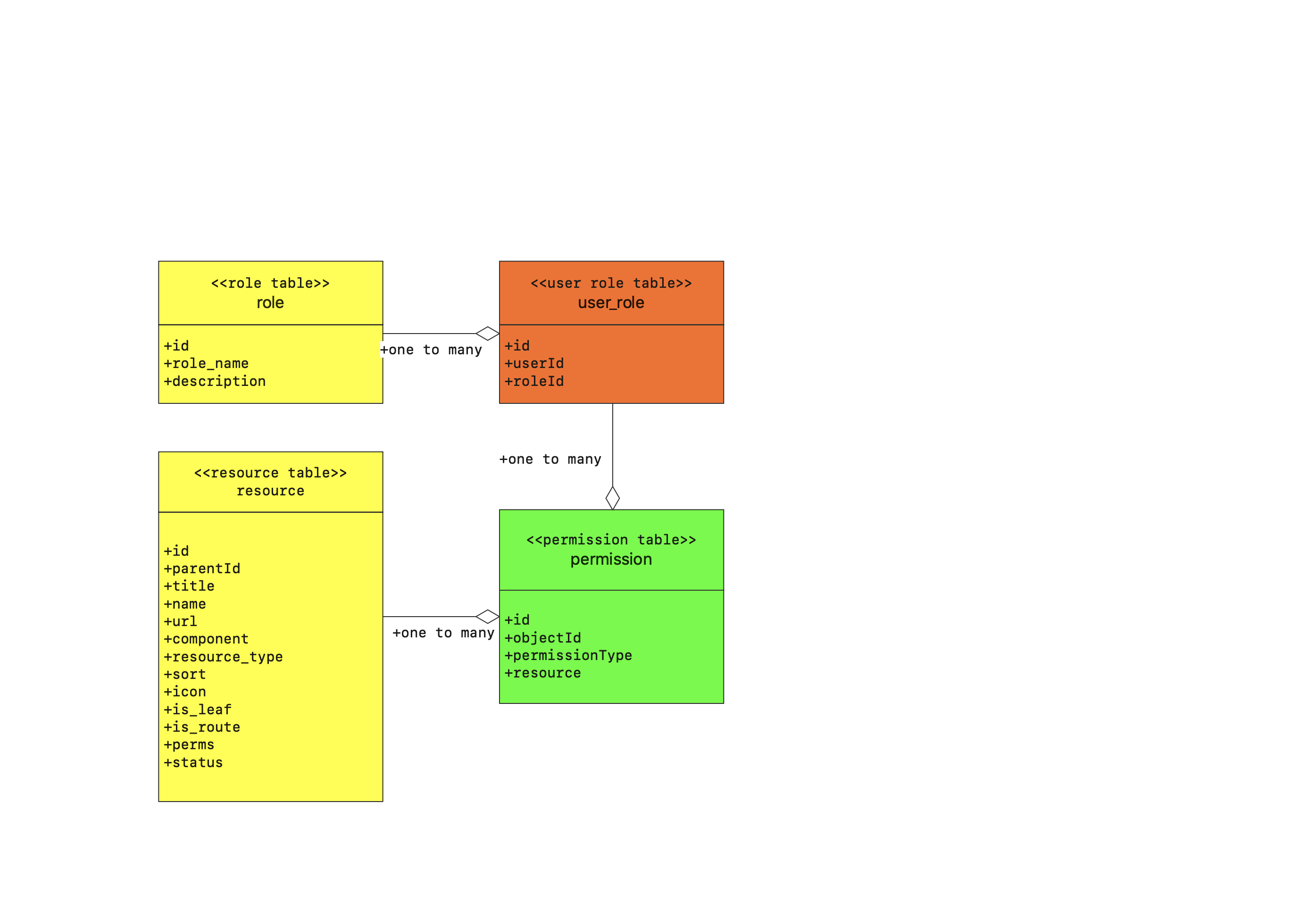
User role permission table structure
- Use existing user tables.
- role table field description
| Field |
Description |
| id |
unique id |
| role_name |
role name |
| description |
description |
- user_role table field description
| Field |
Description |
| id |
unique id |
| user_id |
unique user id |
| role_id |
role unique id |
- resource table field description
| Field |
Description |
| id |
unique id |
| parent_id |
parent menu id |
| title |
menu name |
| name |
frontend route name |
| url |
the url used by frontend route |
| component |
the name of frontend component |
| resource_type |
resource type 0: main menu 1: submenu 2: function button |
| sort |
menu display sorting |
| icon |
menu usage icon |
| is_leaf |
Entry recursion is judged by whether it is leaf or not |
| is_route |
whether it is a route (extended use) 1 yes 0 no |
| perms |
for example, sys:user:add/ sys:user:edit |
| status |
data status 1 is valid and 0 is invalid |
- permission table structure
| Field |
Description |
| id |
unique id |
| objectId |
role id or user id |
| permissionType |
permission type ROLE role permission, USER user permission |
| resourceId |
resource id |
Plan
- Role, basic permission data currently does not interact with the page, use SQL to insert the default data, and add later; However, the soul-admin backend provides the corresponding add, delete, modify, and query development interface
- Logon authentication control is preferred
- User permission menu acquisition and control
Recommendations
- Whether you need to provide certain permissions based on the time range for a single user but not for a role. eg: 2020-12-29 13:00:00~2020-12-29 14:00:00 a user has the new plug-in permission, and the timeout expires.
Preamble
As the soul user group grows larger and larger, enterprises attach importance to gateway configuration permissions. The
following is a list of added functions:
Preparations
Program Logic
Sequence Diagram of login and resource acquisition
User role permission table structure
ROLErole permission,USERuser permissionPlan
Recommendations