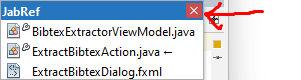
Close whole documents list at once #4792
Conversation


 mbien
added
Editor
UI
mbien
added
Editor
UI

There was a problem hiding this comment.
hi @Richard7111, thanks for implementing this. Ran a quick test and it worked great!
It would be good if new code would use the default NetBeans formatting, so that we don't mix so many styles in one file (no need to format the rest, only for new code). Example:
    // space before braces
    private void method(Foo foo) {
        if (foo != null) {
            foo.method();
        }
    }
Please try to extract the new code which closes the tabs into a package private utility method and put it into DocumentSwitcherTable . Since ButtonPupupSwitcher is in the same package as DocumentSwitcherTable and can simply call its method without code duplication.
Some more comments are inline.
platform/core.multitabs/src/org/netbeans/core/multitabs/impl/DocumentSwitcherTable.java
Outdated
Show resolved
Hide resolved
platform/core.multitabs/src/org/netbeans/core/multitabs/impl/DocumentSwitcherTable.java
Outdated
Show resolved
Hide resolved
platform/core.multitabs/src/org/netbeans/core/multitabs/impl/DocumentSwitcherTable.java
Outdated
Show resolved
Hide resolved
platform/core.multitabs/src/org/netbeans/core/multitabs/impl/ButtonPopupSwitcher.java
Outdated
Show resolved
Hide resolved
platform/core.multitabs/src/org/netbeans/core/multitabs/impl/DocumentSwitcherTable.java
Outdated
Show resolved
Hide resolved
platform/core.multitabs/src/org/netbeans/core/multitabs/impl/DocumentSwitcherTable.java
Outdated
Show resolved
Hide resolved
 Richard7111
force-pushed
the
CloseDocumentList
branch
from
Richard7111
force-pushed
the
CloseDocumentList
branch
from
cd46a32 to
384f7b0
Compare
|
Hey @mbien, I would like to write tests for my changes as a part of school assignment. However I have only used Mockito before for mocks, are you using something else for mocks or am I missing something? |

|
@Richard7111 Tools like Mockito didn't exist when most of NetBeans was written, this lead to custom tooling around tests. For example most tests extend NbTestCase which can do a lot of NB specific things. You could try to ask on the dev mailing list and see if someone has a good idea how to test things like this. However, UI tests have the tendency to break with time (sometimes randomly) and take long setup time to execute. I can't promise that we would add tests like that since we are reaching some limits. Mocking UI code is also not trivial and often not very useful. As you can see on a full test run Btw since we are talking about testing. I think I found a bug, I am not quite sure how to reproduce it reliably. The popup closes sometimes if a list is closed. It often happens if the first list is closed and possibly if the last list has only one item in it - had no time to investigate further. But there is no need to hurry to fix this since there is quite some time till the NB17 release. |
|
@mbien hey, I just tried to replicate the bug with closing popup. It happens only when there are 2 document lists, you close first and the second one contains only one item. Tried to fix it, but can't seem to figure out the correct condition. Will work on it a little more. |
Richard7111
force-pushed
the
CloseDocumentList
branch
from
384f7b0 to
ebb6a1a
Compare
|
Hi @mbien, I managed to fix the bugs, feel free to check it out. Hope everything is fixed now. 😄 |
 mbien
left a comment
mbien
left a comment
mbien
left a comment
There was a problem hiding this comment.
excellent. The most recent update looks good to me too.
Did some manual testing with and without project list sorting and everything worked as expected.
going to ping some more reviewers if they are interested to take a look before merging.
mbien
requested review from
eirikbakke,
lkishalmi,
matthiasblaesing and
neilcsmith-net
mbien
added
the
do not merge
|
@Richard7111 I just saw that your email on the commit is now |

|
Thanks for this patch! Another thing to test: How does this work when there are tabs with unsaved changes? What if there are multiple tabs with unsaved changes? Will take a look at the code in a bit... |
basically it uses the same code to close tabs as it is using now. A popup will ask the user to: discard, save or cancel |
|
There are some other existing bugs in ButtonPopupSwitcher to be aware of, too: Will review... |
|
If multiple tabs have unsaved changes, and the user presses Cancel in the dialog box that prompts to save, what happens in this case? Probably the loop should stop in this case. In fact, this should probably be done in the Close Other and Close All actions in the tab right-click menu as well. (CloseAllButThisAction and CloseAllDocumentsAction, respectively) But that's a separate bug. |
it just going to ask you the same question for each unsaved document. The dialog has the name of the document in it. |
|
@mbien Right, but if the user presses Cancel (rather than No), the loop should stop. Also, do the dialog boxes come one after another, or all on top of each other? They should probably come one at a time. |
Not sure about this since the question is only about the concrete file. The action could simply continue with the rest.
please test it. Its a UI change which is easier to discuss once everyone played around with it. But yes they don't open all at once. |
Well, that's the difference between pressing "Cancel" and "No"; the "No" button refers to the file in question, while Cancel refers to the overall action. I'll need to do a custom build to test this... will do but it may take a couple of days. |
It would be less intuitive to me if a file save dialog which asks me whether or not to save a single file would cancel more than what was asked in the question if cancel is pressed (it would need a "cancel all" button or something similar). The scope of the dialog seems to be clear to me: it is a save operation of a single file. The document group action is already running at this point. Some tabs might have been already closed. To do this differently, one would have to scan the files first, ask the question with the multi-file-save dialog, then scan again and close the group if everything was saved and user didn't press cancel. |
|
@mbien That's standard desktop app behavior for "Cancel" in a multi-document-interface environment: "Cancel" cancels the whole operation, "No" (actually "Discard" in NetBeans) closes the current file without saving, while continuing the loop. That's why there's a Cancel button that's separate from No/Discard.
No, that's not necessary; you just cancel when the user presses Cancel. If they already chose to save or discard some changes in other tabs, that's fine. I just tested with VSCode and Photoshop, for instance; it works that way there. (Not applicable in IntelliJ, since it autosaves and never prompts to save the file.) |
|
But we can leave the Discard/Cancel distinction out of this PR... I can do a separate PR later where I also propose to adjust the similar behavior for "Close All" and "Close Other". |
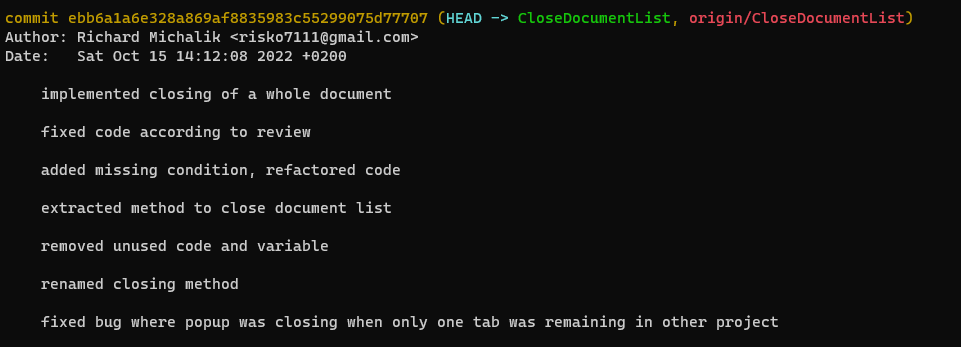
@mbien sorry, I am not sure where you see that. I see correct mail and user name when I check |

|
IMO it would be good to align the dialog with the single one that shows when you try to close the IDE with modified files. |
@eirikbakke IMO: if the situation allows it to run an atomic operation, the software should do that. Run checks first, ask if there is something to resolve, then do the operation. Don't start the op and keep asking questions while its running.
awesome. Would be good to have consistent behavior in comparable actions. |
|
@neilcsmith-net I'll look into that in a future PR. |
@Richard7111 you are right! everything is fine. I looked at the wrong line: restarting the build (please ignore the lock conversation event) |
mbien
removed
the
do not merge


 eirikbakke
left a comment
eirikbakke
left a comment
eirikbakke
left a comment
There was a problem hiding this comment.
Thanks again for this PR! Added some comments and questions.
platform/core.multitabs/src/org/netbeans/core/multitabs/impl/DocumentSwitcherTable.java
Outdated
Show resolved
Hide resolved
platform/core.multitabs/src/org/netbeans/core/multitabs/impl/DocumentSwitcherTable.java
Outdated
Show resolved
Hide resolved
platform/core.multitabs/src/org/netbeans/core/multitabs/impl/ButtonPopupSwitcher.java
Outdated
Show resolved
Hide resolved
platform/core.multitabs/src/org/netbeans/core/multitabs/impl/ButtonPopupSwitcher.java
Outdated
Show resolved
Hide resolved
platform/core.multitabs/src/org/netbeans/core/multitabs/impl/ButtonPopupSwitcher.java
Outdated
Show resolved
Hide resolved
platform/core.multitabs/src/org/netbeans/core/multitabs/impl/ButtonPopupSwitcher.java
Outdated
Show resolved
Hide resolved
platform/core.multitabs/src/org/netbeans/core/multitabs/impl/DocumentSwitcherTable.java
Show resolved
Hide resolved
platform/core.multitabs/src/org/netbeans/core/multitabs/impl/DocumentSwitcherTable.java
Show resolved
Hide resolved
platform/core.multitabs/src/org/netbeans/core/multitabs/impl/DocumentSwitcherTable.java
Outdated
Show resolved
Hide resolved
platform/core.multitabs/src/org/netbeans/core/multitabs/impl/DocumentSwitcherTable.java
Show resolved
Hide resolved
fixed code according to review

added missing condition, refactored code

extracted method to close document list

removed unused code and variable

renamed closing method

fixed bug where popup was closing when only one tab was remaining in other project

Made changes based on review
Richard7111
force-pushed
the
CloseDocumentList
branch
from
ebb6a1a to
2ef7d5e
Compare
eirikbakke
left a comment
eirikbakke
left a comment
There was a problem hiding this comment.
Thanks for the changes! Tested on my own NetBeans build and confirmed to work.
platform/core.multitabs/src/org/netbeans/core/multitabs/impl/DocumentSwitcherTable.java
Show resolved
Hide resolved
platform/core.multitabs/src/org/netbeans/core/multitabs/impl/DocumentSwitcherTable.java
Show resolved
Hide resolved

|
(We can probably merge this one if no one objects within a couple of days.) |
|
@Richard7111 congrats to your first contribution. Thanks for your patience :) |
… dialogs.

When invoking "Close All" on a tab, some tabs may pop up confirmation dialogs asking whether their work should be saved or not. Pressing "Cancel" in any dialog should stop showing further dialogs, and stop the overall operation. This was not previously done. (In some cases, a bunch of dialogs would be shown on top of each other simultaneously as well, creating some visual artifacts.)

This change was made to the Close All and Close Other actions, as well as for the newly introduced "Close whole documents list at once" button in the document list dropdown (PR apache#4792).

In a previous discussion, it was suggested to make the whole operation atomic (i.e. don't close any tabs at all if the user presses Cancel after several tabs have already been iterated), but this is not possible given the existing APIs (where we don't know if Cancel was pressed until TopComponent.close() was called). Moreover, the behavior implemented in this PR is more standard in any case (same as in e.g. Photoshop and VSCode).

It was also suggested to implement similar behavior in the save prompt that shows up when exiting the IDE, but this is a rather different operation that does not actually close any tabs (they remain "open" and persisted for the next time the IDE starts). I'm not quite sure how to improve it; it might require more discussion. See the "Savable" API and the o.n.core.ExitDialog class.

I would also have liked to focus each TopComponent in turn when prompts to save come up, but this is a bit more work due to the various levels of abstractions involved. More work on this can be done later. (See MultiViewFactory.resolveCloseOperation for a relevant starting point.)
When invoking "Close All" on a tab, some tabs may pop up confirmation dialogs asking whether their work should be saved or not. Pressing the "Cancel" button in any dialog, as opposed to "Save" or "Discard", should stop showing further dialogs, and stop the overall operation. This was not previously done. (In some cases, a bunch of dialogs would be shown on top of each other simultaneously, creating visual artifacts.)

This change was made to the Close All and Close Other actions, as well as for the newly introduced "Close whole documents list at once" button in the document list dropdown (PR apache#4792).

In a previous discussion, it was suggested to make the whole operation atomic (i.e. don't close any tabs at all if the user presses Cancel after several tabs have already been iterated), but this is not possible given the existing APIs. (We don't know if Cancel was pressed until TopComponent.close() was called.) Moreover, the behavior implemented in this PR is more standard in any case; it matches the behavior in e.g. Photoshop and VSCode.

It was also suggested to implement similar behavior in the save prompt that shows up when exiting the IDE, but this is a rather different operation that does not actually close any tabs (they remain "open" and persisted for the next time the IDE starts). I'm not quite sure how to improve it; it might require more discussion. See the "Savable" API and the o.n.core.ExitDialog class.

I would also have liked to focus each TopComponent in turn when prompts to save come up, but this is a bit more work due to the various levels of abstractions involved. More work on this can be done later. See MultiViewFactory.resolveCloseOperation for a relevant starting point.
When invoking "Close All" on a tab, some tabs may pop up confirmation dialogs asking whether their work should be saved or not. Pressing the "Cancel" button in any dialog, as opposed to "Save" or "Discard", should stop showing further dialogs, and stop the overall operation. This was not previously done. (In some cases, a bunch of dialogs would be shown on top of each other simultaneously, creating visual artifacts.)

This change was made to the Close All and Close Other actions, as well as for the newly introduced "Close whole documents list at once" button in the document list dropdown (PR #4792).

In a previous discussion, it was suggested to make the whole operation atomic (i.e. don't close any tabs at all if the user presses Cancel after several tabs have already been iterated), but this is not possible given the existing APIs. (We don't know if Cancel was pressed until TopComponent.close() was called.) Moreover, the behavior implemented in this PR is more standard in any case; it matches the behavior in e.g. Photoshop and VSCode.

It was also suggested to implement similar behavior in the save prompt that shows up when exiting the IDE, but this is a rather different operation that does not actually close any tabs (they remain "open" and persisted for the next time the IDE starts). I'm not quite sure how to improve it; it might require more discussion. See the "Savable" API and the o.n.core.ExitDialog class.

I would also have liked to focus each TopComponent in turn when prompts to save come up, but this is a bit more work due to the various levels of abstractions involved. More work on this can be done later. See MultiViewFactory.resolveCloseOperation for a relevant starting point.

When invoking "Close All" on a tab, some tabs may pop up confirmation dialogs asking whether their work should be saved or not. Pressing the "Cancel" button in any dialog, as opposed to "Save" or "Discard", should stop showing further dialogs, and stop the overall operation. This was not previously done. (In some cases, a bunch of dialogs would be shown on top of each other simultaneously, creating visual artifacts.)

This change was made to the Close All and Close Other actions, as well as for the newly introduced "Close whole documents list at once" button in the document list dropdown (PR apache#4792).

In a previous discussion, it was suggested to make the whole operation atomic (i.e. don't close any tabs at all if the user presses Cancel after several tabs have already been iterated), but this is not possible given the existing APIs. (We don't know if Cancel was pressed until TopComponent.close() was called.) Moreover, the behavior implemented in this PR is more standard in any case; it matches the behavior in e.g. Photoshop and VSCode.

It was also suggested to implement similar behavior in the save prompt that shows up when exiting the IDE, but this is a rather different operation that does not actually close any tabs (they remain "open" and persisted for the next time the IDE starts). I'm not quite sure how to improve it; it might require more discussion. See the "Savable" API and the o.n.core.ExitDialog class.

I would also have liked to focus each TopComponent in turn when prompts to save come up, but this is a bit more work due to the various levels of abstractions involved. More work on this can be done later. See MultiViewFactory.resolveCloseOperation for a relevant starting point.
4 participants


Implemented closing of a whole document list at once, based on issue #4760