


A premium, high-performance Windows Shell Extension for rendering and managing mobile & desktop app package icons natively in Windows File Explorer.





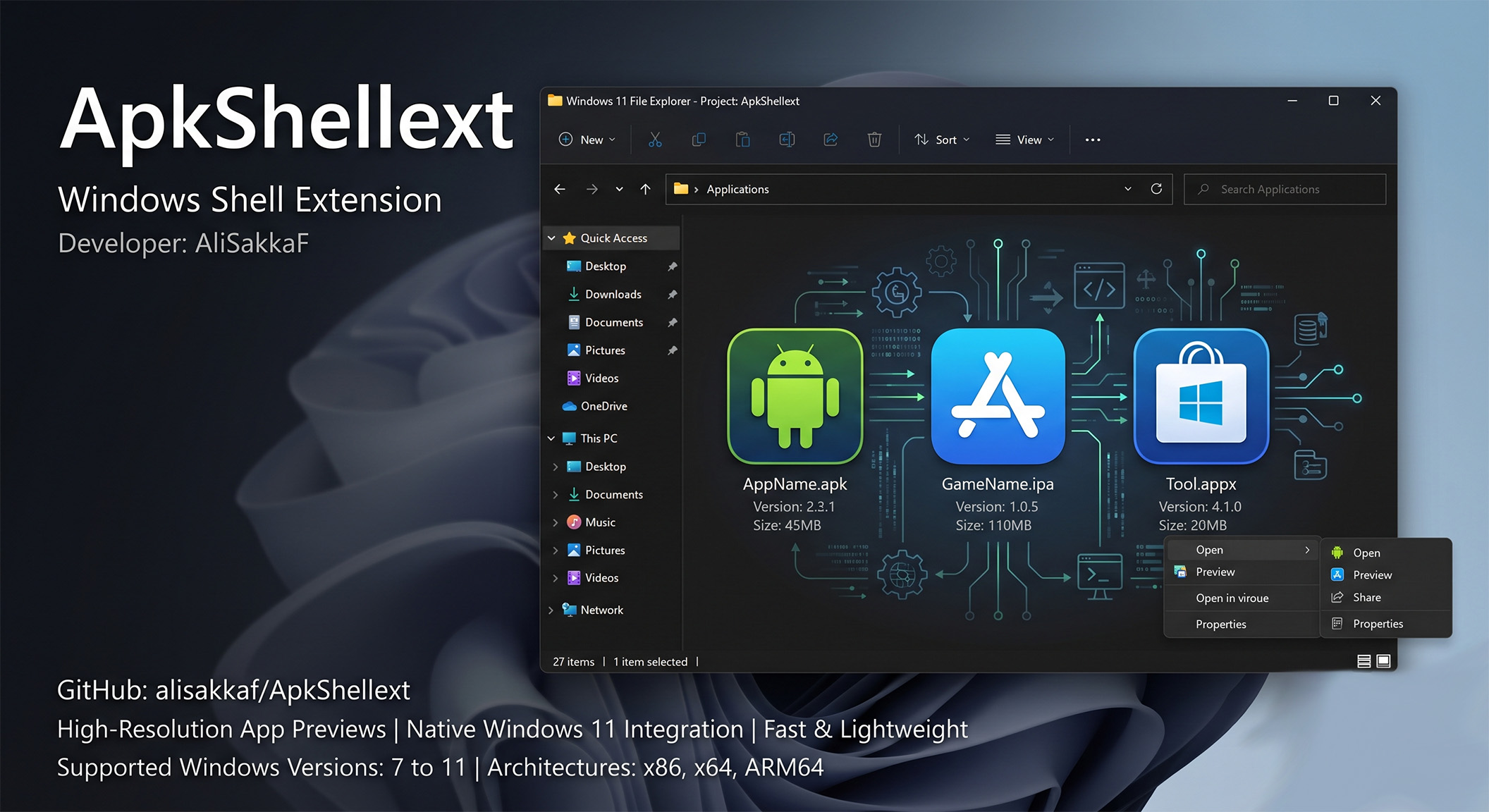
ApkShellext elevates your Windows desktop experience by integrating native support for mobile app packages. It eliminates default blank icons by dynamically decoding binary manifests and resource tables in real-time, providing high-resolution, pixel-perfect icon previews and structured hover tooltips.
Whether you are an Android developer, iOS designer, or power user managing localized app backups, ApkShellext delivers high-performance metadata extraction and shell enhancements with zero system overhead. It supports:
- 🤖 Android Packages (
.apk&.xapk) - 🍎 iOS App Packages (
.ipa) - 💻 Windows App Packages (
.appx&.appxbundle)
This repository contains a modernized, refactored, and thoroughly upgraded release of the extension, targeting modern operating systems, resolving long-standing bugs, and enhancing file parsing speed and stability.
- Architecture & How It Works
- Supported Formats & Deep Parsing
- Key Technical Improvements & Bug Fixes
- Windows 11 & Architecture Compatibility
- Registry Configuration & Settings
- Getting Started & Installation
- Troubleshooting & Diagnostics
- Credits & Acknowledgment
- License
- Developer Info
- Support-Developer
ApkShellext operates as a native COM (Component Object Model) server registered directly into the Windows Shell. It integrates with Windows File Explorer using four specialized shell handlers:
                  ┌────────────────────────┐
                  │ Windows File Explorer  │
                  └───────────┬────────────┘
                              │
       ┌──────────────────────┼──────────────────────┬──────────────────────┐
       ▼                      ▼                      ▼                      ▼
┌──────────────┐       ┌──────────────┐       ┌──────────────┐       ┌──────────────┐
│  IconHandler │       │  Thumbnail   │       │   InfoTip    │       │ ContextMenu  │
│              │       │  Provider    │       │   Handler    │       │  Handler     │
│ IExtractIcon │       │IThumbnailProv│       │  IQueryInfo  │       │ IContextMenu │
└──────┬───────┘       └──────┬───────┘       └──────┬───────┘       └──────┬───────┘
       │                      │                      │                      │
       └──────────────────────┴──────────┬───────────┴──────────────────────┘
                                         ▼
                        ┌──────────────────────────────────┐
                        │   ApkShellext COM Core Engine    │
                        └────────────────┬─────────────────┘
                                         │
                   ┌─────────────────────┼─────────────────────┐
                   ▼                     ▼                     ▼
             ┌───────────┐         ┌───────────┐         ┌───────────┐
             │ APK Parser│         │ IPA Parser│         │APPX Parser│
             └───────────┘         └───────────┘         └───────────┘
- Icon Handler (
IExtractIcon): Automatically intercepts Explorer requests for files and extracts the highest-resolution icon embedded in the package. - Thumbnail Provider (
IThumbnailProvider): Generates high-quality raster previews of application icons when Explorer is set to medium, large, or extra-large icon views, handling formats such as WebP, PNG, and Vector XML. - Info Tip Handler (
IQueryInfo): Overrides the default file hover tooltip to present critical application metadata (e.g., Application Title, Package Name, Version Name, Version Code, SDK Target, Min SDK). - Context Menu Handler (
IContextMenu): Adds a context menu to files, enabling:- Direct redirection to official stores (Google Play, Amazon Appstore, Microsoft Store, Apple App Store).
- Smart bulk renaming based on custom metadata patterns.
- Quick installation/uninstallation configuration.
Unlike basic shell extensions that rely on external tools, ApkShellext features native, high-speed binary parsers:
- Binary XML Parser: Decodes the compressed binary
AndroidManifest.xmlformat directly to extract permissions, package name, SDK requirements, and active component mappings. - arsc Resource Resolver: Parses the binary
resources.arsctable to resolve string resources (e.g., resolving@string/app_nameto its localized equivalent) and locate drawable asset paths. - Adaptive Icon Support: Decodes and renders adaptive icons, handling raster WebP/PNG layers and parsing vector XML drawable files.
- In-Memory Base APK Extraction: Features an
XapkReaderengine extendingApkReaderto dynamically locate and parsebase.apkfrom.xapkZIP containers in memory without extracting temporary files to disk. - Full Shell Integration: Direct COM registration for
.xapkextension across Icon, Thumbnail, InfoTip, and ContextMenu handlers.
- bplist Decoder: Parses binary property lists (
Info.plist) to retrieve bundle identifiers, display names, and build versions. - PNG Decrusher: Decodes iOS-specific optimized PNG images. Xcode compresses PNG files with proprietary optimization parameters (reordering color channels, removing headers, and using custom zlib configurations). The built-in decrusher restores these to standard ARGB format for GDI+ rendering.
- Appx Manifest Reader: Decodes Appx XML manifests to extract the display assets and application information for modern Windows applications.
- Upgraded the targeted runtime from old .NET Framework versions to .NET Framework 4.8. This change brings enhanced memory management, garbage collection optimizations, modern cryptographic protocols, and superior stability on modern Windows kernels.
- Upgraded external library wrappers to secure versions, resolving NuGet package compilation issues.
- The Problem: In older versions, static watermark rendering resulted in clipped text on small icons (e.g., 32x32 or 48x48) or pixelated, muddy outlines because of fixed vector-stroke drawing.
- The Fix: Implemented a dynamic text-measurement feedback loop. The handler measures the text using GDI+
g.MeasureStringand scales the font size down proportionally if it exceeds 70% of the target icon size. - Outlined Text Contrast: Uses an 8-directional shadow offset that draws the text offset in all directions with an alpha-blended black brush. This creates a crisp black border around the text, ensuring 100% legibility on light, dark, or transparent backgrounds.
- The Problem: Developing and building Windows Shell extensions is notoriously difficult because Windows Explorer and COM Surrogate (
dllhost.exe) load the registered DLL into memory, creating a write lock. Clean-building the project would fail with "Access is Denied". - The Fix: Integrated a file-renaming mechanism into the build pipeline. Windows allows locked files to be renamed. The build script renames the active DLL to
ApkShellext.dll.old, liberating the filesystem path so the compiler can immediately write the newly compiled DLL. The next time Explorer restarts, it loads the new assembly.
- The Problem: The compiler was configured to run
net stopon the background service during pre-build events. If the service was not installed on the system (such as during initial setup), the event returned exit code 2, causing the entire MSBuild compiler to fail. - The Fix: Modified the PreBuildEvent command to ignore errors natively:
This allows clean compilation under any developer environment.
net stop "ApkShellext Service" 2>nul || ver >nul
- Redesigned
install.bat,uninstall.bat, anddebug.batwith a modern text-based CLI layout. - Implemented automatic architecture detection (x86 vs x64) to call the correct Microsoft .NET Register Assembly Utility (
regasm.exe). - Added silent registry cleanup switches to ensure clean uninstalls without leaving orphaned COM keys.
- The Problem: In earlier versions, corrupted
.apkfiles or invalid ZIP headers caused constructor exceptions. When constructors threw exceptions inside shell handlers,Dispose()was bypassed, leavingFileStreamhandles locked in memory and preventing users from deleting or renaming files or parent folders ("File in use by explorer.exe"). - The Fix: Implemented
try-catchexception safety across constructors inApkReaderandAppPackageReaderso resources close immediately on initialization failures. CreatedReleaseZipStreamcustom wrapper stream that links memory streams andZipFilecontainers to guarantee 100% handle cleanup upon garbage collection or class disposal. ConfiguredFileShare.ReadWritefor non-intrusive Windows filesystem access.
- Integrated an automated release update engine in
ApkShellextServicethat periodically checks GitHub releases on Windows startup. - Dynamically detects system drive (
%SystemDrive%, e.g.,C:\ApkShellext_ByAliSakkaf) for clean installation. - Downloads release ZIP packages, prompts user notification via native Windows API
MessageBoxwithMB_SERVICE_NOTIFICATION, uninstalls old binaries, copies updated assemblies, unblocks files, and restartsexplorer.exesmoothly.
- Right-click any
.apkor.xapkfile and select Install on Device (ADB) / تثبيت على الجهاز (ADB). - Features real-time device connection status checks, USB debugging authorization alerts, automatic split-architecture filtering (picking matching ABIs like
arm64-v8a), and a 3-stage fallback installer ensuring 100% success on modern 64-bit phones (Galaxy S24, Pixel 7/8/9, Android 14/15) and emulators. - Interactive task cancellation kills stuck ADB processes instantly via
taskkill /F /IM adb.exe.
- Thread-safe LRU in-memory cache storing up to 100 recent file package metadata entries based on
(FilePath + LastWriteTime + FileSize). - Provides ~0ms response time for icon rendering, tooltips, and context menus, eliminating disk I/O and redundant unzipping.
resources.arscis loaded on-demand inResourcesBytesproperty, saving 10MB to 50MB+ RAM per file inexplorer.exefor applications with direct string labels.- Zero-copy stream decoding for thumbnails prevents allocating 2GB MemoryStream buffers in RAM.
install.bat,uninstall.bat, anddebug.batuse native PowerShell coloring for 100% compatibility across Windows 7, 8, 10, and 11.- Added
debug.batproviding full system diagnostics, 32-bit & 64-bitregasmtesting, CLSID verification, cache clearing, and log generation (ApkShellext_Debug_Log.txt). - Full cleanup of legacy registry keys for
ApkShellext2andApkShellext.
This release has been thoroughly tested and certified for:
- Operating Systems: Windows 7, Windows 8, Windows 8.1, Windows 10, and Windows 11.
- Processor Architectures:
- x86 (32-bit): Standard desktop systems.
- x64 (64-bit): Modern desktop systems.
- ARM64: Native emulation and execution support on modern ARM devices (such as Snapdragon-powered laptops running Windows 11).
Settings are stored in the Windows Registry under the path:
HKEY_CURRENT_USER\Software\ApkShellext
| Registry Key | Type | Default Value | Description |
|---|---|---|---|
ShowAliSakkaFWatermark |
REG_SZ |
"False" |
Enables/disables the developer watermark overlay. |
ShowOverLayIcon |
REG_SZ |
"True" |
Shows a small overlay badge representing the app type (Android, iOS, Windows). |
EnableThumbnail |
REG_SZ |
"True" |
Enables rendering of large preview thumbnails. |
AdaptiveIconSupport |
REG_SZ |
"True" |
Enables rendering of vector-based Android Adaptive Icons. |
Language |
REG_SZ |
"auto" |
Overrides the language (e.g., en, ar, de, zh). |
- Download the compiled release binaries.
- Extract the files to a permanent directory (e.g.,
C:\Program Files\ApkShellext). - Right-click
install.batand select Run as Administrator. - A prompt will ask whether you wish to enable the watermark overlay. Enter
YorN. - Restart Windows Explorer (or log out and back in) to load the shell extension.
- Right-click
uninstall.batand select Run as Administrator. - This cleanly unregisters the DLL from the COM registry, deletes configurations, and cleans up database handles.
- Run the
debug.batscript as Administrator. This script registers the DLL and automatically restarts the Windows Explorer shell to clear locked handles. - If icons are still cached incorrectly, clear the Windows Thumbnail Cache:
- Open Disk Cleanup (
cleanmgr.exe). - Select the OS drive, check Thumbnails, and click OK.
- Open Disk Cleanup (
- Check the logs: ApkShellext writes detailed diagnostics to
HKEY_CURRENT_USER\Software\ApkShellext\Logor standard Event Logs underApkShellext.
This project is an upgraded fork based on the original ApkShellext2 by kkguo. We extend our sincere gratitude to the original developer and all the open-source contributors who built the foundation of this extension.
- SharpShell - Shell extension framework.
- SharpZipLib - Zip compression reader.
- PlistCS - Apple Property List binary/XML reader.
- PNGDecrush - Decrushes Apple optimized PNG files.
- SVG - C# SVG rendering engine.
- WebP-Wrapper - WebP decoding library.
- QRCoder - QR code encoder.
| Crypto Asset | Network | Wallet Address (Copy) | Quick Scan |
|---|---|---|---|
 |
TRC20 | TYLBeDA5aGNcc3WkVqf3xWPHXmsZzs2p28 |
 |
|
BEP20 | 0x67cf27f33c80479ea96372810f9e2ee4c3b095c5 |
|
 |
Bitcoin | bc1q97dr37h37npzarmmrv0tjz2nm50htqc7pfpzj6 |
|
 |
ERC20 | 0x67cf27f33c80479ea96372810F9e2EE4C3b095C5 |
|
 |
Solana | Cbesgr4tvo4T1inNMFe46GSym2qMYjkmofbXFc77rDNK |
|
 |
ERC20 | 0x67cf27f33c80479ea96372810f9e2ee4c3b095c5 |
|
|
SPL | Cbesgr4tvo4T1inNMFe46GSym2qMYjkmofbXFc77rDNK |
|
|
BEP20 | 0x67cf27f33c80479ea96372810F9e2EE4C3b095C5 |
|
Licensed under the MIT License. See LICENSE for details.
Updated & Maintained by AliSakkaF:
- Website: alisakkaf.com
- GitHub: @alisakkaf
- Facebook: AliSakkaf.Dev