We need the following items.
- Visual Studio Code
- PlatformIO
- Download the CP210x Universal Windows Driver.
- Unzip the compressed file.
- Right-click the
silabser.infand select "install".
-
Waiting to connect to the Micro ROS agent: The LED flashes.
-
Successfully connected to the Micro ROS agent: The LED remains steady.
The #define IS_RIGHT directive in include/params.hpp controls the parameter setting to right arm.
To use the left arm, please comment out this line.
The double joint_positions[NUM_ALL_SERVOS] array, defined in src/main.cpp, serves as shared memory. Micro ROS writes into the shared memory based on subscribed data, while the arm controller reads from it to execute movements of the robot arm.
The #define USE_MUTEX_LOCK directive in include/params.hpp controls the code to use the mutex lock.
To disable the mutex lock, please comment out this line.
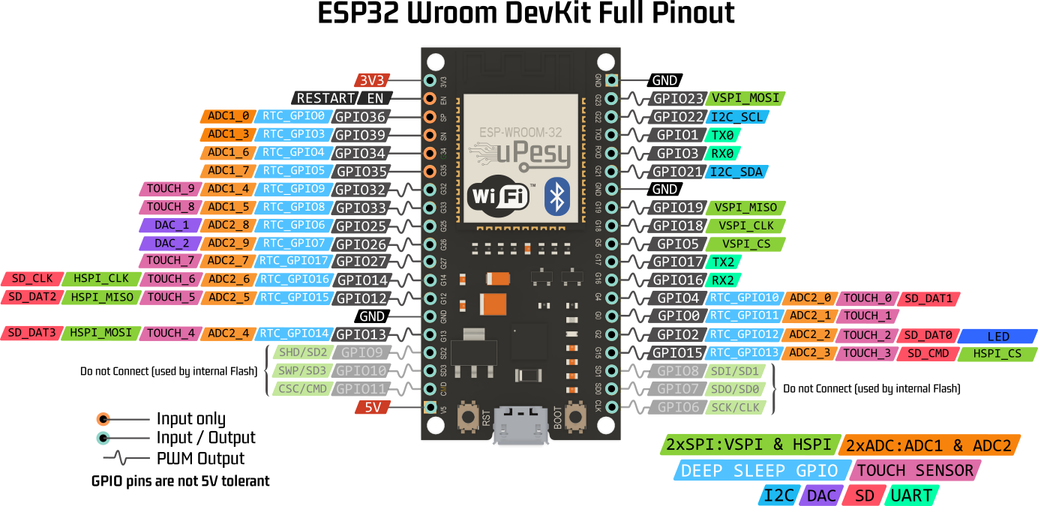
The #define USE_UART2 directive in include/params.hpp controls the code to log the joint data via UART2. We use Rx2 and Tx2, defined as GPIO16 and GPIO17, to transmit joint data.
Connect the Rx (white wire) of the USB-to-UART converter to the Tx2 (GPIO17) on the ESP32, and connect the GND (black wire) to the ESP32 ground.
Finally, execute the following command:
screen /dev/ttyUSB0 921600To exit the screen, press Ctrl-A, then K, and confirm.
The #define USE_REPUBLISH directive in include/params.hpp controls the code to republish the joint data. We subscribe the joint angles from /NAMESPACE/TOPIC_NAME, convert the radian values to degrees, and then publish them to /NAMESPACE/REPUBLISH_TOPIC_NAME.
This will increase the overall workload on the middleware.
Example for publishing and subscribing data.
We provide several simple scripts to publish joint angles to ARM_TOPIC_NAME and HAND_TOPIC_NAME to test your robot arm.