

长任务防休眠守护工具 · Keep your long tasks awake.
离开电脑前一键开启,AI Agent / 渲染 / 下载 / 编译等长任务不再被系统休眠打断。回来碰一下键鼠,自动恢复正常电源管理。
One-click keep-awake for long-running tasks. Prevents Windows from sleeping or turning off the display while your AI agents, renders, downloads, or compiles are running. Automatically restores normal power management when you return.
| 中文 | English | |
|---|---|---|
| 🛡️ | 三重防休眠(Power Request + Execution State + 电源计划兜底) | Triple-layer keep-awake (Power Request + Execution State + power plan fallback) |
| 🌙 | 守护时屏幕亮度降至最低,节电但不中断任务 | Display dimmed to minimum during guard — saves power without interrupting tasks |
| 🖱️ | 进入守护纯手动,退出守护纯自动(持续操作键鼠 3 秒) | Manual enter, auto-exit (3 seconds of continuous input) |
| ⏱️ | 10 秒倒计时可取消,防止误触 | 10-second cancelable countdown to prevent accidental activation |
| 🎈 | 精致悬浮球 + 对话气泡 UI,抗锯齿矢量渲染 | Elegant floating dot + chat-bubble UI, anti-aliased vector rendering |
| 🌐 | 中英文界面切换 | Chinese / English UI toggle |
| 📋 | 开机自启 + 系统托盘常驻 | Auto-start on boot + system tray resident |
| 📝 | 运行日志,便于排查问题 | Runtime logs for troubleshooting |
| 🔒 | 纯本地运行,无网络请求,无数据收集 | 100% local, no network requests, no data collection |
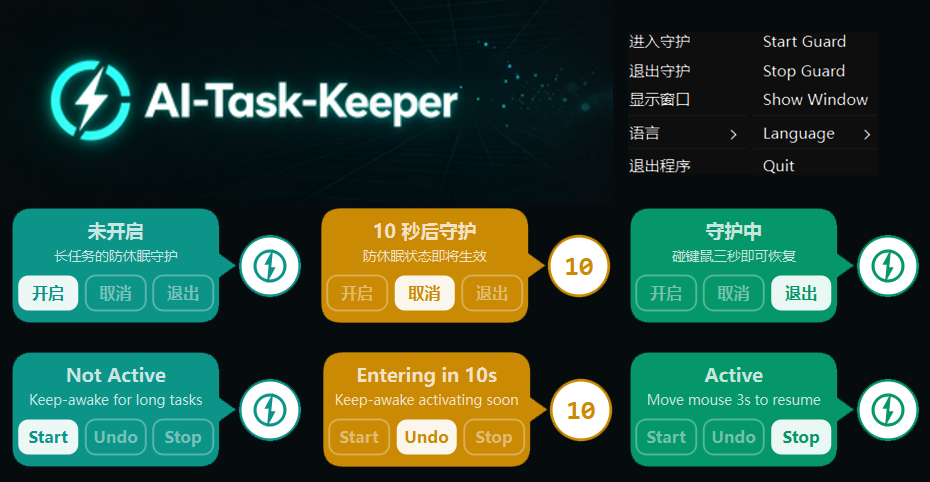
- 未开启 / Not Active — 默认状态,不干预系统电源
- 倒计时 / Countdown — 10 秒后进入守护,可取消
- 守护中 / Active — 防休眠生效,屏幕最暗,碰键鼠 3 秒自动恢复
从 GitHub Releases 下载最新版 AI-Task-Keeper.exe,单文件,双击即用,无需安装。
Download the latest AI-Task-Keeper.exe from GitHub Releases. Single file, no installation required.
系统要求 / System Requirements:Windows 10 / 11(64 位)
- 鼠标划过屏幕右下角的悬浮球,弹出气泡面板
- 点击 开启 / Start(或双击悬浮球)
- 10 秒倒计时后进入守护:屏幕变暗,系统不再休眠
- 倒计时期间可点 取消 / Undo 中止
- 自动:持续移动鼠标或敲击键盘满 3 秒,自动恢复正常
- 手动:悬浮球气泡点 退出 / Stop,或托盘右键 → 退出守护
右键托盘图标:
- 进入守护 / Start Guard
- 退出守护 / Stop Guard
- 显示窗口 / Show Window
- 语言 / Language → 中文 / English
- 退出程序 / Quit
配置文件位于 %APPDATA%\AI-Task-Keeper\config.json:
{
  "dim_brightness": 0,
  "poll_interval": 1.0,
  "grace_period": 2.0,
  "enter_delay": 10.0,
  "exit_confirm": 3.0,
  "topmost": true,
  "autostart": true,
  "language": "zh"
}| 字段 | 说明 | 默认 |
|---|---|---|
dim_brightness |
守护时屏幕亮度(0=最低,0-100) | 0 |
enter_delay |
进入守护倒计时(秒) | 10 |
exit_confirm |
退出守护需持续输入(秒) | 3 |
grace_period |
进入守护后缓冲期(秒,期间不检测输入) | 2 |
poll_interval |
输入检测轮询间隔(秒) | 1.0 |
topmost |
悬浮球是否置顶 | true |
autostart |
开机自启 | true |
language |
界面语言(zh / en) |
"zh" |
日志文件位于 %APPDATA%\AI-Task-Keeper\logs\app.log。
- Python 3.10+
- Windows 10 / 11
pip install -r requirements.txtpython main.pypyinstaller --clean AI-Task-Keeper.spec产物位于 dist/AI-Task-Keeper.exe。
AI-Task-Keeper/
├── main.py              # 入口:初始化、托盘、悬窗
├── appinfo.py           # 品牌常量与标准路径
├── config.py            # 配置读写(JSON)
├── i18n.py              # 中英文文案
├── logger.py            # 日志系统
├── core.py              # 核心:防休眠 API、亮度、输入检测
├── guardian.py          # 状态机:idle → preparing → active
├── qt_gui.py            # Qt 悬浮球 + 气泡 UI
├── tray.py              # 系统托盘
├── startup.py           # 开机自启(注册表)
└── AI-Task-Keeper.spec  # PyInstaller 打包配置
针对 Windows S0 Modern Standby 设备(普通 SetThreadExecutionState 无法阻止待机),采用三重防休眠:
- PowerCreateRequest / PowerSetRequest — 现代电源请求,主动阻止 Modern Standby(主防线)
- SetThreadExecutionState — 传统防休眠 API(辅助)
- 临时电源计划 — 将睡眠/休眠/关屏设为"从不",退出守护时恢复原值(系统级兜底)
For Windows S0 Modern Standby devices (where plain SetThreadExecutionState cannot prevent standby), a triple-layer approach is used:
- PowerCreateRequest / PowerSetRequest — Modern power request that actively blocks Modern Standby (primary)
- SetThreadExecutionState — Legacy keep-awake API (secondary)
- Temporary power plan — Sets sleep/hibernate/display timeout to "Never", restored on exit (system-level fallback)
- Windows 版发布 / Windows release
- macOS 适配(
caffeinate/ IOPMAssertion) - Linux 适配(
systemd-inhibit/ GNOME/KDE) - 自动检测长任务进程(可选)
- winget / scoop 分发